80S-2080F480F5.pdf - 第548页
9 Maintenance SIPLACE 80 S-20/F4/F5 User Manual 9.7 6x Revolver Head (8 000) 05/99 Issue from Software Version SR.405.xx 9 - 82 9.7.2. 3 Sleeve V acuum T est In the Main view menu cl ick on the Gantry 1 functions or Gant…

SIPLACE 80S-20/F4/F5 User Manual 9 Maintenance
05/99 Issue from Software Version SR.405.xx 9.7 6x Revolver Head (8000)
9 - 81
9.7.2 Sleeve
NOTE
Do not touch the sleeve with your bare hands. You should wear white laboratory gloves when working on the
sleeve. In this way you will avoid damaging or soiling the cover disk or the encoder disk.
9.7.2.1 Removing the Sleeve
Tools and Consumables: white laboratory gloves
In the
Main view
menu click on the
Gantry 1 functions
or
Gantry 2 functions
menu.
In the
Gantry functions
menu click on the
Go to service position
button.
Click on the
Revolver head functions
menu.
Keep clicking on the
Star step
button until the desired sleeve is in the removal position - that is, Star
station 2 (see Fig. 9.7.2)
Turn the key-operated switch to the
Unlock
position.
Open the safety hoods.
Remove the selected sleeve from the segment.
In order to make a mechanically secure connection between sleeve and segment the sleeve latches with
its annular groove at the radial spring of the segment (Fig. 9.7.3, page 9 - 83). After a certain amount of
transition resistance is overcome the sleeve can be pulled easily off the segment.
NOTE
If you remove several sleeves, do not fail to make a note of the sleeves and their corresponding star position
numbers so that the sleeves can subsequently be replaced in accordance with the sleeve-nozzle configura-
tion.
Put the sleeves either in the storage case or onto a clean foam rubber mat.
9.7.2.2 Installing the Sleeve
Tools and Consumables: white laboratory gloves
Insert each sleeve in the star position intended for it.
Make sure that the sleeve latches into the segment (you should feel this).
In the Revolver head functions advance the star until all of the sleeves have been inserted.
Close die safety hoods.
Turn the key-operated switch into the Locked position.
Carry out a vacuum test on the sleeve (see Section 9.7.2.3)

9 Maintenance SIPLACE 80S-20/F4/F5 User Manual
9.7 6x Revolver Head (8000) 05/99 Issue from Software Version SR.405.xx
9 - 82
9.7.2.3 Sleeve Vacuum Test
In the
Main view
menu click on the
Gantry 1 functions
or
Gantry 2 functions
menu.
Click on the
Vacuum test revolver head
menu.
Click on the
Measure
button.
For all sleeves the vacuum figures are measured for
Nozzle opened
and
Nozzle closed
in the pick-up
position. The pairs of values so measured will be displayed in tabular form on the screen, arranged by seg-
ment numbers.
9.7.2.4 Cleaning Sleeve and Segment
Tools and Consumables
Lint-free, clean cloth
Metal drill, diameter 1.2 mm and 1.4 mm
Plastic brush, diameter 6 mm, from item no. 00325929-01
White laboratory gloves
Segment maintenance cloth, from item no. 00315253-01
Clean sleeve and segment at least every four weeks. If you do not do so, vacuum conditions at the sleeve will
be impaired.
Remove the sleeve, as described in Section 9.7.2.1 on page 9 - 81.
Wipe the annular surfaces (A) and the grooves of the sleeve (see Fig. 9.7.3) with a lint-free cloth. Wet the
plastic brush with the cleaning agent of the segment maintenance cloth. In addition carefully clean the
annular groove (F) of the vacuum duct with the plastic brush.
Remove dirt remnants from the vacuum duct hole (B) of the sleeve with the 1.4 mm metal drill.
Use the 1.2 mm diameter metal drill to remove remnants of dirt from the transverse vacuum duct hole (E).
Clean the reflective face (G) of the sleeve with a cloth soaked in ethyl alcohol.
Wet the plastic brush with the cleaning agent of the segment maintenance cloth and use it to clean the
hole in the segment (D).
Insert the sleeve in the segment again.
NOTE
Make sure that annular braking surface (C) on the sleeve is free of oil, otherwise there may be rotational
errors.
Carry out a vacuum test (see Section 9.7.2.3, Page 9 - 82).
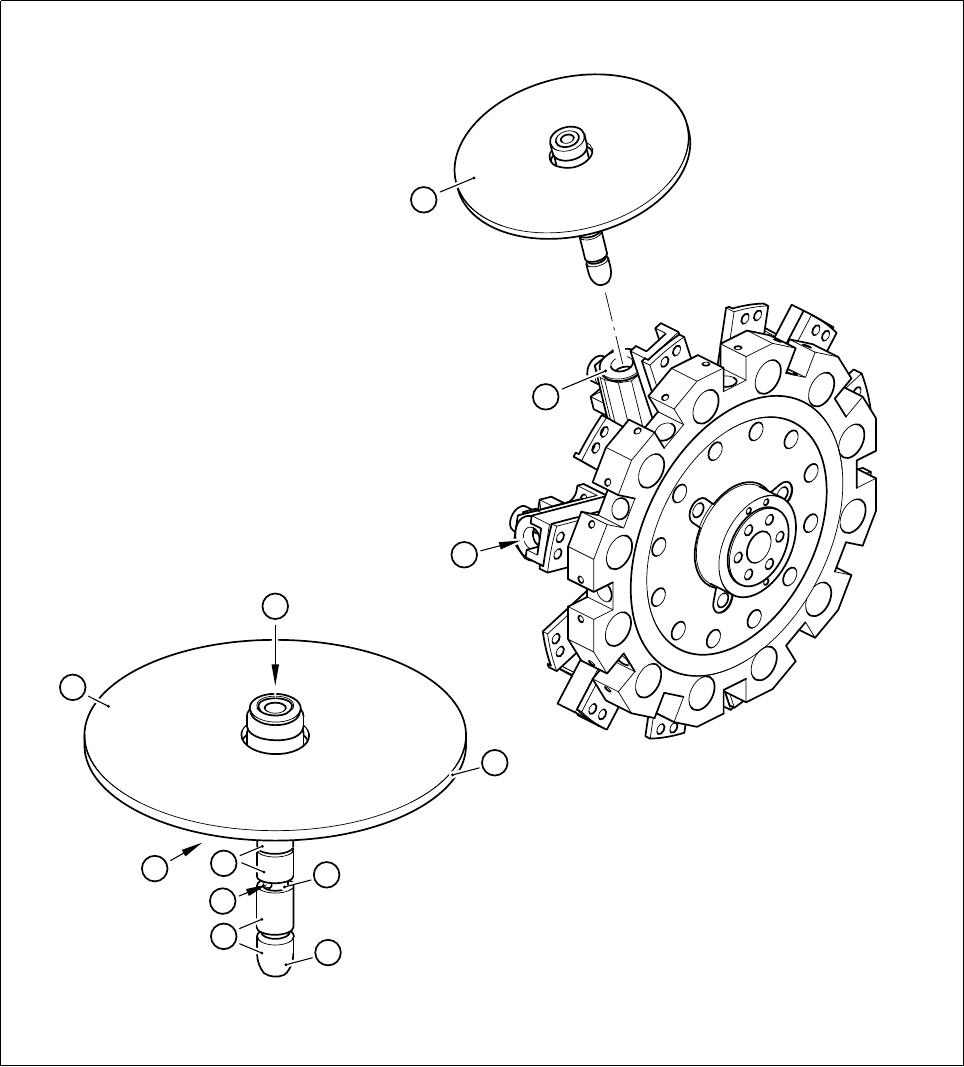
- Key to Fig. 9.7.3
1 Sleeve
2 Segment
SIPLACE 80S-20/F4/F5 User Manual 9 Maintenance
05/99 Issue from Software Version SR.405.xx 9.7 6x Revolver Head (8000)
9 - 83
- Sequence of work in Fig. 9.7.3
A Clean the annular surfaces and grooves of the sleeve.
B Clean the longitudinal vacuum hole of the sleeve using the 1.4 diameter metal drill.
C Make sure that the annular braking surface is free of oil.
D Clean the segment hole with the plastic brush and the cleaning agent of the segment maintenance cloth.
E Clean the transverse vacuum duct hole with the 1.2 diameter metal drill.
F Clean the groove with the plastic brush and the cleaning agent of the segment maintenance cloth.
G Clean the reflective face of the sleeve with ethyl alcohol.
H Keep the drive faces of the sleeve dry and free of grease.
Fig. 9.7.3 Cleaning sleeve and segment of the 6x revolver head
E
C
F
A
A
G
1
H
B
D
2
1