80S-2080F480F5.pdf - 第662页
11 Station Extensions/Options SIPLACE 80S-20/F4/F5 User Manual 11.7 Dispenser Flux Application Uni t for SIPLACE 80F4/F5 05/99 Issue from Software Version SR.405.xx 11 - 46 1 1 .7.6.3 Editing Flux Parameters Select the P…
SIPLACE 80S-20/F4/F5 User Manual 11 Station Extensions/Options
05/99 Issue from Software Version SR.405.xx 11.7 Dispenser Flux Application Unit for SIPLACE 80F4/F5
11 - 45
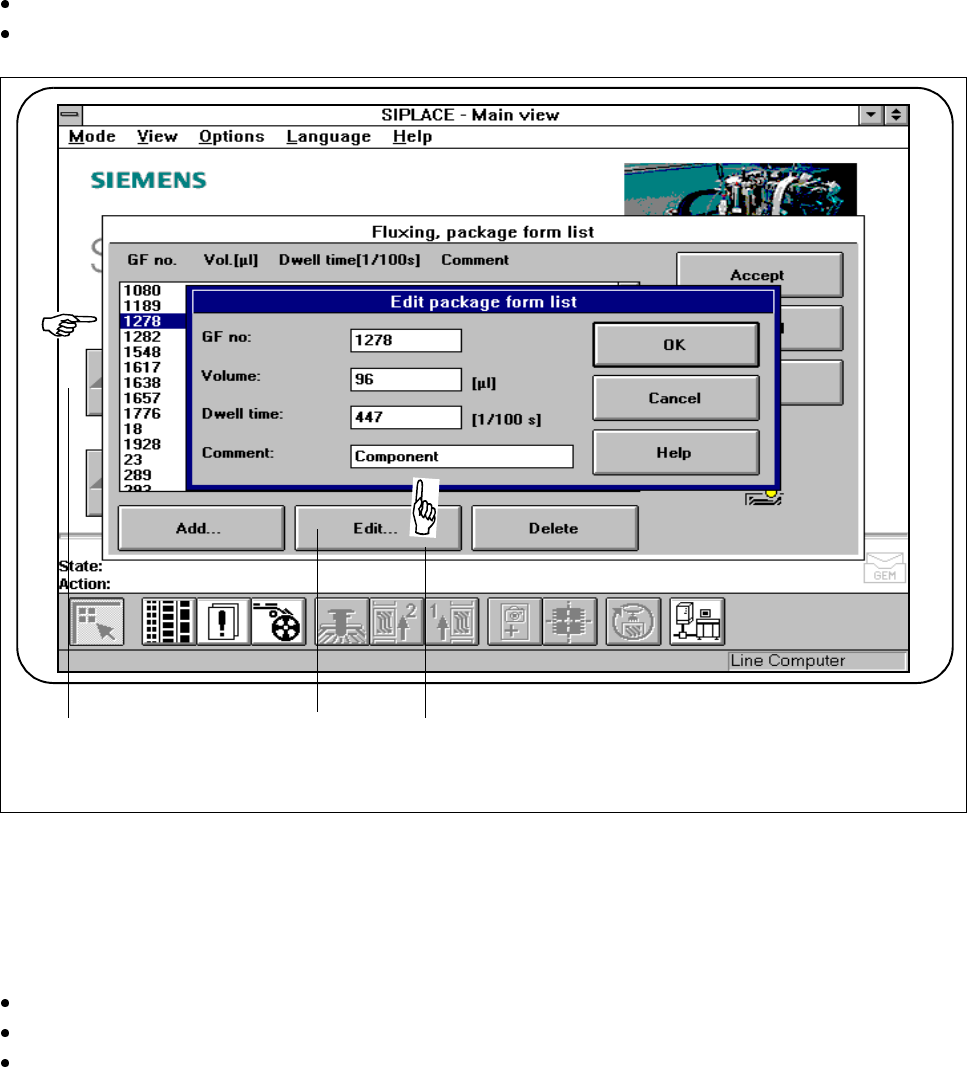
To edit a component, you will need to select the line in question (see Fig. 11.7.8 )
Click on the
Edit
button to edit an existing component.
Fig. 11.7.8 Fluxing: editing the package form list
- Key to Fig. 11.7.8
1 Select line 2
Edit
button
3 Input fields
Edit the data as described for
Add
.
Confirm what you have entered by pressing
OK
.
Save the edited package form list by pressing the
Accept
button.
3 1 2
11 Station Extensions/Options SIPLACE 80S-20/F4/F5 User Manual
11.7 Dispenser Flux Application Unit for SIPLACE 80F4/F5 05/99 Issue from Software Version SR.405.xx
11 - 46
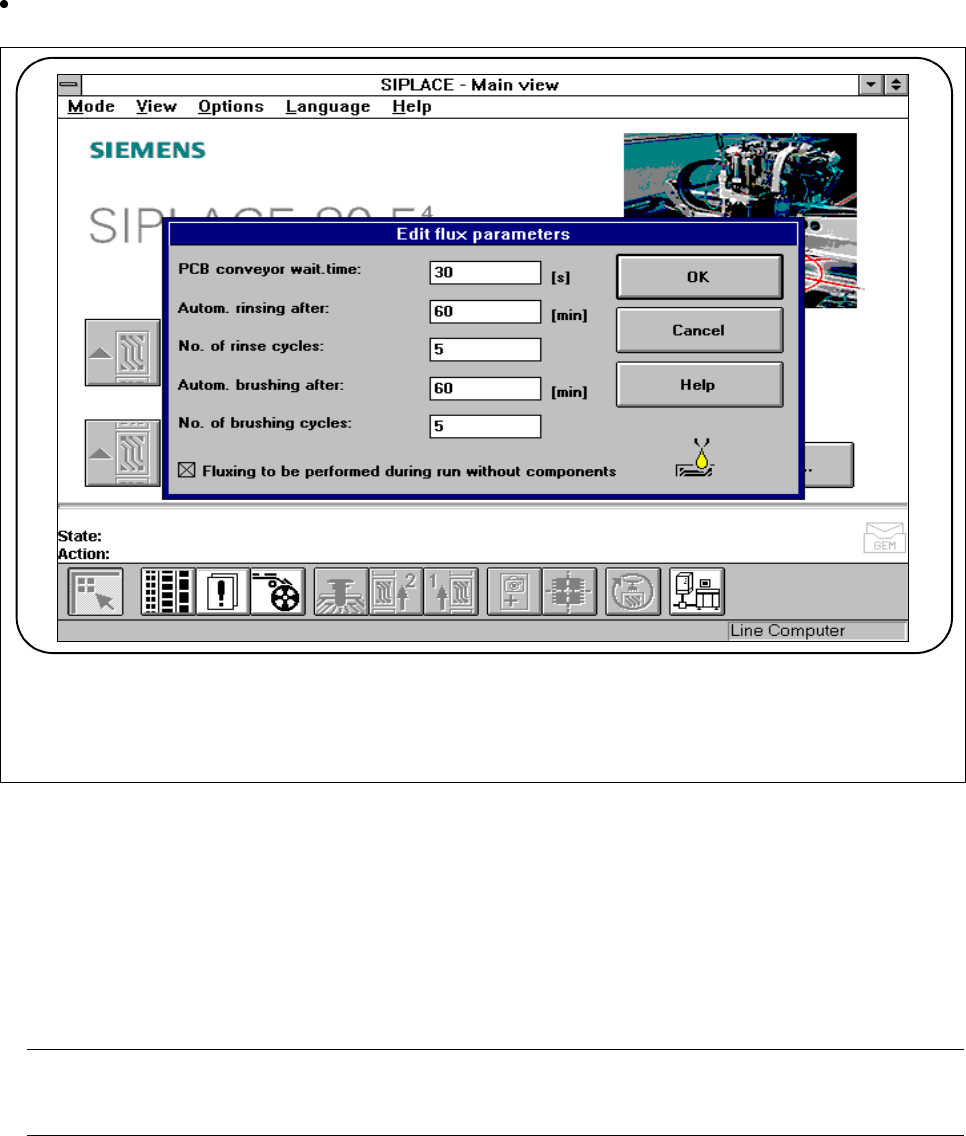
11.7.6.3 Editing Flux Parameters
Select the
Parameters
menu if you wish to specify data for the fluxing procedure.
Fig. 11.7.9 Editing flux parameters
PCB conveyor wait time
:
- The wait time (or dwell time) is the time period the board remains in the station until further placement
occurs. This ensures that the flux dries properly and the components do not ‚float away‘.
- This time period is measured from the flip-chip component last inserted.
- You can specify a time between 0 and 40 seconds.
PLEASE NOTE
The line utilization will be affected if you set this waiting time.
SIPLACE 80S-20/F4/F5 User Manual 11 Station Extensions/Options
05/99 Issue from Software Version SR.405.xx 11.7 Dispenser Flux Application Unit for SIPLACE 80F4/F5
11 - 47
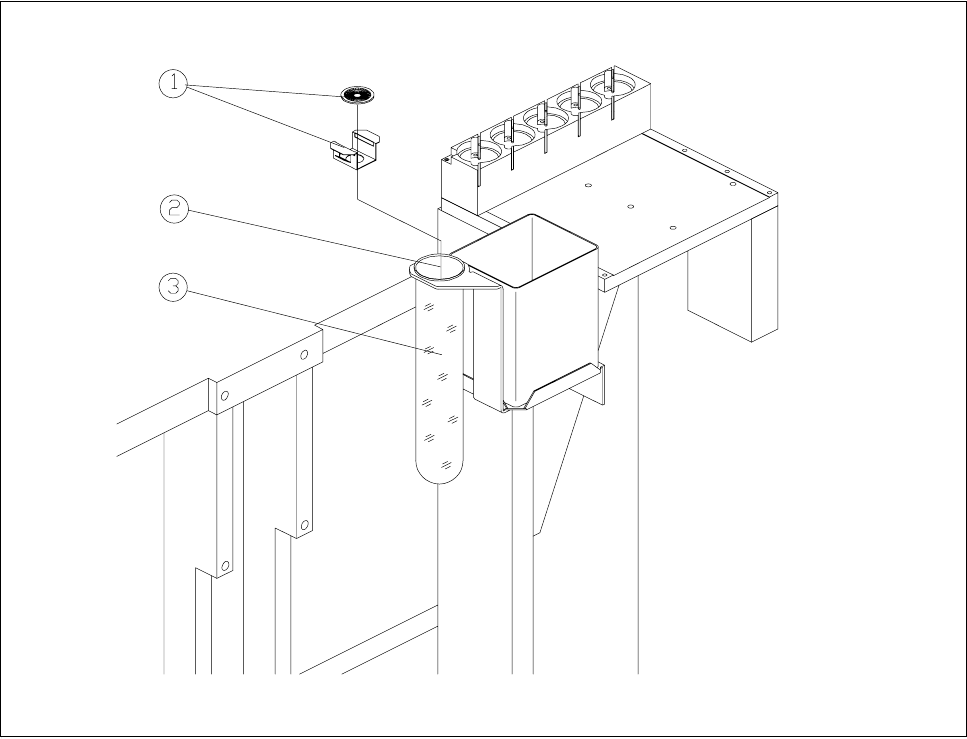
Fig. 11.7.10 Rinsing / brushing position with rinsing container
- Key to Fig. 11.7.10
1 Brush with holder 2 Rinsing / brushing position
3 Brushing / rinsing container
Automatic rinsing after:
- To ensure that the centering nozzle and dispensing needle do not crystallize when the flux application
unit is stopped for long periods, you can set a time, after which the unit will be rinsed. The preset rins-
ing process will be carried out after the placement sequence has ended, immediately before the next
flip-chip is inserted.
- When the machine is switched on, rinsing will take place irrespective of this rinsing period.
- Rinsing is carried out above the rinsing position using the container provided for that purpose (see Fig.
11.7.10).
- You can specify a time between 0 and 600 minutes.
No. of rinsing cycles:
- If you have specified a time for automatic rinsing you can enter here the number of rinsing cycles
required.
- You can specify between 1 and 10 rinsing cycles.