80S-2080F480F5.pdf - 第676页
11 Station Extensions/Options SIPLACE 80S-20/F4/F5 User Manual 11.9 GEM Interface 05/99 Is sue from Software Version SR.405.xx 11 - 60 1 1.9.2 Operation 1 1 .9.2.1 Main Menu with GEM Interface Option Fig. 1 1.9.2 Main vi…
SIPLACE 80S-20/F4/F5 User Manual 11 Station Extensions/Options
05/99 Issue from Software Version SR.405.xx 11.9 GEM Interface
11 - 59
11.9 GEM Interface
11.9.1 General Comments
GEM =>
G
eneric
E
quipment
M
odel
SECS-II =>
S
emiconductor
E
quipment
C
ommunication
S
tandard, Part 2
Host => Communications computer
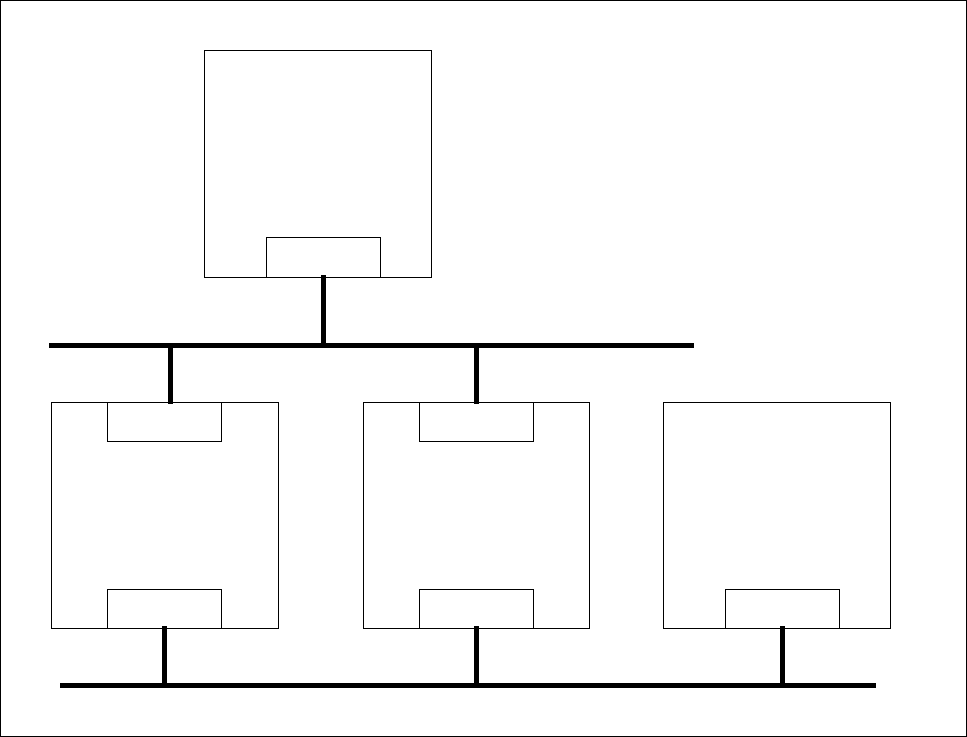
With the GEM / SECS-II interface it is possible to control a SIPLACE station using any host which is compati-
ble with GEM. However, the SIPLACE station must be left connected to the line computer to allow the
machine, set-up and cluster data to be programmed and loaded into the station. The SIPLACE station packs
these data into a placement program and makes this available to the host for reading. During operation, and
depending on the control mode, the host or the line computer provides the SIPLACE station with the neces-
sary machine, set-up and cluster data.
Fig. 11.9.1 General view of overall structure
Host
GEM
Line computer
LAN
SIPLACE 80 S-20
GEM
LAN
SIPLACE 80 F
4
SIPLACE 80 F
5
GEM
LAN
SIPLACE LAN
Customer‘s LAN
11 Station Extensions/Options SIPLACE 80S-20/F4/F5 User Manual
11.9 GEM Interface 05/99 Issue from Software Version SR.405.xx
11 - 60
11.9.2 Operation
11.9.2.1 Main Menu with GEM Interface Option
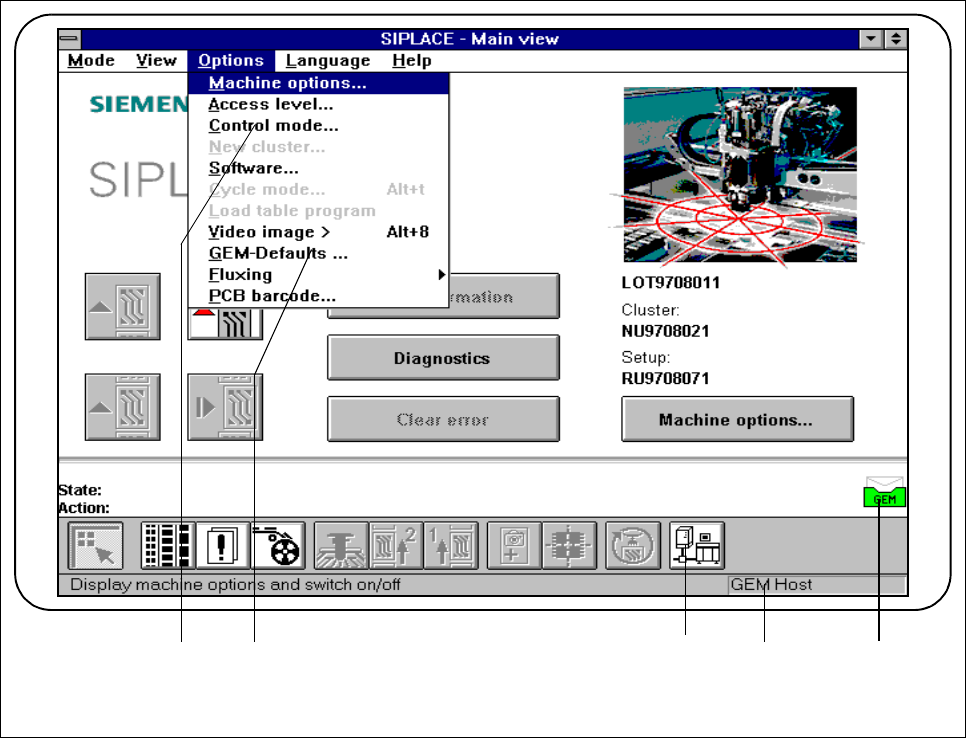
Fig. 11.9.2 Main view with GEM interface option
- Key to Fig. 11.9.2
1 To the
Control mode
menu 2 To the
GEM defaults
menu
3 To the
GEM interface
menus 4 The current control mode is displayed here.
5 GEM status display
2 31 4 5
SIPLACE 80S-20/F4/F5 User Manual 11 Station Extensions/Options
05/99 Issue from Software Version SR.405.xx 11.9 GEM Interface
11 - 61
11.9.2.2 Control Mode
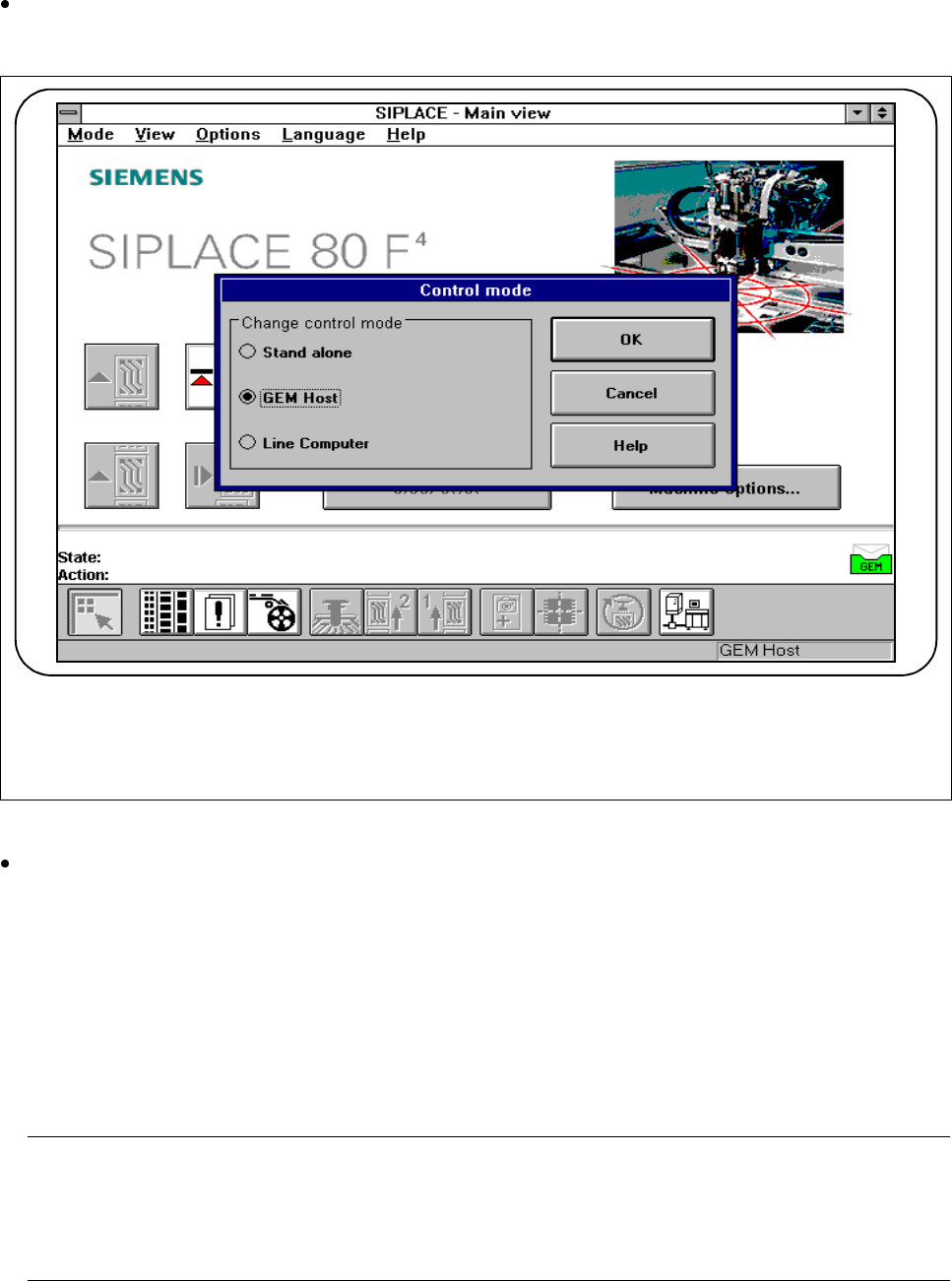
The control mode specifies who is supplying the station with the placement data it requires.
In the main view, select the
Options
menu and then click on
Control mode
.
The following selection box appears.
Fig. 11.9.3 Control mode
Save what you have entered by pressing the
OK
button.
l Stand-alone (for testing only)
If a cluster is specified at the SIPLACE station, all necessary data will be loaded from the hard disk of the
station computer.
All of the data required must be located on the station computer‘s hard disk.
l GEM host
In this control mode only the host can specify the placement programs.
All of the data required must be located on the host computer.
NOTE
This setting must be set if you wish to load placement programs from the host onto the station computer
under the Load placement program menu. In this connection, see Section 11.9.2.7 "Load Placement
Program"