80S-2080F480F5.pdf - 第679页
SIPLACE 80S-20/F4/F5 User M anual 11 Station Extensions/Options 05/99 Issue from Software Version SR.405.xx 11.9 GEM Interface 11 - 63 l C ontrol (see also Section 1 1.9.2.6 "Status Display") - Off-line It is n…
11 Station Extensions/Options SIPLACE 80S-20/F4/F5 User Manual
11.9 GEM Interface 05/99 Issue from Software Version SR.405.xx
11 - 62
l Line computer
If a cluster is specified at the SIPLACE station, all necessary data will be loaded from the line computer. All
of the data required must be located in the line computer.
11.9.2.3 GEM Default Settings
In this menu you can make various settings which will be used at power-up as default parameters for the
SIPLACE station.
In the main view select the
Options
menu and then click on
GEM default settings
.
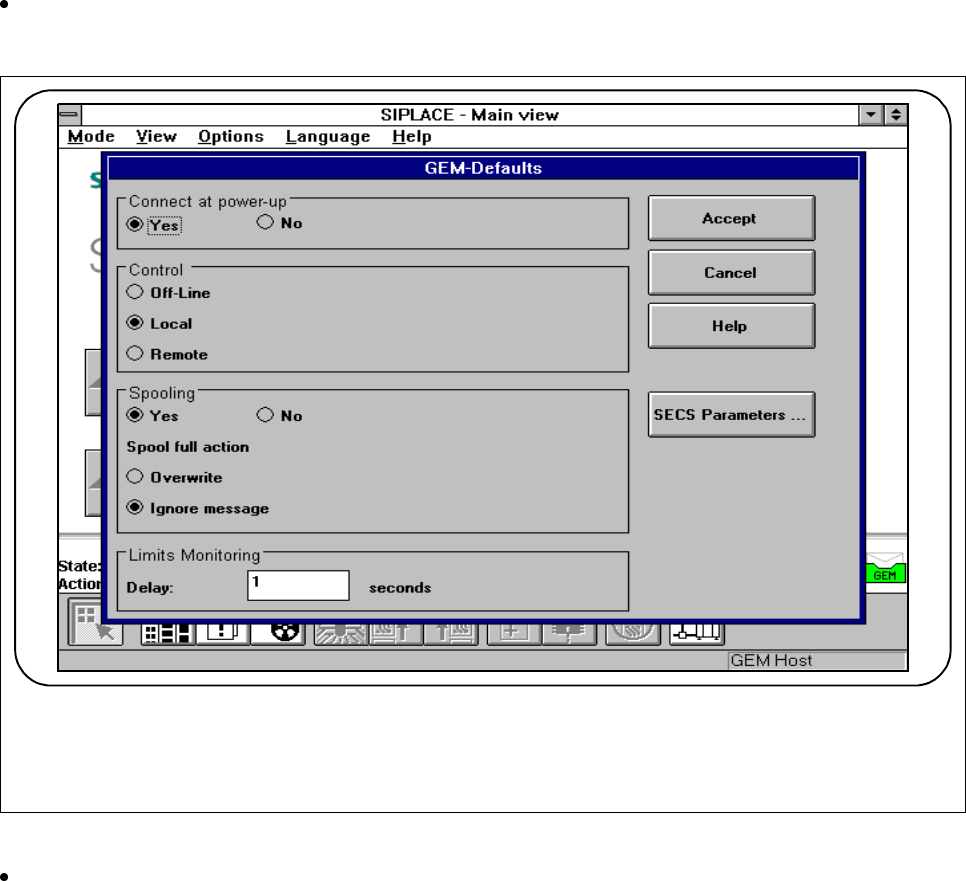
The following menu is displayed.
Fig. 11.9.4 GEM default settings
Save what you have entered by pressing the Accept button.
l Connect at power-up (see also Section 11.9.2.6 "Status Display")
- Yes
When the SIPLACE station is switched on, the station attempts to connect to the host computer.
- No
When the SIPLACE station is switched on, no connection to the host computer is made. However the
operator can make the connection manually under the Status display menu.
SIPLACE 80S-20/F4/F5 User Manual 11 Station Extensions/Options
05/99 Issue from Software Version SR.405.xx 11.9 GEM Interface
11 - 63
l Control (see also Section 11.9.2.6 "Status Display")
- Off-line
It is not possible to send or receive messages.
- Local
Under the
Load placement programs
menu the user can upload placement programs from the sta-
tion to the host or download placement programs from the host to the station.
No
placement programs can be downloaded by the host to the station.
- Remote
Under the
Load placement programs
menu the user can upload placement programs from the sta-
tion to the host.
l Spooling (see also Section 11.9.2.6 "Status Display")
- Yes
If the connection to the host is lost, SIPLACE will collect in a spooling file all messages intended for
the host. Once the connection is re-established, the host can pick up these messages from SIPLACE.
The quantity of messages which can be stored is limited by the size of the spooling file (20 MB).
- No
If the connection to the host is lost, all messages intended for the host will be lost.
l Action when spooling file full
- Overwrite oldest
If there is no more space available for the spooling file, the oldest message stored is overwritten by
the latest and current message.
- Ignore new messages
If there is no more space available for the spooling file, all new incoming messages will be discarded.
l Between two measurements or limits variables
Not currently relevant.
11 Station Extensions/Options SIPLACE 80S-20/F4/F5 User Manual
11.9 GEM Interface 05/99 Issue from Software Version SR.405.xx
11 - 64
11.9.2.4 SECS Parameters
CAUTION
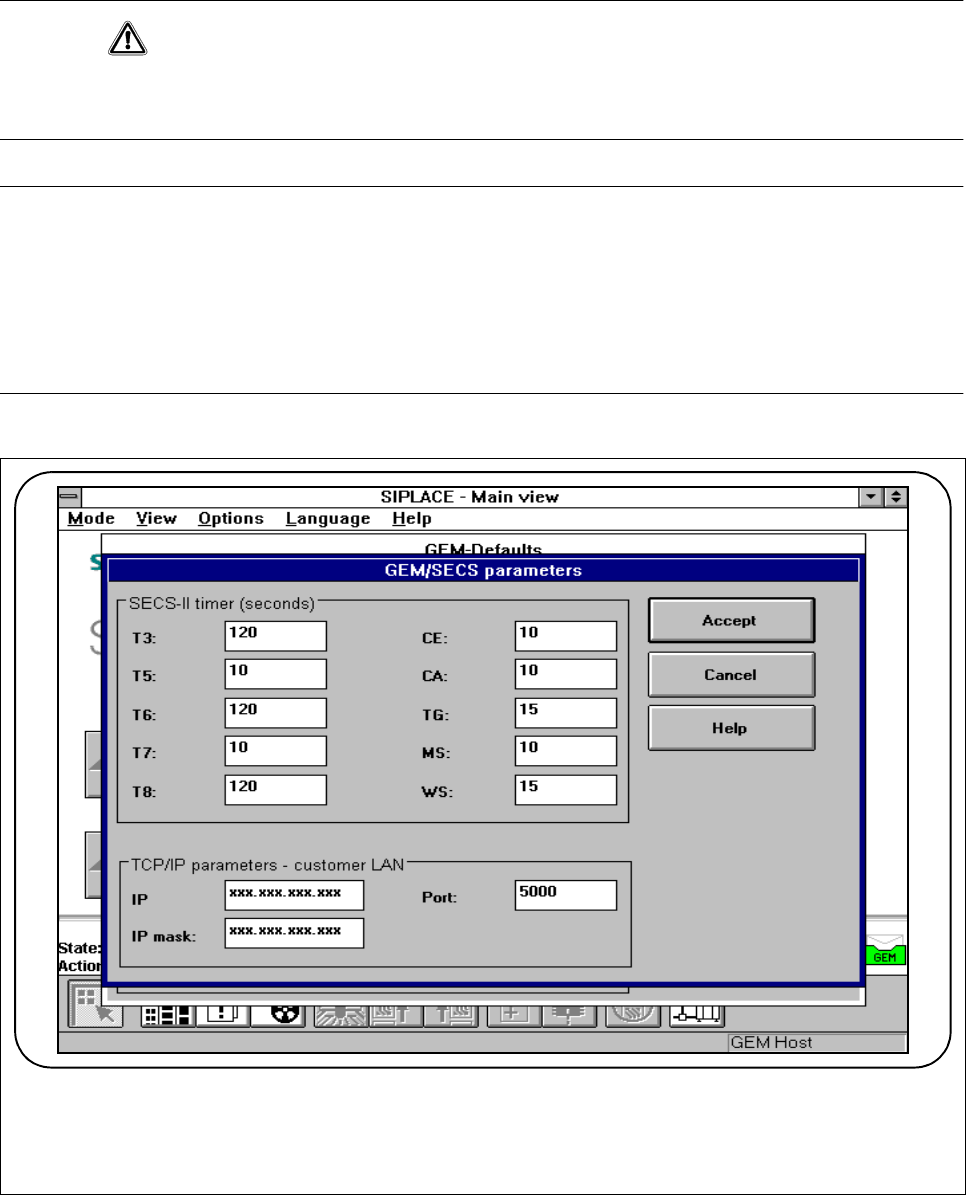
The following parameters must be preset in order to optimize the transfer from the host to the line computer.
The values specified in Fig. 11.9.5 are tested and recommended parameters and should be entered.
PLEASE NOTE
Changing the parameters has the following effects on the day-to-day operation of the GEM interface:
When a timeout value or the TCP port number is changed, the GEM link to the host is interrupted for a short
time.
The GEM software is closed down when the IP address or IP screen is changed.
The GEM software cannot be used until the station is switched on again.
Fig. 11.9.5 SECS parameters