80S-2080F480F5.pdf - 第681页
SIPLACE 80S-20/F4/F5 User M anual 11 Station Extensions/Options 05/99 Issue from Software Version SR.405.xx 11.9 GEM Interface 11 - 65 The follo wing paramete rs can be set: l T3 : Reply timeout - When a pri mary mess ag…
11 Station Extensions/Options SIPLACE 80S-20/F4/F5 User Manual
11.9 GEM Interface 05/99 Issue from Software Version SR.405.xx
11 - 64
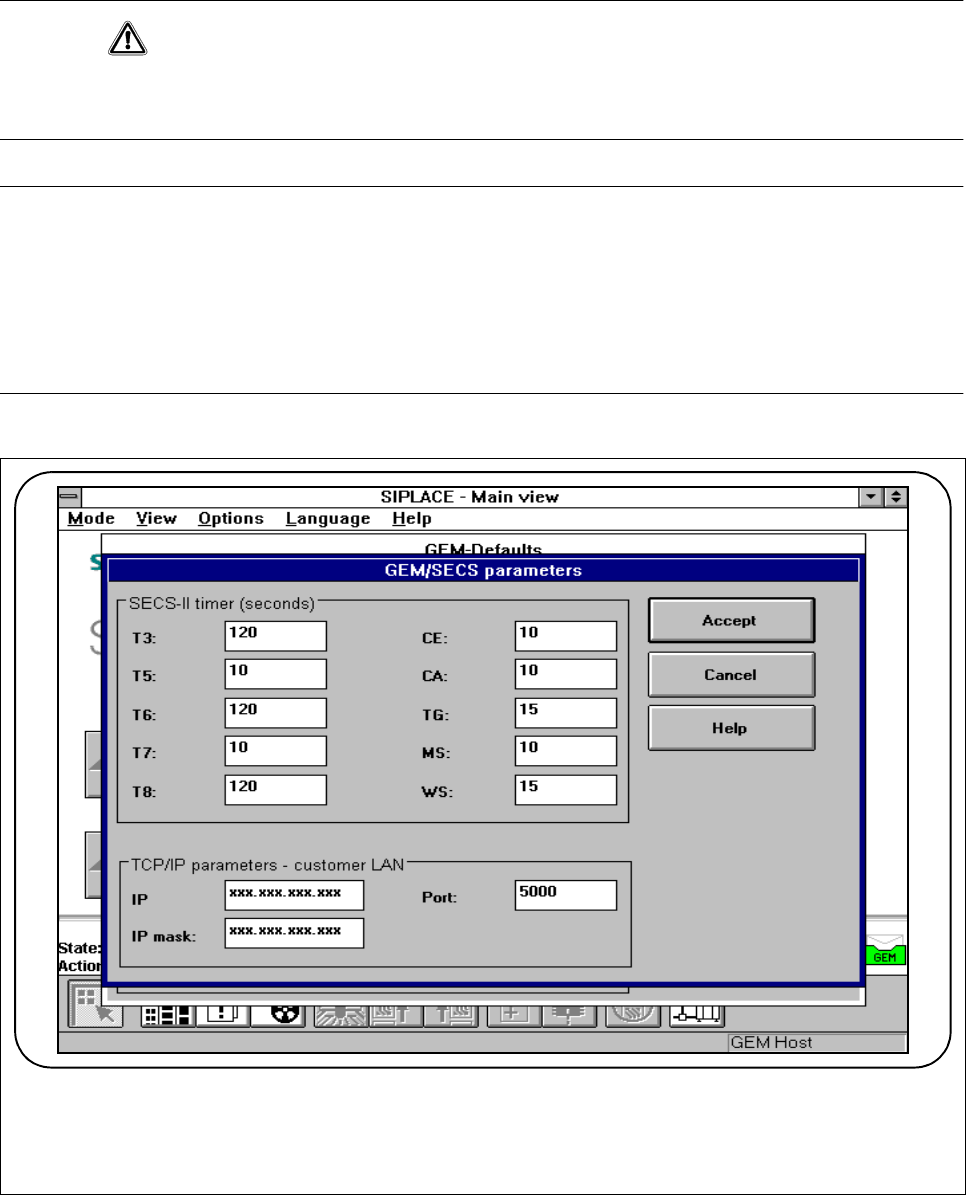
11.9.2.4 SECS Parameters
CAUTION
The following parameters must be preset in order to optimize the transfer from the host to the line computer.
The values specified in Fig. 11.9.5 are tested and recommended parameters and should be entered.
PLEASE NOTE
Changing the parameters has the following effects on the day-to-day operation of the GEM interface:
When a timeout value or the TCP port number is changed, the GEM link to the host is interrupted for a short
time.
The GEM software is closed down when the IP address or IP screen is changed.
The GEM software cannot be used until the station is switched on again.
Fig. 11.9.5 SECS parameters
SIPLACE 80S-20/F4/F5 User Manual 11 Station Extensions/Options
05/99 Issue from Software Version SR.405.xx 11.9 GEM Interface
11 - 65
The following parameters can be set:
l T3: Reply timeout
- When a primary message is sent to the host, the station waits up to T3 seconds for the secondary
message from the host.
- Range of values: 1 - 120 seconds
l T5: Connect separation timeout
- This determines the waiting time between successive attempts to establish a connection. This is only
important if the station has been configured as the ACTIVE ENTITY.
- Range of values: 1 - 240 seconds
l T6: Control transaction timeout
- When the transmitter sends a Connect.req or Linktest.req message to the host, the station waits up to
T6 seconds for the Connect.rsp or Linktest.rsp message. The TCP/IP link is then interrupted.
- Range of values: 1 - 240 seconds
l T7: NOT SELECTED timeout
- Once the TCP/IP connection has been established, the station configured as the PASSIVE ENTITY
waits up to T7 seconds for the Select.req message from the host. The TCP/IP link is then interrupted.
A successful exchange of Select.req and Select.rsp messages forms the basis for conversion of the
TCP/IP connection into an HSMS connection.
- Range of values: 1 - 240 seconds
l T8: Network intercharacter timeout
- Reception of an individual HSMS message must not take longer than T8 seconds. Otherwise the TCP/
IP link will be interrupted.
- Range of values: 1 - 120 seconds
l CE: Connection Establishment timeout
- After sending a TCP/IP connect command, a station which has been configured as an ACTIVE
ENTITY waits up to CE seconds for a connection to be established or for a status message. After this
time it is assumed that the command was not received correctly.
l CA: Circuit Assurance
- This determines the waiting time between sending successive Linktest.req messages. These mes-
sages check that the HSMS connection is working correctly. If CA=0, no Linktest.req messages are
sent.
l TG: Grace period
- While a SECS-II connection is being established, the SDR component of Siplace GEM buffers all the
messages to be sent to the host. If the SECS-II connection can be established within TG seconds, the
buffered message will be sent to the host. Otherwise they are rejected by the SDR component and
have the status F_DELV.
11 Station Extensions/Options SIPLACE 80S-20/F4/F5 User Manual
11.9 GEM Interface 05/99 Issue from Software Version SR.405.xx
11 - 66
l MS: Memory Stall
- The SDR component of Siplace GEM tolerates the status that all internal buffers are full and that the
host is attempting to send further data packets for up to MS seconds. The TCP/IP connection is then
ended in order to prevent the network becoming overloaded.
l WS: Write Stall
- The SDR component of Siplace GEM tolerates the status that data packets to be sent are not received
by the TCP/IP connection for up to WS seconds. The TCP/IP link is then ended.
l IP address:
- for the connection to the customer’s LAN
l IP screen
- for the connection to the customer’s LAN
l Port:
- TCP/IP port number for the GEM connection to the host