SIPLACE Vision Customer_en.pdf - 第114页
Component Shapes New SIPLACE Vision Functions for 605 and 701 Station SW SIPLACE Vision Flux Inspection – only in 605 SW S tudent Guide SIPLACE V ision (Customer) Component Shapes Edition 12/2008 EN 11 4 5-19: The result…
Component Shapes
SIPLACE Vision Flux Inspection – only in 605 SW New SIPLACE Vision Functions for 605 and 701 Station SW
Student Guide SIPLACE Vision (Customer)
Edition 12/2008 EN Component Shapes
113
Evaluation of Homogeneity
The evaluation of homogeneity and brightness are
based on the same principle to a large extent. The
difference is, that only the amplitudes of the
gradients in the evaluation area are calculated in
advance. The mean value of the gradient on the
circular area or on the ring is the characteristic for
each ball which is compared to the threshold (40 in
this example).
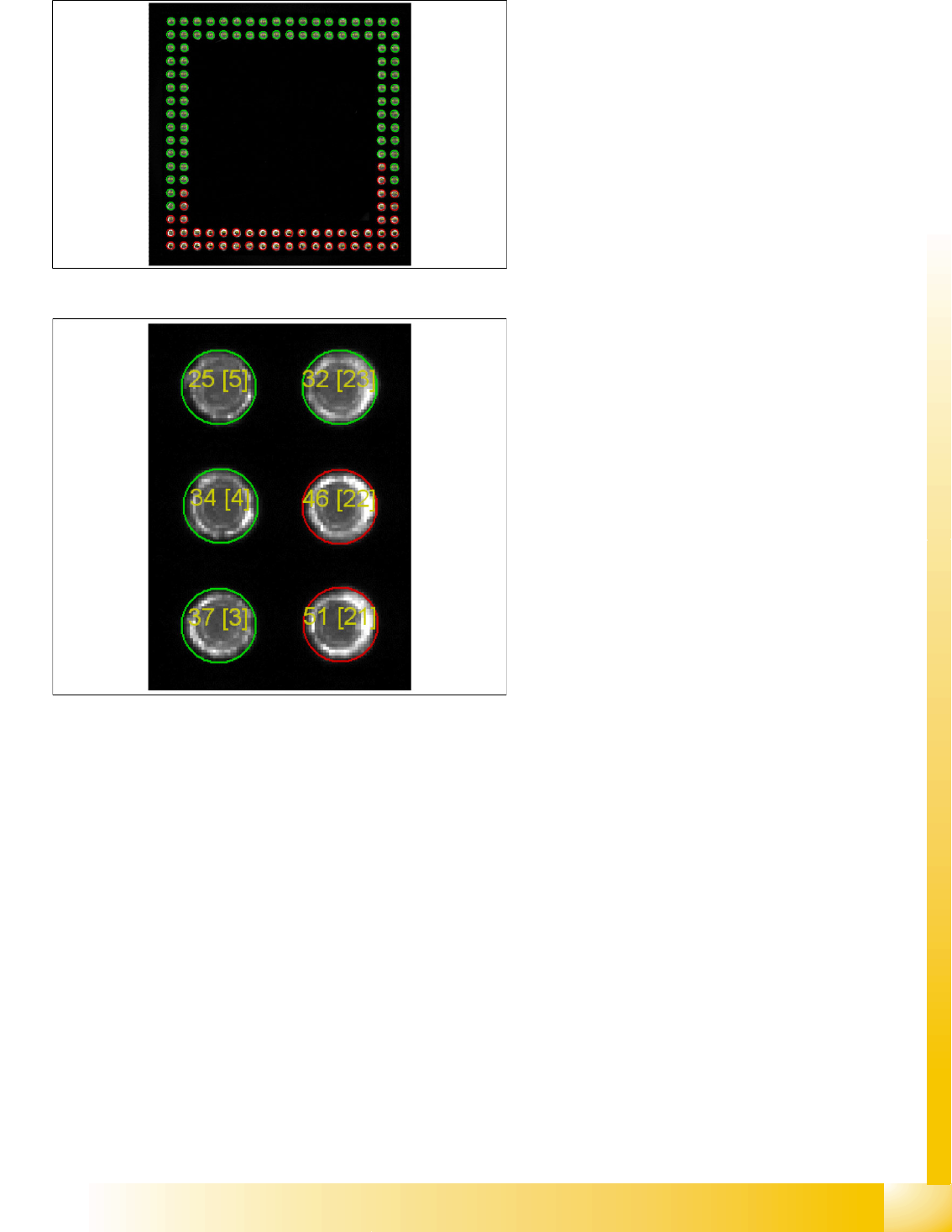
5-18: The result image shows the evaluation of the coating for each ball.
Balls that are sufficiently coated are marked in
green.
Balls that are insufficiently coated are marked in
red.
The inserted numbers represent the calculated
characteristic (left) and the ball number (in
squared brackets [ ]).
Component Shapes
New SIPLACE Vision Functions for 605 and 701 Station SW SIPLACE Vision Flux Inspection – only in 605 SW
Student Guide SIPLACE Vision (Customer)
Component Shapes Edition 12/2008 EN
114
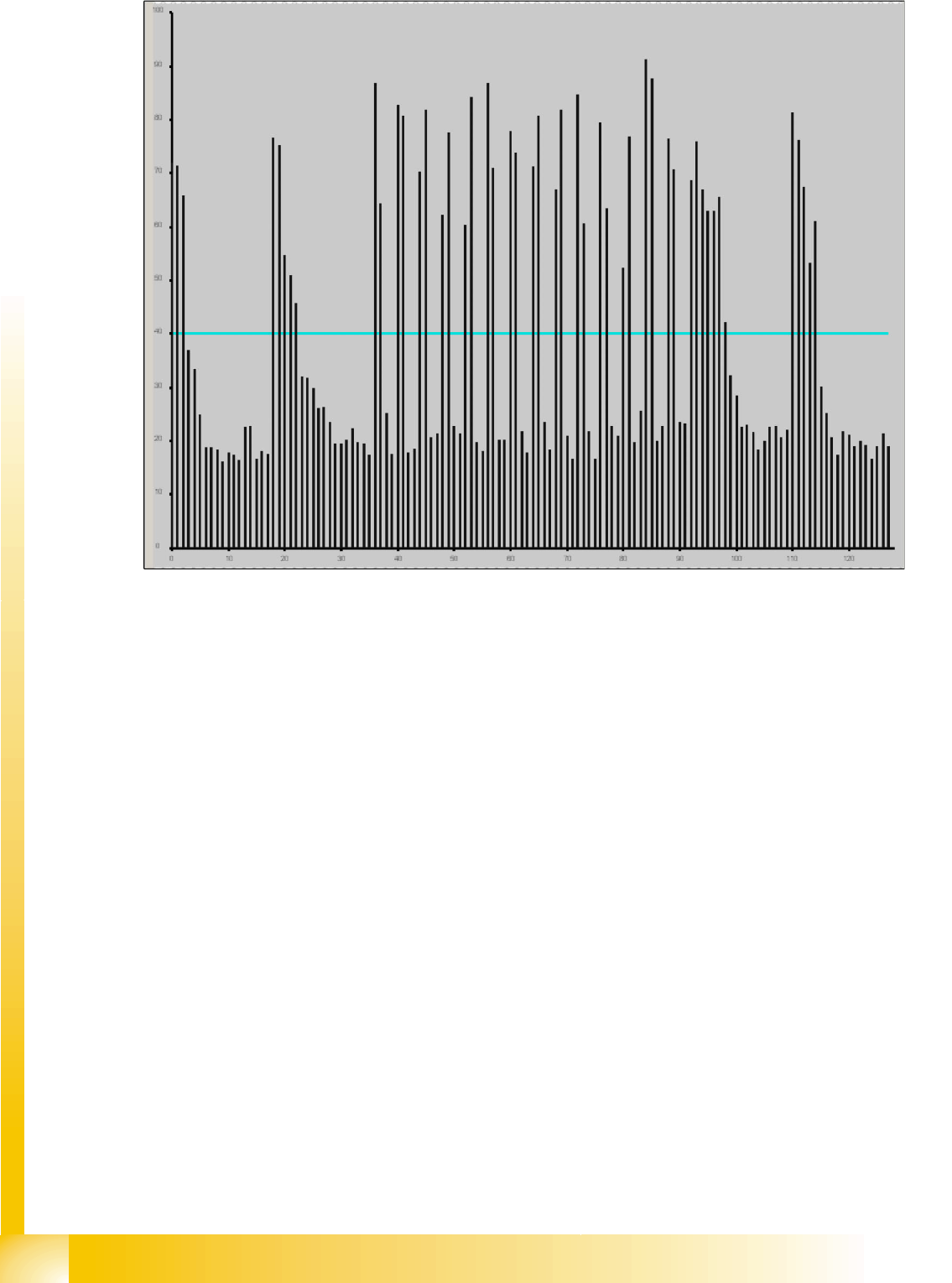
5-19: The result diagram shows the calculated characterisitcs per ball.
The ball numbers are given along the X axis (128 in this example). The calculated characteristic per
ball is given along the Y axis.
The horizontal line in turquoise represents the threshold being set.
All balls whose characteristics are below the threshold are shown in green in the result image (see
above).
All balls whose characteristics are above the threshold are shown in red in the result image (see
above).
Parameterization
The parameterization is carried out on the station during shape component teaching using the algorithm
parameters in the programming area labeled
Flux inspection
.
Selection of the Analyzing Procedure
Initially, 2 procedures (brightness and homogeneity analysis) are provided as described.
Both procedures return a characteristic value per ball that is compared to a threshold. If the characteristic
exceeds the threshold, that is to be set here, the ball is characterized as insufficiently coated.
The procedures differ in the anlysis area.
Analysis is either carried out on the entire circular area, defined by means of DonutOuter (see 0 setting
of the evaluation area), or on the area of the circular ring (Donut), defined by means of DonutOuter and
DonutInner. Thus 4 different analysis variants are offered in total.

Component Shapes
SIPLACE Vision Flux Inspection – only in 605 SW New SIPLACE Vision Functions for 605 and 701 Station SW
Student Guide SIPLACE Vision (Customer)
Edition 12/2008 EN Component Shapes
115
These are numbered from 1 to 4 as follows
Analysis of homogeneity on the circular area
Analysis of homogeneity on the circular ring
Analysis of brightness on the circular area
Analysis of brightness on the circular ring
Choose the procedure, whose ball characteristics comply with the following requirements:
The characteristics for dipped and un-dipped balls differ to a great extent.
The characteristics for dipped and un-dipped balls differ to a small extent.
Setting of the Evaluation Area
2 parameters, refering to the ball diameter, are available for setting the evaluation area.
DonutOuter defines the diameter of the circular area if the entire area is to be analyzed, or the outer
diameter of the circular ring is determined if only the ring is to be analyzed.
DonutInner defines the inner diameter of the circular ring if this ring is to be analyzed. Otherwise it
has no meaning.
Both parameters are entered as the factor for the ball diameter.
Range of values:
DonutInner: 0.1 to 1.0
DonutOuter: 0.4 to 1.3 and > DonutInner + 0.1
Default Settings of the Parameters
Parameterization procedure
Parameterization is carried out during component shape teaching:
X Preparation in SIPLACE Pro:
Activate dipping for the component and flux inspection for the component shape. (Flux inspection
can also be activated in the component shape editor of the station. Dipping, however, can only be
activated in SIPLACE Pro.)
X Select the recipe.
X Switch to the station and launch
Teach Component Shapes.
Analysis procedure = 3 Analysis of homogeneity on the circular ring
Threshold = 35
DonutOuter = 0.8 0.8 * ball diameter
DonutInner = 0.4 0.4 * ball diameter