SIPLACE Vision Customer_en.pdf - 第134页
SIPLACE Vision - Teaching Fiducials Fiducial shapes Synthetic Fiducials fo r Position Recognition Applications S tudent Guide SIPLACE V ision (Customer) SIPLACE Vision - T eaching Fiducials Edition 12/2008 EN 134 6.2.1.2…
SIPLACE Vision - Teaching Fiducials
Synthetic Fiducials for Position Recognition Applications Fiducial shapes
Student Guide SIPLACE Vision (Customer)
Edition 12/2008 EN SIPLACE Vision - Teaching Fiducials
133
6.2.1.1 Programming the Fiducial
Fiducial recognition is based on a correct description of the geometry, which is why the geometry
programming window is described here.
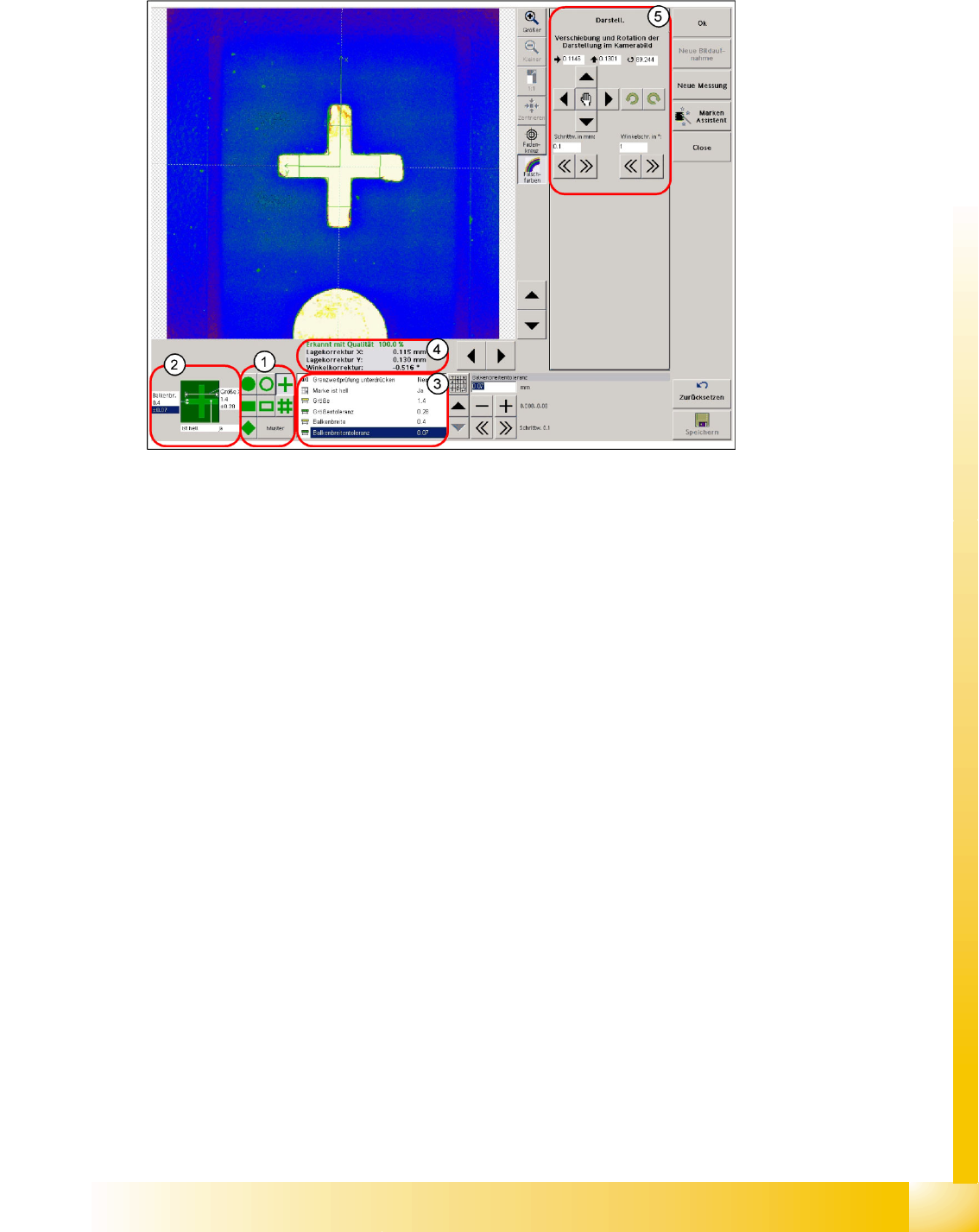
6-4: Programming geometry – teaching
Legend
1. Selection of geometry for synthetic fiducials or pattern programming
2. Quick access to the dimension parameters of the fiducial geometry and to the contrast to the PCB
background
3. Table of fiducial dimension parameters
4. Result of fiducial recognition
The X/Y deviation to the camera center point is given for the correctly recognized fiducial
During teaching/testing, a fiducial angle (exception: circular fiducials 0.0°) to the camera coordinates
is specified. However, this is not processed further by the MC during placement measurement.
5. Programming drawing displacement or centering step selection area
The fiducial is saved once the notifications window displayed when you exit the teaching menu has
been acknowledged.
A smaller size can be programmed for structures such as the cross-shaped fiducial, since the fiducial
shape remains the same and leads to the same fiducial center if parts of the cross bars are cut off. The
image pairs, 16 per cross bar, are set closer together in smaller cross-shaped fiducial sizes to ensure
that the edges are recognized reliably.
In fiducials taking up more space, such as circles, the fiducial background of the entire shape must be
recognizable. If this is not the case, it will not be possible to recognize the fiducial shape and the fiducial
center. This means that the evaluation area needs to be larger than the fiducial area.

SIPLACE Vision - Teaching Fiducials
Fiducial shapes Synthetic Fiducials for Position Recognition Applications
Student Guide SIPLACE Vision (Customer)
SIPLACE Vision - Teaching Fiducials Edition 12/2008 EN
134
6.2.1.2 Shapes and Sizes of Synthetic Fiducials
The cross is the most suitable fiducial shape, as the ends of the cross bars can be cut off and the
fiducial reference point still remains in the center of the cross. This shape does not require much
space on the PCB layout.
SIPLACE Vision detects the doublecross as a geometric shape by searching for all outer and inner
edges. There is therefore only one fiducial reference point, in the center of the fiducial. (In ICOS
brightness evaluations, doublecrosses with unfavorably long outer arms could cause the
coincidental and faulty detection of 4 "auxiliary positions" as the correct fiducial center.)
Squares, as a special type of rectangle with even sides, are not listed as a separate programming
item. A rectangular, square ring is a fiducial shape which hardly ever appears on a standard PCB
layout.
A square rotated by 45° is known as a diamond and is classified as a filled synthetic fiducial.
The circle and the circular ring are frequently used fiducial options. When selecting the circular ring,
which uses the "vias" of multiple PCBs, make sure you pay attention to the quality of the outer line
of the metallic ring. If this outer line is not totally circular for all PCBs, we advise using dark circles
on a bright background, unless other suitable fiducials are available in the PCB layout.
All other shapes can be trained as samples (explanations in following text).
Geometric
fiducial shape
Min. structure size Max. structure size Min. tolerance Max. tolerance
Circle Diameter: 250 µm Diameter: 3 mm 2% of nominal
dimensions
20% of nominal
dimensions
Cross Size: 300 µm
Bar width: 100 µm
Size: 3 mm
Bar width: 1.5 mm
2% of nominal
dimensions
20 % of nominal bar
width, from SC/MC
702 30%
Doublecross Size: 500 µm
Bar width: 100 µm
Extension:100 μm
Size: 3 mm
Bar width: 1.2 mm
2% of nominal
dimensions
20 % of nominal bar
width, from SC/MC
702 30%
Rectangle/
square
Length: 250 µm
Width: 250 µm
Length: 3 mm
Width: 3 mm
2% of nominal
dimensions
20% of nominal
dimensions
Rectangle/
square frame
Length: 300 µm
Width: 300 µm
Frame thickness: 100 µm
Length: 3 mm
Width: 3 mm
2% of nominal
dimensions
20% of nominal
dimensions
Circular ring Diameter: 300 µm
Ring thickness:100 µm
Diameter: 3 mm 2% of nominal
dimensions
20% of nominal
dimensions
Diamond Length/width: 350 µm Length/width: 3 mm 2% of nominal
dimensions
20% of nominal
dimensions
Pattern Length/width: 500 µm Length/width: 3 mm 2% of nominal
dimensions
20% of nominal
dimensions
SIPLACE Vision - Teaching Fiducials
Synthetic Fiducials for Position Recognition Applications Fiducial shapes
Student Guide SIPLACE Vision (Customer)
Edition 12/2008 EN SIPLACE Vision - Teaching Fiducials
135
6.2.1.3 Recognition of Synthetic Fiducials
One of the 3 position recognition fiducials should have at least the maximum position correction
(otherwise the error
ROI (Region of Interest) too small
will be issued).
The other two fiducials can have limited presentation tolerances:
max. position correction = (FOV – fiducial size inc. size tolerance) / 2
e.g. X = (5.7 mm – 2.1 mm) / 2 = 1.8 mm
During placement, the position fiducials are approached in the order of their search field size.
If the position correction of the fiducial has been restricted in SIPLACE Pro, this value will be shown as
the correction value in the "Position correction X/Y" lines.
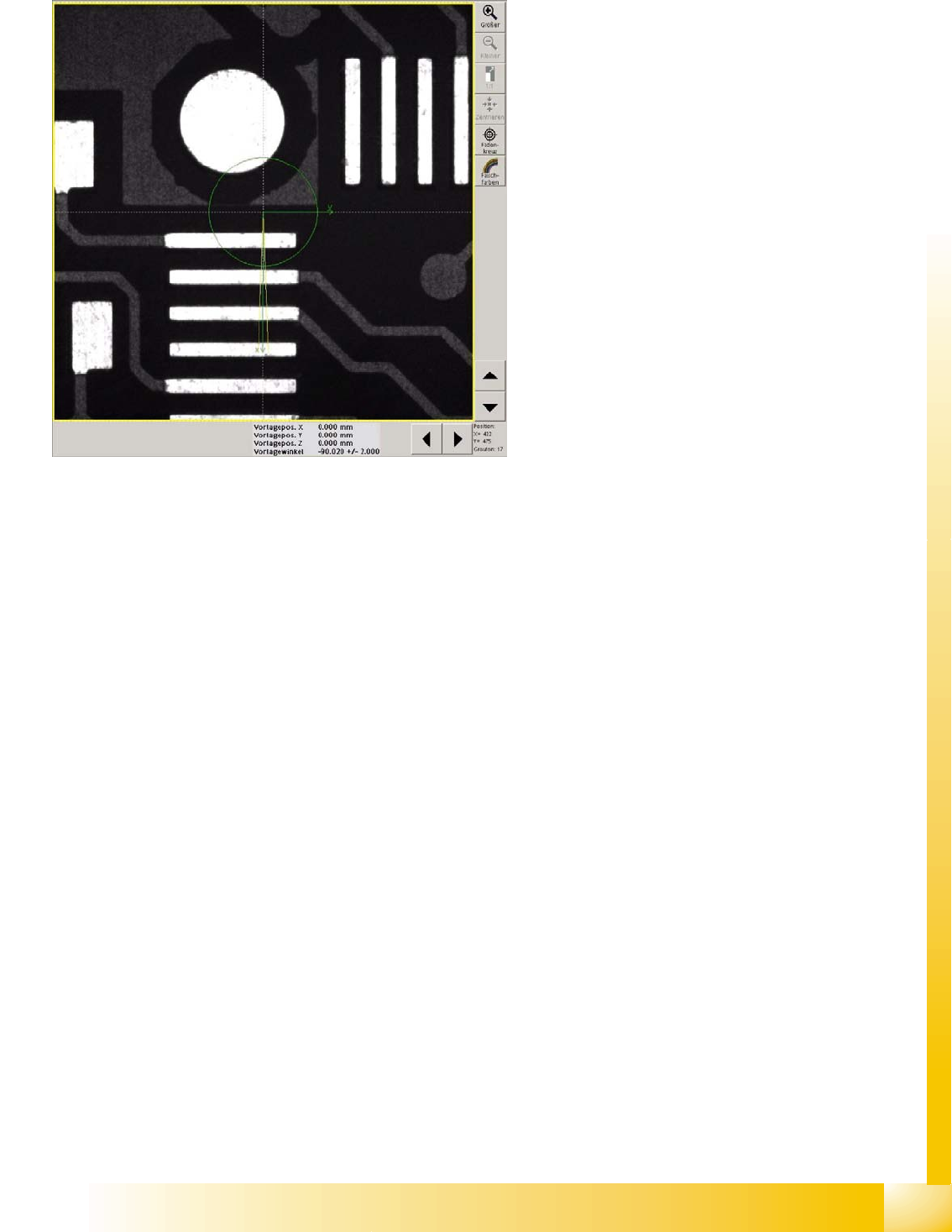
6-5: Position correction
The centering step camera image shows the
unedited camera image resulting from the current
PCB position and PCB camera at the theoretical
fiducial position in the machine.
The centering step "position correction" shows the
fiducial shape and size in the PCB camera center,
with the permitted angle correction of 2°.
The angle shows the assembly position of the
camera at the gantry and the PCB camera
calibration angle.
If a position correction is programmed which
corresponds to the whole PCB camera field of
vision (5.7x5.7mm), the yellow frame of the search
field will show the relevant extract from the whole
image.
When the position correction is the same as the
whole camera field of vision, no X/Y position
correction will be shown in the results line.