SIPLACE Vision Customer_en.pdf - 第141页
SIPLACE Vision - T eaching Fiducials Sample Fiducials for Position Recognition F iducial shapes S tudent Guide SIPLACE Vision (Customer) Edition 12/2008 EN SIPLACE Vision - T eaching Fiducials 141 6.2.2.1 Position Candid…

SIPLACE Vision - Teaching Fiducials
Fiducial shapes Sample Fiducials for Position Recognition
Student Guide SIPLACE Vision (Customer)
SIPLACE Vision - Teaching Fiducials Edition 12/2008 EN
140
The effect on fine centering can be shown on an ellipsoid, programmed as a circle. The edge quality is
changed from left to right, from a value of 1 to 3.
Legend
1. Edge quality 1: 22 scan lines not in tolerance range.
2. Edge quality 2: 16 scan lines not in tolerance range.
3. Edge quality 3: all scan lines OK
As can be seen in the diagrams, the circle diameter recognized is larger due to the higher permitted
tolerances (clearly seen in the differences between diagrams 2 and 3).
6.2.2 Sample Fiducials for Position Recognition
The sample fiducials are learnt interactively by the system, during programming. The following
procedures are performed:
The evaluation area for the fiducial shape is defined by the operating personnel.
The fiducial reference point (usually the fiducial center point) is searched for by the Vision system.
If the fiducial reference point can not be found or if the coordinates defined for the fiducial shape are
unusual, the operator can click to define the fiducial reference point manually and then let the system
learn the fiducial shape.
The parameters and coordinates learnt by the Vision system can NOT be subsequently manually
changed. In this case, the fiducial has to be retrained (repeat procedure).
NOTE:
Sample fiducials do not support the function for rotating the PC orientation in the placement
recipe.
SIPLACE Vision - Teaching Fiducials
Sample Fiducials for Position Recognition Fiducial shapes
Student Guide SIPLACE Vision (Customer)
Edition 12/2008 EN SIPLACE Vision - Teaching Fiducials
141
6.2.2.1 Position Candidates
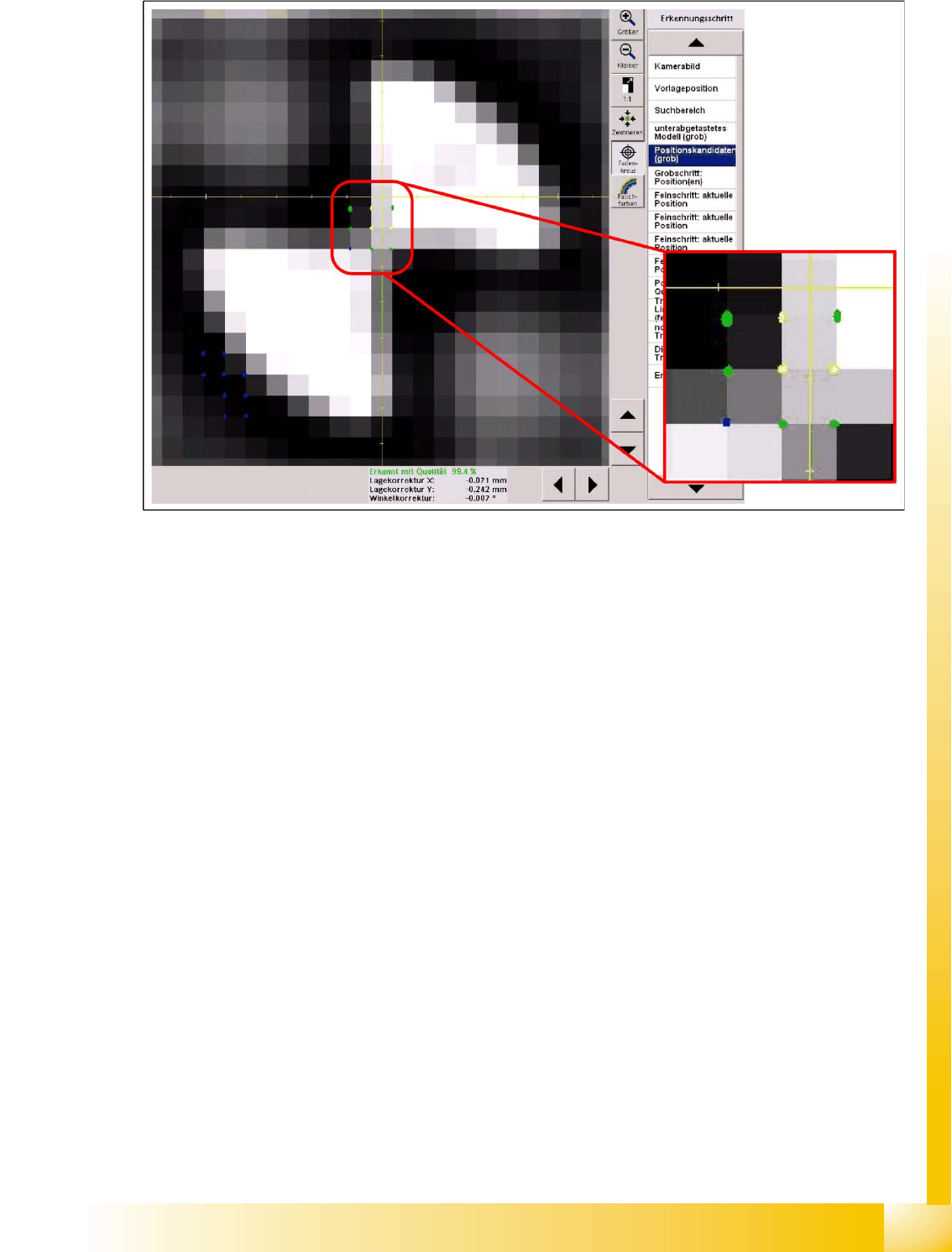
6-10: Coarse position candidates
The yellow dots show positions for which a coarse pattern matches very well.
The green dots show positions for which the coarse pattern matches well.
The blue dots show points with relatively low matching.
The high match positions will be evaluated first during the next centering steps.
2 fine searches are performed with the points which have been combined to form "moxels". This is then
followed by 2 fine searches with high resolution (one search for the dark outer edge and one search for
the light inner edge).
SIPLACE Vision - Teaching Fiducials
Fiducial shapes Sample Fiducials for Position Recognition
Student Guide SIPLACE Vision (Customer)
SIPLACE Vision - Teaching Fiducials Edition 12/2008 EN
142
6.2.2.2 Position and Quality
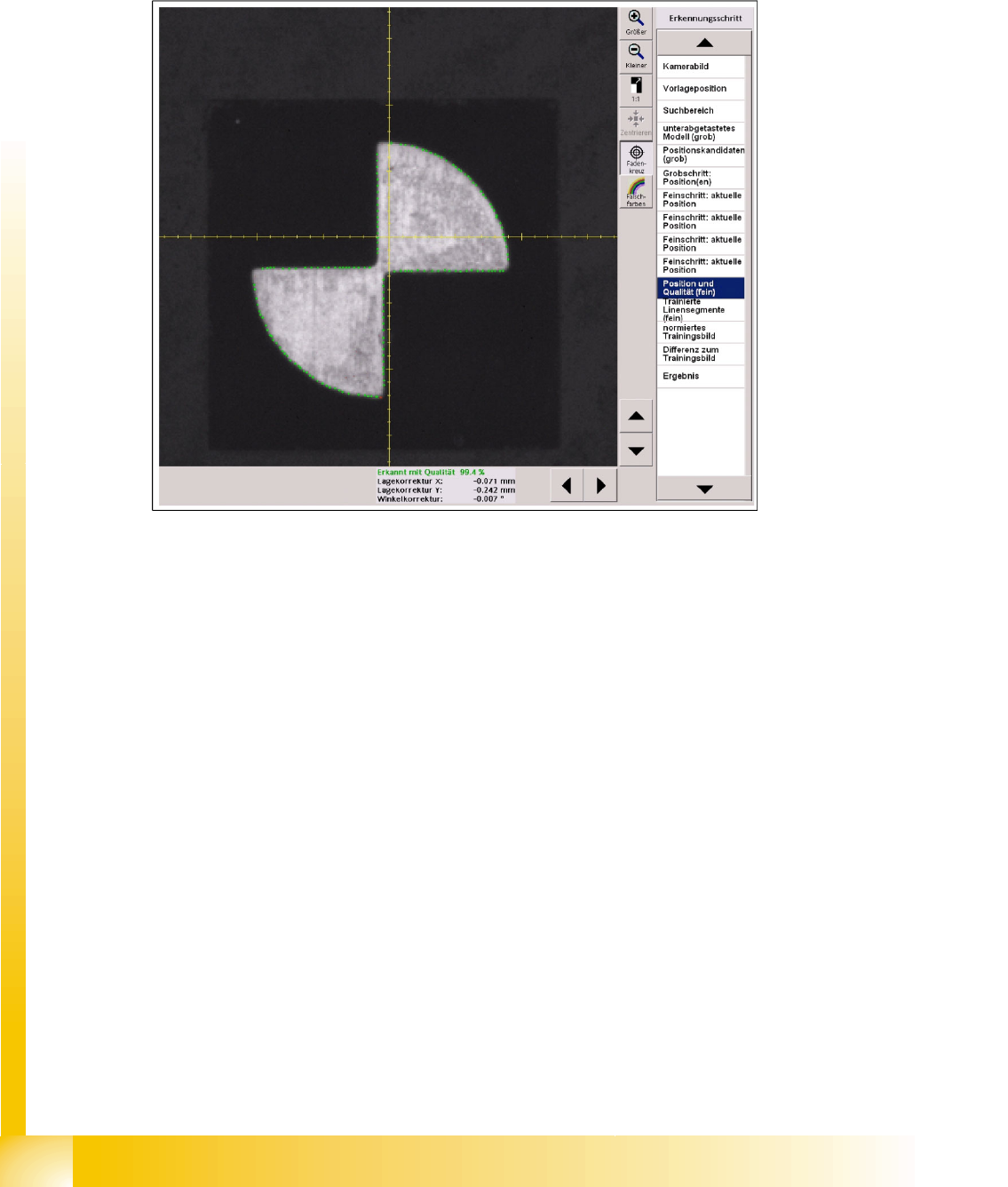
In this case, the green dots show the matches between the outer edge positions and the camera image.
The more matches are found, the higher the quality value will be.
This procedure involves teaching distinctive fiducial points and points with high contrast.
If these points are found again during measurement, they will be marked green.
If they are not found again, they will be marked red.
6-11: Fiducial pattern recognition for position and quality, based on the outer shape