00195044-14_UM_VisionTeachStation_DE EN.pdf - 第144页
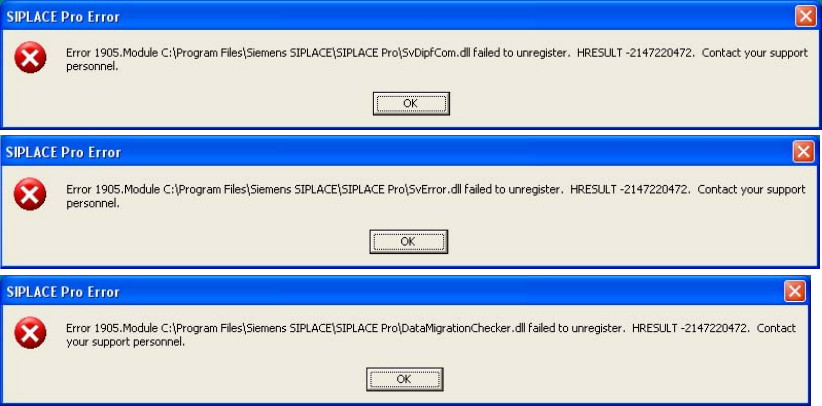
7 Software Vision Teach Station User Manual 7.2 Software upgrade 05/2015 Edition 144 7 Fig. 7.2 - 1 Error messages when uninstalling SIPLACE Pro Ignore the three error messages that appear while you are uninstalling SI…

Vision Teach Station User Manual 7 Software
05/2015 Edition 7.2 Software upgrade
143
7.2.1 Software required
You will need the Installation Package Vision Teach Station for SIPLACE Pro 12.x
(item no: 00117256-xx) for the upgrade to Vision Teach Station version 5.2.2.
The upgrade package contains the following CDs:
Tab. 7.2 - 2 Installation Package Vision Teach Station for SIPLACE Pro 12.x
7.2.2 License for the local SIPLACE Pro server as of V7.0
In order to operate Vision Teach Station offline, you will need a valid license for the SIPLACE Pro
server on the VTS computer.
The license management for line software products has been overworked in the SIPLACE Pro 7.0
version. The VTS computer is configured as license manager server and is delivered with a test
license. If this license expires, you will have to generate a host bound license key with your factory
license via the SIPLACE Licence web portal. Instructions can be found in the
"Installation_Manual_SIPLACE_OIB_License_Manager.pdf" document. This document is avail-
able on the SIPLACE Net Support Media DVD in the <<Siplace Installation\SIPLACE
License Manager\V2.x>> directory. If you do not have any factory license for the current SIPLACE
Pro version by this time, you can create a test license that is valid for three months via this portal
as well.
If the Vision Teach Station is operated in SIPLACE LAN and you work with databases on other
SIPLACE Pro computers, you will need no license for the local SIPLACE Pro server.
7.2.3 Removing the old version
Uninstall SIPLACE Pro in the Control Panel under "Add & Remove Programs" (see the
"SiplaceProInstall_eng.pdf" document on the "SIPLACE Pro Application" setup CD in the
"Documentation" directory).
7
Designation
Item no. Requires
SIPLACE NET Support Media V2.0
00117951-xx X
SIPLACE Pro Application V12.0
00117808-xx X
Vision teach station software V5.2.2
00388782-xx X
7 Software Vision Teach Station User Manual
7.2 Software upgrade 05/2015 Edition
144
7
Fig. 7.2 - 1 Error messages when uninstalling SIPLACE Pro
Ignore the three error messages that appear while you are uninstalling SIPLACE Pro. These
relate to files that SIPLACE Pro and the SIPLACE vision teach station software use together.
Click on OK for each message.
Uninstall the vision teach station software by running the "UninstallAll.bat" file in
"C:\ Program Files\Siemens AG\Teach Station".
From Vision Teach Station version 3.51 onwards, you can also uninstall from the
Start menu > Programs > Teach Station > Teach Station "Uninstall All". 7
Vision Teach Station User Manual 7 Software
05/2015 Edition 7.2 Software upgrade
145
7.2.4 Installing the new version
7.2.4.1 Installing the CD "SIPLACE NET Support Media" CD
Insert the "SIPLACE NET Support Media" CD. If it does not start automatically, run the
AUTORUN.CMD file.
Select the "Requirements" button under "Analysis and Administration" and follow the instruc-
tions.
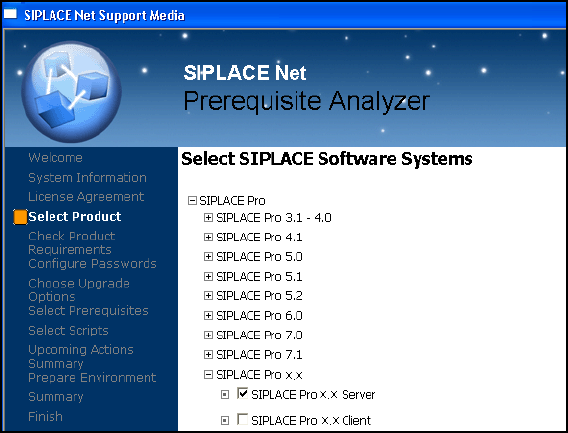
In the "Select SIPLACE Software Systems" window, select the
"Siplace Pro > Siplace Pro x.x > SIPLACE Pro x.x Server" product.
Fig. 7.2 - 2 Product choice für SIPLACE Pro x.x
7
If an SQL database already exists, the "Choose Upgrade Options" dialog box will be opened.
Select the update to the existing SQL version.
Let the "Server" option be selected in the "License Manager" window and click on "OK".