00198764-01_IM_SIPLACE_Pro_17.0_R19-2_EN - 第46页
SIPLACE Pro 17.0 (R19-2) / Installation Manual 11/2019 Edition 46 SIPLACE Pro Upgrade is comp atible with the inst alled language pack The SIPLACE Pro version that has been currently installed i s compatible with the alr…
SIPLACE Pro 17.0 (R19-2) / Installation Manual 11/2019 Edition
45
6.3.1 Compatibility of SIPLACE Language Packs
Before installing the Language Pack, SIPLACE Pro checks if the language pack version and the
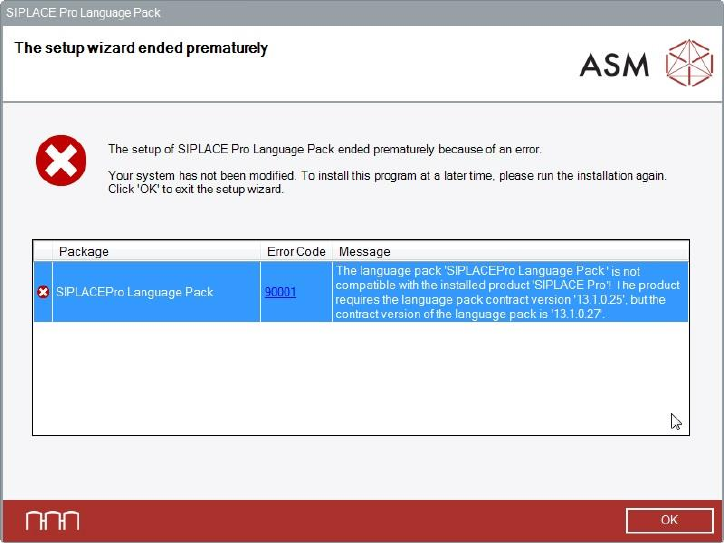
SIPLACE Pro basic version are compatible. If not, the following dialog is displayed.
Figure 6-43: Language pack not compatible
The following use cases are possible.
Language Pack version is not compatible to the basic SIPLACE Pro installation
► Make sure that you have installed the compatible basic SIPLACE Pro version or that you install
the language pack version that is compatible to the basic product version.
No SIPLACE Pro installed at all
► Make sure that you have installed the compatible basic SIPLACE Pro version or that you install
the language pack version that is compatible to the basic product version.
During an SIPLACE Pro upgrade - the newly upgraded SIPLACE Pro basic version is not
compatible with the already installed Language Pack version
► Perform the SIPLACE Pro upgrade as usual.
The incompatible language pack will be automatically uninstalled. After the upgrade only the
standard languages English, German and Simplified Chinese are available.
► Install the language pack that is compatible to the new SIPLACE Pro version (if available).
SIPLACE Pro 17.0 (R19-2) / Installation Manual 11/2019 Edition
46
SIPLACE Pro Upgrade is compatible with the installed language pack
The SIPLACE Pro version that has been currently installed is compatible with the already installed
language pack.
► Perform the SIPLACE Pro upgrade as usual without changing the language pack.
After the upgrade all languages installed with the language pack are available.
SIPLACE Pro 17.0 (R19-2) / Installation Manual 11/2019 Edition
47
7 After Installation
This chapter contains information on basic actions to be performed after installation and describes
some characteristics in the SIPLACE Pro configuration. Additionally, troubleshooting is offered for
known issues that might occur.
7.1 Importing Standard Shape Library
After a new installation of the database, it is necessary to import the standard shape library. This
step is required to use SIPLACE Pro and it ensures that data is available to be used for reporting.
► In SIPLACE Pro Desk, select Tools – Import – Standard Shape Library...
Two import variants are available:
– Component shape numbers
– Component shape names
► Do not import the two variants parallel or mixed.
After having upgraded the database from a previous version (see chapter 3) it is not necessary to
import data from the component shape library.
7.2 Logging of Changes to User Data
To enable our customers to fulfill legal responsibilities stemming from the GDPR of the European
Union which became effective 25-May-2018 – the SIPLACE Pro User Manager must log any
changes to User data that a User Manager Administrator is performing.
During installation of SIPLACE Pro, the ASM_AS_Security event log is created (if not already
existing).
The SIPLACE Pro applications logs all relevant actions into this log on the local computer on which
a SIPLACE Pro administrator with Execute permission for Security functionality makes changes to
a user, user group, or the associated privileges and permissions. For all such actions, an entry will
be made into the ASM_AS_Security event log. The entries consist of text which clearly describes
what data is changed (including 'original' and 'new' values) and identifies the user who made the
changes as well as the affected user or user groups.
The following actions performed in SIPLACE Pro Desk under Tools – Administration will be
logged:
– Create / delete / update user(s)
– Create / delete / update user group(s), modify user <-> group assignments
– Modify privileges and permissions of the user groups
– Create / delete / update folder permissions,
– User name and real names of the user making the change
– User name and real names of the affected user(s)
Additionally, all actions when importing and exporting Security Settings data under Tools –
Extras in SIPLACE Pro Desk will be logged.