00198764-01_IM_SIPLACE_Pro_17.0_R19-2_EN - 第8页
SIPLACE Pro 17.0 (R19-2) / Installation Manual 11/2019 Edition 8 3 Upgrading This chapter describes which ste ps you must attend when upg rading to the current SIPLA CE Pro version. 3.1 Upgrading from SIPLACE Pro 5.x and…

SIPLACE Pro 17.0 (R19-2) / Installation Manual 11/2019 Edition
7
2.2 Languages
User Interface and Online Help SIPLACE Pro
The standard package contains German, English and Simplified Chinese. Other languages
contained in the languages package are optional. The language package can be downloaded free
of charge from the ASM Download Center.
Available languages
● Czech
● French
● Hungarian
● Italian
● Japanese
● Korean
● Portuguese (Brazil)
● Spanish (Mexico)
NOTICE
The Optimizer Toolkit and SIPLACE LED Pairing are available in English, German and
Simplified Chinese. The SIPLACE Pro Optimizer Messages Help is available in English
and German only.
Setup wizard
The setup wizard is available in English only.
SIPLACE Pro 17.0 (R19-2) / Installation Manual 11/2019 Edition
8
3 Upgrading
This chapter describes which steps you must attend when upgrading to the current SIPLACE Pro
version.
3.1 Upgrading from SIPLACE Pro 5.x and Higher
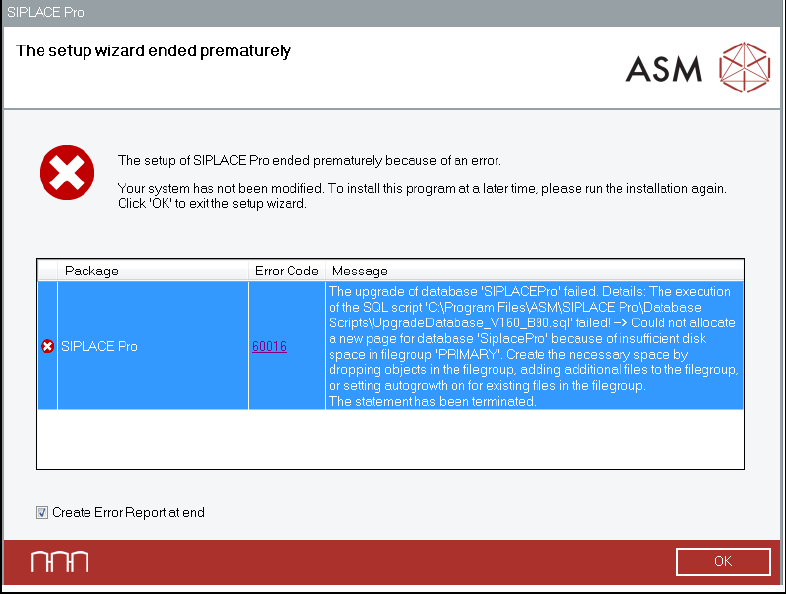
● The size of the SQL database increases by ~50% during an upgrade from lower SIPLACE Pro
versions. For example, a database of approximately 6.5 GB exceeds the allowed size of 10 GB
during the installation.
In this case, an error message appears:
Figure 3-1: Error during upgrade
► Please consider this before upgrading if your disk space is limited or if you are using an
SQL edition (such as Express) that limits the maximum size of your database.

SIPLACE Pro 17.0 (R19-2) / Installation Manual 11/2019 Edition
9
● If you have SIPLACE Pro 13.1 or lower installed, you must uninstall it manually before
upgrading. This is required because of a change in the installation technology beginning with
SIPLACE Pro 14.0. Please refer to chapter 9.
The database will be kept untouched by that uninstallation and will be upgraded during the
installation of SIPLACE Pro.
NOTICE
Any upgrade from lower to higher versions is possible provided that an upgrade script is
available.
► In case of problems, please note any (error) messages that occur and check the
installation log files of the setup. To locate the installation log files in your temporary
folder, enter "%temp%" in the address field of Windows Explorer, sort the files in
there by creation date and have a look for files beginning with "SIPLACEPro" with the
extension ".log".
► For more details please contact your service technician.
● If the list of hidden hardware has been customized, these customizations will be kept during a
SIPLACE Pro version upgrade.
If the list of hidden hardware has never been customized before and a new, empty database is
generated, all discontinued hardware is set to be hidden during the installation. It is always
possible to un-hide these objects again.
3.2 Upgrading from SIPLACE Pro 4.x and Lower
Upgrading is discontinued from the following versions:
– SIPLACE Pro 1.x including all Service Packs
– SIPLACE Pro 2.x including all Service Packs
– SIPLACE Pro 3.x including all Service Packs
– SIPLACE Pro 4.x including all Service Packs
For these versions, an upgrade with the existing SIPLACE Pro 13.0 installation has to be done
before the 14.x version is installed.