3OM-1343-008_w.pdf - 第111页
3-26 AKFEDT -ID (A03_03) Mark Sizes D1 [mm] and D2 [mm] Set the size of the fi ducial mark. • Data Input Range Mark Size D1 : 0.50 to 3.00 Mark Size D2 : 0.00 to 3.00 Reference Refer to "1.2.4 Fiducial Marks" fo…
3-25
AKFEDT-ID
1.2.3 (A03) PEC Recognition Mark Data
(A03_01)
Mark No.
The mark Nos. correspond to the mark codes and the specifi ed
parameters of each fi ducial mark used in the PEC recognition function.
10 types of mark codes can be registered for each pattern program.
(A03_02)
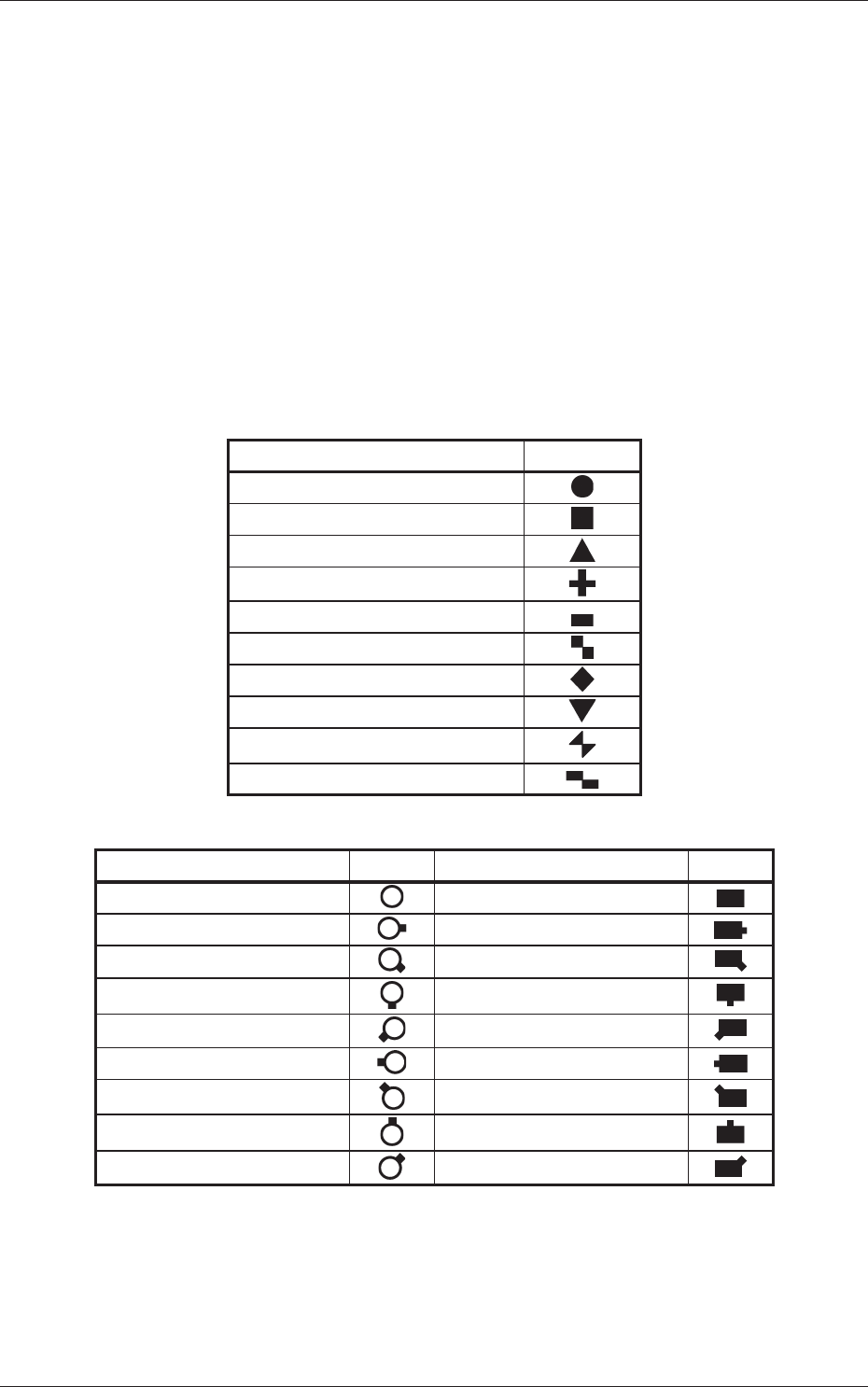
Mark Type
The following options can be selected as shapes of fi ducial marks.
Table 3C1-1
Mark Type Shape
Round
Square
Equilateral Triangle (Up)
Cross
Rectangle
Checker (Square)
Diamond
Equilateral Triangle (Down)
Bow Tie
Checker (Rectangle)
Table 3C1-2
Mark Type Shape Mark Type Shape
Through Hole
Pad Mark
Through Hole (E) Pad Mark (E)
Through Hole (SE) Pad Mark (SE)
Through Hole (S) Pad Mark (S)
Through Hole (SW) Pad Mark (SW)
Through Hole (W)
Pad Mark (W)
Through Hole (NW) Pad Mark (NW)
Through Hole (N) Pad Mark (N)
Through Hole (NE) Pad Mark (NE)
0601-002
1.2 Operation Data
3-26
AKFEDT-ID
(A03_03)
Mark Sizes D1 [mm] and D2 [mm]
Set the size of the fi ducial mark.
•
Data Input Range
Mark Size D1 :
0.50 to 3.00
Mark Size D2 :
0.00 to 3.00
Reference
Refer to "1.2.4 Fiducial Marks" for details.
(A03_04)
Angle [deg]
Set the angle at which a fi ducial mark should be turned clockwise.
•
Data Input Range
0, 90, 180, 270
Note
(a) A numerical value must be entered in increments of 90°.
When a value other than the specifi ed increments is entered, the
"Information" window appears, indicating that the entered value
(angle) is changed to "0°", "90°", "180°" or "270°".
(b) When "Thru Hole/Land" is selected in the "Mark Type" (A03_02)
combo box, the color of the angle cell is highlighted and "000.00" is
set in the "Angle [deg]" text box.
(A03_05)
Window Size [mm]
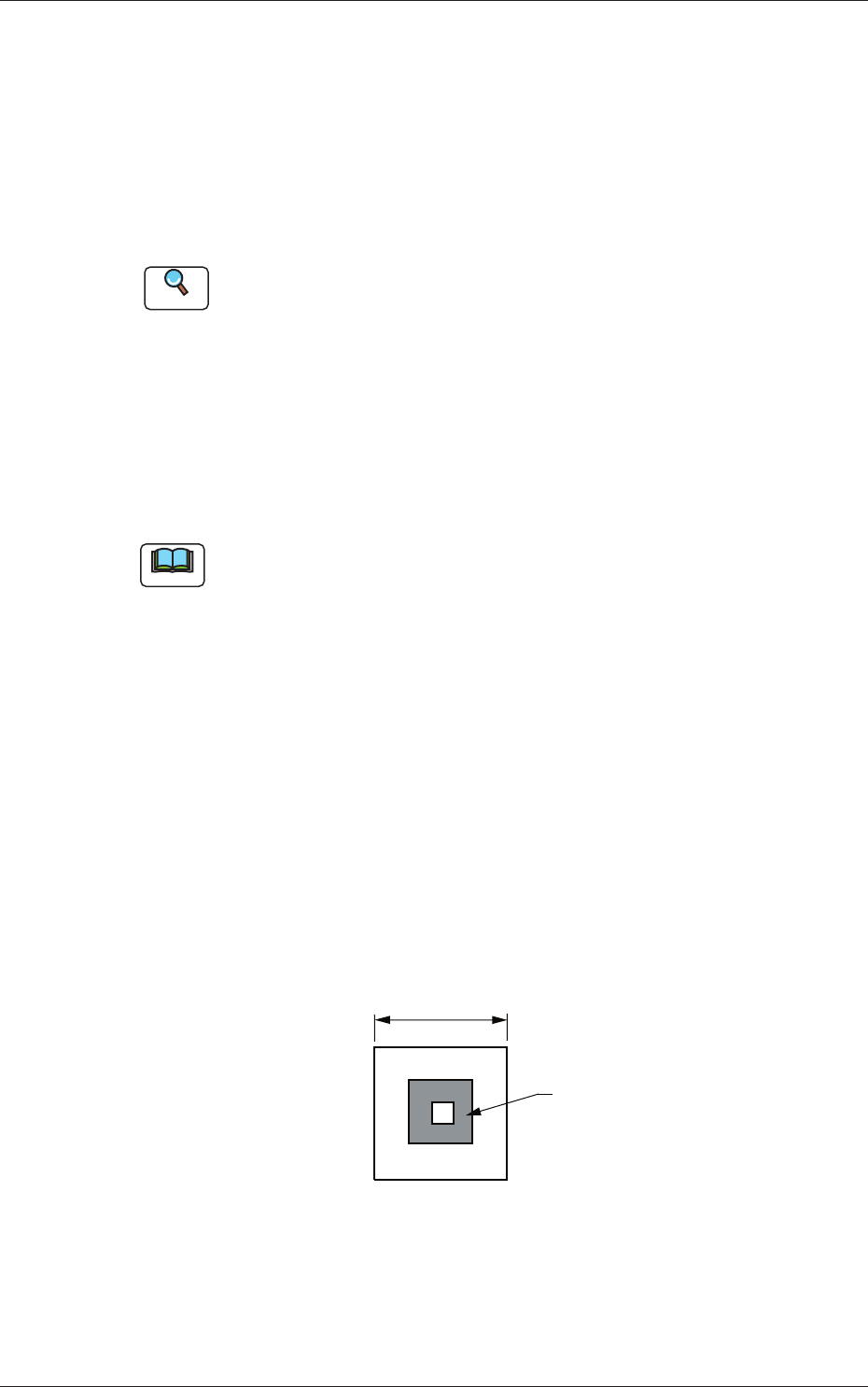
Set the recognition area (complete square) for the PEC recognition
function.
Set preferably small values to avoid false recognition and shorten
recognition time.
Fiducial Mark
Window Size
Fig. 3C23
•
Data Input Range
1.0 to 10.0
0601-002
1.2 Operation Data
3-27
AKFEDT-ID
(A03_06)
Mark Image
Select one of the following options as an image of the mark pattern to
be captured by the camera.
Select either mode according to the difference in contrast between a
mark pattern and its surroundings to get a clear fi ducial images.
Bright (Normal) :
Bright Fiducial/Dark Background
Dark (Inverted) :
Dark Fiducial/Bright Background
Note
Wrong mode selection causes malfunction of the recognition.
(A03_07)
Mark Level
Set the threshold levels of the fi ducial marks.
In normal cases, set "High".
High :
Both identity and similarity between the shape of a
fi ducial mark and the real image are detected on a high
level.
Middle :
Either identity or similarity between the shape of a fi ducial
mark and the real image are detected on a middle level.
Low :
Both identity and similarity between the shape of a
fi ducial mark and the real image are detected on a low
level.
Note
(a) Identity : Degree of identity between the shapes of the specifi ed
mark and the real image (including the size)
(b) Similarity : Degree of similarity between the shapes of the specifi ed
mark and the real image
0601-002
1.2 Operation Data