YG12F_Ope_E.pdf - 第45页
1-11 1 Part names and functions 4. Component supply section The feeder setup section is equipped with feeder plates for installing feeders such as tape feeders, and power supply connectors and air connectors for driving …
1-10
1
Part names and functions
Front of machine
HEAD 1
TYPE311A
HEAD 2
TYPE311A
HEAD 3
TYPE311A
HEAD 4
TYPE311A
HEAD 5
TYPE311A
HEAD 1
TYPE312A
HEAD 2
TYPE312A
HEAD 3
TYPE312A
HEAD 4
TYPE312A
HEAD 5
TYPE312A
HEAD 1
TYPE314A
HEAD 3
TYPE314A
HEAD 4
TYPE314A
HEAD 2
TYPE315A
HEAD 5
TYPE315A
HEAD 1
TYPE313A
HEAD 2
TYPE313A
HEAD 3
TYPE313A
HEAD 4
TYPE313A
HEAD 5
TYPE313A
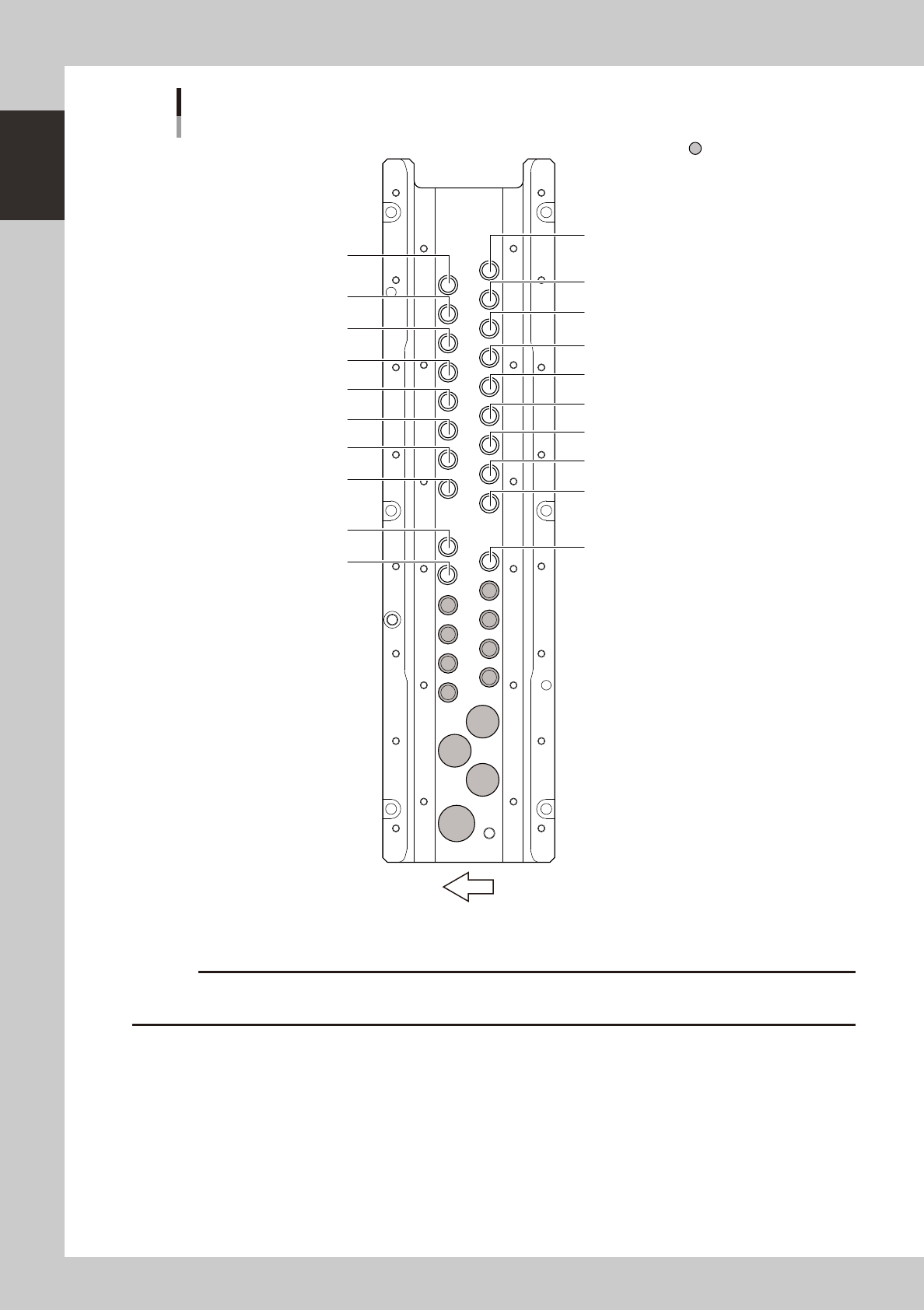
Nozzle station
Narrow adjacent type
Custom nozzle pockets
23108-M7-00
c
restrictions on the size of components suitable for those nozzles.
1-11
1
Part names and functions
4. Component supply section
The feeder setup section is equipped with feeder plates for installing feeders such as tape feeders, and power
supply connectors and air connectors for driving optional units. Automatic tray changer (ATS15) is available
for YG12F as an option.
4.1 Supplying components from feeder plates
The tape feeder is installed on the feeder plate and is driven by air pressure supplied from the mounter.
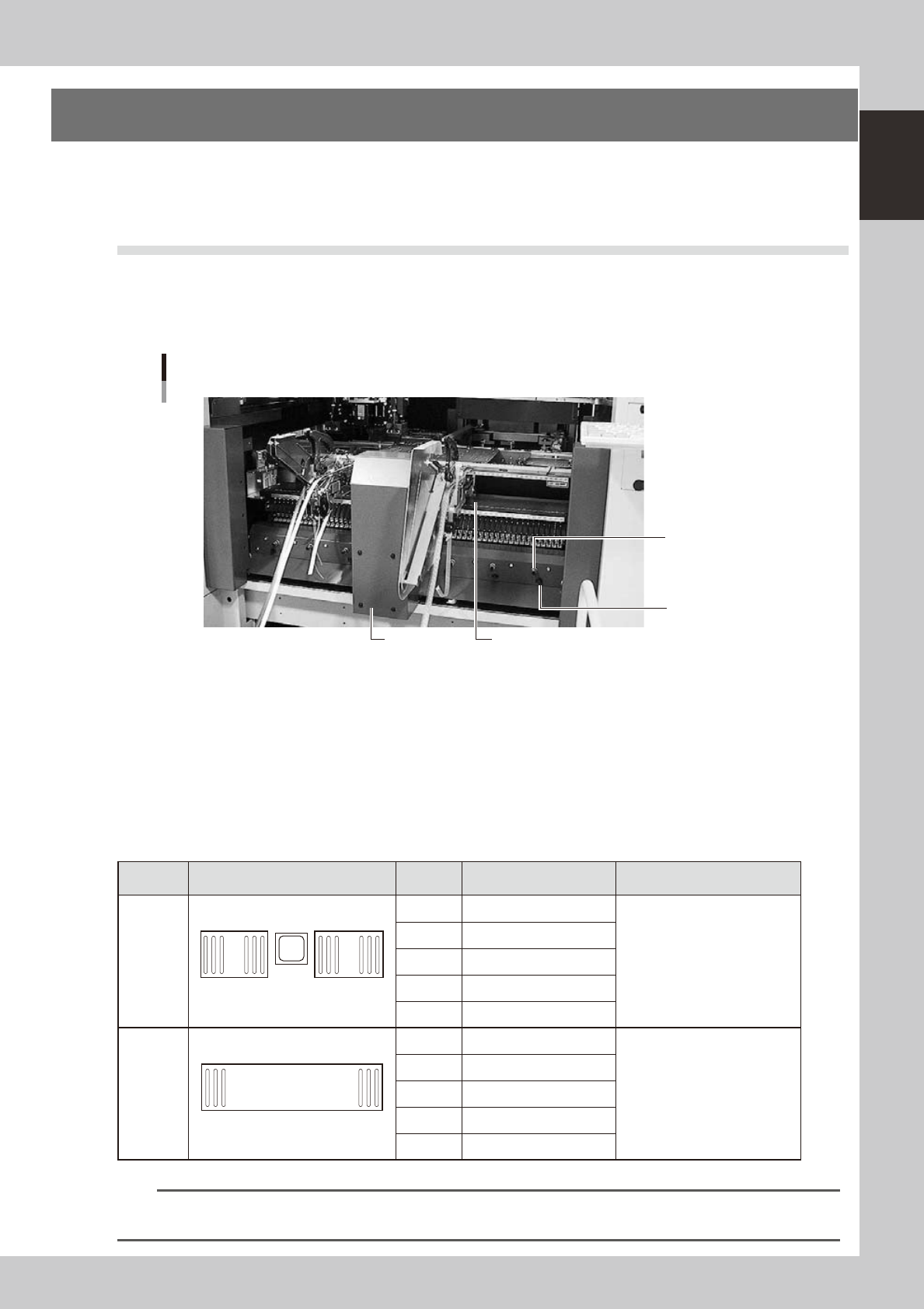
4.1.1 Fixed 24-feeder plate
Feeder plate section
Safety cover
Air connector
Power supply
connector
24-feeder plate
23109-M7-00
Power supply connector
When using optional units such as dump stations, plug the power cord into these connectors.
Air connector
Use these air connectors when using an optional device such as an air blow gun. Connect the air tube (outer diameter
4mm) to supply compressed air to the optional device from the mounter.
■
Head No. and feeder set No.
Some feeders cannot be reached by a head depending on the head assembly configuration and X-axis movement range.
The tables below show feeder set numbers that can be accessed by each head of the machine.
Type Layout Head No. Accessible feeder set No.
Number of feeders than can be
attached
Front
24-feeder
plate
(fixed) × 2
1
24
25
48
1 9 to 48
48 when FT feeders are used
2 7 to 46
3 5 to 44
4 3 to 42
5 1 to 40
Front
60-feeder
plate
(fixed)
1 60
1 101 to 151
59 when FT feeders are used
2 103 to 153
3 105 to 155
4 107 to 157
5 109 to 159
n
NOTE
Accessible feeder positions may differ from the above when the Feeder Definition parameter in component
information is set to "Teach" or "Relative".
1-12
1
Part names and functions
4.2 Supplying components from tray changer (ATS15)
Major part names and their functions of the tray changer (ATS15) are explained below.
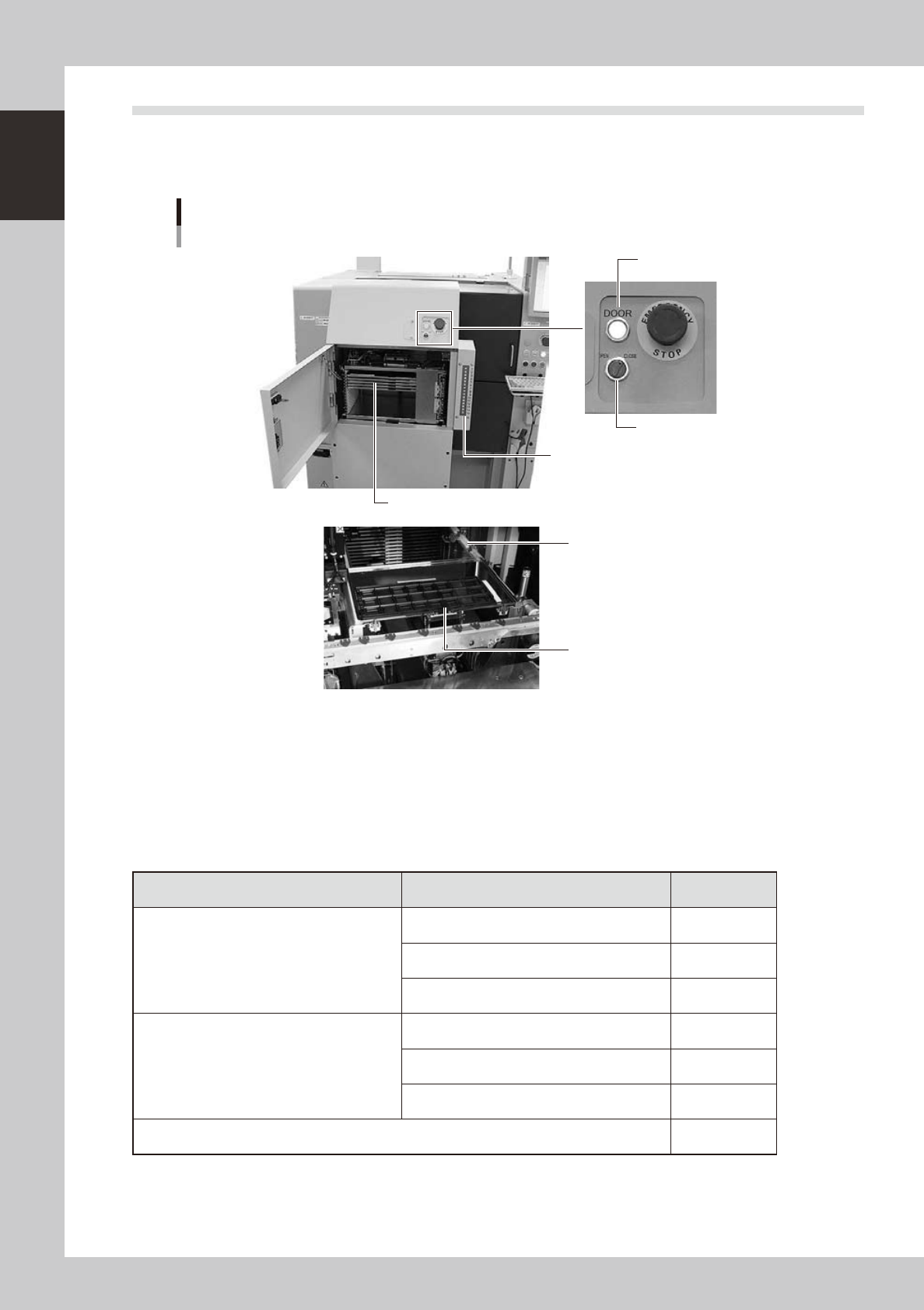
4.2.1 ATS15 main unit
Tray changer main unit
ATS15
Pallet indicator
Guide rail
Pallet clamp position (work position)
Door switch
Door indicator
Pallet (Up to 15 pallets can be stored at 12.5mm pitch.)
23110-M7-00
Door switch
Setting this switch to "OPEN" unlocks the door and the DOOR indicator turns off.
Pallet indicator
The indicator lamps for the pallet No. set in the parts information are lit up. When the tray components on a pallet are
used up, the indicator lamp for that pallet No. flashes (see below). After setting new a pallet in the ATS15, press the
flashing indicator button to reset it.
n
Pallet indicator lighting pattern
Pallet condition Component condition Indicator status
One component type on one pallet
Components have been supplied. ON
Used up all components. Flashing
Components are currently being used. ON
Two or more components types on one pallet
All components on pallet have been supplied. ON
Used up all components. Flashing
Used up at least one type of component. Flashing
Components to be used are not specified in board data. OFF