CP-6-series Mechanical Reference.pdf - 第6页
Body The information needed to understand the workings of the machine and how to perform operation is explained using text and illustrations. Page number A three digit hyphenated number appears in the footer on each page…
About This Manual
Edition 1.6 ii CP-6-series Mechanical Reference
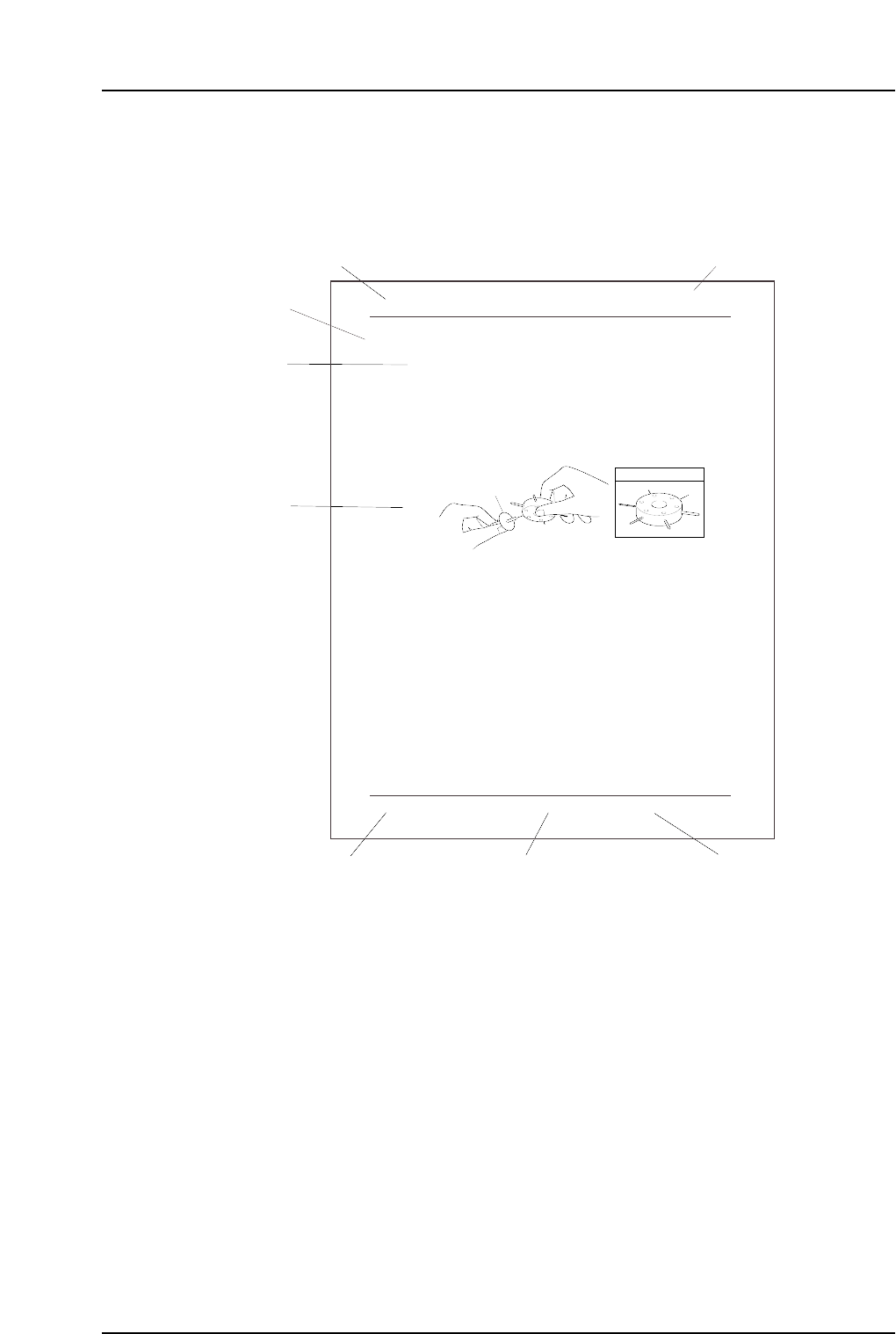
Page Layout
Each page indicates the part number, chapter number and title, section title , manual
name, page number, and the edition number of the manual.
Part number
The part number to which each chapter belongs is shown on the header on each page.
Chapter number and title
The title of each chapter is shown in the header on each page. Each part may contain one
or more chapters.
Section title
Each chapter may be divided into several sections. The section number is composed of
the number of the chapter to which the section belongs, followed by a sequential number
for each section.
1. Cleaning
1.1 Cleaning the Nozzles
Point
Because the nozzles operate by vacuum pressure, sometimes foreign materials are drawn
in. Nozzle blockage occurs when particles of dust, glue, and solder paste are drawn in
and solidify. If this blockage is not corrected, pick-up errors will occur and placing
performance will drop.
Procedure
If a certain nozzle consistently causes pick-up errors, clean it out by inserting and turning
a drill bit as shown in the illustration below.
1.2 Cleaning the Fluorescent Disk (Every Month)
Point
If dust or other fine particles build up on the fluorescent disk, the percentage of UV light
reflection from the station 6 UV lamp will be reduced. If this reflected light is
insufficient, a proper image can not be captured during vision processing. Vision
processing errors thus occur and placing performance drops.
Procedure
If a certain nozzle consistently causes pickup errors, clean its fluorescent disk with a soft
brush (the type of brush used for cleaning a camera lens is best).
Note : Do not rub the fluorescent disk with a rag. Rubbing the fluorescent disk makes grime
adhere to the disk, which causes vision processing problems. If grime cannot be removed,
replace the fluorescent disk.
Nozzle
JIG No. AWPJ8100
CP6M3001Ea
Part 3 Chapter 1 Cleaning
Edition 1.1 3-1-1 CP-6-series Mechanical Reference
Chapter title
Chapter number and title
Manual name
Edition number
Page number
CP6MF003E
Body
Part number
Section title

Body
The information needed to understand the workings of the machine and how to perform
operation is explained using text and illustrations.
Page number
A three digit hyphenated number appears in the footer on each page. The first digit of
each page number indicates the part number, the second digit indicates the chapter
number within the part, and the final digit is the sequential page number within that
chapter. Page 1-2-1, for example, indicates that this is the first page in the second chapter
of part 1.
Manual name
The name of the manual that appears on the cover is also shown in the footer on each
page.
Edition number
The edition number is updated each time the manual is revised, with the number
reflecting the scale of changes that were made.
Minor revision: Minor changes are reflected in the part of the edition number after
the decimal point, for example, a change from edition 1.0 to 1.1. This
change is made on the revised pages only, and these pages can be
downloaded as required from Fuji's website.
Major revision: If major changes are made, the edition number is increased by one,
for example, a change from edition 1.0 to 2.0.
Note: The reference numbers at the bottom right of the illustrations are for administrative
purposes only, and are in no way connected to the content of the manual.
Notation Conventions Used in this Manual
The notation conventions employed in this manual are described below.
[Production] command The names of the command buttons are enclosed in
brackets, and use the verb “press”.
START button Buttons on the machine are written exactly as they
appear, and use the verb “press”.
“Production” command section The names of commands that have been grouped
together are enclosed in quotation marks.
[TAB] key Keys on the keyboard appear in brackets.
About This Manual
Edition 1.6 iii CP-6-series Mechanical Reference

Terminology Notice
“Production Program” In this manual the term “production program” is
used to refer to the operating instructions used by the
machine in the production of a board.
In FujiCam, this data is referred to as the “recipe”.
Despite the differences in name, the terms carry the
same meaning, and references to “production
program” may therefore be thought of as “recipe” by
FujiCam users.
“Board”, “Block” In this manual the term “board” is used to refer to
the printed circuit on which parts are placed, and the
term “block” is used for multiple identical circuits
that may exist within a board and which are split into
individual units when production is complete.
In FujiCam, these terms are referred to as “panel”
and “board” respectively.
Despite the differences in name, the terms used in
this manual carry the same meaning as the
corresponding FujiCam terminology and can
therefore be freely interchanged by FujiCam users.
About This Manual
Edition 1.6 iv CP-6-series Mechanical Reference