2OM-1150-001_w.pdf - 第25页
1.2.2 Print Data( 1.2.2 Print Data( 1.2.2 Print Data( 1.2.2 Print Data( 1.2.2 Print Data( 印刷数据 印刷数据 印刷数据 印刷数据 印刷数据 ) ) ) ) ) (1) Screen Basis( (1) Screen Basis( (1) Screen Basis( (1) Screen Basis( (1) Screen Basis( 制版基准 …
(3) Operation Mode((3) Operation Mode(
(3) Operation Mode((3) Operation Mode(
(3) Operation Mode(
运作模式运作模式
运作模式运作模式
运作模式
))
))
)
选择在要生产的基板上是否印刷Solder Paste。
PRINTPRINT
PRINTPRINT
PRINT
: :
: :
: 生产运作时进行Solder Paste的印刷。
PASSPASS
PASSPASS
PASS
::
::
: 生产运作时仅做基板搬送。
(4) Print Area((4) Print Area(
(4) Print Area((4) Print Area(
(4) Print Area(
印刷范围印刷范围
印刷范围印刷范围
印刷范围
))
))
)
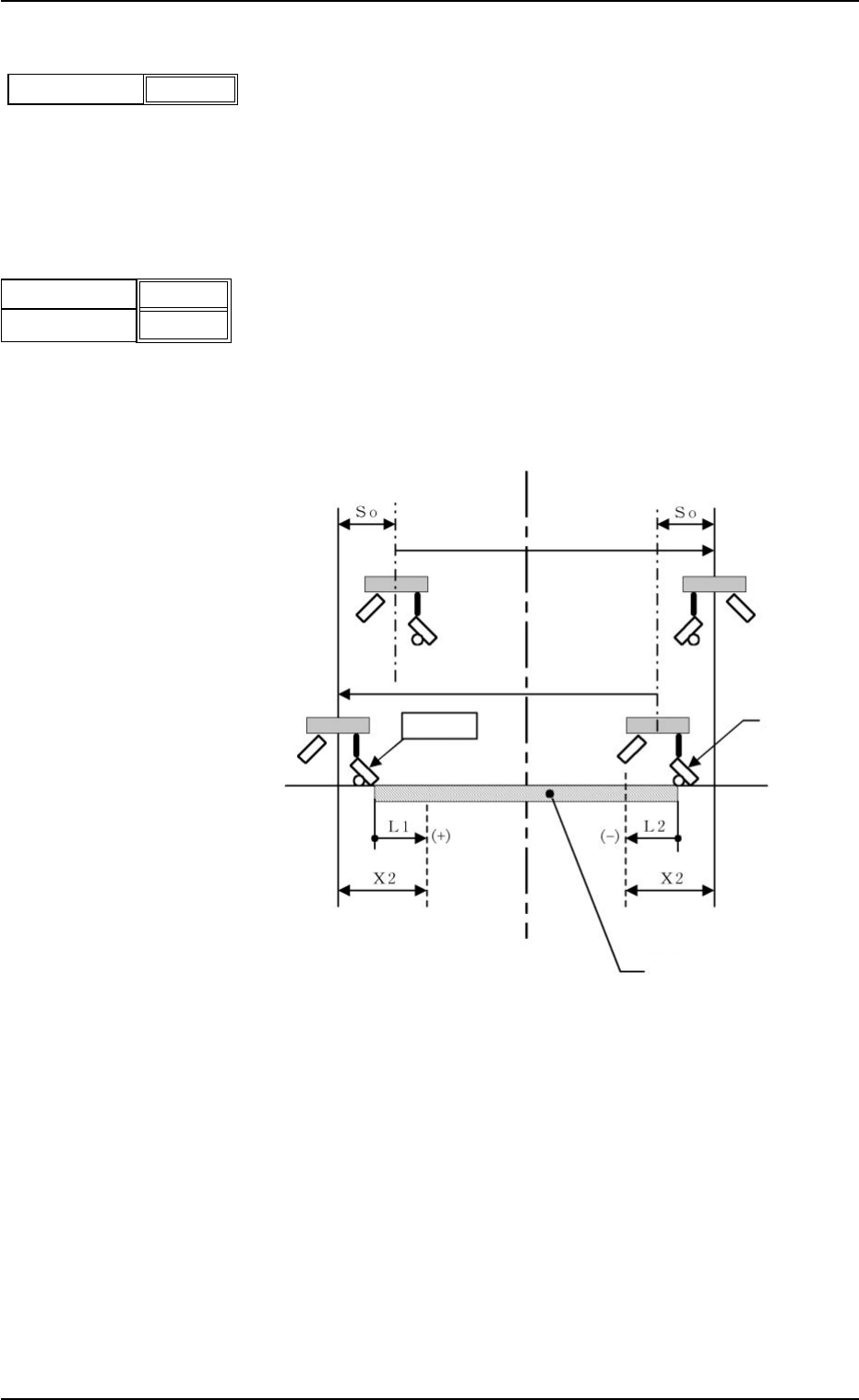
通过有关基板Y 方向端面的Offset设定印刷范围。
单位: mm
输入有关原点侧和深度侧端面上的NC坐标的Offset,初始值(0)
全面印刷基板。
实际印刷范围如下所示,牵涉到各种Offset。
L1、L2 : 印刷范围数据(以NC原点为基准)
X 2 : 印刷结束时超过量
So : 印刷开始时从前次结束位置的移动量
(Squeegee Offset)
Fig.3B7Fig.3B7
Fig.3B7Fig.3B7
Fig.3B7
数据的设置范围数据的设置范围
数据的设置范围数据的设置范围
数据的设置范围
原点侧 : -10~+250
深度侧 : -250~+10
0004-002 1章2-3
AFQ01JDTP
1.2 Operation Data1.2 Operation Data
1.2 Operation Data1.2 Operation Data
1.2 Operation Data
OriginOrigin
OriginOrigin
Origin
DepthDepth
DepthDepth
Depth
+00.000+00.000
+00.000+00.000
+00.000
+00.000+00.000
+00.000+00.000
+00.000
Fig.3B6Fig.3B6
Fig.3B6Fig.3B6
Fig.3B6
Operation ModeOperation Mode
Operation ModeOperation Mode
Operation Mode
PrintPrint
PrintPrint
Print
Fig.3B5Fig.3B5
Fig.3B5Fig.3B5
Fig.3B5
Screen中心
Squeege
基板
NC原点
1.2.2 Print Data(1.2.2 Print Data(
1.2.2 Print Data(1.2.2 Print Data(
1.2.2 Print Data(
印刷数据印刷数据
印刷数据印刷数据
印刷数据
))
))
)
(1) Screen Basis((1) Screen Basis(
(1) Screen Basis((1) Screen Basis(
(1) Screen Basis(
制版基准制版基准
制版基准制版基准
制版基准
))
))
)
选择屏幕轮廓基准的种类。
Center Ref.Center Ref.
Center Ref.Center Ref.
Center Ref. :以屏幕轮廓的中心为基准。
Front Ref.Front Ref.
Front Ref.Front Ref.
Front Ref. :以屏幕轮廓的前侧为基准。
Rear Ref.Rear Ref.
Rear Ref.Rear Ref.
Rear Ref. :以屏幕轮廓的背侧为基准。
(2) Round-Way Printing((2) Round-Way Printing(
(2) Round-Way Printing((2) Round-Way Printing(
(2) Round-Way Printing(
来回印刷来回印刷
来回印刷来回印刷
来回印刷
))
))
)
选择是否进行来回印刷。
ONON
ONON
ON : 做来回印刷
OFFOFF
OFFOFF
OFF : 不做来回印刷。
(3) Frame Select((3) Frame Select(
(3) Frame Select((3) Frame Select(
(3) Frame Select(
版轮廓选择版轮廓选择
版轮廓选择版轮廓选择
版轮廓选择
))
))
)
选择要用屏幕的版轮廓尺寸。
单位: mm
650650
650650
650
××
××
×
550 550550 550
550 550550 550
550 550
××
××
×
550 600550 600
550 600550 600
550 600
××
××
×
550 550550 550
550 550550 550
550 550
××
××
×
650650
650650
650
(4) Prntg.Press.[N]((4) Prntg.Press.[N](
(4) Prntg.Press.[N]((4) Prntg.Press.[N](
(4) Prntg.Press.[N](
印压选择印压选择
印压选择印压选择
印压选择
))
))
)
设定Squeegee的前侧以及背侧的印压。
单位: N
数据的设置范围数据的设置范围
数据的设置范围数据的设置范围
数据的设置范围: 10~147 N
(5) Squeegee Select(Squeegee(5) Squeegee Select(Squeegee
(5) Squeegee Select(Squeegee(5) Squeegee Select(Squeegee
(5) Squeegee Select(Squeegee
选择选择
选择选择
选择
))
))
)
选择要用Squeegee的长为 “270”或 “350”。
单位: mm
(6) Squeegee Spd.(Squeegee(6) Squeegee Spd.(Squeegee
(6) Squeegee Spd.(Squeegee(6) Squeegee Spd.(Squeegee
(6) Squeegee Spd.(Squeegee
速度速度
速度速度
速度
))
))
)
设定Squeegee前后移动印刷时的速度。
单位: mm/s
For. For.
For. For.
For. : Squeegee从 “背”进入 “前”时的速度
Back.Back.
Back.Back.
Back.: Squeegee从 “前”进入 “背”时的速度
(7) Screen Distance(7) Screen Distance
(7) Screen Distance(7) Screen Distance
(7) Screen Distance
设定印刷动作时屏幕和基板上表面间的间隔。
单位: mm
数据的设置范围数据的设置范围
数据的设置范围数据的设置范围
数据的设置范围
:-1.5:-1.5
:-1.5:-1.5
:-1.5
~~
~~
~
3.03.0
3.03.0
3.0
0008-003 1章2-4
AFQ01JDTP
1.2 Operation Data1.2 Operation Data
1.2 Operation Data1.2 Operation Data
1.2 Operation Data
Round-WayRound-Way
Round-WayRound-Way
Round-Way
PrintingPrinting
PrintingPrinting
Printing
OFFOFF
OFFOFF
OFF
Fig.3B9Fig.3B9
Fig.3B9Fig.3B9
Fig.3B9
FrameFrame
FrameFrame
Frame
SelectSelect
SelectSelect
Select
650650
650650
650
××
××
×
550550
550550
550
Fig.3B10Fig.3B10
Fig.3B10Fig.3B10
Fig.3B10
Squeegee SelectSqueegee Select
Squeegee SelectSqueegee Select
Squeegee Select
270270
270270
270
Fig.3B12Fig.3B12
Fig.3B12Fig.3B12
Fig.3B12
Screen DistanceScreen Distance
Screen DistanceScreen Distance
Screen Distance
-0.1-0.1
-0.1-0.1
-0.1
Fig.3B14Fig.3B14
Fig.3B14Fig.3B14
Fig.3B14
Fig.3B8Fig.3B8
Fig.3B8Fig.3B8
Fig.3B8
Screen BasisScreen Basis
Screen BasisScreen Basis
Screen Basis
Center Ref.Center Ref.
Center Ref.Center Ref.
Center Ref.
040040
040040
040
040040
040040
040
Front SideFront Side
Front SideFront Side
Front Side
Rear SideRear Side
Rear SideRear Side
Rear Side
Fig.3B11Fig.3B11
Fig.3B11Fig.3B11
Fig.3B11
FF
FF
F
OR.OR.
OR.OR.
OR.
BACKBACK
BACKBACK
BACK
005005
005005
005
005005
005005
005
Fig.3B13Fig.3B13
Fig.3B13Fig.3B13
Fig.3B13
(8) Separation Mode((8) Separation Mode(
(8) Separation Mode((8) Separation Mode(
(8) Separation Mode(
版分离模式版分离模式
版分离模式版分离模式
版分离模式
))
))
)
选择印刷结束后,屏幕轮廓从基板分离时,先下降基板或
先上升Squeegee。
PCB DownPCB Down
PCB DownPCB Down
PCB Down : 基板下降后上升Squeegee
SqueegeeSqueegee
SqueegeeSqueegee
Squeegee
UpUp
UpUp
Up : Squeegee上升后下降基板
(9) Separation Speed [mm/s]((9) Separation Speed [mm/s](
(9) Separation Speed [mm/s]((9) Separation Speed [mm/s](
(9) Separation Speed [mm/s](
版分离速度版分离速度
版分离速度版分离速度
版分离速度
))
))
)
设定印刷结束后,屏幕轮廓从基板分离的速度。
单位: mm/s
数据的设置范围数据的设置范围
数据的设置范围数据的设置范围
数据的设置范围: 0.05~3.00
( 1 0) Separation Acc. [mm/S( 1 0) Separation Acc. [mm/S
( 1 0) Separation Acc. [mm/S( 1 0) Separation Acc. [mm/S
( 1 0) Separation Acc. [mm/S
22
22
2
](](
](](
](
版分离加速度版分离加速度
版分离加速度版分离加速度
版分离加速度
))
))
)
设定印刷结束后,屏幕轮廓从基板分离的加速度。
单位:mm/sec
2
数据的设置范围数据的设置范围
数据的设置范围数据的设置范围
数据的设置范围: 0.01~50.0
( 11) Separation Distance [mm](( 11) Separation Distance [mm](
( 11) Separation Distance [mm](( 11) Separation Distance [mm](
( 11) Separation Distance [mm](
版分离距离版分离距离
版分离距离版分离距离
版分离距离
))
))
)
设定印刷结束后,屏幕轮廓从基板分离出来的距离。
单位:mm
数据的设置范围数据的设置范围
数据的设置范围数据的设置范围
数据的设置范围: 0~9.9
( 1 2) Prntng.Correction(Back)(( 1 2) Prntng.Correction(Back)(
( 1 2) Prntng.Correction(Back)(( 1 2) Prntng.Correction(Back)(
( 1 2) Prntng.Correction(Back)(
印刷偏离补正印刷偏离补正
印刷偏离补正印刷偏离补正
印刷偏离补正
((
((
(
后退后退
后退后退
后退
))))
))))
))
X(X(
X(X(
X(
单位单位
单位单位
单位
: mm), Y(: mm), Y(
: mm), Y(: mm), Y(
: mm), Y(
单位单位
单位单位
单位
: mm), : mm),
: mm), : mm),
: mm),
θθ
θθ
θ
((
((
(
单位单位
单位单位
单位
: "): ")
: "): ")
: ")
设定Squeegee后退(从“前”向“背”移动)时发生的基板和屏幕的
相对位置( 微量) 补正数据。
0008-003 1章2-5
AFQ01JDTP
1 .2 Operation Data1 .2 Operation Data
1 .2 Operation Data1 .2 Operation Data
1 .2 Operation Data
Separation ModeSeparation Mode
Separation ModeSeparation Mode
Separation Mode
PCB DownPCB Down
PCB DownPCB Down
PCB Down
Fig.3B1 5Fig.3B1 5
Fig.3B1 5Fig.3B1 5
Fig.3B1 5
Separation Speed [mm/s]Separation Speed [mm/s]
Separation Speed [mm/s]Separation Speed [mm/s]
Separation Speed [mm/s]
0.050.05
0.050.05
0.05
Fig.3B1 6Fig.3B1 6
Fig.3B1 6Fig.3B1 6
Fig.3B1 6
Separation Acc.[mm/Separation Acc.[mm/
Separation Acc.[mm/Separation Acc.[mm/
Separation Acc.[mm/
SS
SS
S
2
]]
]]
]
50.0050.00
50.0050.00
50.00
Fig.3B1 7Fig.3B1 7
Fig.3B1 7Fig.3B1 7
Fig.3B1 7
Separation Distance [mm]Separation Distance [mm]
Separation Distance [mm]Separation Distance [mm]
Separation Distance [mm]
0.50.5
0.50.5
0.5
Fig.3B1 8Fig.3B1 8
Fig.3B1 8Fig.3B1 8
Fig.3B1 8
XX
XX
X
〔〔
〔〔
〔
mmmm
mmmm
mm
〕〕
〕〕
〕
YY
YY
Y
〔〔
〔〔
〔
mmmm
mmmm
mm
〕〕
〕〕
〕
+0.000+0.000
+0.000+0.000
+0.000
+0.000+0.000
+0.000+0.000
+0.000
+0.000+0.000
+0.000+0.000
+0.000
Fig.3B1 9Fig.3B1 9
Fig.3B1 9Fig.3B1 9
Fig.3B1 9
θθ
θθ
θ
〔〔
〔〔
〔
""
""
"
〕〕
〕〕
〕