00197623-03_VD_708.1_SP2_DE_EN.pdf - 第13页
Station Software 7 08.1 SP2 / Version Description Ausgabe 10/2015 E dition 13 Prerequisites – All stations in the line m ust be equipped with the same stati on software (708.1 versi on or higher ). – WDTL has to be provi…
Station Software 708.1 SP2 / Version Description Ausgabe 10/2015 Edition
12
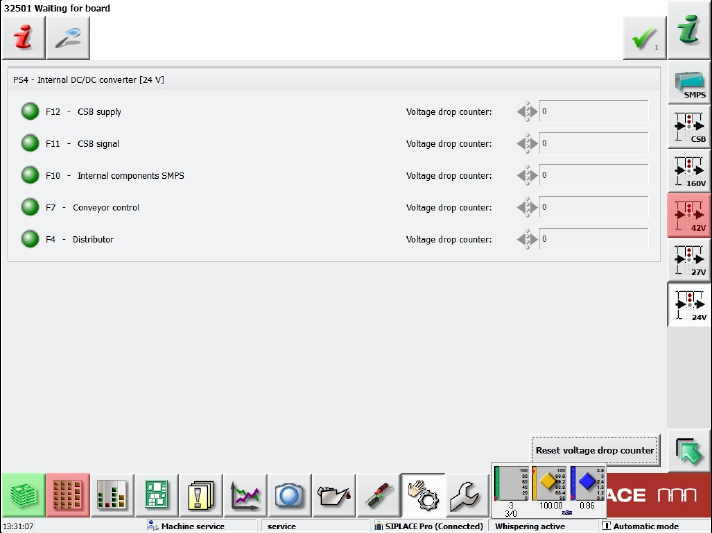
If a fuse group is selected (here 24V), a corresponding view is displayed.
Figure 5-5: Fuse group view
The states of the assigned fuses are displayed in the following colors:
Gray: switched off
Green: switched on
Red: faulty
One long name and one short name are displayed for each fuse. The short names are the same as
those in the figures of the real hardware that can be found in the Online help of the station
software.
Additionally, the number of voltage drops since the last reset is displayed. The counter for all
displayed fuses can be reset with the Reset voltage drop counter button.
5.4 WDTL – Multiple Set-up Components in Barcode Controlled
Production with Synchronous Dual Lane Mode
Compatible mode: Not supported
The station software now supports multiple set-up components in barcode controlled production
with synchronous dual lane mode. Multiple set-up components means that the components are set-
up on more than one station.
In synchronous dual lane mode, each of the two boards gets the same unique ID for the SIPLACE
Pro job in the first station. This ID will be transferred by WDTL through the line.
If boards with the same ID are moved together into another station, the boards will be placed
together with the same SIPLACE Pro job. This is the usual case.
If boards with different IDs are moved together into another station, the boards will be separated
and separately placed in asynchronous mode.

Station Software 708.1 SP2 / Version Description Ausgabe 10/2015 Edition
13
Prerequisites
– All stations in the line must be equipped with the same station software (708.1 version or
higher).
– WDTL has to be provided through the complete line. If a SIPLACE cluster is interrupted by a
device like an AOI system, WDTL is only possible via individual PCB barcodes.
5.5 "Feeding on Demand" Option for Tape Feeders
Compatible mode: Complete
As of this station software version, the Feeding on Demand option can be used for all tape
feeders. With this option it can be avoided that components remain in the tape without a cover foil
and fall out at a changeover.
The option is set in the SetupUnitTypes.xml configuration file and oriented either to the head cycle
or the board cycle dependent on the feeder type. For fast feeders like the 8 mm and 2x8 mm
X-feeders, the head cycle variant is used.
The board cycle variant can be enabled per station. Only one sequence for each feeder type can
be set and a mixture is not supported.
NOTICE
Components without a cover foil can possibly remain in the tape if a board is canceled,
i.e. if it has not been completely placed.
5.6 Configurable "Pickup Components during Measuring Fiducials"
Compatible mode: Not supported
Previously it was standard that the components were already picked up and measured while the
board entered the machine for a faster passing through. This practice was only suppressed if ink
spots had to be evaluated.
Now it can be configured in SIPLACE Pro if pre-pickup shall be performed always, never or
dependent of the recipe.
The option can only be overridden by correcting the configuration files of the station software
respectively. However, this should only be performed for test and integration purposes.
5.7 Placement of 03015 / 0201 Components with C&P20 A or C&P20 P
Compatible mode: Not supported
The component shapes that can be selected in SIPLACE Pro for the placement process are based
on the imperial units, i.e. on inches (1 inch = 2.4 cm) with one exception: the 03015 component
shape is based on the metric system.
As of this station software version, a new metric-based 0201 component shape can be defined in
addition to the existing, inch-based 0201 component shape.
For the metric-based 0201 component shape a new nozzle type has been introduced that is
supported by the C&P20 A and C&P20 P placement heads. The nozzle number 1002 is assigned
to the C&P20 A placement head and 4102 to the C&P20 P placement head.
Station Software 708.1 SP2 / Version Description Ausgabe 10/2015 Edition
14
NOTICE
Selection of the component shapes in SIPLACE Pro
In SIPLACE Pro the 0201 component shapes (= inch-based) or 03015m
(= metric-based) can be selected for the placement process.
SIPLACE Pro treats the metric-based 0201 component shapes as 03015m component
shapes. Therefore, in this case 03015m has to be selected and not 0201!
5.8 Optional Automatic Detection of the Feeder Pitch
Compatible mode: Complete
Components in tapes for 8 mm and 2x8 mm X-feeders are often delivered with different feeder
pitches dependent on the manufacturer. Thus, it is not possible to work with a fixed setting what in
the worst case might cause a big loss of components from a tape reel.
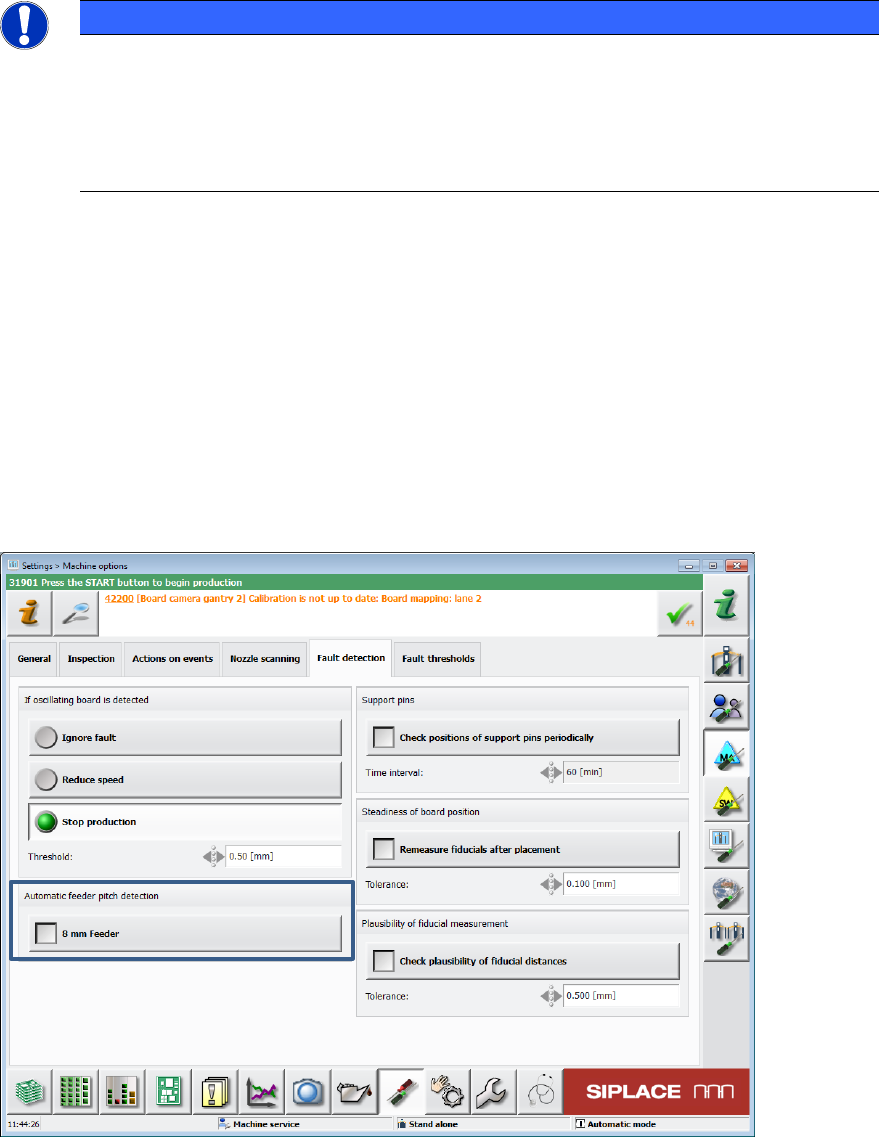
For this, the already available Automatic feeder pitch detection function has been enhanced. As
of this station software version, an optional automatic detection of the feeder pitch can be set and
performed during runtime.
The check can be enabled or disabled in the Machine options on the GUI.
Figure 5-6: Automatic detection of the feeder pitch