HS50的结构及原理.pdf - 第125页
Adjustment Instructions SIPLACE HS -50 6 Gantries Edition 05/00 6.5 D ynamic Adjustment of the X - and Y- A xes 125 – If you adjust ed the dy namic s of the x- axis c orrectl y , eac h indivi dual s ignal wil l be disp…
6 Gantries Adjustment Instructions SIPLACE HS-50
6.5 Dynamic Adjustment of the X- and Y- Axes Edition 05/00
124
2VFLOORVFRSH6HWWLQJV
&KDQQHO 6LJQDO &RXSOLQJ <'HIOHFWLRQ 7ULJJHU ;'HIOHFWLRQ
CH1 Vnominal DC 0.1 V/ DIV
CH 1
positive
10% pre
10 ms/ DIV
CH2 deviat. of pos. DC 0.5 V/ DIV
CH3 nominal current DC 0.2 V/ DIV
Ch4 end signal DC 5.0 V/ DIV
Sollwert /
Vnominal
Positionsabweichung
deviation of position
Kraftsollwert /
nominal current
Endemeldung /
end signal
&KDQQHO 6LJQDO &RXSOLQJ <'HIOHFWLRQ 7ULJJHU ;'HIOHFWLRQ
CH1 Vnominal DC 1.0V/ DIV
CH 1
positive
3% pre
10 ms/ DIV
CH2 deviat. of pos. DC 0.5 V/ DIV
CH3 nominal current DC 5.0V/ DIV
Ch4 end signal DC 5.0 V/ DIV
Adjustment Instructions SIPLACE HS-50 6 Gantries
Edition 05/00 6.5 Dynamic Adjustment of the X- and Y- Axes
125
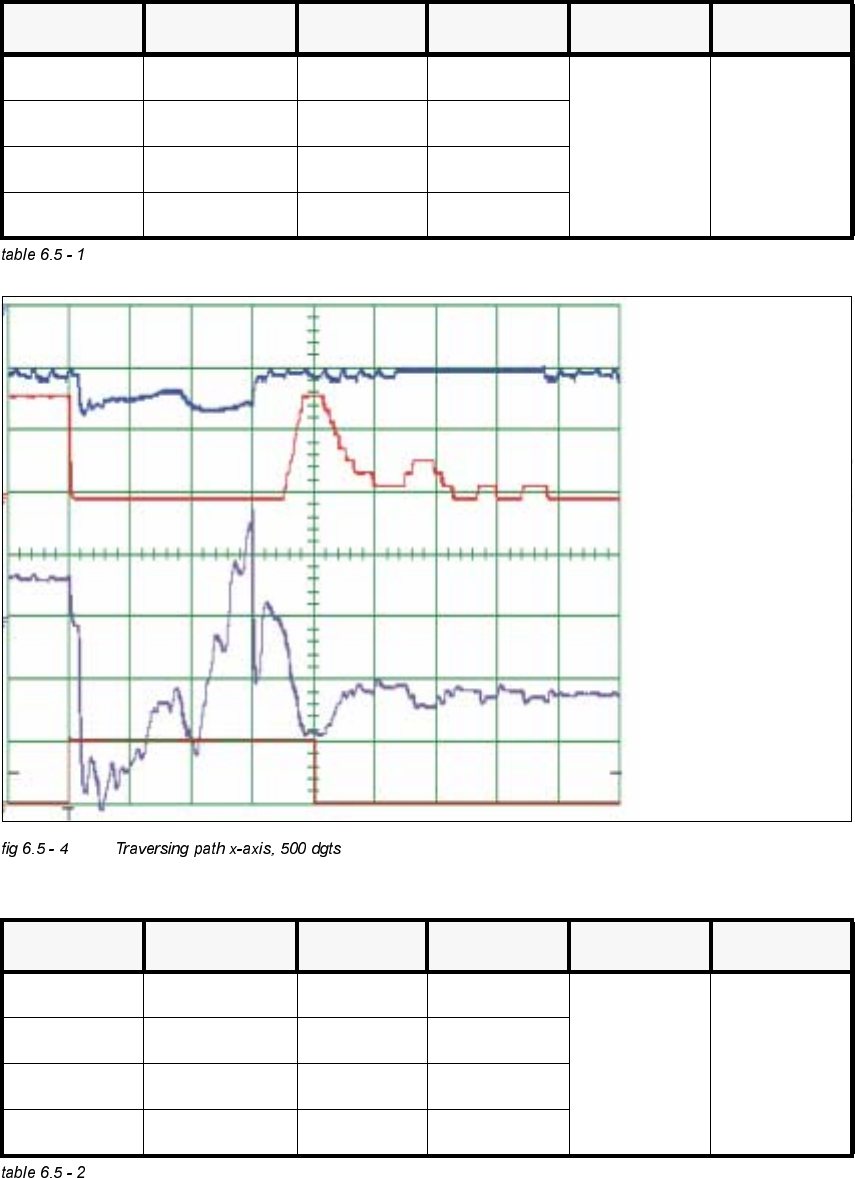
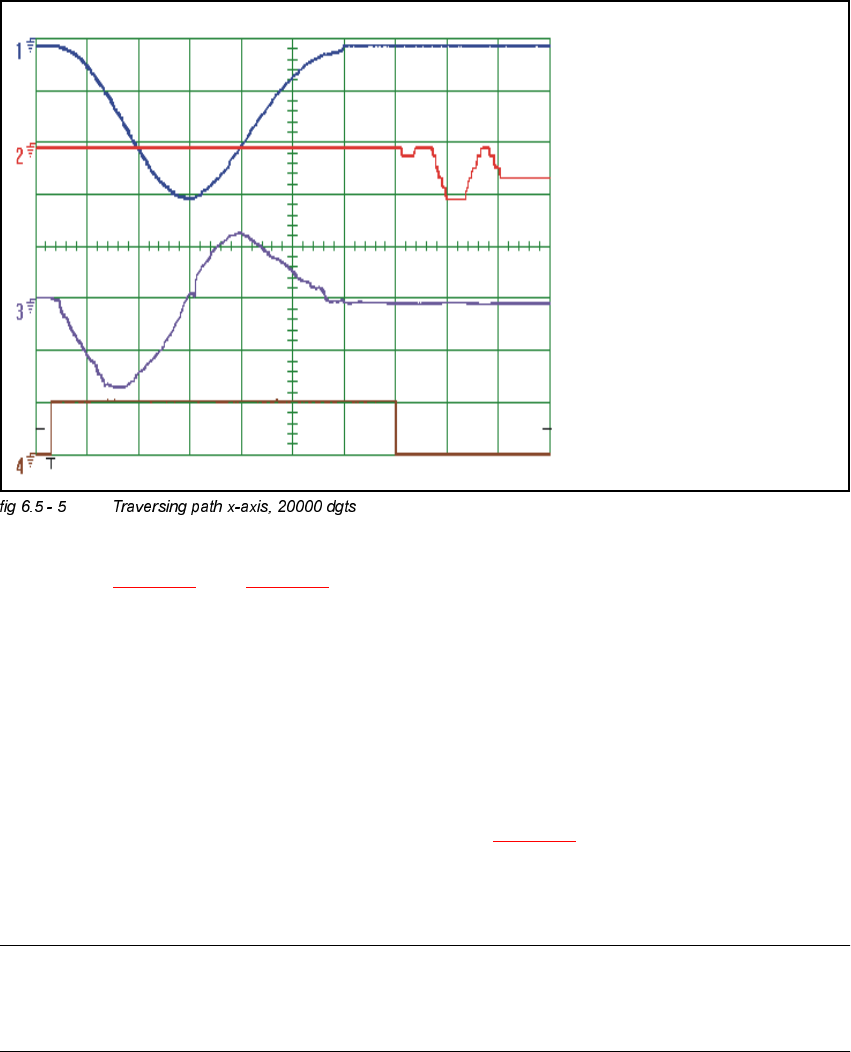
– If you adjusted the dynamics of the x-axis correctly, each individual signal will be displayed as
shown in fig 6.5 - 4
. and fig 6.5 - 5.
<$[LV
*HQHUDO3UHSDUDWLRQ
Å Start SITEST.
Å Make sure that all friction surfaces are clean.
Å Prepare the measurement setup for the y-axis. (See fig 6.5 - 3).
Å Perform a head reference run.
Å Perform a gantry reference run.
NOTE
Use an RC - filter to record the current curve
Measure the end signal on the adapter board "axis test box", with the switch pressed down.
Sollwert /
Vnominal
Positionsabweichung /
deviation of position
Kraftsollwert /
nominal current
Endemeldung /
end signal
6 Gantries Adjustment Instructions SIPLACE HS-50
6.5 Dynamic Adjustment of the X- and Y- Axes Edition 05/00
126
&RQWURO 3* DLQ
NOTE
Adjustments of the gantry axes on the servo amplifier are not possible.
Adjustment parameters are preset through board VC10.
This board is positioned on the axis control cards 1, 2, 3 and 4.
Measure the nominal current of the y-axis at the "measuring adapter axis control card, measuring
pin, axis 1".
(Do not connect GND).
6,7(67
Å Select "Gantry" ==> ==> "Select gantry" ==>
"Axis functions" ==> "Select y-axis" ==> "Adjust P-gain" ==>
"Select travel range with the help of the ÇÆ arrow buttons".
– If you adjusted the dynamics of the y-axis correctly, each individual signal will be
displayed as shown in fig 6.5 - 6
and fig 6.5 - 7.
Å To end the procedure, select "Abort".
2VFLOORVFRSH6HWWLQJV
&KDQQHO 6LJQDO &RXSOLQJ <'HIOHFWLRQ 7ULJJHU ;'HIOHFWLRQ
CH 1 Vnominal DC 0.1 V/ DIV
Ch1
positive
10% pre
10 ms/ DIV
CH 2 deviat.of pos. DC 0.5 V/ DIV
CH 3 nominal current DC 1.0 V/ DIV
CH 4 end signal DC 5.0 V/ DIV