PS288_PS388_PS588_981-0424-002D - 第10页
Preface • Contacting D ata I/O x Data I/O • 9 81-0424-002 back Contacting Data I/O Contact Data I/O for technical assistance by visiting the Data I/O W eb site and completing a W e b form, by sending an e-mail, or by cal…
• Using This Manual •• Symbols for Specific Models/Equipment
PS Series Owner’s Manual ix
back
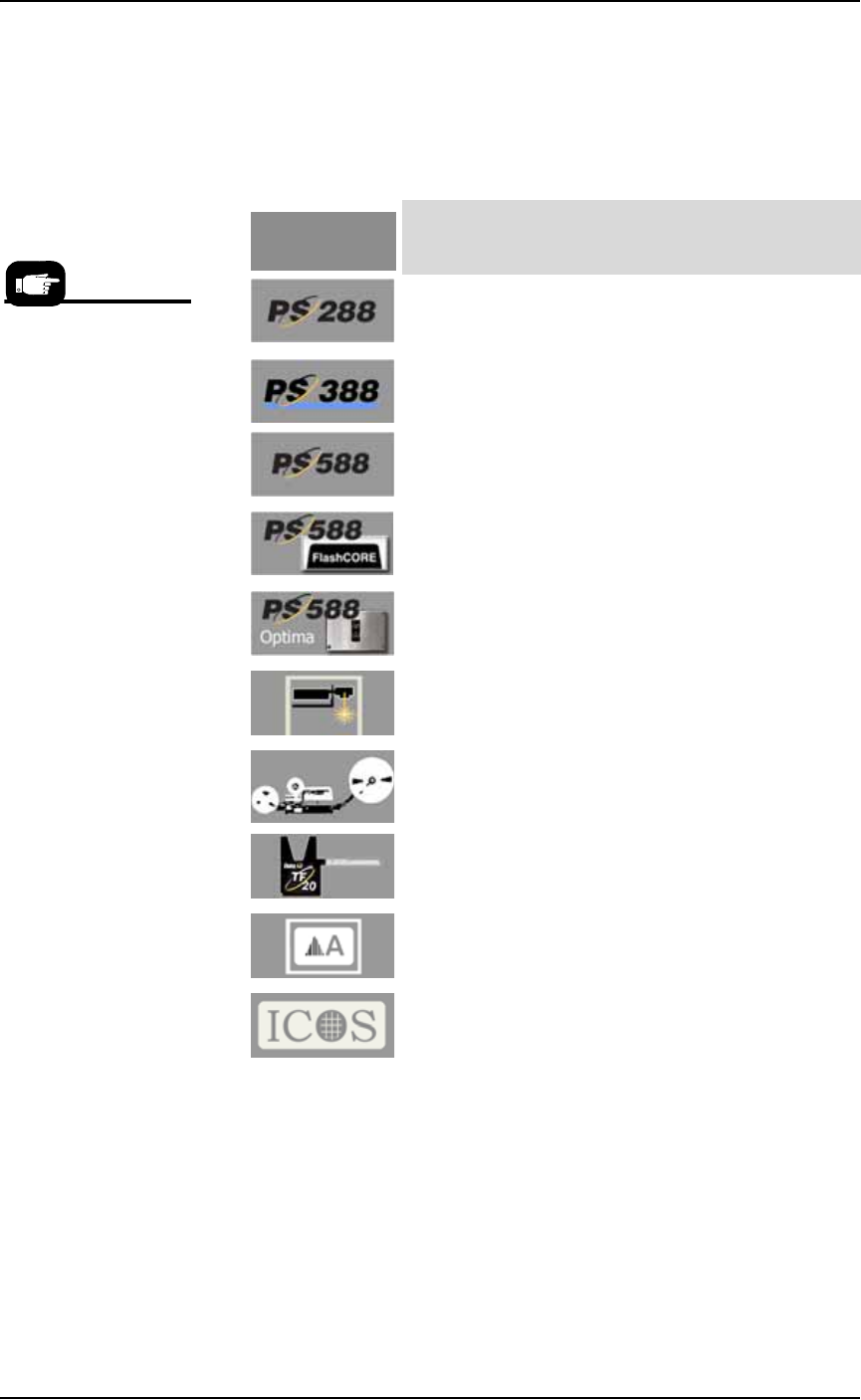
Symbols for Specific Models/Equipment
The following symbols appear in the side bar next to paragraphs or
procedural steps that are limited to a specific model or piece of
optional equipment. If the symbol is next to a heading, the entire con-
tent under that heading is limited to the equipment indicated.
Jump Right In
Thanks for reading about the safety symbols, notes, and icons. If your
PS System is already set up and you want to skip ahead:
Be safe —see Safety Systems on page 1-4
Where’s the _____? —see Machine Components on page 1-11
How to run a job —see Running a Job on PS Systems on page 3-2
What if it stops? —see Troubleshooting on page 4-58
What info is needed when I request service? -see next page.
For a description of any
PS model or optional
equipment, see
Chapter 1.
. . . adjacent information is limited to the:
PS288 Machines only.
PS388 Machines only.
All PS588 Machines only (regardless of type of
programmers installed)
Only PS588 Machines with (at least one) FlashCORE
Programmers
Only PS588 Machines with (at least one) OPTIMA
(Universal) Programmers
Only Laser Marking Systems, or PS Machines with
Marking Systems
Only Tape Output Systems, or PS Machines with
Tape Output Systems
Only TF20 Tray Feeders, or PS Machines with Tray
Feeders
Only Label Marking Systems, or PS Machines with
Label Marking Systems.
A lead, 3D inspection system by ICOS detects bent
leads on devices. It includes a PC and hardware.
This symbol
means . . .
Preface • Contacting Data I/O
x Data I/O • 981-0424-002
back
Contacting Data I/O
Contact Data I/O for technical assistance by visiting the Data I/O Web
site and completing a Web form, by sending an e-mail, or by calling.
To help us give you quick and accurate assistance, please provide the
following information:
• PS Machine serial number
• TaskLink and AH500 software version numbers
• Detailed description of the problem you are experiencing
• The event log from the FlashCORE programmer site
• Error messages (if any)
• Device manufacturer and part number (if device related)
Data I/O Customer Support
Worldwide: www.dataio.com
China: www.dataio.cn
Germany: www.dataio.de
Other Countries
Data I/O Customer Support offices around the world are staffed with
factory-trained technicians to provide prompt, quality service. For
warranty service, contact Data I/O Customer Support at the numbers
listed at our Rep Search on our Web site.
For Serial Number location
see page 1-11
Data I/O Corporation
Redmond, WA USA 98052
Telephone: +1 425-881-6444
in USA: 1-800-3-DATAIO
Fax: +1 425-867-6972
E-mail: support@dataio.com
Data I/O Co. Ltd E-mail: support@dataio.com
Data I/O GmbH E-mail: support@dataio.com
To find your local Data I/O representative, use the Representative
Search feature at:
www.dataio.com/contact/repsearch.asp
The best way to contact technical support is by using our online
form: at www.dataio.com click on the Technical Support button.
Want to contact Sales?
USA–
salesDIOAmerica
@dataio.com
China–
ChinaSales@dataio.com
Germany–
salesgmbh@data-io.de

• Repair Service •• Change of Address
PS Series Owner’s Manual xi
back
Warranty Information
Data I/O Corporation warrants this product will be free from defects
in materials and workmanship for one (1) year from delivery.
This warranty and any third party warranties are in lieu of all other
warranties, expressed, implied, or arising under law, including, but
not limited to, the implied warranties of merchantability and fitness
for a particular purpose.
Repair Service
\
After the warranty period expires, repair services are available at
Data I/O Service Centers on a time-and-materials basis, or through a
fixed price basis. The fixed price basis is an annual agreement that
covers all parts and labor needed to correct normal malfunctions and
includes semiannual performance certification.
For more information or to order a Service Contract, call Data I/O
Customer Support at the numbers listed on the previous page.
Change of Address
If your address has changed, please notify Data I/O Customer Sup-
port via e-mail. This ensures that you receive information about
product enhancements. Be sure to include the PS Machine serial
number.