PS288_PS388_PS588_981-0424-002D - 第15页
■ Snapshot of the PS M achine ◘ Comparison of the PS288, PS38 8 and PS588 PS Series Owner’s Manual 1—3 back Comparison of the PS288, PS388 and PS588 The table below compares features among the different models o f PS Mac…
Introduction ■ Snapshot of the PS Machine
1—2 Data I/O • 981-0424-002
back
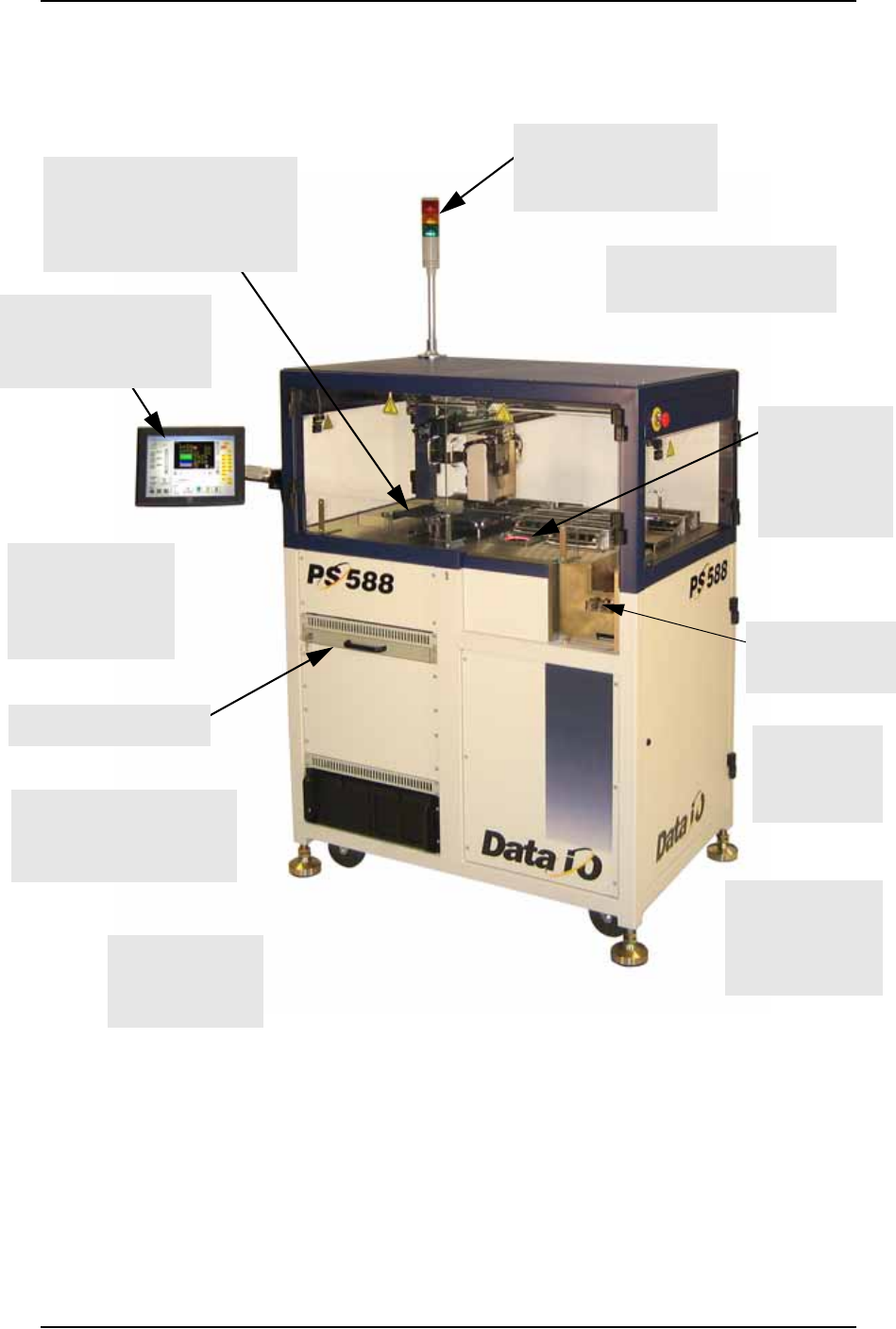
Snapshot of the PS Machine
Figure 1-1: Features of the PS Machine. (PS588 shown.)
Many software
options such as the
Automotive
Performance Pak
Support for
label or laser
marking
Modular design
for a wide range
of applications
Adjustable feet for
leveling and
wheels for relocat-
ing ease
Touch screen monitor
displays real-time pro-
cesses and online Help
Light tower makes
machine status avail-
able from a distance
Good visibility of the work-
space and easy access.
Flexible options for input &
output: • static tray (shown),
• automatic tray feeder,
•tube, •tape
Uses FlashCORE program-
mer modules offering the
latest industry technology
Keyboard in a drawer
Supports Tape
Feeder tape input
Optical Vision
System for
precise device
placement

■ Snapshot of the PS Machine ◘ Comparison of the PS288, PS388 and PS588
PS Series Owner’s Manual 1—3
back
Comparison of the PS288, PS388 and
PS588
The table below compares features among the different models of
PS Machine.
Setting the Language
Several other languages are available for the User Interface. To
change the language, edit the WinAH400.ini file as follows:
1. Find “Language Settings” section.
2. Remove the semicolon from the line for desired language.
3. Add a semicolon to the line that initially didn’t have one.
Figure 1-2: Sample from the WinAH400.ini file. The language in this
sample is set to English.
4. Restart AH500 Software for the changes to take effect.
Feature PS288 PS388 PS588
Maximum number
of Programmers
44 12
Type(s) of Program-
mer
FlashCORE II FlashCORE III FlashCORE II, FlashCORE III
and
OPTIMA (Universal)
programmers
Socket Actuation by ribs on the PNP
head
by ribs on the PNP
head
Integrated into the program-
mer on FlashCORE pro-
grammers, and
performed by ribs on the
PNP head for OPTIMA pro-
grammers
Size 90 cm by 80 cm 90 cm by 80 cm 140 cm by 81 cm
Weight 364 kg 364 kg 600 kg
;-------- Language Settings------------------------
;Default language is English 1000
;LangId=0 german
LangId=1000 english
;LangID=2000french
;LangID=3000spanish
;LangID=4000danish
Introduction ■ System Description
1—4 Data I/O • 981-0424-002
back
System Description
The PS System moves devices from input media through a program-
ming and optional marking process to output media for delivery to
the next phase of the production process. The PS System combines a
device programming system and a high-speed pick and place head
(PNP head) to provide rapid programming of standard pitch devices,
as well as ultra-fine pitched devices.
TaskLink™ software and Automated Handler software (AH500) run-
ning on the system’s Handler Computer direct the PS System to per-
form a series of processes, including automatic handling,
programming, marking, and placement of devices to the output
media of choice.
Safety Systems
The PS System has several safety systems to prevent personal injury
and system damage. These systems include E-Stops and Safety
Shields. If your system has a Laser Marker, it comes with a fume
extractor.
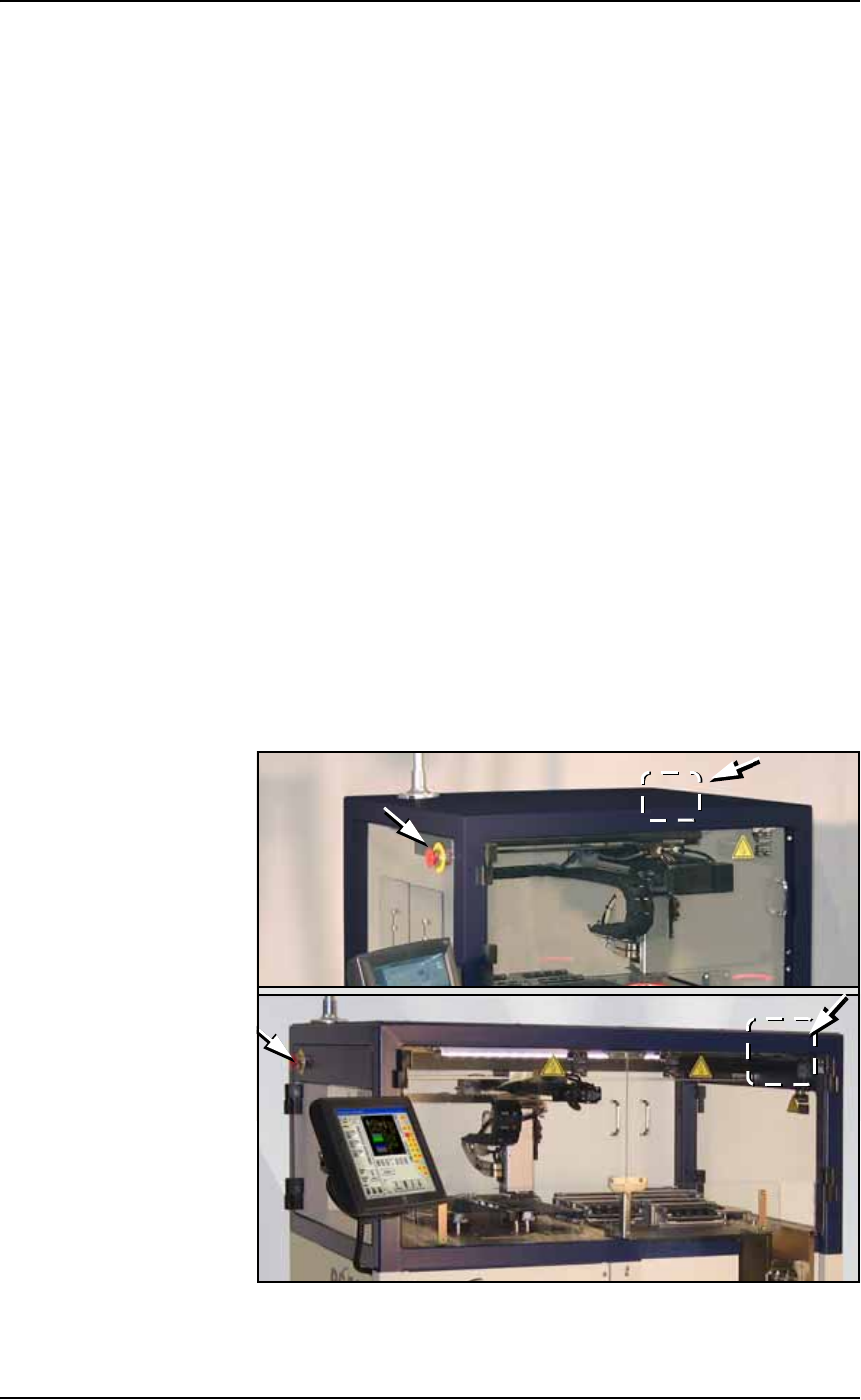
Emergency Stop (E-Stop) Buttons
Two large, red Emergency Stop buttons are located near the top of the
PS System, one on either side of the machine. The buttons are easily
reached in an emergency. When an E-Stop button is pressed, the
gantry stops moving immediately. The PNP head Z-axis motion is not
stopped.
.
Figure 1-3: Emergency Stop (E-Stop) buttons on the PS288 (not shown)
and PS388 (top). They are different from the PS588 (bottom).
Far
Side
Far
Side