PS288_PS388_PS588_981-0424-002D - 第158页
Maintenance ■ Workspace, Head and Gantry 4—18 Data I/O • 981-0424 -002 back Adjusting the V acuum Generator Sensors Note: If you notice consecutive pr ogramming pick errors, befor e adjusting vacuum sensors comple te the…
■ Workspace, Head and Gantry ◘ Vacuum Generator Filters and Silencers
PS Series Owner’s Manual 4—17
back
3. Reinstall Vacuum Generator—
3a. Reinstall the generator (after installing a filter and silencer).
4. [Marking System only] Repeats steps 1b through 3a above for
two more Vacuum Generators mounted inside the Option Bay
under the laser support plate. See figure below.
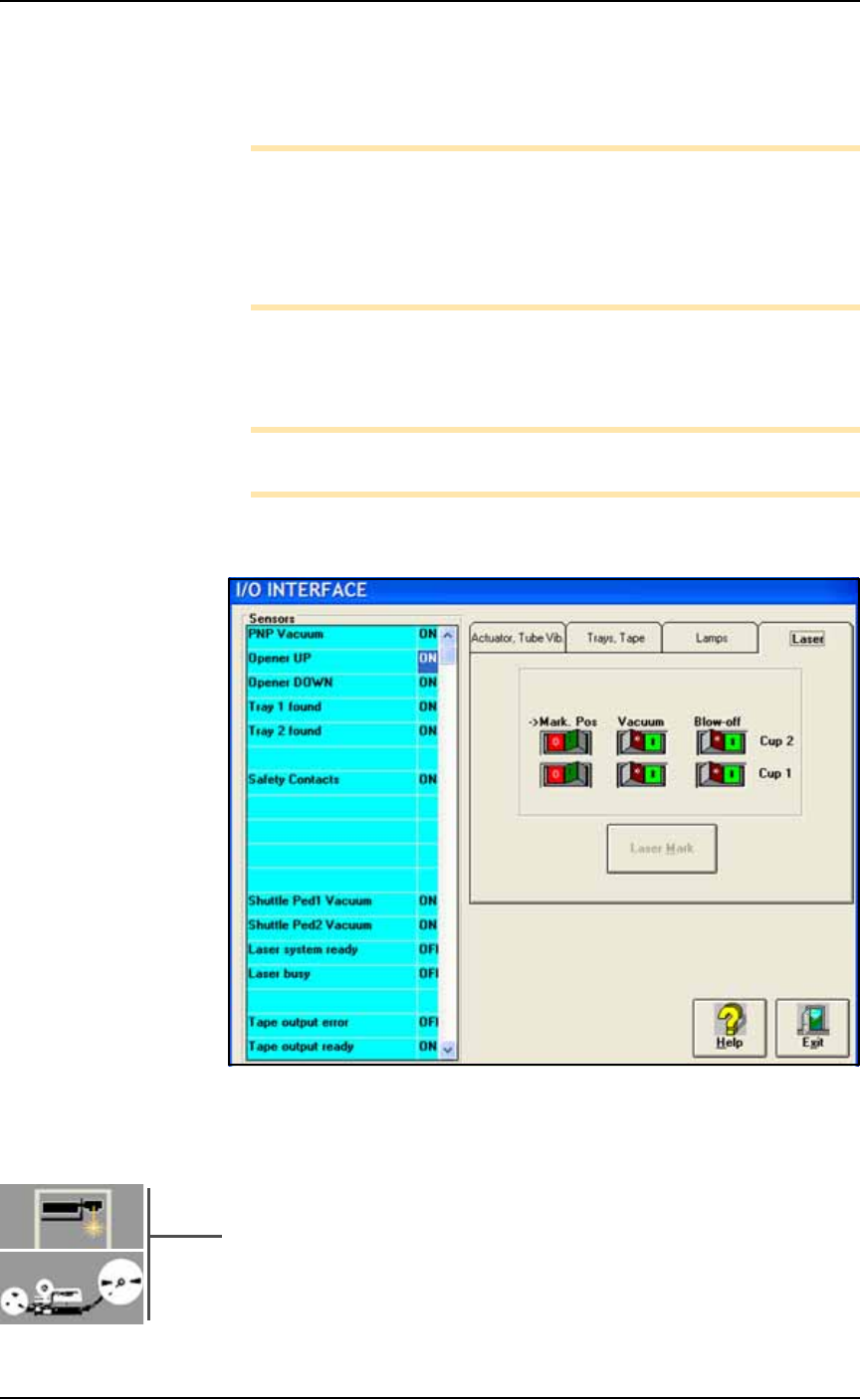
Figure 4-13: Two Vacuum Generators on the Laser Marker. Arrows
point to the filters. Two screws secure both Vacuum block (circled).
Note: The Tape-Output has a Data I/O-installed PNP Taping
Head.
5. [Tape Out Module only] Remove the front panel of the box
supporting the Tape Out Module (1/8 inch Hex Key) and then
repeat steps 1b through 3a above for the additional Vacuum
Generator mounted inside the control box. See figure below.
Figure 4-14: A Vacuum Generator on the TM50 Taping Module. The
front panel has been removed with a 1/8 in. hex key (six SHCS).
Maintenance ■ Workspace, Head and Gantry
4—18 Data I/O • 981-0424-002
back
Adjusting the Vacuum Generator
Sensors
Note: If you notice consecutive programming pick errors, before
adjusting vacuum sensors complete the Z-Axis adjustment. For
instructions on Z-Axis adjustment, see Teaching the Package File
on page 3-40. If completing the Z-Axis adjustment does not reduce
or eliminate subsequent pick errors, complete the vacuum sensor
adjustments described here.
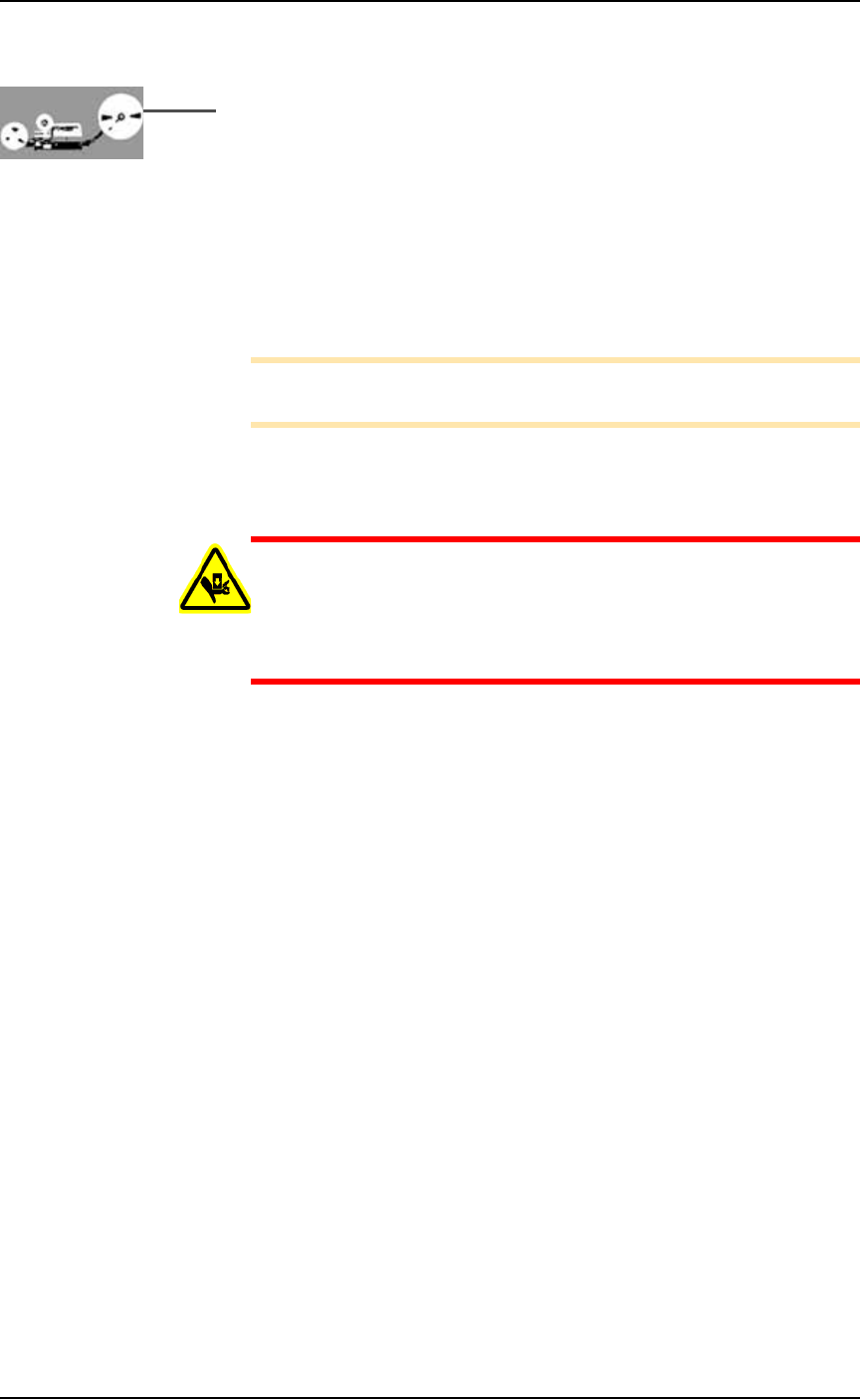
Vacuum sensors on the PS System are adjustable. The I/O Interface
window displays a list of the sensors in the PS System and the status
of each sensor.
Note: The number of sensors on the PS System depends on the
options installed.
To view the status of sensors at the main AH500 Setup window, click
System > Misc. I/O.
Figure 4-15: The I/O Interface window reports sensor status and allows
switching options on or off. PS588 shown.
Sensor Locations
• PNP Head Vacuum Generator Sensor:
An adjustable vacuum generator sensor on the PNP head con-
trols probe vacuum. See heading below.
•[Laser Marking or Tape Output only] Shuttle Pedestal 1 and 2
Vacuum Generator Sensors on page 4-21:
Either of these options on your PS Machines include adjustable
■ Workspace, Head and Gantry ◘ Adjusting the Vacuum Generator Sensors
PS Series Owner’s Manual 4—19
back
vacuum generator sensors for the Shuttle Transfer System con-
trolling vacuum at the shuttles.
•[Tape Output only] Tape Output PNP Head Vacuum Generator
Sensor on page 4-23. The adjustable vacuum generator sensor on
the Tape Output PNP head controls vacuum at the probe.
PNP Head Vacuum Generator Sensor
To adjust the PNP head vacuum generator sensor:
1. Gantry Window—
1a. On the Gantry Window, move the PNP head to either the Tape
or Vision location.
Note: To move the PNP head, tap the Tape or Vision label on the
monitor or use the touch pad and left touch pad button .
1b. Click the Gantry Vacuum switch to ON.
1c. Push the E-stop.
CAUTION: Collision hazard! The high speed and force behind a
moving gantry can cause serious bodily injury to anyone working
inside the work envelope. Ensure that a job is Paused, the Emer-
gency-Stop is pushed, or the power is off prior to opening work-
space doors.
2. Vacuum sensor—
2a. Open the workspace door.
2b. On the vacuum generator sensor, locate the adjustment screws
labeled HYS and SET. Locate the red sensor light. See Figure
4-16.