PS288_PS388_PS588_981-0424-002D - 第171页
■ Programmers ◘ Removing a Programmer PS Series Owner’s Manual 4—31 back Removing a FlashCORE Programmer Note: Replacing a FlashCORE pr ogrammer with a new one requir es T askLink to update the firmwar e to the same vers…

Maintenance ■ Programmers
4—30 Data I/O • 981-0424-002
back
1b. Remove the Socket Adapter from the target programmer and
insert the Diagnostic Adapter Board, ensuring that it aligns cor-
rectly on the adapter pins. Screw down the two bracket screws.
1c. Switch the programmer circuit breaker at the Power panel ON
(up position).
2. TaskLink—
2a. Start TaskLink and click Tools > Run Programmer Diagnostics.
2b. On the Diagnostics Window, select the programmer with the
DAB installed.
2c. Click Test All.
The pass/fail test results are displayed in TaskLink and are also
written to
/fdrroot/system/diaglog.txt
and
/fdrroot/system/eventlog.txt
files on the PC card of the target
FlashCORE programmer. These files can be viewed in TaskLink and
saved (on the Handler Computer).
If any of the tests show Fail in the TaskLink display, contact your
nearest Data I/O Service Center for repair options. To help our service
personnel diagnose the problem, please e-mail both the
eventlog.txt
and
diaglog.txt
files.
Sample
dialog.txt
file:
Diagnostic Pass #1
Run Vpp Overcurrent test.
DUT 1 G1 Vpp overcurrent is sensed at 57 mA.
DUT 1 G2 Vpp overcurrent is sensed at 57 mA.
DUT 1 G3 Vpp overcurrent is sensed at 57 mA.
DUT 1 G4 Vpp overcurrent is sensed at 57 mA.
DUT 2 G1 Vpp overcurrent is sensed at 57 mA.
DUT 2 G2 Vpp overcurrent is sensed at 57 mA.
DUT 2 G3 Vpp overcurrent is sensed at 57 mA.
DUT 2 G4 Vpp overcurrent is sensed at 57 mA.
Error: DUT 3 G1 Vpp overcurrent is not sensed from 50 mA to 70 mA.
Error: DUT 3 G2 Vpp overcurrent is not sensed from 50 mA to 70 mA.
Error: DUT 3 G3 Vpp overcurrent is not sensed from 50 mA to 70 mA.
Error: DUT 3 G4 Vpp overcurrent is not sensed from 50 mA to 70 mA.
DUT 4 G1 Vpp overcurrent is sensed at 57 mA.
DUT 4 G2 Vpp overcurrent is sensed at 57 mA.
DUT 4 G3 Vpp overcurrent is sensed at 57 mA.
DUT 4 G4 Vpp overcurrent is sensed at 57 mA.
Diagnostics failed
Removing a Programmer
The following two headings describe programmer removal: the first
is for FlashCORE programmers and the second for Optima (Uni-
versal) programmers. For FlashCORE programmers, differences are
noted between PS288, PS388 and PS588.
How do I tell what pro-
grammer I have? See
Programmers on page
1-13.
■ Programmers ◘ Removing a Programmer
PS Series Owner’s Manual 4—31
back
Removing a FlashCORE Programmer
Note: Replacing a FlashCORE programmer with a new one
requires TaskLink to update the firmware to the same version as the
other programmers and to update the date and time. These steps are
included below.
To replace an individual FlashCORE programmer assembly:
1. Preparation—
1a. Switch the PS System power off at the main power switch.
Ensure the switch is in the OFF position.
1b. Open the outer access door closest to the target FlashCORE pro-
grammer assembly.
2. Disconnect—
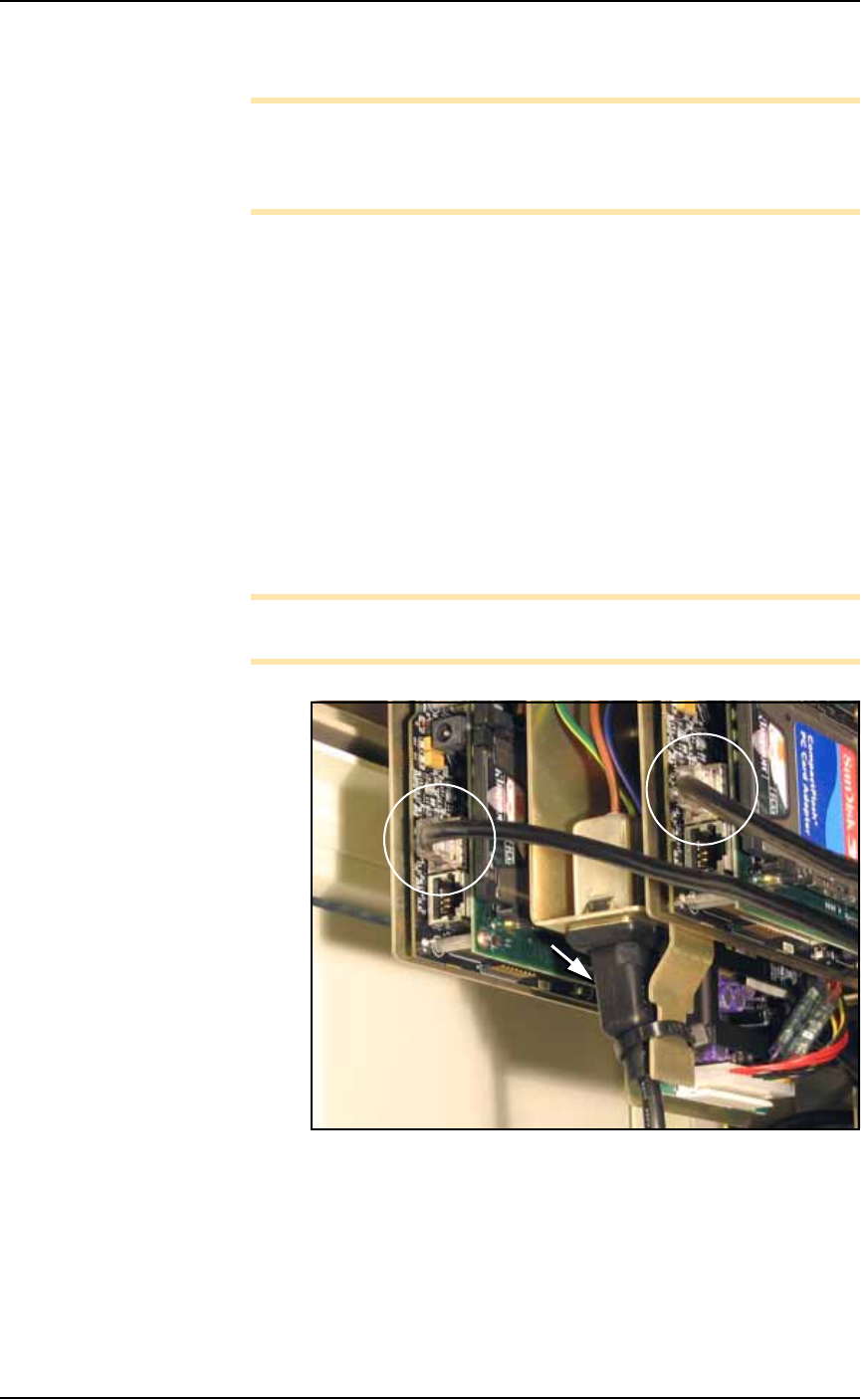
2a. Disconnect the power cable from the bottom of the FlashCORE
programmer assembly after cutting the tie wrap. There is only
one power cable for each assembly whether a single, a dual, or a
quad assembly.
2b. Disconnect the communications cable from the network connec-
tion on each programmer of the target assembly.
Note: There are two network connections on the FlashCORE pro-
grammer assembly. Use the one with LEDs.
Figure 4-27: FlashCORE Programmer connections: the power cable
(arrow) and the communication cables (circled).
Maintenance ■ Programmers
4—32 Data I/O • 981-0424-002
back
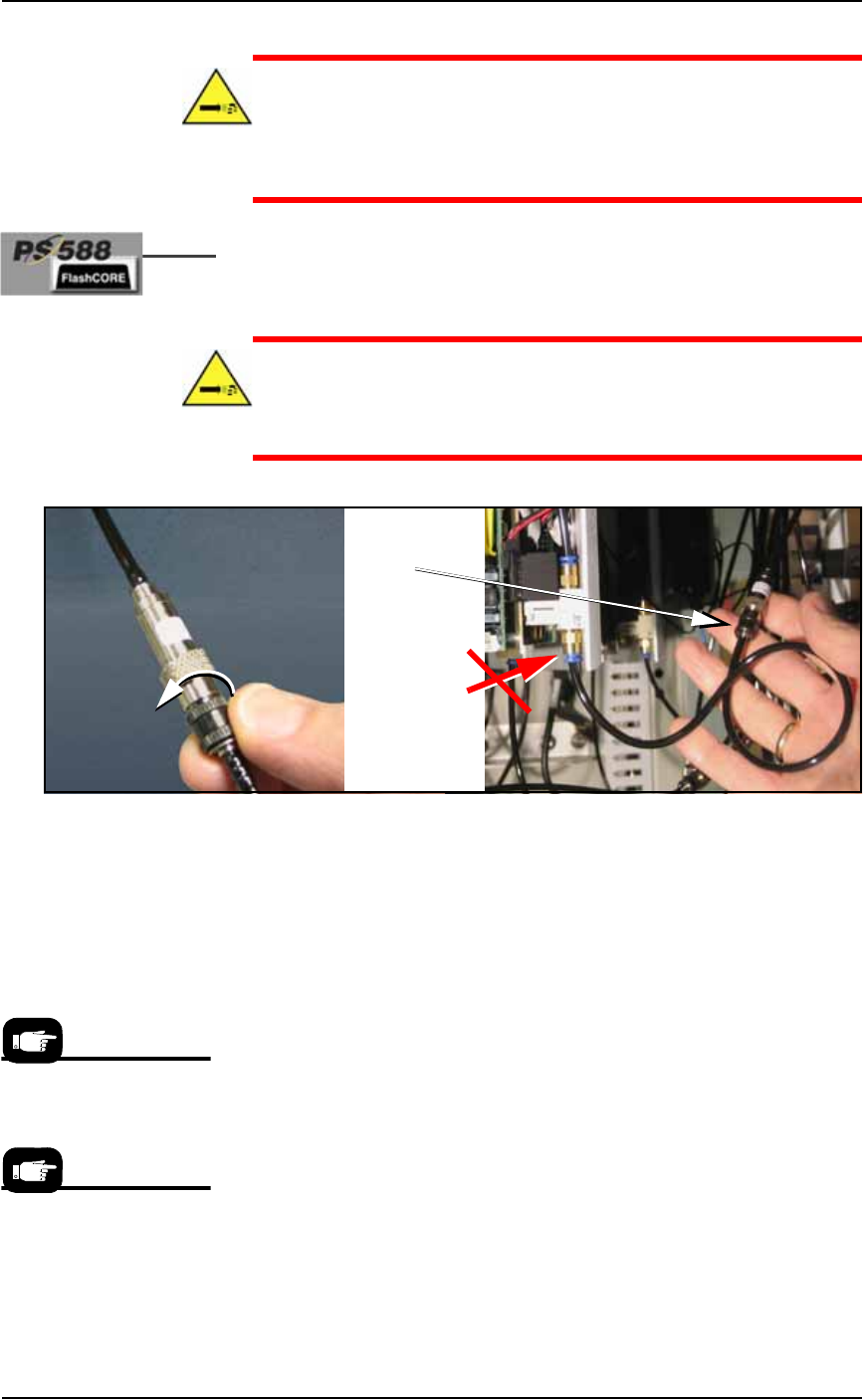
CAUTION: Pressurized air hazard. The main air line is connected
and ON. If the wrong air fitting is disconnected, the tube will fly
about until the main air valve at the back of the machine is
switched off. For the correct programmer connector, see Figure
4-28.
2c. [PS588 only] Disconnect the air hose by unscrewing the pro-
grammer-side of the automatic shut-off union shown in the fig-
ure below.
WARNING: Pressurized air hazard. If your model does not have
the inline, automatic shut-off union shown in Figure 4-28, then
switch off (or disconnect) the main air supply at the Power Panel
before disconnecting any air lines.
Figure 4-28: [PS588 only] Unscrew the black collar on the air fitting as
shown.
3. Remove programmer assembly—
3a. Remove the three mounting screws (single) or five mounting
screws (dual) that hold the FlashCORE programmer assembly to
the top plate with a 1/8 inch hex key.
3b. Carefully lift out the FlashCORE programmer assembly.
4. Installing—
4a. Install a new FlashCORE programmer assembly in reverse order
of removal.
5. Update firmware—
The newly installed FlashCORE programmer assembly must be
located and assigned a site number with TaskLink. Once the site
is assigned, firmware on the new FlashCORE programmer
assembly must be updated from TaskLink.
6. Update programmer date/time—
This TaskLink feature sets the date and time on each connected
FlashCORE programmer so that the Log files report accurate
time and date information. See TaskLink’s on-screen Help for
information on how to view log files.
Disconnect air
here . . .
. . . NOT here.
see Caution
note
For information about
updating firmware see
TaskLink’s on-screen Help.
For information on setting
programmer date and
time, see TaskLink’s
on-screen Help.