PS288_PS388_PS588_981-0424-002D - 第175页
■ The Marking Systems and Shuttle ◘ The Shuttle Assembly PS Series Owner’s Manual 4—35 back Fi g ur e 4- 3 0: Le f t e nd o f t h e l as e r housing with lens. The Option Bay left side panels hav e been remo ved. 2. Clea…
Maintenance ■ The Marking Systems and Shuttle
4—34 Data I/O • 981-0424-002
back
The Marking Systems and Shuttle
[Label or Laser Marking only] Laser Marker and Label Marker Sys-
tems are optional equipment on your PS Programming System. Your
PS Machine may not have either. Each marking system requires some
maintenance. Both have a computer with filter, and both have a
marker Shuttle Assembly. The Tape Out System also uses a Shuttle
Assembly. In addition, Laser Markers have fume extractors.
The Shuttle Assembly
Whether you have a Laser Marker or Label Marker System, Shuttle
Transfer Assemblies attached to a belt transport devices to and from
the marker. The Shuttle Assembly requires periodic maintenance.
Cleaning the Shuttle Assembly
During extended or heavy periods of use, the shuttle assembly may
become dirty and gummed up by laser dust or other foreign material.
This situation may cause the shuttle assembly to stall during move-
ment to and from the laser mark position.
WARNING: Electric shock hazard. Shut off the PS System (Turn-
ing Off the System on page 4-4) and switch off the main power
switch.
Hazardous materials: Do not use compressed air to remove laser
dust. Wear safety goggles and disposable protective gloves.
To clean the laser marker shuttle assembly:
1. Preparation—
1a. Shut off the PS System power and ensure the main power switch
is in the OFF position.
1b. Put on safety goggles and disposable protective gloves.
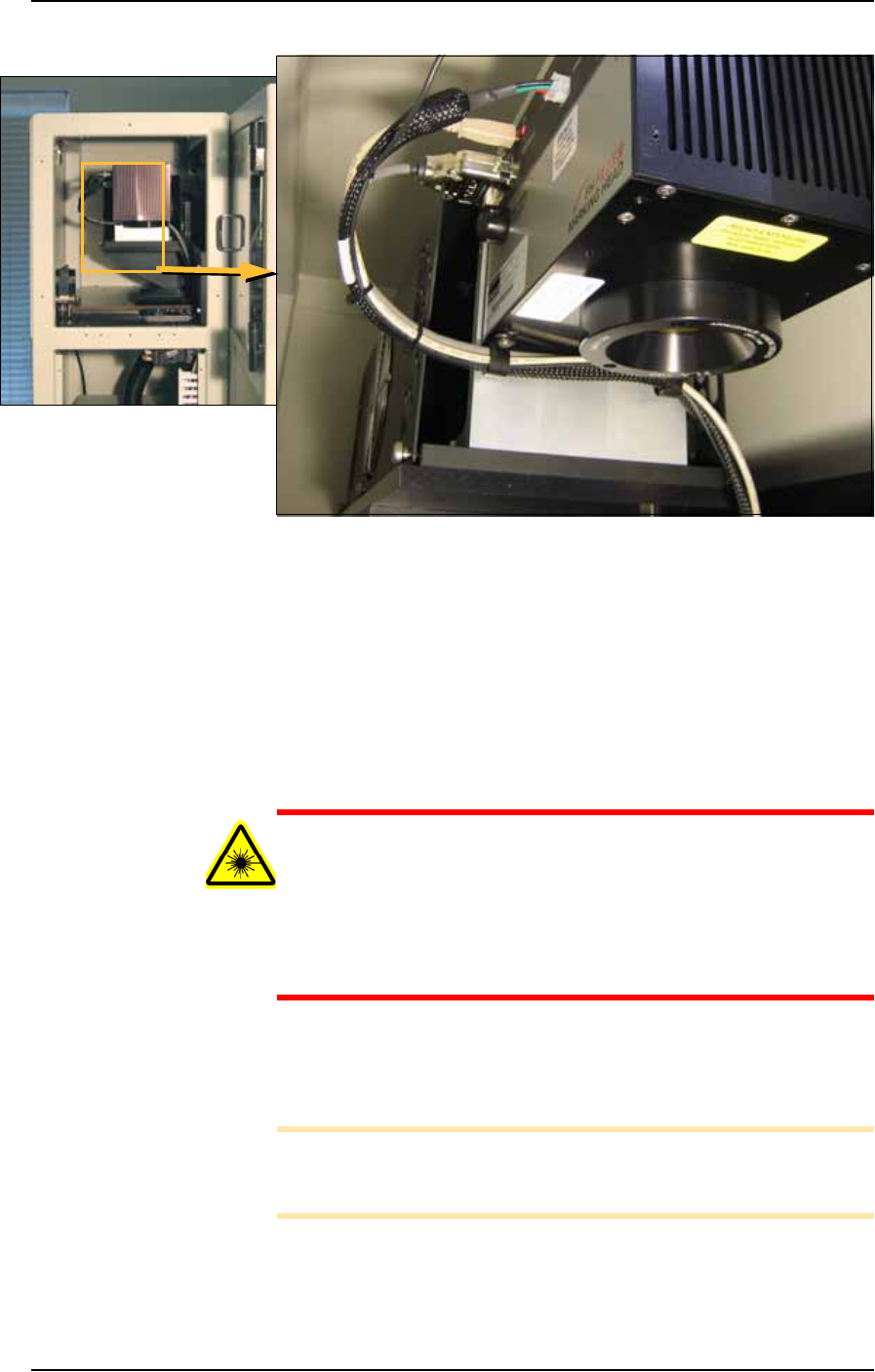
1c. Remove the upper left Option Bay panel (1/8 in. Hex Key) to
access the laser housing. See Figure 4-30. Remove Option Bay
panels as needed for cleaning the laser marking system.
The Shuttle Assembly
information here also
applies to systems
with the optional Tape
Output. Other Tape
Output information
can be found later in
this chapter.
■ The Marking Systems and Shuttle ◘ The Shuttle Assembly
PS Series Owner’s Manual 4—35
back
Figure 4-30: Left end of the laser housing with lens. The Option Bay left
side panels have been removed.
2. Clean—
2a. Use a damp paper towel and antistatic cleaner to wipe laser
marking dust and other foreign material from the housing into a
sealable plastic bag.
2b. Clean the shuttle track using a lint-free cloth.
2c. Place paper towels, cloth, and protective gloves into a sealable
plastic bag. Seal the bag and dispose of as hazardous waste.
Remove safety goggles.
WARNING: Numerous government regulations apply to the stor-
age of hazardous waste. Ensure that contaminated filters are
properly labeled and stored in your hazardous waste storage
area. Also, make sure that they are not stored on your site longer
than government regulations allow (the typical limit is 90 days).
Check your government (local, state, and federal) regulations for
hazardous waste storage requirements.
3. Lubricate—
3a. Lubricate the bearing block and shuttle track with Tri-Flow
lubricant.
Note: Use a small amount of lubricant, just enough to allow the
bearing block to move freely on the track. Too much lubricant will
aid in the build up of contamination and cause stalling.
4. Reinstall—
4a. Reinstall all Option Bay panels.
Maintenance ■ The Marking Systems and Shuttle
4—36 Data I/O • 981-0424-002
back
Adjusting Shuttle Belt Tension
[Label or Laser Marking only]
CAUTION: Health hazard. The Laser Marking System should be
cleaned as described in The Shuttle Assembly on page 4-34 prior
to performing work.
WARNING: Electric shock hazard. Shut off the PS System main
power switch before removing any panels.
1. Preparation—
1a. Shut off the PS System power and ensure the main power switch
is in the OFF position. For more information see Turning Off the
System on page 4-4.
1b. Remove the upper left Option Bay panel.
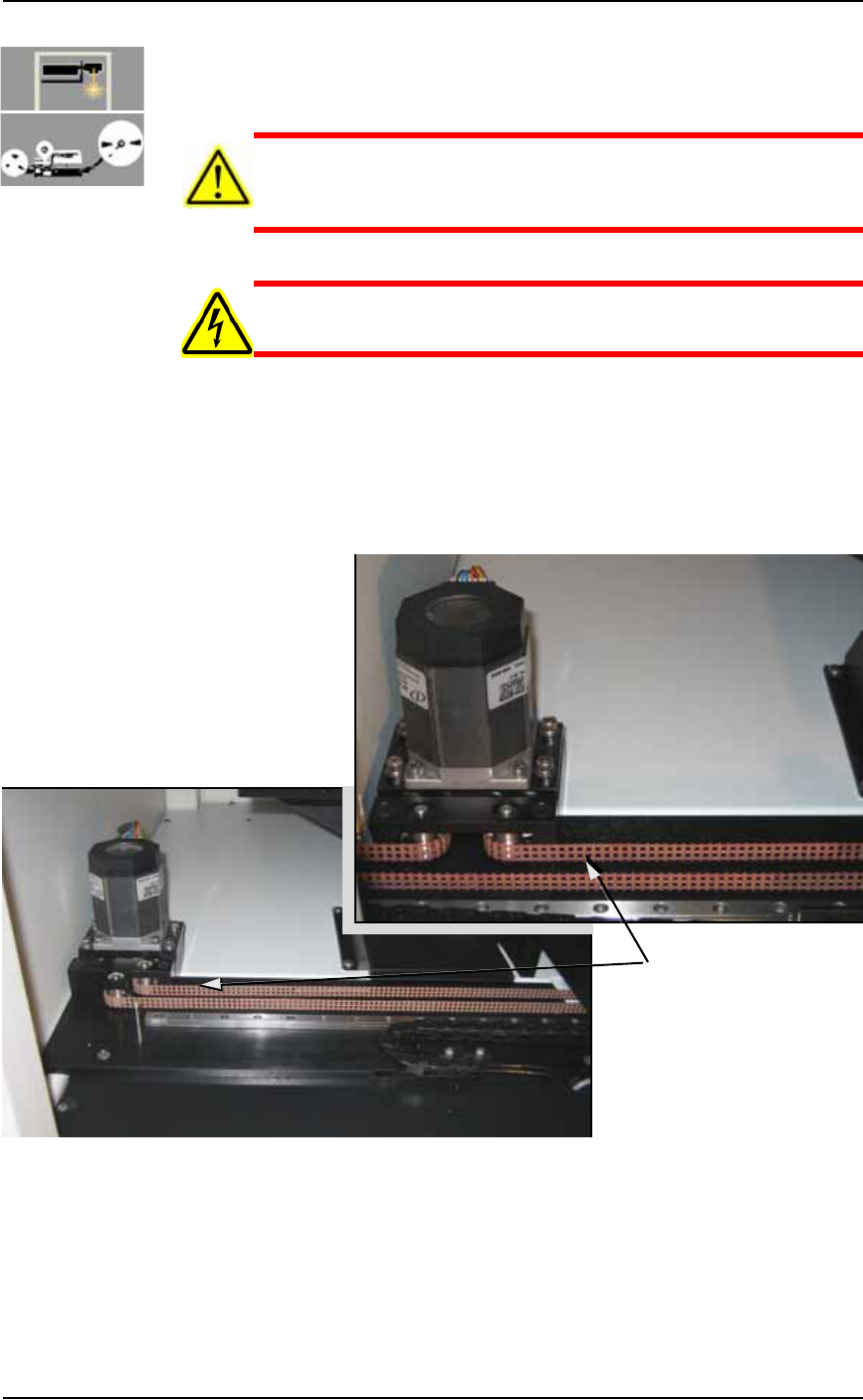
2. Check the belt for wear and replace if necessary.
Figure 4-31: Marker Shuttle belt and motor, with Tape Out (A) and
without (B).
3. Test the tension by pulling lightly on the center of the shuttle
belt to the right of the motor. See Figure 4-31. If the belt moves
more than 12 mm (0.5 inch) off its path, loosen the four motor
mounting plate screws with a 4 mm hex key (see Figure 4-32),
Test tension here
A
B