PS288_PS388_PS588_981-0424-002D - 第212页
Maintenance ■ Tape Output System 4—72 Data I/O • 981-0424 -002 back Figure 4-6 1: T ape Output Module Controller . The arrow points t o the Pow er On/Off button which is also the Emergency-Stop. 3b. Configure the T ape O…

■ Tape Output System ◘ Cleaning the Pressure Seal
PS Series Owner’s Manual 4—71
back
Tape Output System
The Tape Output System is an optional system for placing and taping
programmed devices into device tape.
Items not covered here can be found in the TM-50 Taping Module
User’s Guide that came with your PS System.
The Tape Output also uses the Shuttle Transfer System to deliver
devices to it. For maintenance issues regarding the Shuttle System see
The Marking Systems and Shuttle on page 4-34.
Cleaning the Pressure Seal
The Pressure Seal Tape Output System requires cleaning to prevent
problems with breaking the device tape or tearing the tape sprocket
holes. The cleaning process removes adhesive built up from the cover
tape application rollers and the drive sprocket top pressure idler
wheel.
The Tape Output System also employs a PNP head. For information
on cleaning and maintaining the Probe tip see PNP Probe on page 4-12.
Cleaning Tools Required:
• Dry or damp shop towel
• A reel of empty device tape (carrier tape)
• A reel of cover tape
To clean the Pressure Seal Tape Output System:
1. Preparation—
1a. Switch on the PS System power and air.
2. Start a job—
2a. Start TaskLink. (Optional and deprecated: start AH500 by dou-
ble-clicking the AH500 icon on the Windows Desktop, and then
skip Step 2c below.)
2b. Select a job that requires the use of the tape output.
2c. Click Run (and Yes or Ok to subsequent dialogs), which opens
AH500 automatically.
2d. Click Start.
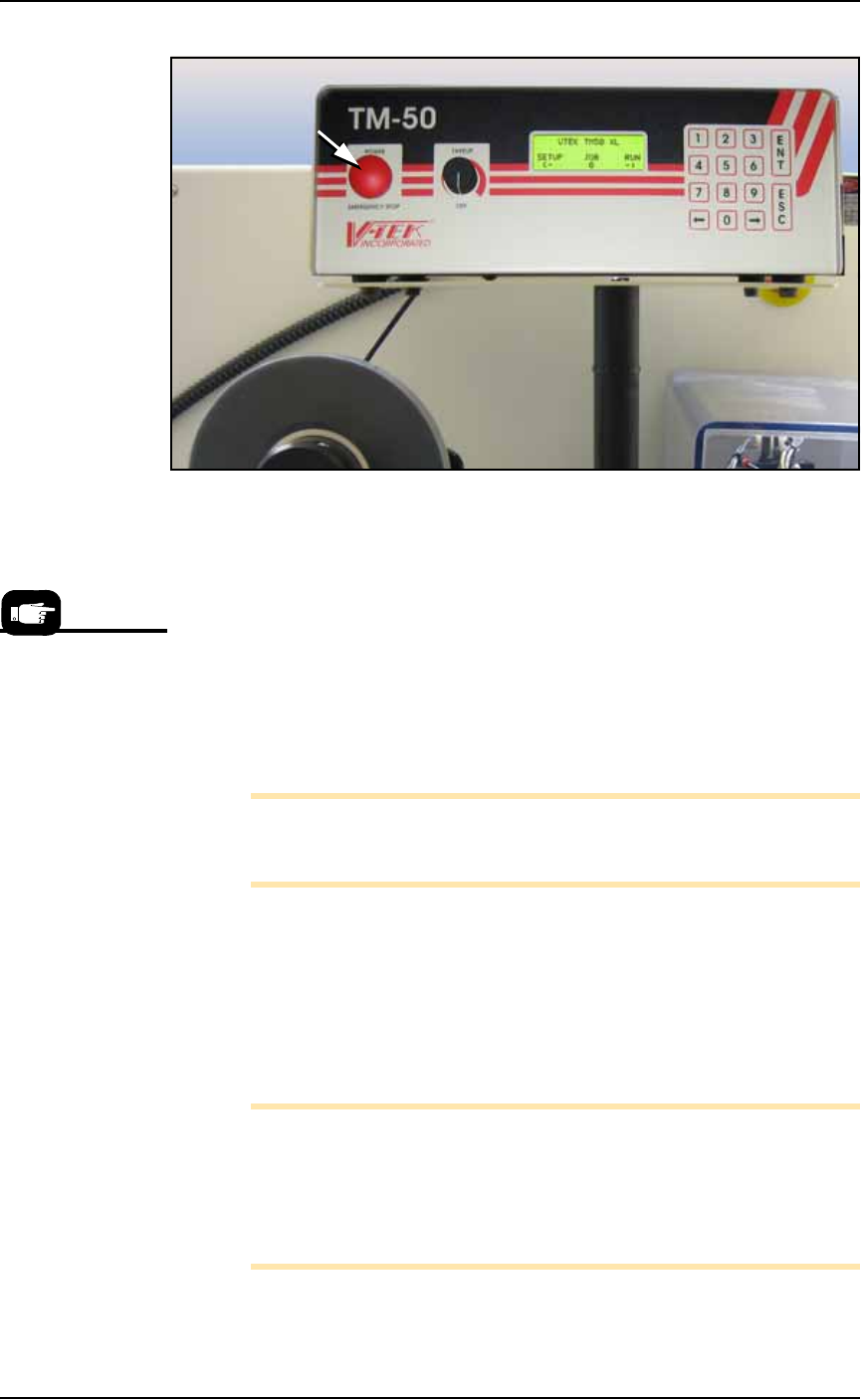
2e. Switch on the Tape Output Controller by pushing the red Power
button. Refer to Figure 4-61.
3. Configure the Tape Output Controller—
3a. At the V-TEK start-up screen, select Setup by pressing the left
arrow button.
Maintenance ■ Tape Output System
4—72 Data I/O • 981-0424-002
back
Figure 4-61: Tape Output Module Controller. The arrow points to the
Power On/Off button which is also the Emergency-Stop.
3b. Configure the Tape Output Controller by setting the following:
At the Setup menu:
•reset Count Stop to desired amount:
Press 1, to re-zero the present count
Press 2, then enter the desired number, then press the ENT but-
ton.
• select the desired device tape pitch from the Pitch Selection
menu. Then press ENT.
Note: The pitch can be determined by using the pitch setting decal
located on the loading track or the pitch setting guide found at the
front of the TM-50 Taping Module User’s Guide.
At the Advance menu:
• set the number of pockets to advance to 1. Then press ENT.
At the Speed menu:
• set the advance speed between 40 to 100 depending on the
device tape width and device size. Then press ENT.
Note: Prevent device tape breakage and advancement problems
with small devices and narrower tape widths by setting slower
speeds— in the range 40 to 60.
Higher speeds may cause the devices to be dislodged from the pock-
ets or may cause the sprocket holes on the tape to rip out.
For more information,
see the TM-50 Taping
Module Users Guide
that came with your
equipment.
■ Tape Output System ◘ Cleaning the Pressure Seal
PS Series Owner’s Manual 4—73
back
At the Jog menu
• jog the device tape forward to align the pocket with the
PNP head.
At the Mode menu
• select PSA mode for pressure seal cover tape. An asterisk indi-
cates the current setting. Then press ESC.
Note: The Heat Seal switch should be OFF.
At the Run menu
•select Run Mode. The run window displays all the selected setup
parameters.
• verify all settings for accuracy.
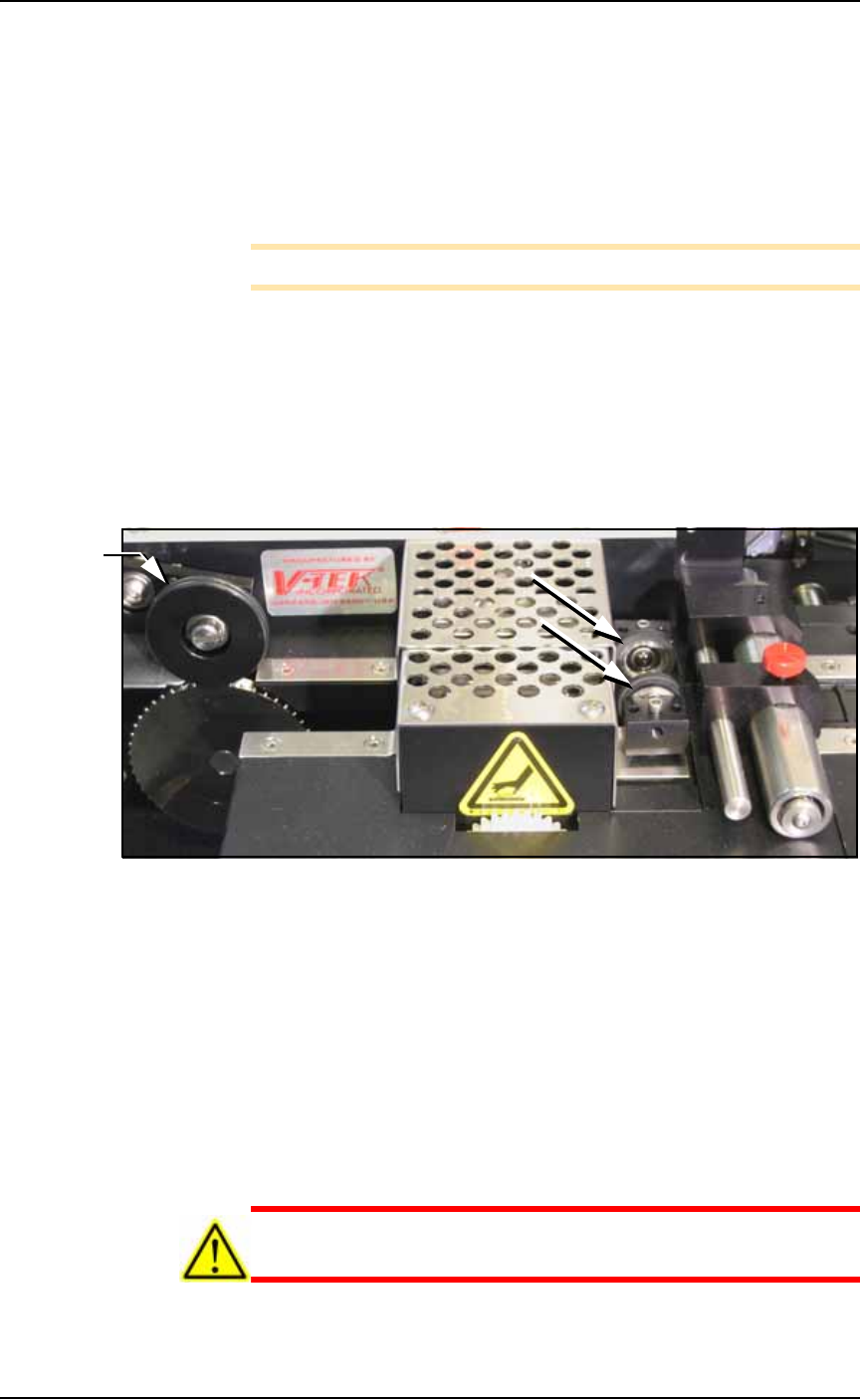
4. Inspect the PSA Seal Rollers (cover tape rollers)—
4a. Inspect the seal rollers for build up of adhesive from the cover
tape. See Figure 4-62.
Figure 4-62: On the Tape Out Module, the PSA Seal Rollers (arrows)
and Sprocket Idler with O-rings.
5. If adhesive buildup exists on the PSA Seal rollers—
5a. Using a shop towel and alcohol or alcohol wipes, clean the adhe-
sive build up from the cover tape application rollers. Hold the
alcohol cloth on the roller and rotate the roller 360°.
5b. Repeat procedure for the other application roller.
6. Inspect drive sprocket idler and rubber O-rings—
6a. Inspect the drive sprocket top idler and rubber O-rings for any
build up of adhesive from the cover tape. See Figure 4-62.
7. If adhesive buildup exists on the idler and O-rings—
CAUTION: O-rings might be easily damaged. Handle gently to
avoid breaking them.
O-rings