PS288_PS388_PS588_981-0424-002D - 第27页
■ Machine Components ◘ Component Descrip tions PS Series Owner’s Manual 1—15 back models hosts the Laser Software if applicable. The computer contains a CPU that runs Microsoft W indows XP Operating System (at time of re…
Introduction ■ Machine Components
1—14 Data I/O • 981-0424-002
back
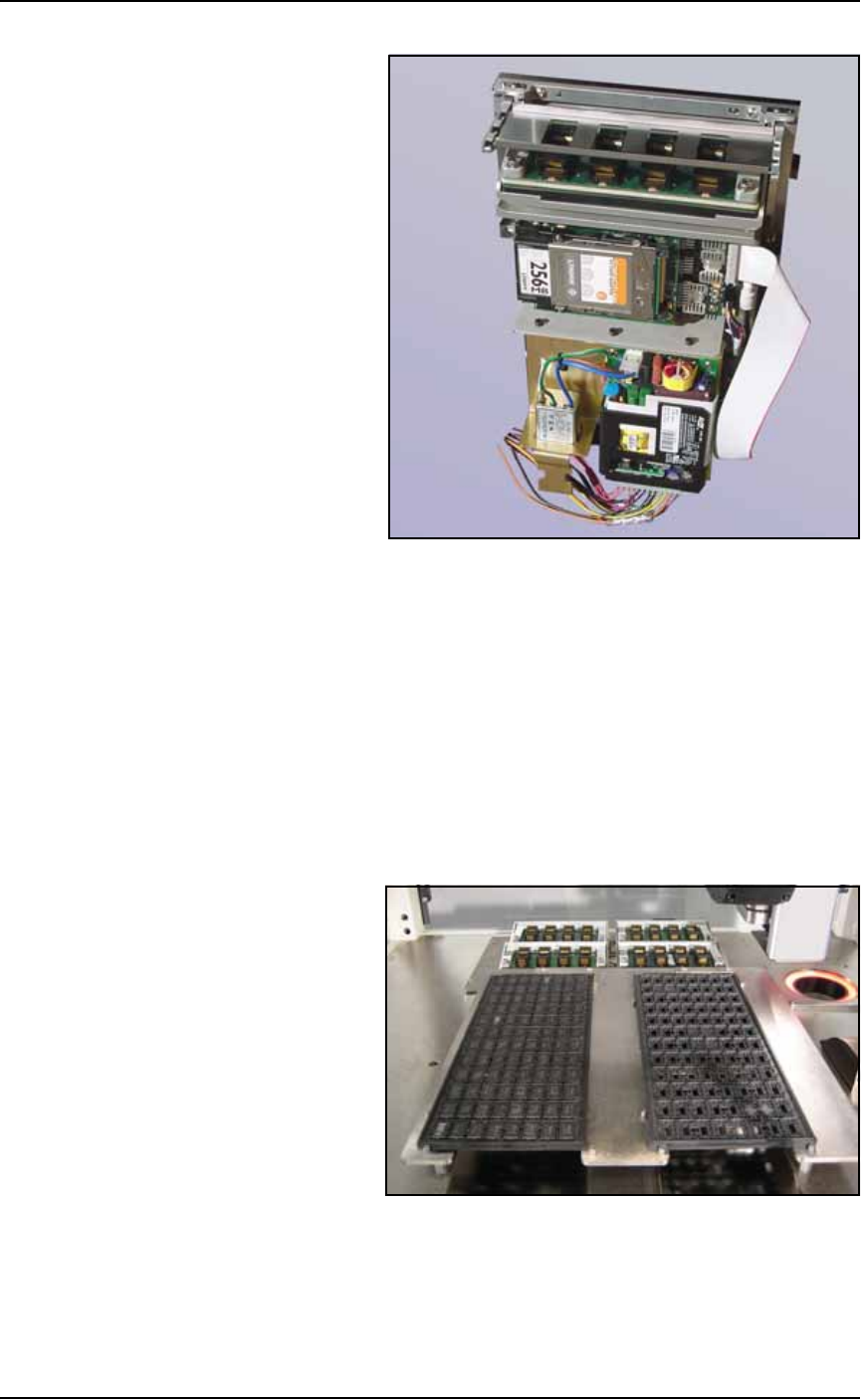
Figure 1-5: A FlashCORE Programmer with a Socket Adapter and
Actuator Plate installed on it.
Vision System
The camera and associated components of the Vision System provide
fine alignment of devices removed from the input media before
inserting them into the programming sockets or marking pedestal.
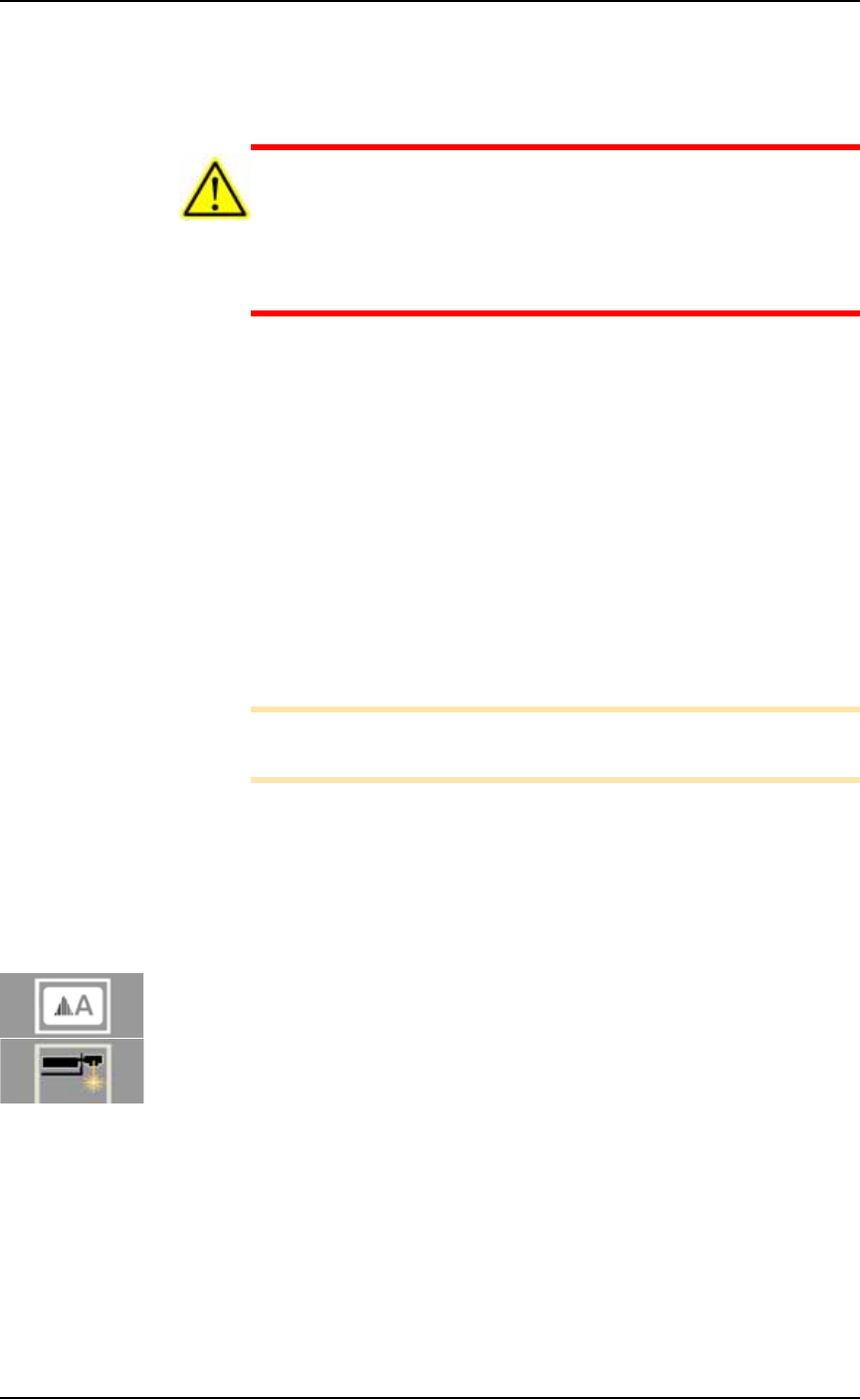
Static Tray Mount
Using positioning pins and magnetic L-shaped brackets (or thumb
screws on some models), JEDEC and non-JEDEC standard trays are
held firm for the PNP head to pick devices and return them after pro-
cessing.
Figure 1-6: Static tray mount on PS288.
Handler Computer
The computer that hosts TaskLink software and the AH500 software,
monitors all sensors. It also hosts the Vision System and in some
■ Machine Components ◘ Component Descriptions
PS Series Owner’s Manual 1—15
back
models hosts the Laser Software if applicable. The computer contains
a CPU that runs Microsoft Windows XP Operating System (at time of
release).
CAUTION: Possible machine damage. The PS System should
never have software added unless instructed to do so by Data I/O
Customer Support. Adding software to the PS System can cause
damage and/or cause the system to operate improperly. Adding
software without specific instruction from Data I/O Customer Sup-
port will void the warranty and may incur service charges.
Keyboard and Track Pad
Used for operation. Can be used instead of the touch screen monitor.
ESD Strap Connection
When operators plug an antistatic wrist strap into the ESD strap con-
nection, it reduces the risk of damage to devices and Socket Adapters
from electrostatic discharge (ESD).
Touch Screen Monitor
The display screen (user interface) on the PS System, accepts input
when touched or tapped with a finger. The touch screen may be used
instead of the keyboard and track pad.
Note: Throughout this Owner’s Manual, the term click is also
used to mean tap when using the touch screen monitor.
Safety Shields
Designed to protect against injury and damage from the PNP head
movement, the safety shields are an important safety feature, stop-
ping the gantry when they are opened. For more information see
Safety Shields with Interlocks on page 1-5.
(Optional) Marking System
A Label Marking or Laser Marking System is used to mark devices
for identifying at a later time. Either marking system is installed in
the Option Bay at the back of the PS System.
The marking systems use the Shuttle Transfer Assembly to move
devices to and from the marking stage. The shuttle transfer is a
belt-driven shuttle system that has two pedestals for holding devices.
If the Tape Output System is selected in addition to a marking
system, then only one of the pedestals is used since both marking and
the tape output systems are in the Option Bay.
Label Marking
The Label Printing System only uses one pedestal.
Introduction ■ Machine Components
1—16 Data I/O • 981-0424-002
back
Figure 1-7: Paper Labeler. (Your labeler may look different.)
Laser Marking
The Laser Marking System uses a CO
2
laser to mark parts. The laser
applies a user-defined mark. The laser marking system operates as a
Class 1 laser system (CDRH classification), and therefore uses inte-
grated interlocks to prevent the laser from firing while any cover is
open. The laser should never be operated without safety covers in
place.
WARNING: Blindness hazard! When servicing, always wear eye
protection when the laser access doors are open. Direct or diffuse
laser radiation can damage eyes. Goggles must block 10.57 to
10.63
μ
m laser radiation. Goggles protect against scattered
energy but not against direct viewing of the laser beam or reflec-
tions from metallic surfaces.
WARNING: Serious burn hazard! Laser radiation, whether direct
or diffuse, can cause serious burns. When servicing, keep hands
and other parts of the body out of the path of the laser beam.
WARNING: Toxic fume hazard! Laser marking generates vapors,
fumes, and particles that may be noxious, toxic, or even fatal. Fol-
low maintenance procedures on the fume extractor. Use proper
ventilation.
For additional safety information, see Laser Safety on page 1-24.
(Optional) Automatic Tray Feeder
Designed to automatically supply devices in trays to the PS System,
the TF20 Automatic Tray Feeder accepts thin or thick JEDEC trays.