PS288_PS388_PS588_981-0424-002D - 第77页
■ Operator Functions ◘ Running a Job on PS Systems PS Series Owner’s Manual 3—7 back Figure 3-7 : Align Socket Adapter and programmer ba se connectors 3. Holding the new Socket Adapter above the base, align the pins with…
Operation ■ Operator Functions
3—6 Data I/O • 981-0424-002
back
CAUTION: Collision hazard on PS388. HIC Socket Openers can hit
some standard Socket Adapters. Remove standard Socket
Adapters from all programmers before using HIC Openers.
CAUTION: Collision hazard. On PS288 and PS388, the Socket
Opener can possibly hit some Socket Adapters with large clamp-
ing arms such as the G491. After installing a Socket Opener,
always check clearance at all the Socket Adapters.
8. [PS288, PS388] Adjust the Socket Opener Ribs prior to opera-
tion. See Adjust Socket Opener Ribs on page 3-14.
To restart the same job, click Run in the Run Window.
If starting a new job, at the Run Window, click Exit, click Exit again at
the Setup Window, and Exit again to quit the AH500 software. Then in
TaskLink’s Task Manager dialog. select the desired job and click Run.
Follow the on-screen instructions.
Note: If starting a job that uses Tape Output, pull the red
E-Stop/On button on the taping machine to start it.
Installing Socket Adapters – OPTIMA
To change a Socket Adapter on an OPTIMA/Universal Programmer:
Each TOP (Socket Adapter) is connected to Universal programmer
base connectors which are attached to the work surface of the PS588.
1. If a job is running, click Finish on the Run window and wait for
the PNP head to empty the sockets and move to the park posi-
tion.
2. Remove the existing Socket Adapter by holding the sides of the
case and gently rocking and lifting.
■ Operator Functions ◘ Running a Job on PS Systems
PS Series Owner’s Manual 3—7
back
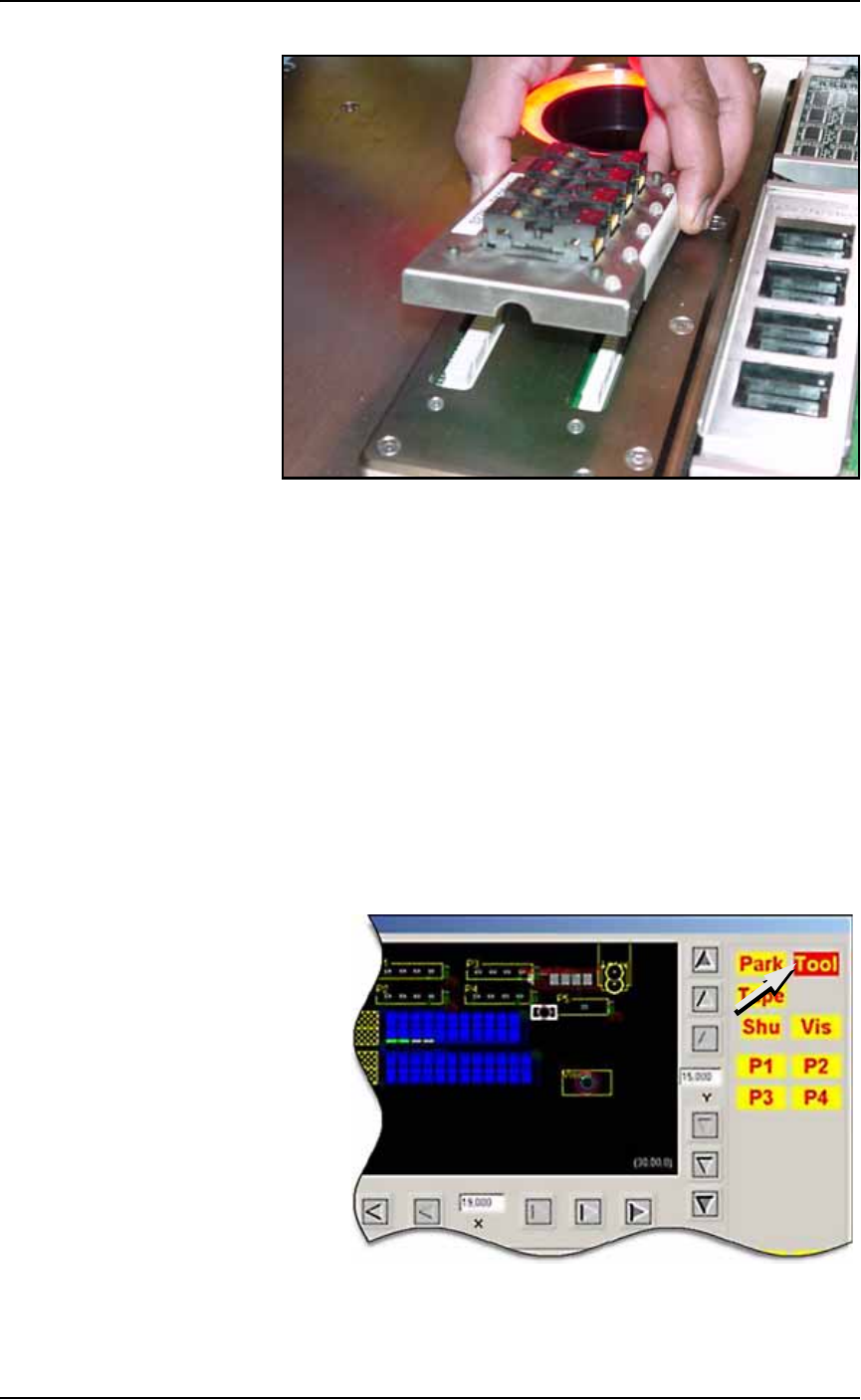
Figure 3-7: Align Socket Adapter and programmer base connectors
3. Holding the new Socket Adapter above the base, align the pins
with the base connector and press down.
4. Adjust the Socket Opener ribs to fit the new sockets. See Adjust
Socket Opener Ribs on page 3-14.
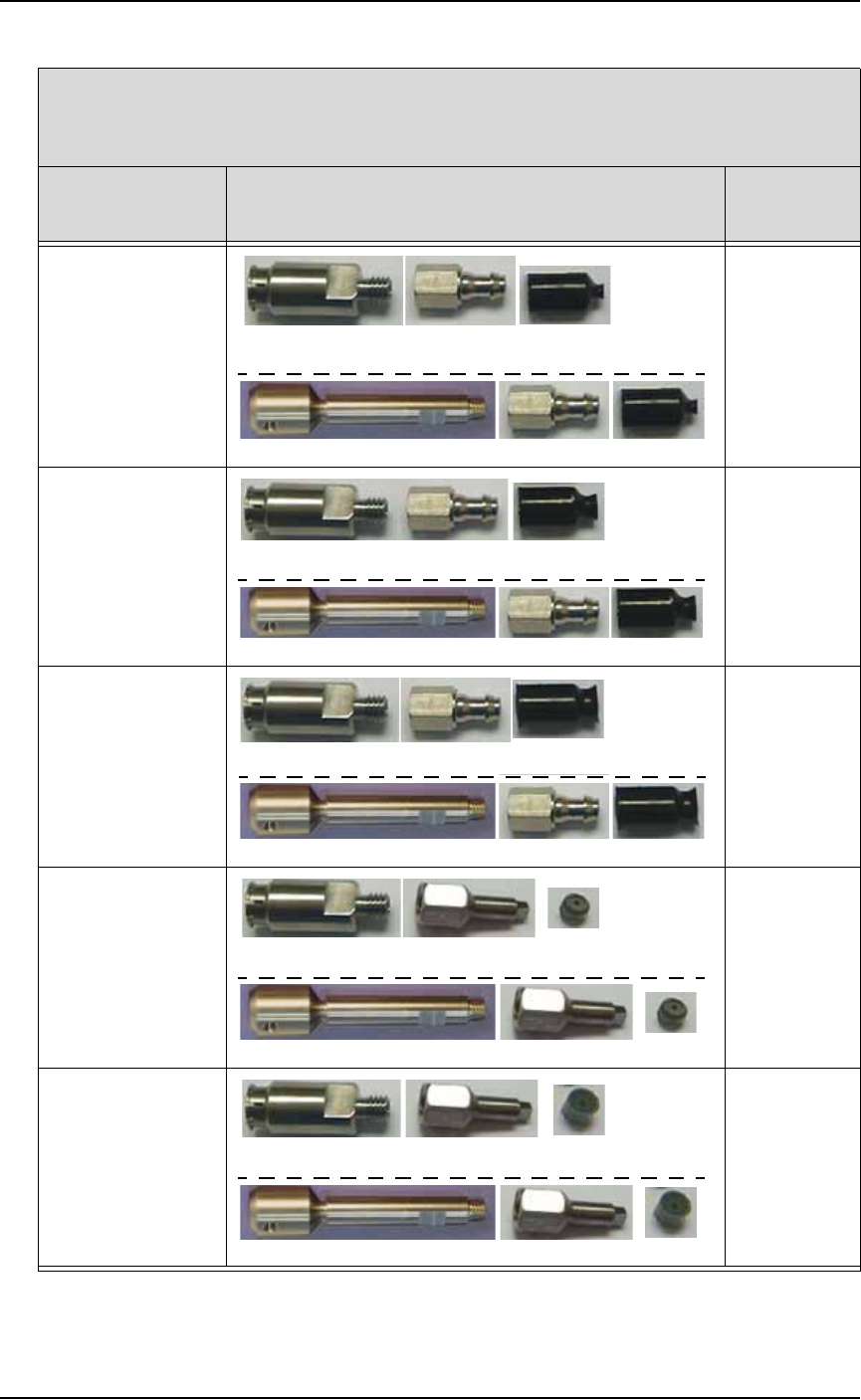
Installing the Correct Probe Tip
Different sized devices require a different size probe tip. Install the
recommended tip onto the probe for your type of PNP head as shown
below.
If the AH500 Software is already started, open the Gantry window
(Start Setup Window > System > Gantry) and click the Tool label to
move the PNP head to a spot where it is accessible. It is okay to move
the probe/opener down in this position without affecting the set
travel height.
Figure 3-8: The Tool position in the Gantry window allow easy access to
the probe tips. The Tool position can also be set by the customer.
Operation ■ Operator Functions
3—8 Data I/O • 981-0424-002
back
Intellepro Head (std on machines prior to March 2009)*
- - - - - - - - - - - - - - - - - - - - - - - - - - - - - - - - - - -
Data I/O ‘J-Head’ (std on machines March 2009 and later)*
If processing this
device type:
Breakaway Tip (or stem)/ Nozzle/ Cup or Tip
(Data I/O Part Numbers)
probe tip
size
FBGA
μBGA
288-0100-001 288-2500-001 288-0017-001
641-0110-001 288-2500-001 288-0017-001
2 mm cup
300 mil DIP
20 PLCC
32 TSOP
288-0100-001 288-2500-001 288-0018-001
641-0110-001 288-2500-001 288-0018-001
4 mm cup
28 PLCC or greater
40 TSOP or greater
QFP
600 mil DIP
288-0100-001 288-2500-001 288-1000-001
641-0110-001 288-2500-001 288-1000-001
6 mm cup
Small devices such
as QFN20
288-0100-001 638-0007-001 288-0020-001
641-0110-001 638-0007-001 288-0020-001
3.05 mm tip
Small devices such
as QFN40
288-0100-001 638-0007-001 288-0019-001
641-0110-001 638-0007-001 288-0019-001
4.57 mm tip
* What PNP head do I have? See Figure 1-3 on page 1–11.