[Superset] Chapter5_SPC Plus_ENG_20100827TW - 第40页
Programmer's Manual | 40 3.12.1. R EAL -T IME C HART Real-time chart is the Rea l-time screen mode focused on the stati stical value. Figure 3-18. Real time (1) – Real-Time Chart For the details of the Rea…
Programmer's Manual | 39
Real-Time View Option (Defect View)
Select a screen for Real time.
Note:Thismenumayhavedifferentcategoriesperversion.
Defect Limit Option
Function for excluding defect results that are greater than a certain ratio (e.g., bare board inspection,
printer adjustment, etc.) when calculating statistics in Defect SPC or Defect View.
Assign Screen Capture Main Path
Clicking the <Screen Capture> button sets the location of the saving folder (excluding YieldView).
3.12. Real Time
Realtime isthemenuthat checks the status and inspection resultsofSPIequipmentin realtime.
Thismenuhasthefollowing3screenmodes:
Real‐TimeChart
Real‐Time3D
Multi‐RealTime
Note:SettheReal‐timecomponentinSetup.
Category Description
Real-Time Mode
Selects a Real-Time screen
Real-Time 3D
Real-Time Chart
Real-Time (Dual Lane)
Multi-Real Time
Programmer's Manual | 40
3.12.1. REAL-TIME CHART
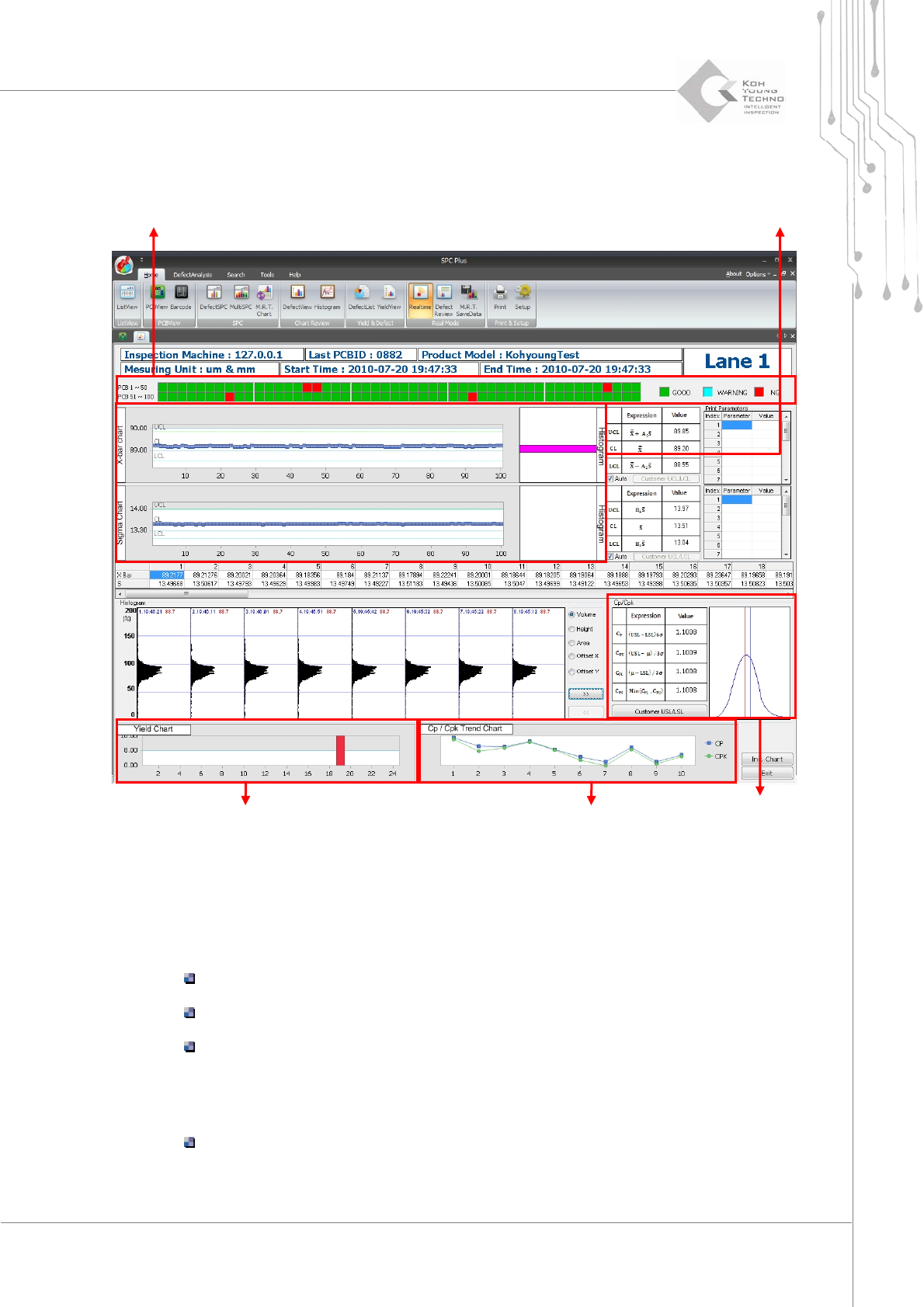
Real-time chart is the Real-time screen mode focused on the statistical value.
Figure 3-18. Real time (1) – Real-Time Chart
Forthedetailsof theReal‐timechartmode,seethefollowing:
Inspectionresult:Displaystherecentlyinspected100PCBinspectionresultsinrealtime
Greenblock:Good
Skyblueblock:Warning
RedBlock:NG(Defect)
Recentinspectionelements:DisplaystheX‐BarSigmachartfortherecentlyinspect e d100
PCBs
Queriestheresultoftheselectedelement:Selectthedesiredelementfromtheleft
windowofC
P&CPKandclickthe<OK>button.
Inspection result Recent inspection elements
C
P
& C
PK
Yield Chart
Process capability index chart
Programmer's Manual | 41
Yieldchart:Displaystheyieldrateofthelast24hours
Processcapabilityindexchart:Displaystheprocesscapabilityindexbysettingtherecently
inspected100PCBwith10astheunit
3.12.2. REAL-TIME 3D
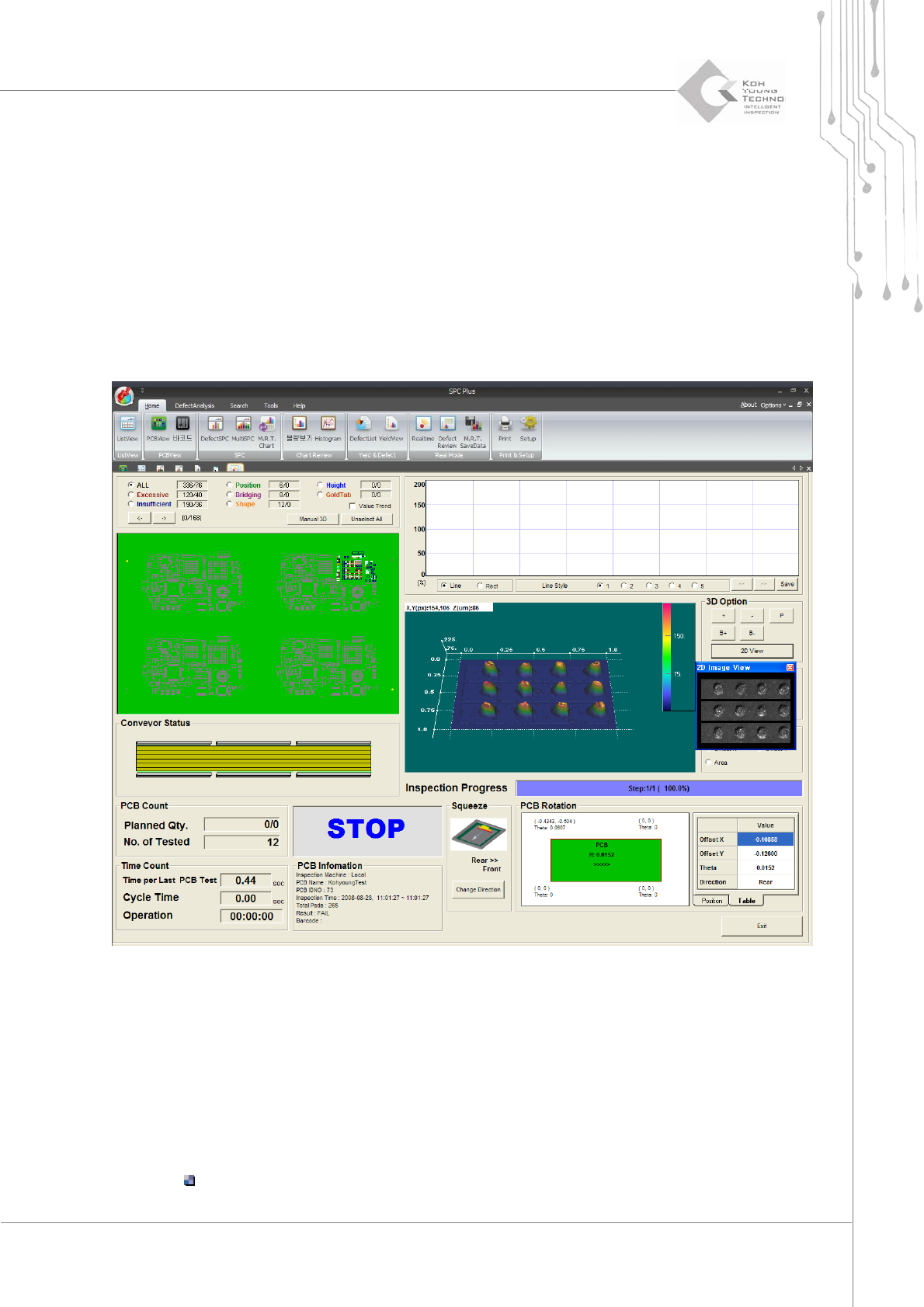
Real‐tim e3DistheReal‐timescreenmodefocusedonobtainingthelastPCBinspectionresultsin
realtime.
Figure 3-19. Real time (2) – Real-Time 3D
Forthedetailsof Real‐time3D,seethefollowing:
LastPCBinspectionresult:Displays thelast inspection‐completedPCBinspectionresults
fromtheequipment
3DView:SelectsapartfromPCBtodisplayin3Dbytotalingtheinspectionresultsofthe
correspondingpartduringeachinspection
Thefigureaboveshowstheorange‐coloredpartofPCBon3Dscreen.