SIPLACE OIS V9.1安装手册 - 第24页
Installation Manual OIS 9.1 / Installati onsanleitung OIS 9.1 Ausgabe 02/2011 Edition 3.6 System time (only OIS client) The OIS operating data is stored usi ng the appropriate station´s system time. The SIS operating dat…
Installation Manual OIS 9.1 / Installationsanleitung OIS 9.1 Ausgabe 02/2011 Edition
3.5 Removing the program (Uninstallation)
This option removes all the installed components, including all the corresponding entries in the Registry.
You have the option to keep or remove the database.
¾ Click the Windows Start button and select Settings and then Control Panel.
¾ Start the Add/Remove Programs dialog, by double-clicking on Add/Remove Programs.
¾ Select the program from the list (SIPLACE OIS / SIPLACE Monitoring Service)and click on
Change/Remove.
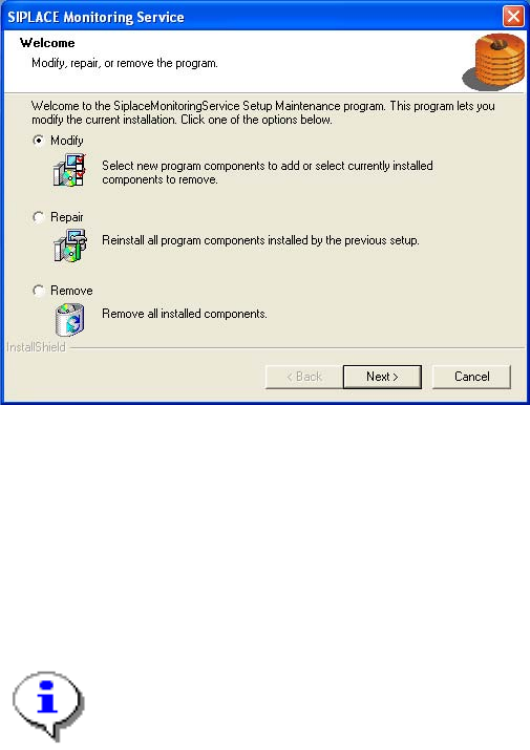
The setup program will start and display the following dialog.
¾ Select Remove, and then click Next.
¾ Confirm the subsequent prompt with Yes.
The program is uninstalled. Follow the subsequent stages of the setup program.
Additional information for removing OIS/SIS Server:
¾ If you want to delete the OIS/SIS database also, respond to the confirmation request with Yes.
Note:
If you delete the database, all the recipe and setup data of the OIS/SIS system are lost.
23

Installation Manual OIS 9.1 / Installationsanleitung OIS 9.1 Ausgabe 02/2011 Edition
3.6 System time (only OIS client)
The OIS operating data is stored using the appropriate station´s system time. The SIS operating data are
stored with the server system time. Therefore, it is important that the system time on all station computers
is synchronized to allow the operating data to be evaluated correctly. To do this, you must install a time
server client on each machine.
SIPLACE Explorer also requires the system time of the OIS and SIS operating data to be synchronized.
Note:
To synchronized the system time, install the current version of TimeSync.
TimeSync is not included in the OIS package.
TimeSync is provided on the Support Media DVD. In the software guide (00194669-xx)
you find detailed information for the installation of TimeSync.
24
Installation Manual OIS 9.1 / Installationsanleitung OIS 9.1 Ausgabe 02/2011 Edition
3.7 Identify Station (only OIS client)
For a station to be monitored, it must be identified.
For a station with station software version 70x, the station identification is not necessary.
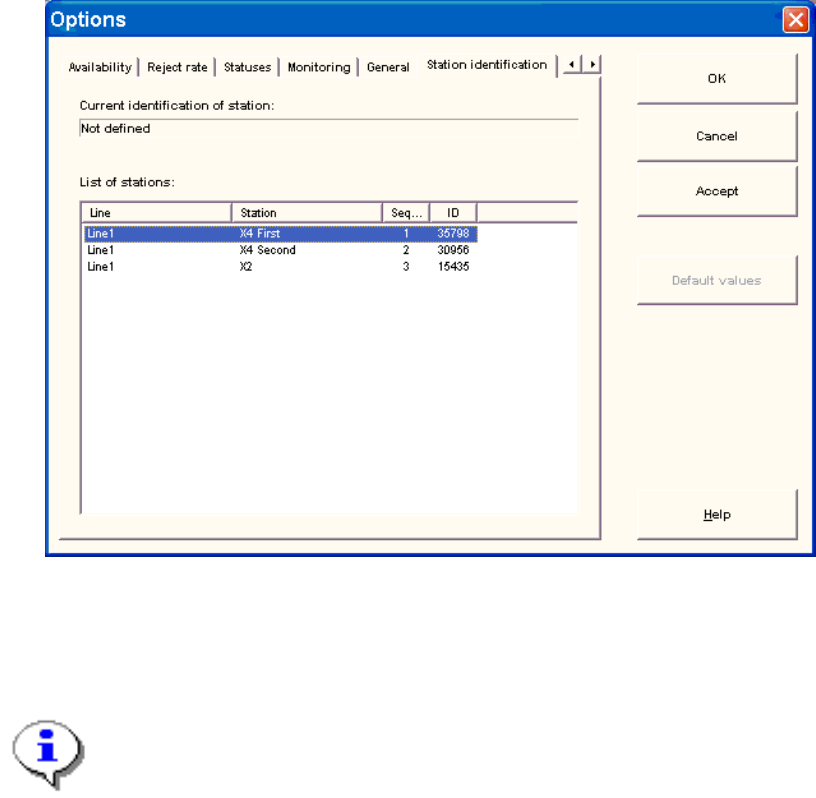
¾ Select the Station identification item from the Options menu.
¾ Select the appropriate station in the OIS client from the list.
¾ Double-click the station to identify it.
¾ Close the dialog by clicking OK.
Note:
To select the station, the line configuration must be created first on the OIS server using
OIS Line Config, see the Administration Guide (item number 00196790-01).
25