4OM-1322-006_w.pdf - 第137页
2-B AKOEMT -ID 0603-001

2-A
AKOEMT-ID
0603-001
Chapter 2
Troubleshooting
This chapter outlines the troubleshooting.

2-B
AKOEMT-ID
0603-001
2-1
AKOEMT-ID
1. "CHECK" and "ERROR" Windows
1004-002
1. "CHECK" and "ERROR" Windows
1.1 "ERROR" Window
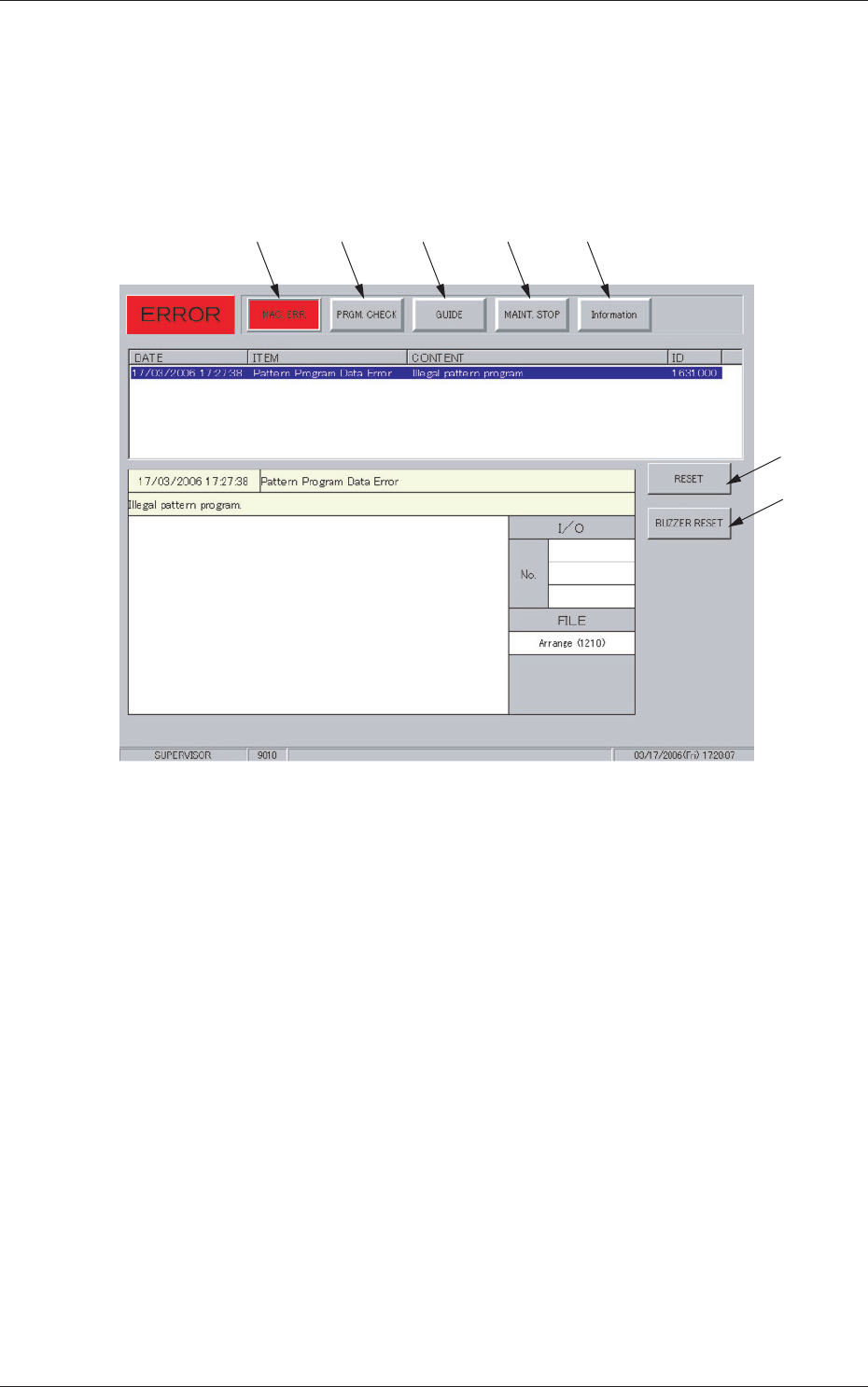
When the machine detects an error, the following window opens.
[1] [2] [3] [4] [5]
[6]
[7]
Fig. 4B1
•
Window Composition
[1] [MAC. ERR.] Button
Pressing this button displays the contents of the error.
Refer to "1.1.1 MAC. ERR. Window" for details.
[2] [PRGM. CHECK] Button
When "Pattern Program Data Error" appears under "ITEM" in the
"ERROR" window and this button is pressed, the contents of the pattern
program are displayed.
Refer to "1.1.2 PRGM. CHECK Window" for details.
[3] [GUIDE] Button
Pressing this button displays the procedure to restart the halted machine.
When the [GUIDE] button flickers in blue and gray, it indicates that a
restarting procedure is found.
Refer to "1.1.3 GUIDE Window" for details.