4OM-1322-006_w.pdf - 第191页
2-54 AKOEMT -ID T able 4B45 Error ID Error Name, Description, Cause, and Remedy 1801029 PEC Recog. #1 Image around fiducial mark was unstable. 1801030 PEC Recog. #1 Error of mark figure similitude was extensive. 1801031 PE…
2-53 AKOEMT-ID
(18 PEC Recognition) Table 4B44
Error ID Error Name, Description, Cause, and Remedy
1801000 PEC Recog. #1
1801001 PEC Recog. #1
[Camera ID] exceeds the range of setting.
(Cause 1)
Self-Diagnostics Error Message
(Remedy 1) Zero all axes and restart the operation. If the machine is not reset to its
normal condition, shut down the power of the machine once and power up
the machine again. After that, restart the operation. When the same error still
occurs, contact our service personnel for details.
1801003 PEC Recog. #1
[Camera Gain] exceeds the range of setting.
1801004
PEC Recog. #1
[Camera Level] exceeds the range of setting.
180101
1 PEC Recog. #1
[Mark Size D1] exceeds the range of setting.
1801012
PEC Recog. #1
[Mark Size D2] exceeds the range of setting.
1801014 PEC Recog. #1
[Mark Judge Level] exceeds the range of setting.
(Cause 1)
The data has exceeded the allowable range.
(Remedy 1) Set correct parameters.
0609-002
2.2 Troubleshooting after Error Display
2-54 AKOEMT-ID
Table 4B45
Error ID Error Name, Description, Cause, and Remedy
1801029 PEC Recog. #1
Image around fiducial mark was unstable.
1801030 PEC Recog. #1
Error of mark figure similitude was extensive.
1801031
PEC Recog. #1
Error of mark similitude or mark size was extensive.
1801032 PEC Recog. #1
Specified mark was not found in window of recog.monitor
.
(Cause 1) The fiducial marks do not conform to the coordinates X and
Y of the fiducial
marks or the recognition mark data in the pattern program.
(Remedy 1) Follow the steps below to reset the machine to the normal condition.
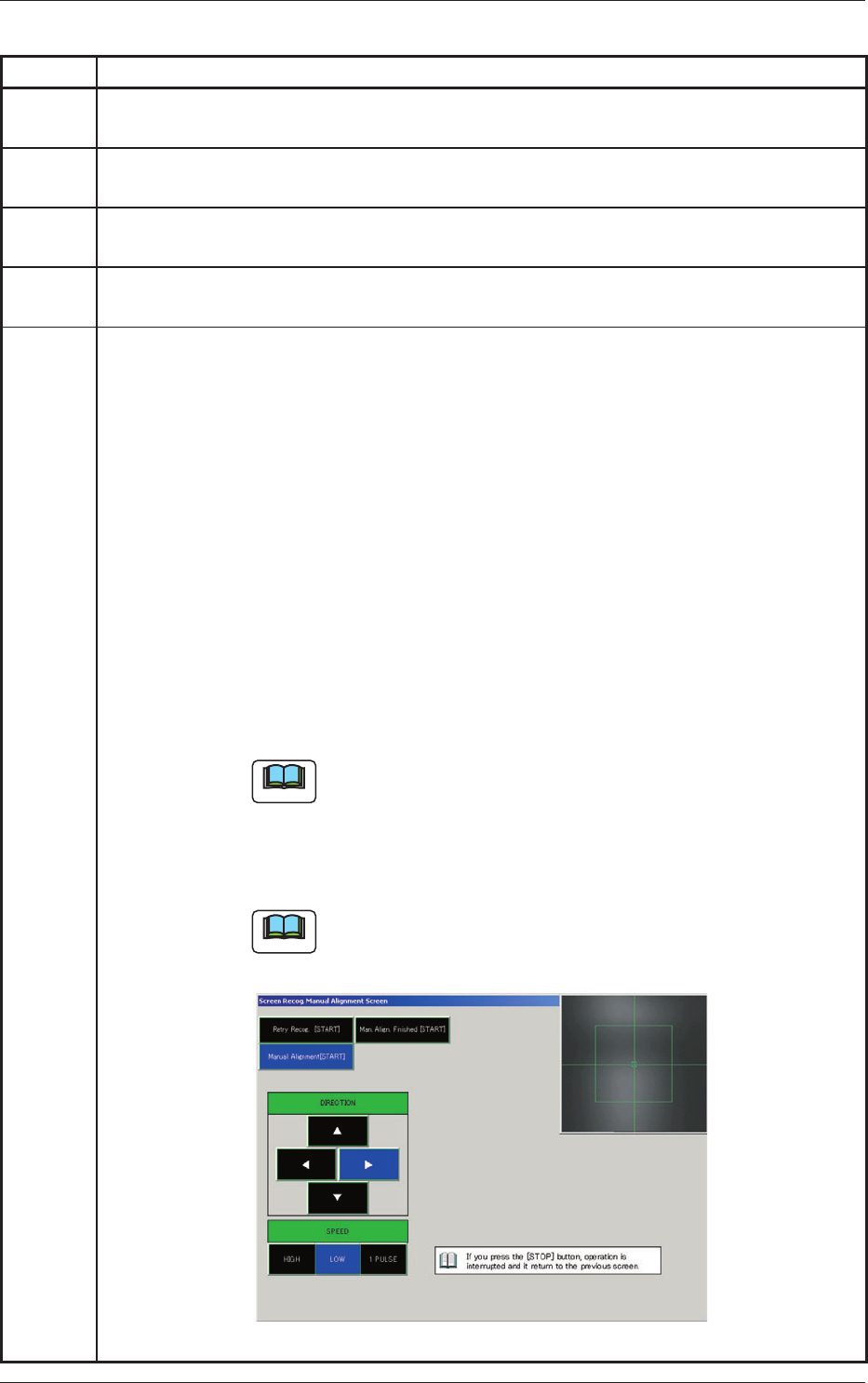
(1) When the [RESET] button is pressed, the following window opens.
(2)
When the actual fiducial mark is out of the recognition area, move the
camera such that the mark can enter the recognition area. Select the
[Manual Alignment [START]] button and press one of the arrow buttons
in the “DIRECTION” and one of the “SPEED” buttons. While the [START]
button is being pressed, the camera keeps on moving.
(3) Select the [Retry Recog. [START]] button and press the [START] button.
When the recognition is completed successfully, this window automatically
closes.
(4) When the recognition still failed after the re-recognition operation, move
the camera such that the actual fiducial mark can stay at the fiducial mark
template (located at the center of the cross hair).
Note
Be sure to adjust the position of the fiducial mark as
accurately as possible because the printing accuracy is
affected by this adjustment.
(5) Select the [Man. Align. finished [START]] button and press the [START]
button. The original window resumes.
Note
If the [STOP] button is pressed while the “Manual Alignment"
window is active, the processing is interrupted and the
original window resumes.
Fig. 4B10
0609-002
2.2 Troubleshooting after Error Display
2-55 AKOEMT-ID
Table 4B46
Error ID Error Name, Description, Cause, and Remedy
1801038 PEC Recog. #1
Unavailable fiducial mark polality was set.
1801040 PEC Recog. #1
Unavailable fiducial mark area was set.
1801043 PEC Recog. #1
Recognition system error.
1801056 PEC Recog. #1
Recog. transaction time over.
(Cause 1) Self-Diagnostics Error Message
(Remedy 1)
Shut down the power of the machine once and power up the machine again.
After that, restart the operation. When the same error still occurs, contact our
service personnel for details.
1802000 PEC Recog. #2
1802001 PEC Recog. #2
[Camera ID] exceeds the range of setting.
(Cause 1)
Self-Diagnostics Error Message
(Remedy 1) Zero all axes and restart the operation. If the machine is not reset to its
normal condition, shut down the power of the machine once and power up
the machine again. After that, restart the operation. When the same error still
occurs, contact our service personnel for details.
1802003 PEC Recog. #2
[Camera Gain] exceeds the range of setting.
1802004
PEC Recog. #2
[Camera Level] exceeds the range of setting.
180201
1 PEC Recog. #2
[Mark Size D1] exceeds the range of setting.
1802012
PEC Recog. #2
[Mark Size D2] exceeds the range of setting.
1802014 PEC Recog. #2
[Mark Judge Level] exceeds the range of setting.
(Cause 1)
The data has exceeded the allowable range.
(Remedy 1) Set correct parameters.
0609-002
2.2 Troubleshooting after Error Display