4OM-1322-006_w.pdf - 第203页
2-66 AKOEMT -ID T able 4B57 Error ID Error Name, Description, Cause, and Remedy 1906000 Screen Recog. Camera 1906001 Screen Recog. Camera [Camera ID] exceeds the range of setting. (Cause 1) Self-Diagnostics Error Message…
2-65 AKOEMT-ID
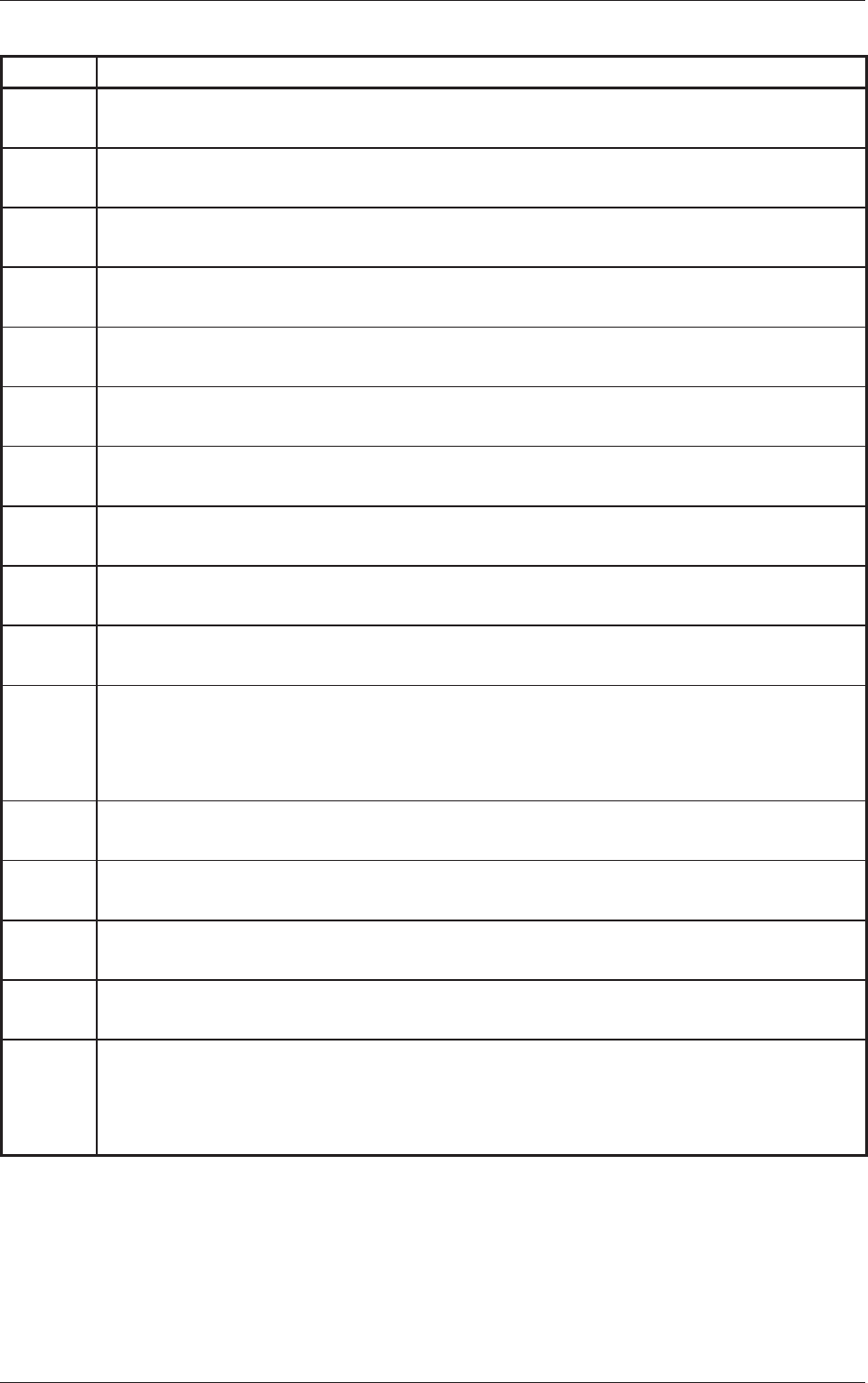
Table 4B56
Error ID Error Name, Description, Cause, and Remedy
1904003 Screen Recog. Test
[Camera Gain] exceeds the range of setting.
1904004
Screen Recog. Test
[Camera Level] exceeds the range of setting.
190401
1 Screen Recog. Test
[Mark Size D1] exceeds the range of setting.
1904012 Screen Recog.
Test
[Mark Size D2] exceeds the range of setting.
1904014
Screen Recog. Test
[Mark Judge Level] exceeds the range of setting.
(Cause 1)
The data has exceeded the allowable range.
(Remedy 1) Set correct parameters.
1904029 Screen Recog.
Test
Image around fi
ducial mark was unstable.
1904030 Screen Recog. Test
Error of mark figure similitude was extensive.
1904031
Screen Recog. Test
Error of mark similitude or mark size was extensive.
1904032
Screen Recog. Test
Specified mark was not found in window of recog.monitor
.
(Cause 1) The fiducial marks do not conform to the coordinates X and Y of the fiducial
marks or the recognition mark data in the pattern program.
(Remedy 1) Follow the steps below to reset the machine to the normal condition.
Refer to “Error ID “1901032”” for details.
1904038 Screen Recog. Test
Unavailable fi
ducial mark polality was set.
1904040 Screen Recog. Test
Unavailable fi
ducial mark area was set.
1904043 Screen Recog. Test
Recognition system error
.
1904056 Screen Recog. Test
Recog. transaction time over
.
(Cause 1) Self-Diagnostics Error Message
(Remedy 1) Shut down the power of the machine once and power up the machine again.
After that, restart the operation. When the same error still occurs, contact our
service personnel for details.
0609-002
2.2 Troubleshooting after Error Display
2-66 AKOEMT-ID
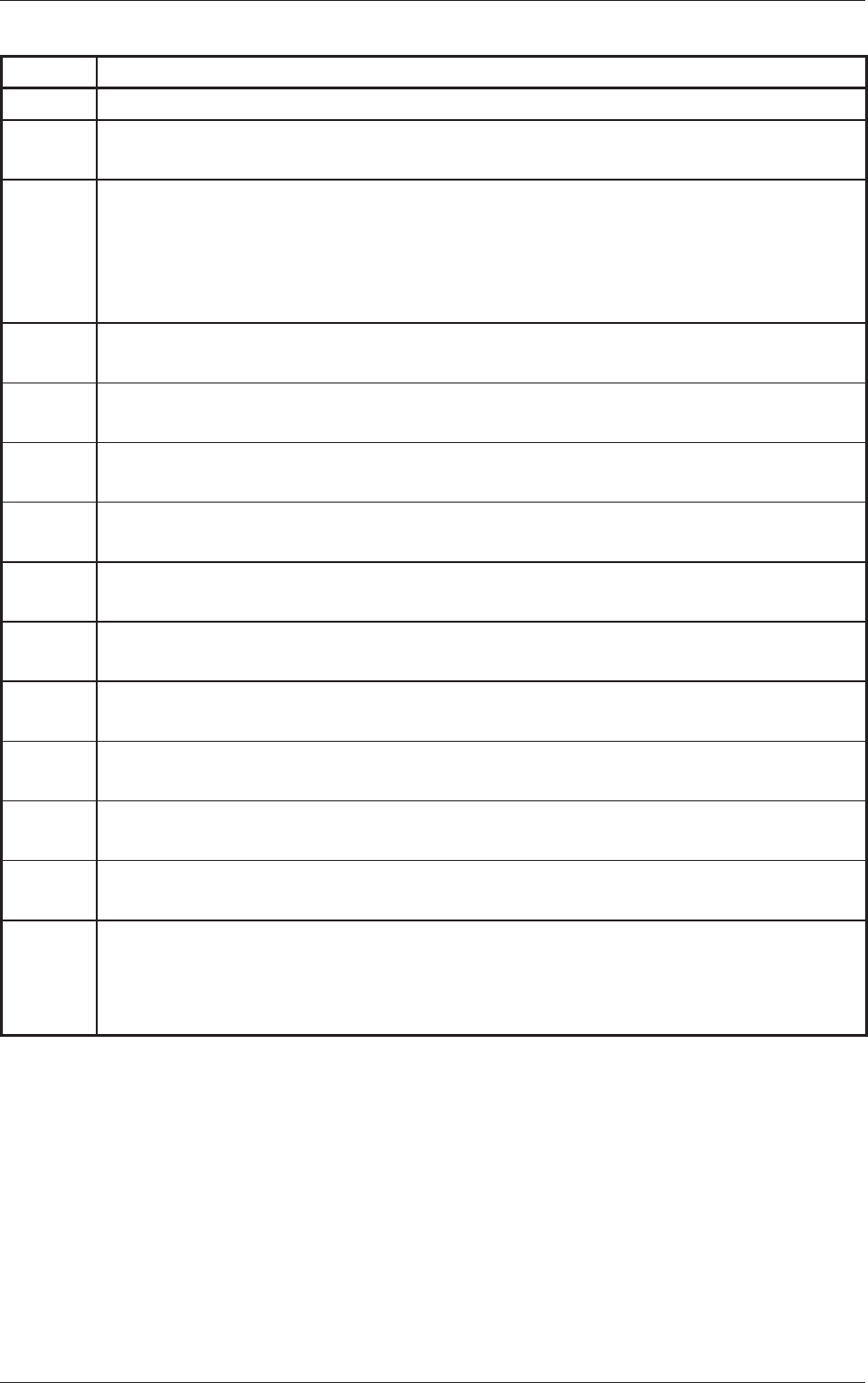
Table 4B57
Error ID Error Name, Description, Cause, and Remedy
1906000 Screen Recog. Camera
1906001 Screen Recog. Camera
[Camera ID] exceeds the range of setting.
(Cause 1)
Self-Diagnostics Error Message
(Remedy 1) Zero all axes and restart the operation. If the machine is not reset to its
normal condition, shut down the power of the machine once and power up
the machine again. After that, restart the operation. When the same error still
occurs, contact our service personnel for details.
1906003 Screen Recog. Camera
[Camera Gain] exceeds the range of setting.
1906004
Screen Recog. Camera
[Camera Level] exceeds the range of setting.
190601
1 Screen Recog. Camera
[Mark Size D1] exceeds the range of setting.
1906012
Screen Recog. Camera
[Mark Size D2] exceeds the range of setting.
1906014 Screen Recog. Camera
[Mark Judge Level] exceeds the range of setting.
(Cause 1)
The data has exceeded the allowable range.
(Remedy 1) Set correct parameters.
1906029
Screen Recog. Camera
Image around fi
ducial mark was unstable.
1906030 Screen Recog. Camera
Error of mark figure similitude was extensive.
1906031
Screen Recog. Camera
Error of mark similitude or mark size was extensive.
1906032 Screen Recog. Camera
Specified mark was not found in window of recog.monitor
.
(Cause 1) The fiducial marks do not conform to the coordinates X and
Y of the fiducial
marks or the recognition mark data in the pattern program.
(Remedy 1) Follow the steps below to reset the machine to the normal condition. Refer to
“Error ID “1901032”” for details.
0609-002
2.2 Troubleshooting after Error Display
2-67 AKOEMT-ID
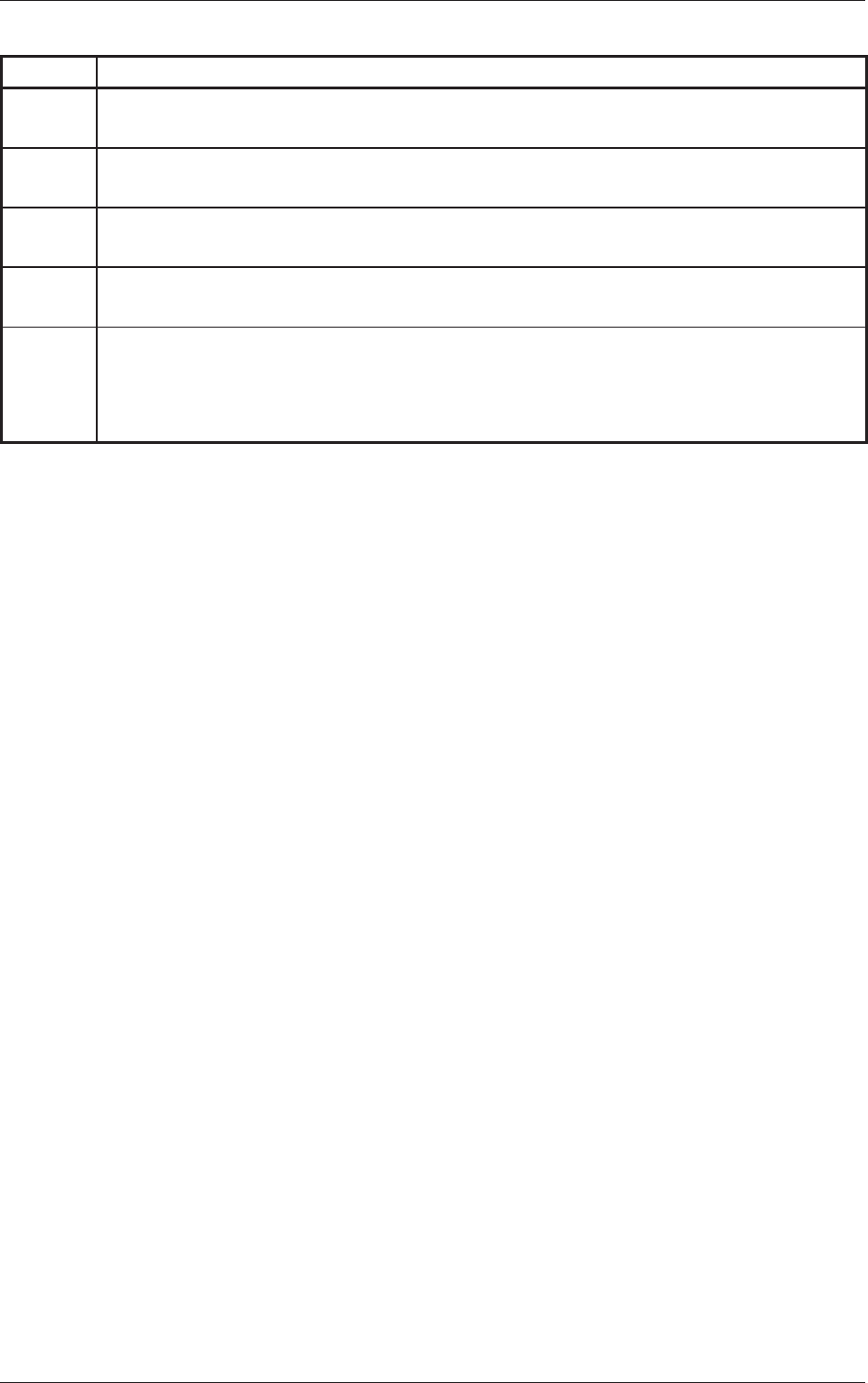
Table 4B58
Error ID Error Name, Description, Cause, and Remedy
1906038 Screen Recog. Camera
Unavailable fiducial mark polality was set.
1906040 Screen Recog. Camera
Unavailable fiducial mark area was set.
1906043 Screen Recog. Camera
Recognition system error.
1906056 Screen Recog. Camera
Recog. transaction time over.
(Cause 1) Self-Diagnostics Error Message
(Remedy 1)
Shut down the power of the machine once and power up the machine again.
After that, restart the operation. When the same error still occurs, contact our
service personnel for details.
0609-002
2.2 Troubleshooting after Error Display