DECAN_S2_Trouble(Eng_Ver4.2).pdf - 第136页
1-114 Advanced Chip Shooter DECAN S2 T roubleshooting Guide 1.4.11. V ision related errors in VME [$a000~$afff ] $a100 Error occurred during the processing o f vision fiducial mark. [FREEZE LEVEL] [Problem] V ision fid…
1-113
System Messages of the MMI and Solutions
If the problem occurs continuously, contact our designated C/S or local agent.
$7000 Component alignment method not supported by this equipment. [EMER LEVEL]
[Problem]
The component alignment method that was not defined was setup.
[Solution]
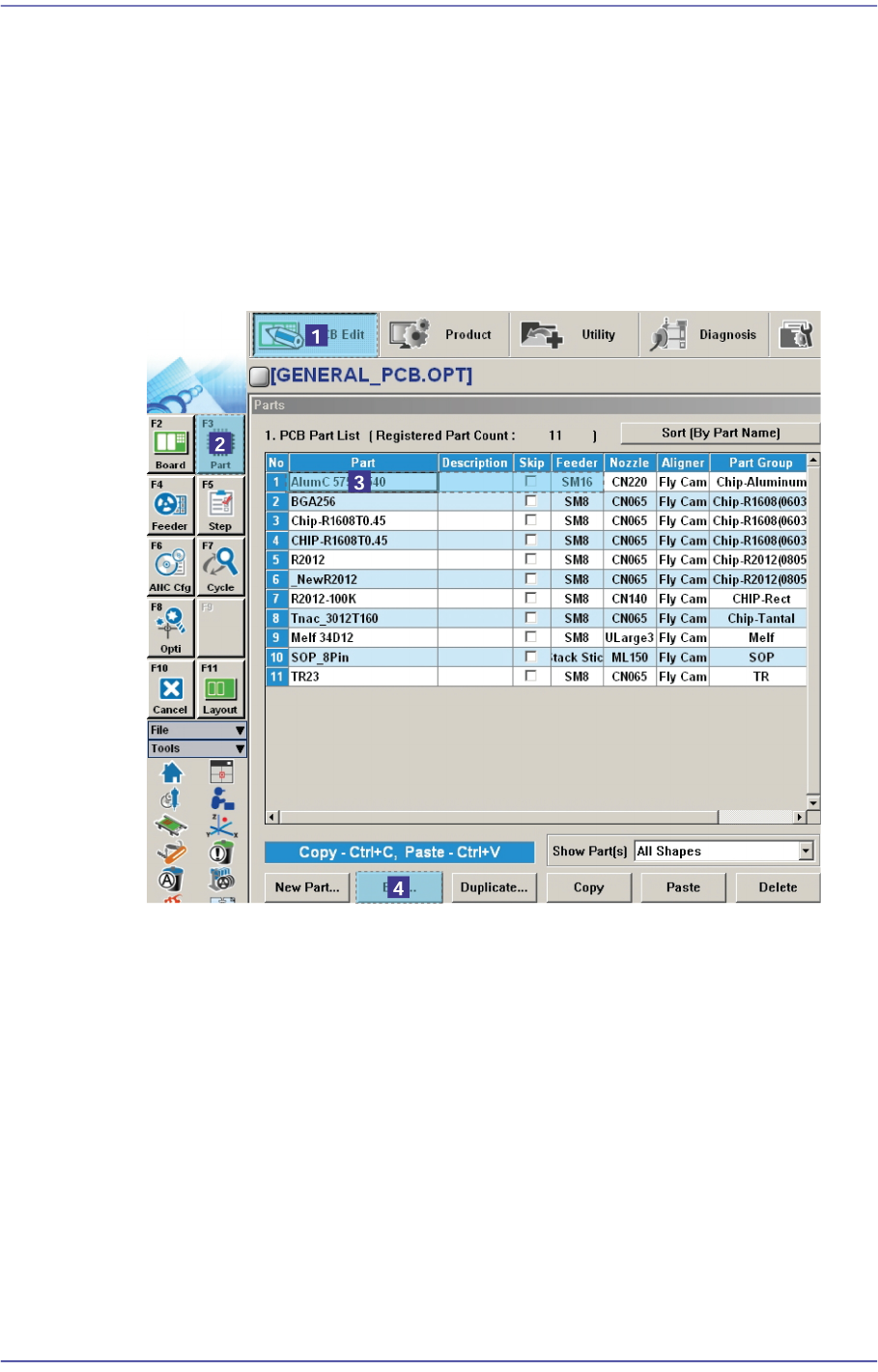
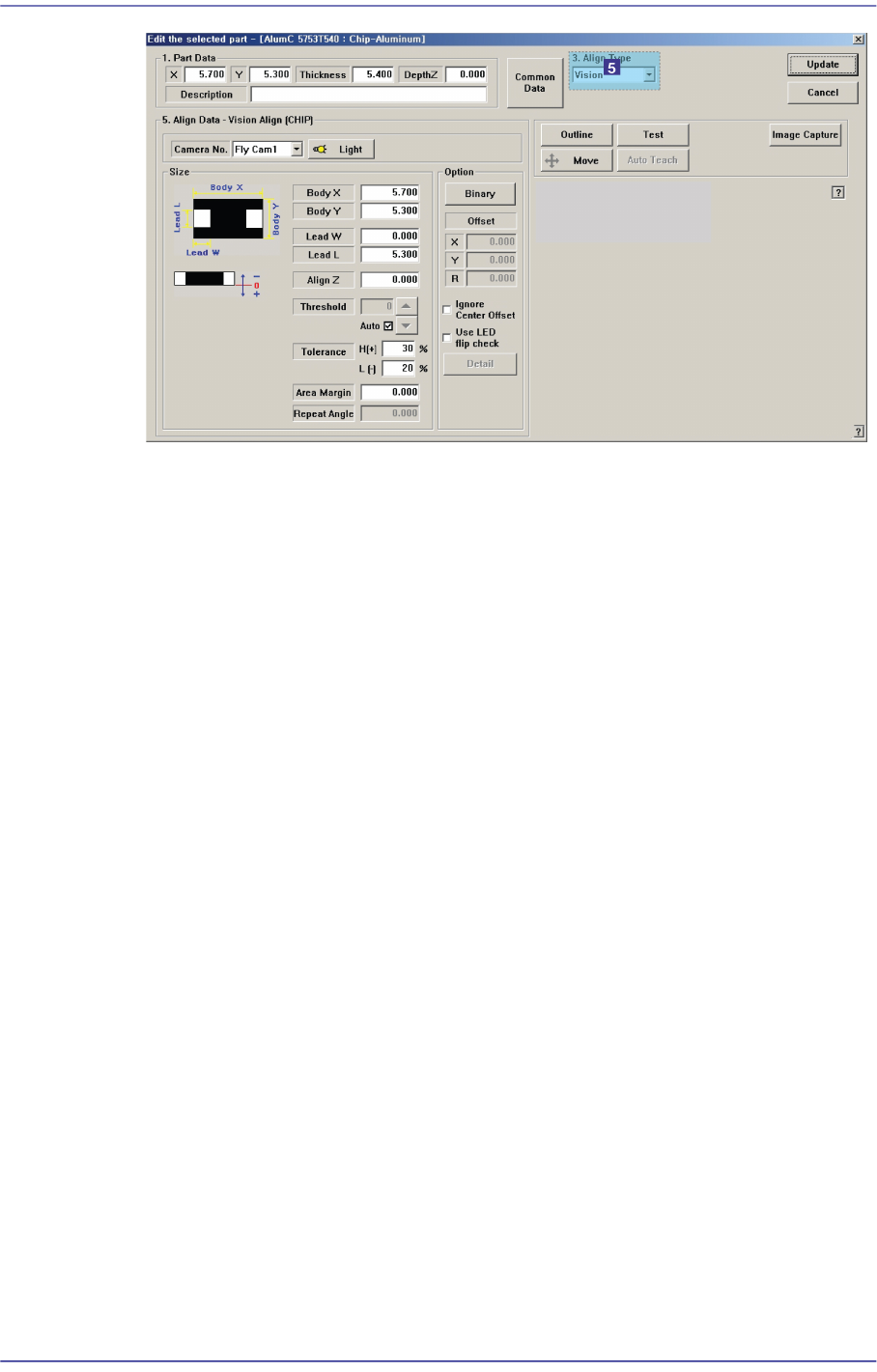
Click the <Edit> button after selecting the error occurred component in ‘Part’ of the
“PCB Edit” menu.
1-114
Advanced Chip Shooter DECAN S2 Troubleshooting Guide
1.4.11. Vision related errors in VME [$a000~$afff]
$a100 Error occurred during the processing of vision fiducial mark. [FREEZE LEVEL]
[Problem]
Vision fiducial mark sensing error occurred.
[Solution]
Turn off the Buzzer by pressing the “STOP” button.
Switch the machine to “IDLE” mode by pressing the “RESET” button.
Press the “READY” button to supply power to the machine.
Check and edit the data related to the corresponding fiducial mark setup after clicking
the ‘Fiducial Mark …’ button on the ‘board’ dialog box of PCB edit menu. Please
refer to section “6.3 Fiducial Mark Setup” of Administrator’s Guide for more
information.
$a131 Failed to recognize the vision fiducial mark of the first PCB. [FREEZE LEVEL]
$a132 Failed to recognize the vision fiducial mark of the second PCB. [FREEZE LEVEL]
$a133 Failed to recognize the vision fiducial mark of the third PCB. [FREEZE LEVEL]
$a134 Failed to recognize the vision fiducial mark of the fourth PCB. [FREEZE LEVEL]
[Problem]
The first fiducial mark recognition error occurred.($a131)
The second fiducial mark recognition error occurred.($a132)
The third fiducial mark recognition error occurred.($a133)
The fourth fiducial mark recognition error occurred.($a134)

1-115
System Messages of the MMI and Solutions
[Solution]
Perform [Solution] in $a100.
$a135 Failed to recognize the vision fiducial mark of the first component. [FREEZE
LEVEL]
$a136 Failed to recognize the vision fiducial mark of the second component. [FREEZE
LEVEL]
[Problem]
The first component fiducial mark recognition error occurred.($a135)
The second component fiducial mark recognition error oc.($a136)
[Solution]
Turn off the Buzzer by pressing the “STOP” button.
Press the “RESET” button to change the operation mode to “IDLE”.
Press the “READY” button to supply power to the machine.
Check and edit the data related to the corresponding fiducial mark setup after clicking
the ‘Fiducial Mark …’ button on the ‘Step’ dialog box of the PCB edit menu. Please
refer to section “<Fiducial…> button on the “chapter 9. Step Programming” of the
Administrator’s Guide for more information.
$A160 [%t] Failed to recognize the barcode with vision system. [WARNING LEVEL]
[Problem]
The vision system failed to recognize the barcode on the PCB.
Incorrect teaching of the barcode position
Incorrect input of the barcode related vision data.
[Solution]
Check if the center of the barcode falls on the vicinity of the cross hair of the SMvision
window when moving the fiducial camera to the barcode position.
Check if the vision data related to recognition range, illumination, barcode etc. is
inputted correctly.
$a201 Unsupported camera is used. [EMER LEVEL]
[Problem]
The undefined camera was setup.
After making the step program using the camera defined in the system setup, reset was
performed so that the camera would not be used.
[Solution]
Check if the corresponding ‘Camera No.’ is setup properly in the ‘Part’ of the PCB
Edit menu.