DECAN_S2_Trouble(Eng_Ver4.2).pdf - 第88页
1-66 Advanced Chip Shooter DECAN S2 T roubleshooting Guide 1: Pr essur e Decr e ase (Counter cloc kwise) 2: Pr essur e incr ease (Cl ockwise) Check if the sensor related to the upward movement of the backu p table oper…
1-65
System Messages of the MMI and Solutions
A PCB is on the conveyor when the conveyor width is to be adjusted
[Solution]
Turn off the Buzzer by pressing the “STOP” button.
Press the “RESET” button to change the operation mode to “IDLE”.
Remove the PCB from the conveyor.
Remove the PCB from the conveyor.
Warning Adjusting the sensor or correcting an error while the
equipment is ready could result in personal injury. Be sure
to adjust the sensor or correct an error in the stop status
(idle mode) after canceling the ready status.
$3042 Check the state of the backup table. [EMER LEVEL]
[Problem]
When the backup table does not move up or down due to mechanical interference.
When pneumatic pressure is not supplied to the cylinder of the backup table properly.
A problem occurred in the position and wiring of the sensor related to the upward
movement of the backup table.
[Solution]
Turn off the Buzzer by pressing the “STOP” button.
Switch the machine to “IDLE” mode by pressing the “RESET” button.
If there is mechanical interference related to the up/down movement of the backup
table, remove it.
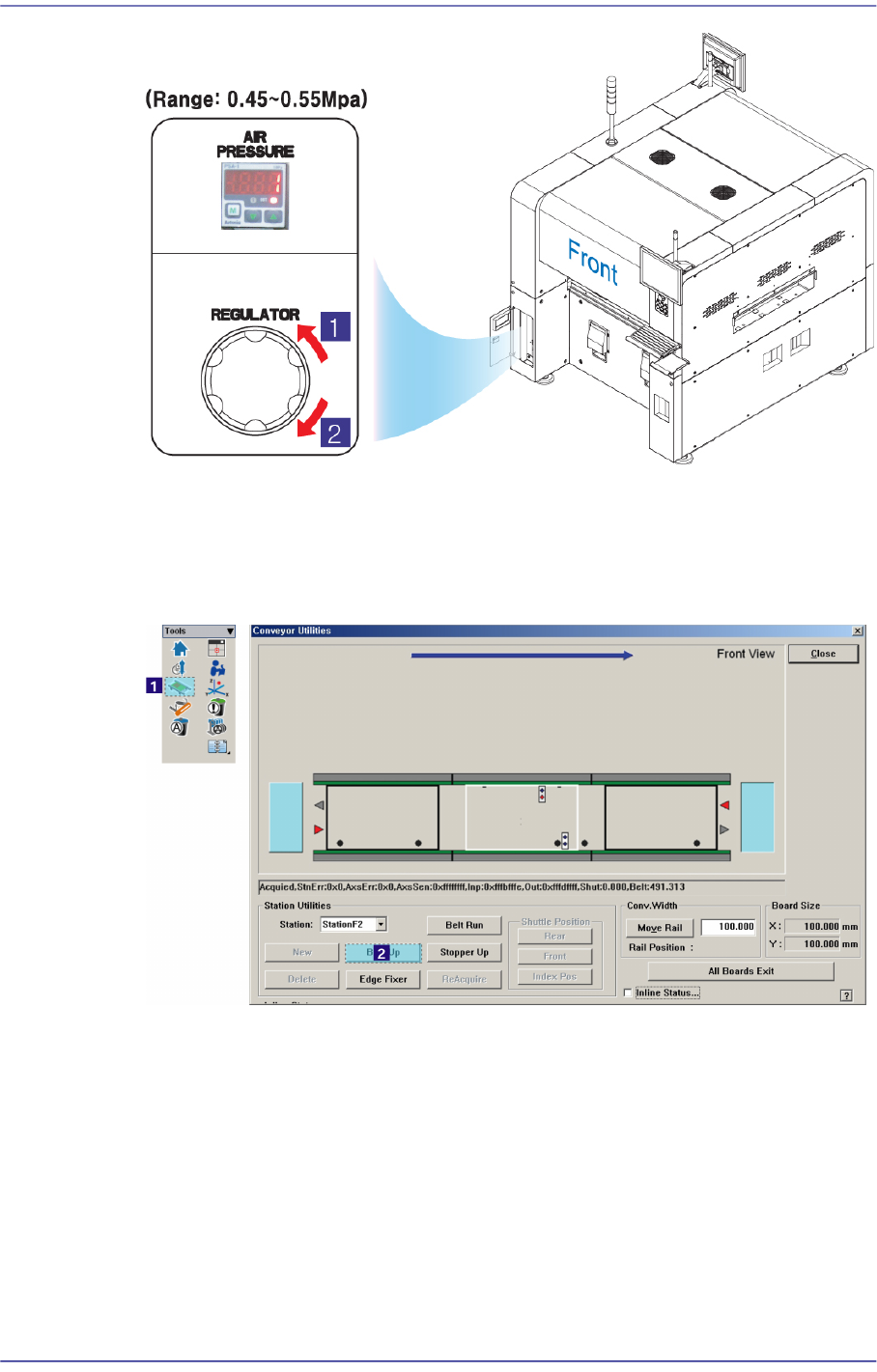
Check if pneumatic pressure is supplied normally (0.45-0.55Mpa) from the front
pressure gage.
1-66
Advanced Chip Shooter DECAN S2 Troubleshooting Guide
1: Pressure Decrease (Counterclockwise)
2: Pressure increase (Clockwise)
Check if the sensor related to the upward movement of the backup table operates
normally. If it is thought to have a problem, adjust the sensor position.
Check the wiring related to the upward movement of the backup table.
For further details, refer to section “Conveyor Board Interface (2/5)” in the Technical
Reference.
1-67
System Messages of the MMI and Solutions
Warning Please check the movement of the sensor and cylinder in
the ‘Diagnosis I/O’ of MMI.
As it is dangerous to check the sensor during the operation
of the equipment, be sure to check the equipment in stop
status (idle mode) after releasing “Ready”.
$3043 Check the sensor for upward movement of the backup table. [EMER LEVEL]
[Problem]
When the upward movement sensor failed to detect the upward movement of the
backup table.
[Solution]
Take measures same as those against the error code “$3042”.
$3044 Check the backup table downward movement sensor. [EMER LEVEL]
[Problem]
When the backup table downward movement sensor failed to detect the downward
movement of the backup table.
[Solution]
Take measures same as those against the error code “$3042”.
$3045 Check the state of the stopper. [EMER LEVEL]
[Problem]
When the corresponding stopper cannot move up/down due to mechanical
interference.
When pneumatic pressure is not supplied to the cylinder of the corresponding stopper
properly.
A problem occurred in the position and wiring of the sensor related to the upward or
downward movement of the corresponding stopper.
[Solution]
Turn off the Buzzer by pressing the “STOP” button.
Switch the machine to “IDLE” mode by pressing the “RESET” button.
If there is mechanical interference related to the upward/downward movement of the
corresponding stopper, remove it.
Check if the supplied pneumatic pressure is as high as the set pressure (0.45 ~ 0.55
MPa) by the air pressure gauge through air panel on the front side of the machine.