00192791-02.pdf - 第39页
User Manual 2 Ceramic Substrate Centering Unit Software Version S R.502.xx 01/01 Issue 2.3 Mechanical Ceramic Substrate Centering 39 'HVFUL SWLRQ RI)X QFWL RQ The major co mponents of the mec hanical cer …

2 Ceramic Substrate Centering Unit User Manual SIPLACE HS-50
2.3 Mechanical Ceramic Substrate Centering Software Version SR.502.xx 01/01 Issue
38
The building block of the mechanical substrate centering unit is adapted to the substrate size to
be placed - 50 mm to 140 mm - by installing the pertinent stop rail and the pertinent stop unit (kit
1, 2 or 3, Item no.: see table, Fig. 2.3 - 4). This adapting is described in Section 2.3.4.
7HFKQLFDO'DWD
2
Substrate sizes that can be cen-
tered, following pertinent setup of
the mechanical substrate centering
unit:
50 mm to 140 mm
Substrate thickness: Depends on the thickness of the PCBs
Substrate design: Without scratch: troublefree within the specified dimen-
sions
Scratched: After customer test, before starting the
placement
Width of contact in the conveyor: 2.5 mm
Y-centering when using the
mechanical ceramic substrate cen-
tering unit:
Positional accuracy in accordance with the tolerance of
the set conveyor width relative to the width of the sub-
strate.
No Y-centering by the mech. substrate centering unit.
Compressed air connection: Operating pressure 5.6 bar, compressed air branch
stopper
Clearance under the substrate
when using the mech. substrate
centering unit:
12 mm
Position recognition via PCB vision,
optional oblique illumination or PCB
camera multicolor.
When ceramic substrates are cen-
tered mechanically, recognition of
the position of the fiducials is
required.
There have to be at least 2 suitable fiducials on the
ceramic substrate.
The position recognition is selected on the basis of the
surface of the fiducials, as described in the appropriate
section:
- PCB vision: See User Manual
- optional oblique illumination:Section 2.6
- PCB camera multicolor: see single document "User
Manual PCB camera Multicolor", Item no. 00192790-01
User Manual 2 Ceramic Substrate Centering Unit
Software Version SR.502.xx 01/01 Issue 2.3 Mechanical Ceramic Substrate Centering
39
'HVFULSWLRQRI)XQFWLRQ
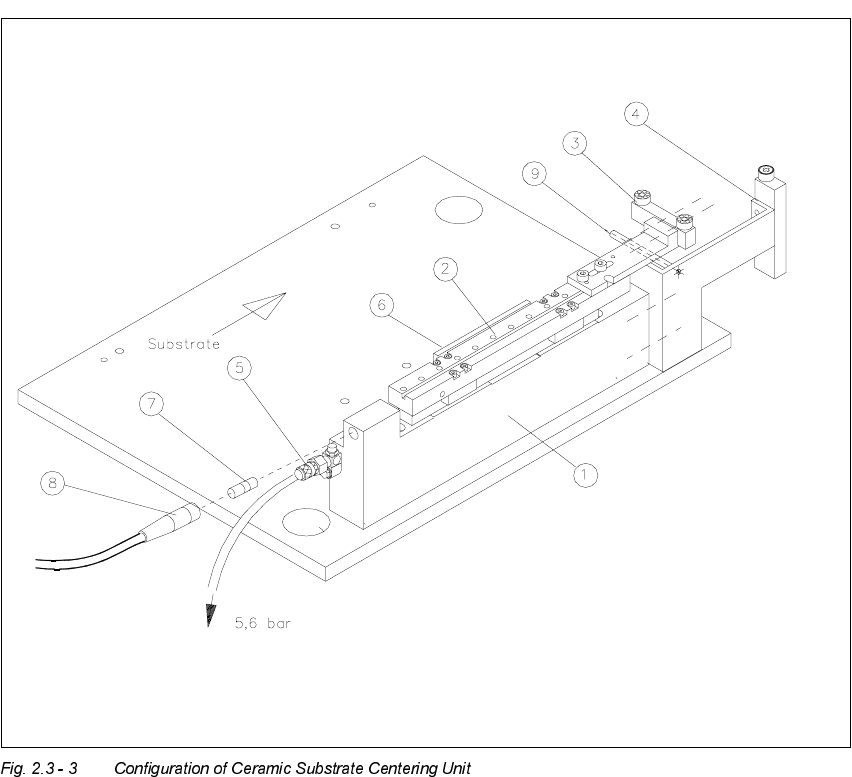
The major components of the mechanical ceramic substrate centering unit are the X-slide unit with
centering jaws which consists of a stop rail and stop unit at the front of the centering unit, a flat
cylinder with 5.6 bar compressed air connection, resetting spring, and inductive proximity switch
at the back (see Fig 2.3 - 3), that signals the condition "Centering unit open".
The triggering of the mechanical ceramic substrate centering and the monitoring of the proximity
switch are activated by the conveyor control. If an error occurs, the message "Error ceramic sub-
strate centering 1 / 2" is output at the station’s operating interface (see Section 2.3.6).
During the placement run, the substrate - like a PCB - is transported into the processing area
1 / 2 or 4 / 3 where it is recorded by the ultrasonic sensor. The stopper thereupon moves out, prep-
ositioning the substrate in X-direction, and the stopper then moves back.
When the ceramic substrate centering unit is open (in which state compressed air is present at
the ceramic substrate centering unit), it is lifted into the area of the substrate by the lifting table
and the signal "Lifting table at top" is triggered.
The mechanical X-centering follows: The pressure in the centering unit drops to zero. As a con-
sequence, the X-slide unit of the ceramic substrate centering unit moves forward and centers the
substrate in the X-direction (= transport direction) with the help of a tension spring between the
two ball bearings of the stop rail and the roller on the stop unit.
Following position recognition and completion of placement, the pressure of the compressed air
is exerted, opening the mechanical substrate centering unit.
The inductive proximity switch on the centering unit is tripped (switch signal => 1). When this sig-
nal "Ceramic substrate centering unit open" is received, the lifting table moves down with the open
centering unit and thus moves out of the path where substrates are transported.
The substrate is transported into the next conveyor area (intermediate conveyor / output con-
veyor).
2 Ceramic Substrate Centering Unit User Manual SIPLACE HS-50
2.3 Mechanical Ceramic Substrate Centering Software Version SR.502.xx 01/01 Issue
40
Key:
4. Body
5. X-slide unit
6. Stop rail 1, 2, or 3 (movable stop) with 2 ball bearings for 50 mm to 140 mm,
fastened with 2 socket head cap screws M3 x 8
7. Stop unit kit 1, 2 or 3 (fixed stop) with stationary roller of plastic AND distance bolt:
for 50 mm to 140 mm
8. Compressed air connection 5.6 bar / pneumatic hose
9. Flat cylinder and tension spring
10.Proximity switch
11.Proximity switch cable with plug-in connection
12.Distance bolt