00192791-02.pdf - 第46页
2 Ceramic S ubstrate Centering Unit User Manual S IPLACE HS-50 2.3 Mechanical Ceramic Substrate Centering Software Version SR.502.xx 01/01 Issue 46 3UREOHP5HVROXWLRQ6XEVW UDWHLVUDLV HG &KHFNLQJW…
User Manual 2 Ceramic Substrate Centering Unit
Software Version SR.502.xx 01/01 Issue 2.3 Mechanical Ceramic Substrate Centering
45
Using the single function "Ceramic substrate centering" in the conveyor menu it is possible to open
and close the mechanical substrate centering unit for test purposes (see Section 2.7.1).
After placing a substrate in the input conveyor, it is possible to conduct a substrate trial run as de-
scribed in Section 2.7.1 using the "Single functions" of the processing conveyor.
(UURU0HVVDJHV3RVVLEOH&DXVHVDQG5HPHG\
In case of raising the substrate during the centering process -> see Section 2.3.7.
In the event of an error, one of the following error messages is output at the station’s operator in-
terface:
– "Error, ceramic substrate centering 1" or
– "Error, ceramic substrate centering 2"
This stops the placement process.
The messages mean that the required condition of the mechanical substrate centering unit "open"
/ "closed"), which is interrogated by the proximity switch of the substrate centering unit, is absent.
Addition
means: The error is in processing area 1 or 4 (see Fig. 2.3 - 1).
Addition
means: The error is in processing area 2 or 3 (see Fig. 2.3 - 1).
Possible causes:
– There is a mechanical obstruction,
e.g., due to a component that is wedged in place and is preventing the X-slide from moving:
Å Remove the wedged component with a vacuum cleaner or, if necessary, with tweezers as
described under "Weekly Maintenance" in the Section 2.4.
– Ther is a malfunction at the tension spring on the flat cylinder:
Å Remedy the malfunction as described under "Monthly Maintenance" in Section 2.5.
– There is another malfunction:
Defect of the proximity switch / solenoid valve / leaky pneumatic connection, not plugged in
properly, cable conductors broken.
Å Notify the line engineer / service technician.

2 Ceramic Substrate Centering Unit User Manual SIPLACE HS-50
2.3 Mechanical Ceramic Substrate Centering Software Version SR.502.xx 01/01 Issue
46
3UREOHP5HVROXWLRQ6XEVWUDWHLVUDLV HG
&KHFNLQJWKH6WRSSHU3RVLWLRQ
While the substrat is beeing raised during the centering process os the substrate centering unit
conduct the following test run with substrate to check the psoitin of the stopper.
NOTICE
These jobs must be carried out for each ceramic substrate centering unit, i.e., for each processing
area.
When the centering unit is open, the substrate edge pointing in the direction of the unloader must
still be 0.5 mm IN FRONT OF that of the unmovable roller of the fixed stop (see Fig. 2.3 - 8).
When the substrate is raised while the centering unit is moving upward, the stopper position must
be adjusted - in the direction of the X-centering station -> Only by LINE ENGINEER.
Å Select the menu "Transport functions".
Å Place the substrate on the input belt
Å During the following step, keep an eye on the substrate and the closing movement of the X-
centering unit
± 7KHVXEVWUDWHLVQRWWRUDLVH
Å For the corresponding conveyor (processing area), select: PCB onto processing belt 1.
Å Select:PCB onto intermediate belt.
Å Carry out the above-described check on the function and the substrate/stopper position for pro-
cessing belt 2.
Select: PCB onto processing belt 2.
Å Select: PCB onto output belt.
Å If the stopper is in the right position, conduct a trial placement with substrate and check
whether the fiducials of the substrate can be reliably recognized. If necessary, select a different
type of illumination (see User Manual).
Å If the substrate is lifted when the open centering unit moves upward, the LINE ENGINEER
must adjust the stopper position (see Section 2.3.7.2).
User Manual 2 Ceramic Substrate Centering Unit
Software Version SR.502.xx 01/01 Issue 2.3 Mechanical Ceramic Substrate Centering
47
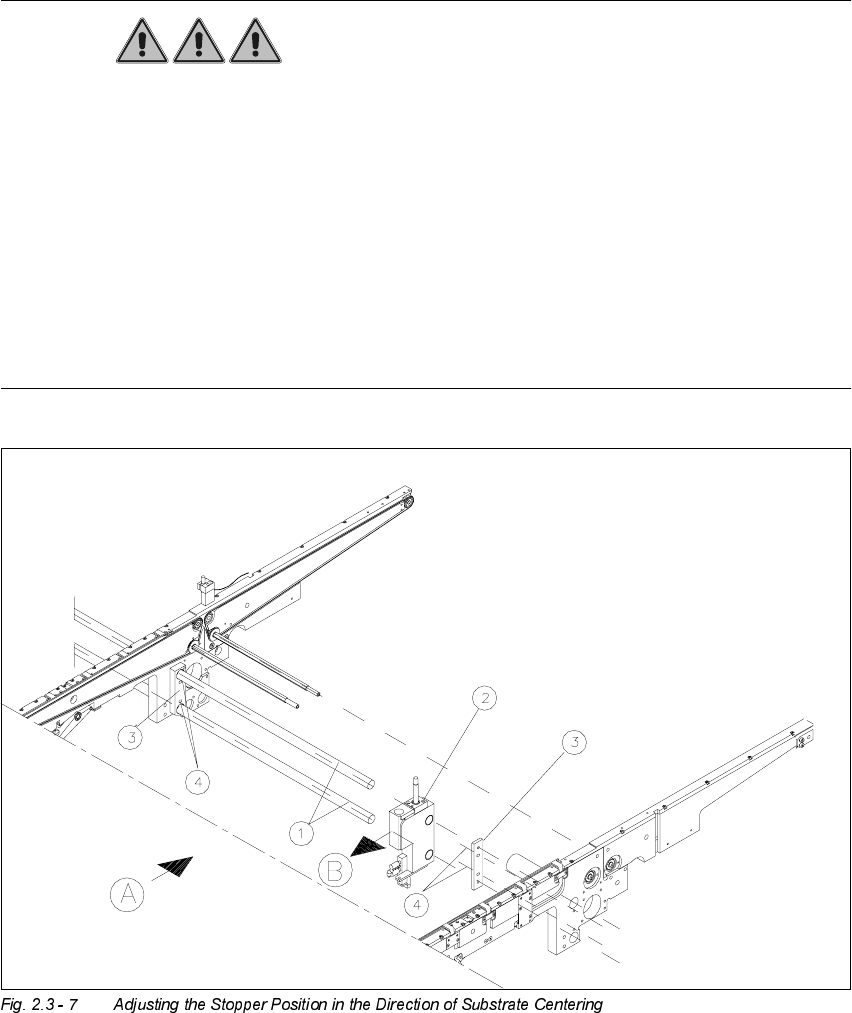
$GMXVWLQJWKH6WRSSHU3RVLWLRQ
DANGER
Only the line engineer is permitted to perform the following work.
The safety instructions in the chapter "Operational Safety" in the User Manual HS-50 take prece-
dence.
BEFORE any work, the machine must be switched OFF and isolated from the mains.
In addition, the compressed air feed must be switched OFF at the main valve of the compressed
air unit in the machine frame.
While working, secure the machine conscientiously against other persons and against being re-
started without authority. Proceed as described in the chapter "Locking of the Machine".
.H\
A) PCB / substrate transport direction
B) Direction for adjusting the postion of the stopper