00192791-02.pdf - 第60页
2 Ceramic S ubstrate Centering Unit User Manual S IPLACE HS-50 2.8 Configuration Ceramic Substrate Centering Software Version SR.502.xx 01/01 Issue 60 $FWLYD WLRQDQG&RQILJXUDWLRQRI&HUDPLF6 XEV WUDW H&…
User Manual 2 Ceramic Substrate Centering Unit
Software Version SR.502.xx 01/01 Issue 2.8 Configuration Ceramic Substrate Centering
59
&RQILJXUDWLRQ&HUDPLF6XEVWUDWH&HQWHULQJ
2Y HUYLHZ
The software SR V 502.xx is required to utilize the mechanical ceramic substrate centering unit
on HS-50.
In principle, using the mechanical ceramic substrate centering unit and/or the SW V502.xx is in-
dependent of the existing version of the conveyor control (TSP 100 / TSP 200).
However, when the option "Mechanical ceramic substrate centering HS-50" was to retrofitted, a
setup change was always made from TSP 100 to TSP 200.
Although the optional "Mechanical Ceramic Substrate Center Unit" with completely installed hard-
ware is automatically recognized due to the coding plug on the HS-50, it must be activated in
SITEST anyway.
On the HS-50, mechanical ceramic substrate centering is always combined with recognition of the
position of fiducials on the substrate.
Here, position is recognized with the PCB camera with normal illumination or with the optional ob-
lique illumination. If the machine is already fitted with the PCB camera multicolor, the fiducials are
always centered with this camera, as standard. In this case the optional oblique illumination is
eliminated.
Please note:
– If the hardware of the mechanical ceramic substrate centering is installed, it MUST be ACTI-
VATED in the menu "Machine configuration".
– If the mechanical ceramic substrate centering in the menu "Machine configuration" is deacti-
vated, the hardware MUST first be removed complete in BOTH processing areas of the perti-
nent conveyor, i.e., the plug-in connections of the option must also be unplugged on the
conveyor control.
In parallel, the conveyor assemblies must be converted to transport the PCBs.
2 Ceramic Substrate Centering Unit User Manual SIPLACE HS-50
2.8 Configuration Ceramic Substrate Centering Software Version SR.502.xx 01/01 Issue
60
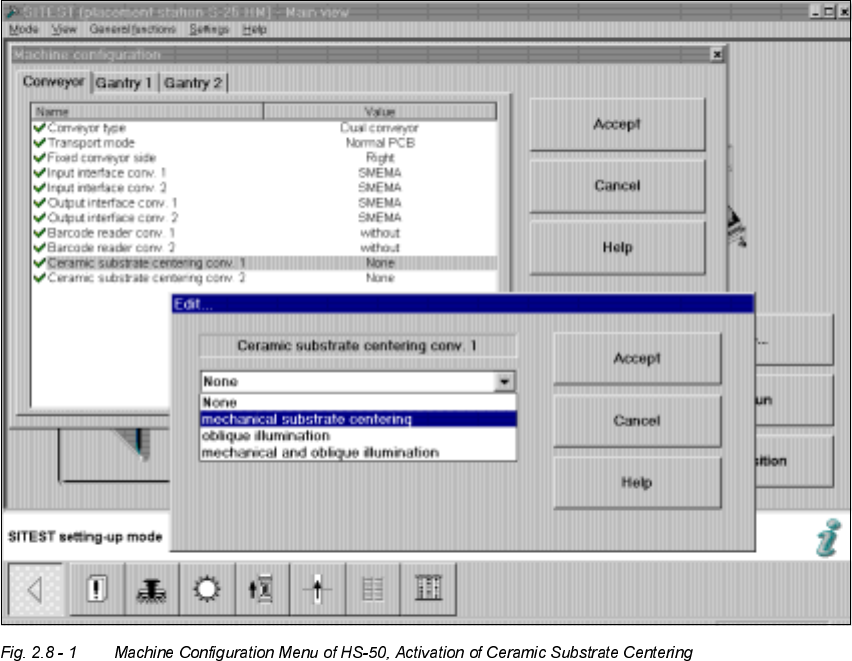
$FWLYDWLRQDQG&RQILJXUDWLRQRI&HUDPLF6 XEV WUDW H&HQWHULQJ
Å Start the SITEST program.
Å Select "Settings" in the menu bar.
Å In the menu "Machine configuration" select the option "Ceramic substrate centering
" (= pro-
cessing range 1 and 2) -> "Edit".
The "Edit" window is indicated, as follows:

User Manual 2 Ceramic Substrate Centering Unit
Software Version SR.502.xx 01/01 Issue 2.8 Configuration Ceramic Substrate Centering
61
Å The following options are available in the "Edit" window.
CAUTION
The options "Additional PCB camera illumination" or "None" are not relevant for ceramic substrate
centering.
However, if you do select one of these options, you must first DEinstall the entire mechanical ce-
ramic substrate centering unit and restore PCB clamping on the pertinent conveyor as described
in the Service Manual.
If you fail to do so, the next PCB or the mechanical substrate centering unit may be damaged. 2
Å If you want to use the mechanical ceramic substrate centering in combination with the sub-
strate position recognition via PCB camera (normal illumination) or PCB camera multicolor, se-
lect:
0HFKDQLFDOFHQWHULQJVW DWLRQ-> "Accept".
Option in the "Edit" window Explanation
None Normal transport of PCBs with PCB clamping and PCB
position recognition via PCB camera (normal illumination)
or with PCB camera multicolor.
The hardware of the mechanical ceramic substrate center-
ing has to be removed and the conveyor must be equipped
to clamp PCBs.
Mechanical centering station Mechanical ceramic substrate centering AND substrate
position recognition via PCB camera (normal illumination)
or optinonal PCB camera multicolor.
Additional PCB camera illumina-
tion
No mechanical centering,
ONLY position recognition via optional oblique illumination
(annular illumination).
-> Oblique illumination is ONLY possible for both convey-
ors.
CAUTION:
For this purpose, the hardware of the mechanical ceramic
substrate centering has to be removed and the conveyor
must be equipped to clamp PCBs.
Mechanical and oblique illumi-
nation
Mechanical substrate centering AND substrate position rec-
ognition illumination via optional oblique illumination of the
PCB camera.
-> Oblique illumination is ONLY possible for both convey-
ors.