YSM20&40_how_to_change_directionPDFA.pdf - 第8页
Service Engineer Service Information SI1407002E - 000 =YSM40_How to change the board flow direction (Tentative measure) 8/ 24 3. Move the fiber sensor (Re ceiver) position. Remove the brack et and move the f iber sensor …
Service Engineer
Service Information
SI1407002E-000=YSM40_How to change the board flow direction (Tentative measure)
7/24
2. Change the board flow direction
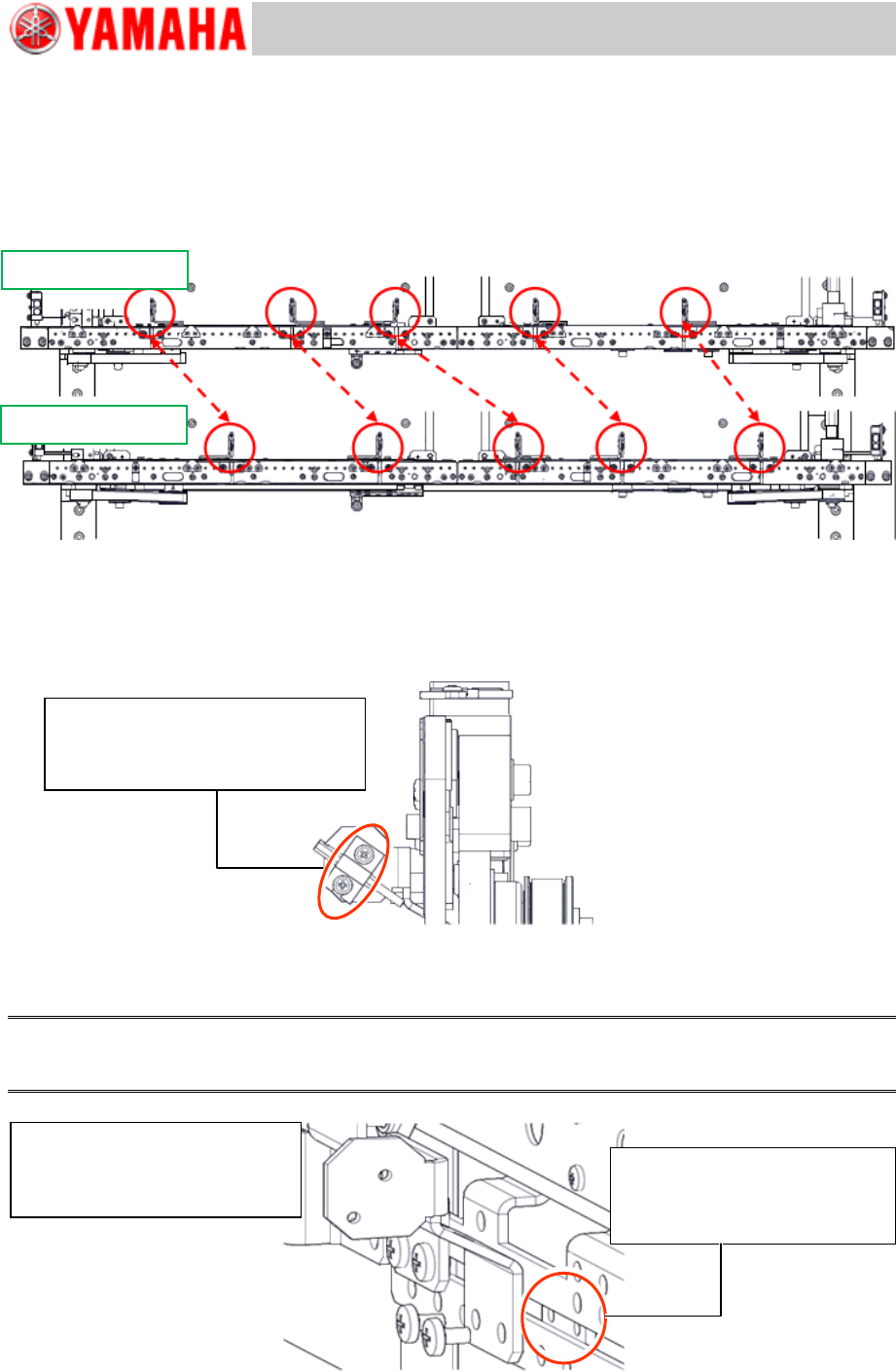
2.1 Change the positions of the Transit position sensors
The positions of the Transit position sensors vary depending on the board flow direction.
Change the positions of the Transit position sensors and the brackets.
Figure 6
1. Remove the fiber sensor (Emitter).
As the positions of the sensor brackets need to be changed for changing the board flow direction,
remove the fiber sensor (Emitter).
Make sure to set the removed fiber sensor back to its original position.
Figure 7
2. Remove the sensor bracket.
Use the removed bracket for the opposite side lane.
Note:
When removing the bracket, be careful not to lose the plate nut that is behind the bracket to secure it
with the screws.
Figure 8
From Right to Left
From Left to Right
Sensor is secured with a bracket.
Remove the bracket with a
screwdriver.
Be careful NOT TO LOSE the
plate nut when removing the
bracket.
The sensor is secured with the
bracket.
Remove it with a screwdriver.
Service Engineer
Service Information
SI1407002E-000=YSM40_How to change the board flow direction (Tentative measure)
8/24
3. Move the fiber sensor (Receiver) position.
Remove the bracket and move the fiber sensor (Receiver) position.
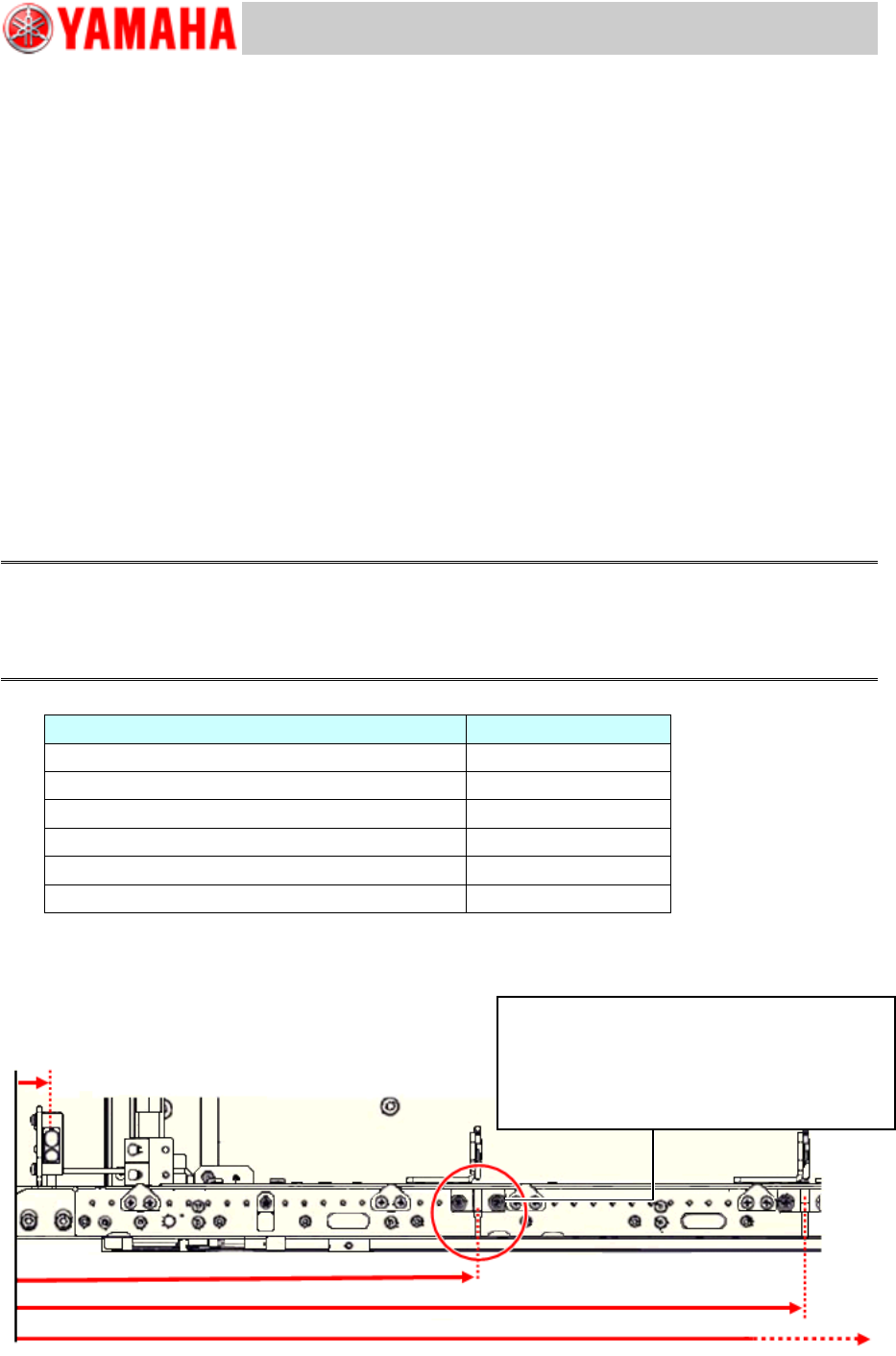
The sensor position shown in the table below is the distance from the conveyor edge on the board
carry-in side.
Measure the distance from the conveyor edge and adjust the sensor position as follows.
<Board flow direction>
From Right to Left: Distance from the right side edge of the conveyor
From Left to Right: Distance from the left side edge of the conveyor
<Note for the work>
Adjust the sensor position by using a tape measure or a ruler.
When moving the sensor, DO NOT PULL the fiber wires. Cut off the cable ties that secure the
fiber wires as needed, and then bundle them again after adjusting the position.
Adjust the fiber sensor (Receiver) position so that it protrudes from the conveyor edge from
1mm to less than 3mm.
If the sensor protrudes 3mm or more from the conveyor edge, it may interfere with the
mounted component.
Caution:
As YSM40 is not equipped with the stoppers on the conveyor, it is possible to perform production even
though the sensor position is slightly shifted.
However if the position is significantly shifted, it may negatively affect the production speed and the
maximum board size that the mounting can be performed.
PCB detection sensor
Position (mm)
Lane 1 Conveyor 1 Entrance Port
18
Lane 1 Conveyor 1 Transit position 1
239
Lane 1 Conveyor 1 Transit position 2
409
Lane 1 Conveyor 2 Transit position 1
567
Lane 1 Conveyor 2 Transit position 3
847
Lane 1 Conveyor 1 Exit Port
978
Table 1
* The position of the Entrance port and the Exit port sensors do not need to be adjusted.
Figure 9
(18)
(409)
(239)
Lane 1 Conveyor 1 Transit position 1
Fix the bracket at the position 239mm (or
closest to 239mm) from the conveyor edge
on the Entrance side.
Service Engineer
Service Information
SI1407002E-000=YSM40_How to change the board flow direction (Tentative measure)
9/24
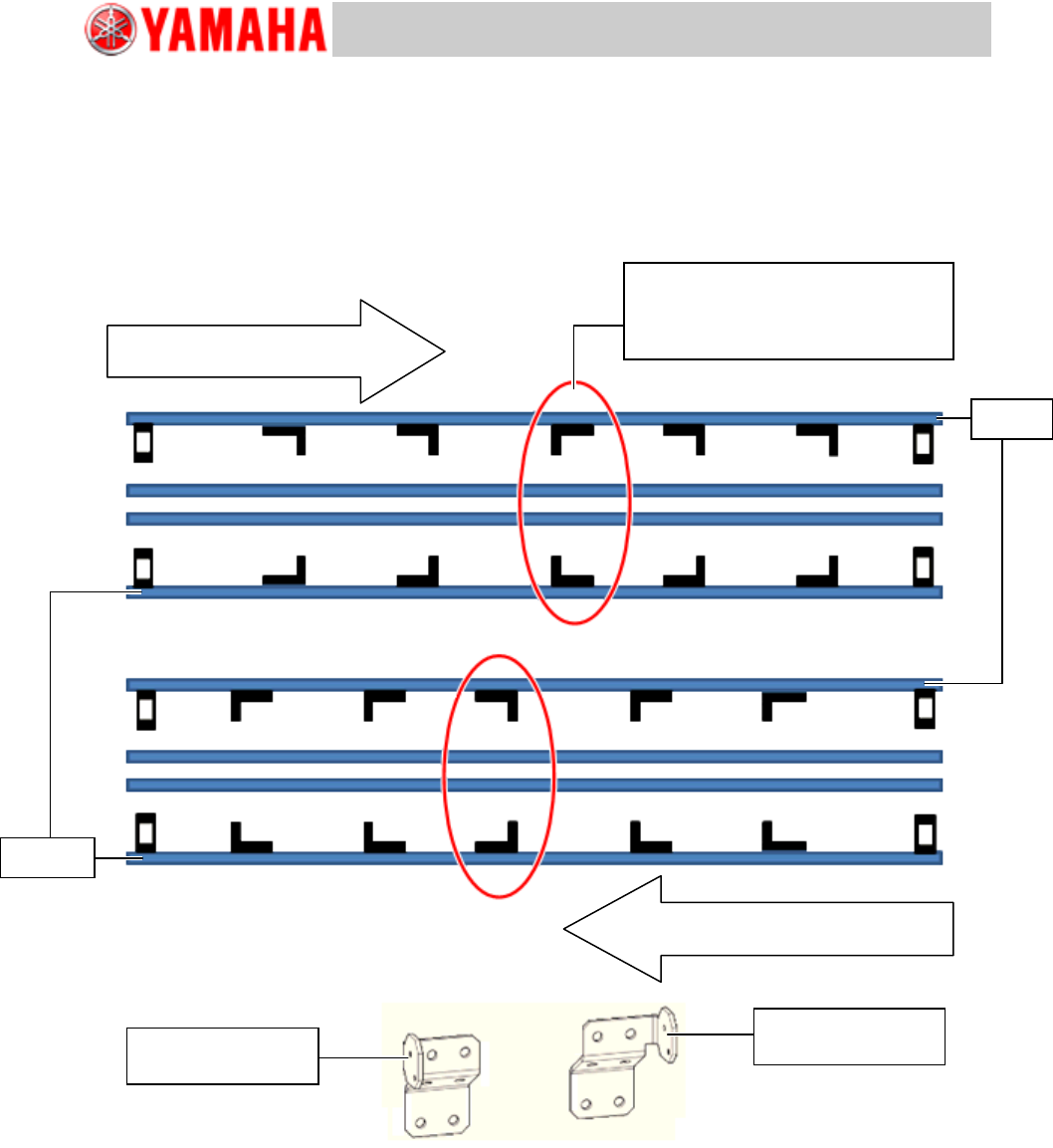
4. Temporarily attach the brackets.
Attach the brackets removed in step 2. Interchange the brackets between the Lane 1 and the Lane
2.
See the figure below for the orientation of the brackets.
As the optical axis position of the sensor will be adjusted later on, attach the brackets only
temporarily.
[Orientation of the brackets]
Figure 10
Board flow direction:
From Left to Right
Board flow direction:
From Right to Left
Set the other type of the bracket of
the brackets on the same lane.
KLF-M912A-01
BRKT., SENSOR
Lane 1
Lane 2
KLF-M912A-51
BRKT., SENSOR