N7201A616E00_0317.pdf - 第354页
NPM-W 2 EJM7DE-MB-05O-0 0 Defec- tive PCB process 5-5-1 -1 Operating procedure 5-5-1 How to remove a defective PCB resulting in inspecti on and how to repair the defective PCB are explained. 3 1 Remove a defective PCB Re…
NPM-W2 EJM7DE-MB-05O-00
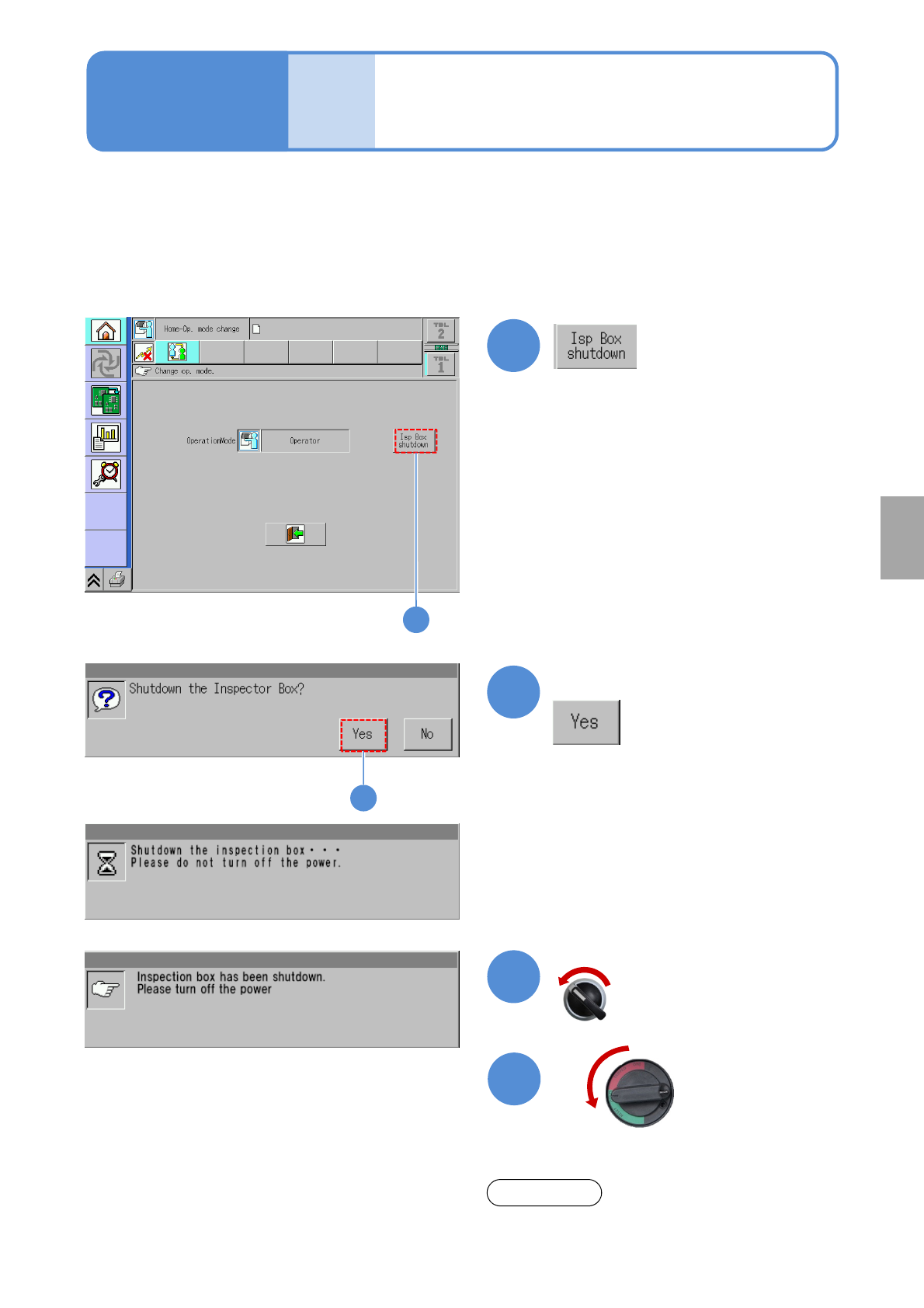
Finishing production
Produc-
tion
5-4-5
1
1
2
2
3
4
OFF
Confirm the message
Confirm the message
Even though the message background blinks, it is
not machine trouble.
NOTE
Servo switch OFF
Since the inspection box (PC and UPS—Uninterruptible Power Supply) is connected to the machine with the
inspection head, shut down the inspection box before turning off the power to the machine.
●Failing to do so may shorten a battery life of UPS or disable communication with the inspection box next
time.
●When communication with the inspection box cannot be established, shut down the machine and wait for
one minute or more before restarting the machine.
Operating procedure
5-4-5
Solder
inspection
NPM-W2 EJM7DE-MB-05O-00
Defec-
tive PCB
process
5-5-1-1
Operating procedure
5-5-1
How to remove a defective PCB resulting in inspection and how to repair the defective PCB are explained.
3
1
Remove a
defective PCB
Restart
transportation
2
Repair the
defective part
● Turn ON a transport
restart switch (such as
the foot switch)
● The signal tower lights
up and a buzzer sounds.
●Cancel the [NG eject
reset] on the inspection
monitor.
(→P.5-4-3 ‘Explanation of
the screen’)
Overview
■Inspection ejection conveyor specifications
●PCB judged as defective suspends on the ejection conveyor and PCB judged as good does not suspend.
(→[NPM-W2 specification])
●When APC is used, do not insert the PCB except for the one being produced from the inspection ejection
conveyor.
●Process during transportation restart
A) If a PCB stays on the conveyor
The PCB is unloaded to the downstream process and the next PCB is allowed to load after unloaded.
B) If no PCB is on the conveyor after the PCB removed
PCB can be loaded from the upstream process.

NPM-W2 EJM7DE-MB-05O-00
Depending on solder inspection conditions and the presence/absence of a defective PCB being at rest on the
ejection conveyor, the processing method differs. Use solder inspection condition suitable for your production
pattern. (→P.5-5-2)
Solder inspection condition
Whether defective PCB
stops or not
1)
Processing method
Placement after all solders
inspection
Stops
●When skipping placement on PCB
3)
After removing an unplaced PCB,
dispose of it, or clean it for reuse.
●When selecting “NG placement”
Check or repair the defective part of
a component or solder.
Placement by pattern after all
solders inspection
No stopping
2)
●When skipping placement in a
pattern
3)
Dispose of a defective pattern with no
components placed.
●When selecting “NG placement”
Check or repair the defective part of a
component or solder.
Solder inspection right before
placement
Stops
●When skipping placement on PCB
4)
Check or repair the defective part of a
component or solder.
●When selecting “NG placement”
Check or repair the defective part of a
component or solder.
■Defective PCB processing
1) Since PCB cannot be repaired or removed before reflow without setting up an ejection conveyor, it is
recommended to use [Placement after all solder inspection] or [Placement by pattern after all solders
inspection] as the solder inspection condition.
2) When NG placement is selected for the defective part of solder during the over judge input, the ejection
conveyor stops for verification of PCB.
3) When component inspection comes after solder inspection, the component inspection will not be
conducted on the skipped pattern.
4) When component inspection comes after solder inspection, the component inspection will not be
conducted on the skipped PCB. Component inspection, however, will be conducted on the PCB flowing
into the process downstream from the ejection conveyor since it is considered as a repaired PCB.
5-5-1-2
Solder
inspection