N7201A616E00_0317.pdf - 第411页
NPM-W 2 EJM7DE-MB-06O-0 0 6-1-16 -2 J XY action speed You can check and edit the XY speed in production. K Spew speed You can c heck and edit the dispensing speed (r otation speed o f the sc rew shaft) in dis pensing ope…
NPM-W2 EJM7DE-MB-06O-00
6-1-16-1
A
A
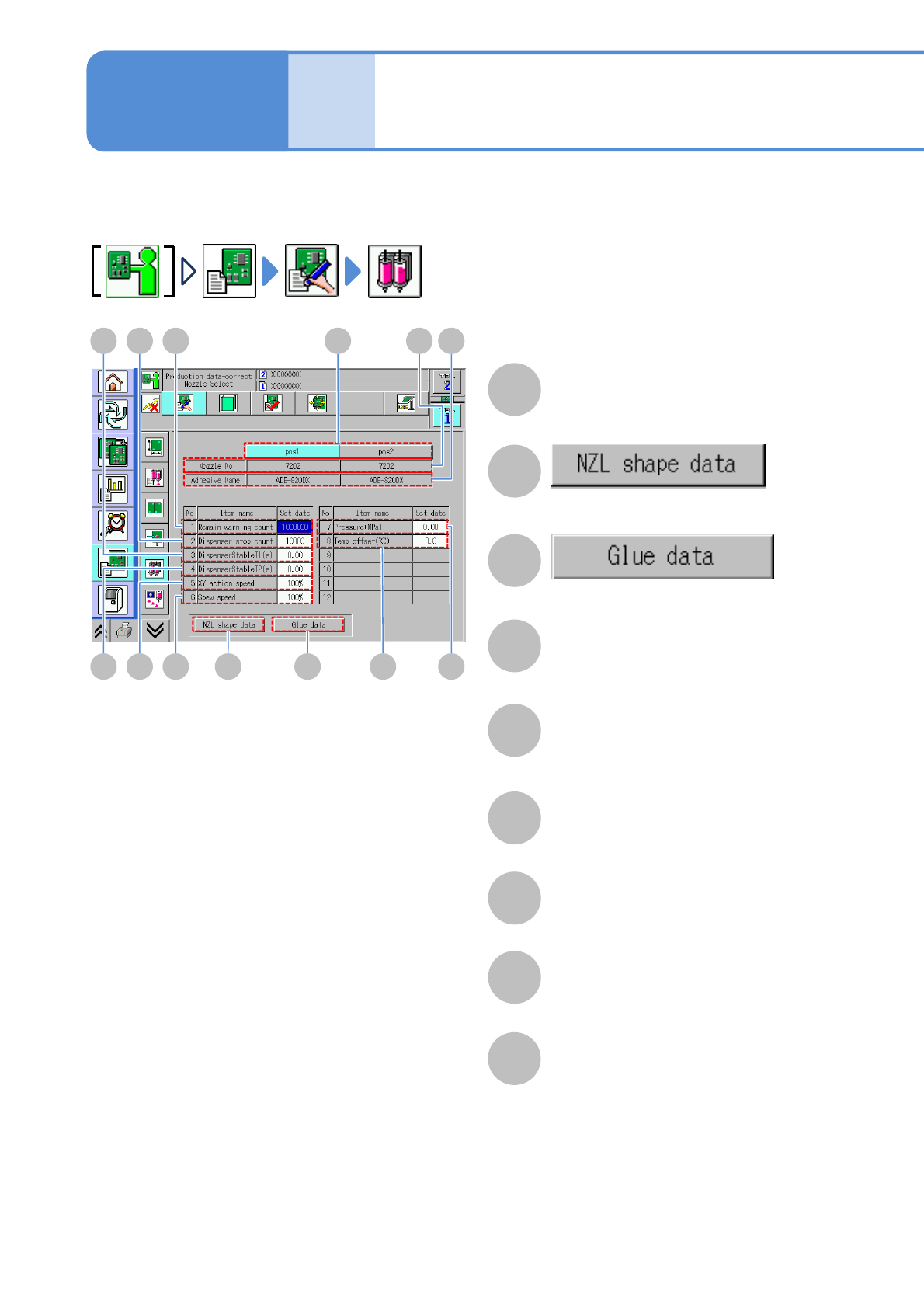
Nozzle selection data
edit (dispensing head)
pos1/pos2
You can check and modify the nozzle control parameter information used by each head.
F
I B
E
Control parameters of the selected
nozzle position are displayed
DGH
J K C LM
B
The library screen of the nozzle shape
data is displayed.
C
The library screen of the adhesive data
is displayed.
D
Nozzle number
The nozzle shape code number of the
nozzle shape data used by the head is
displayed.
E
Adhesive Name
The adhesive name of the adhesive
data used by the head is displayed.
F
Remain warning count
You can check and edit the remaining
count warning.
G
Dispenser stop count
You can check and edit the dispensing
stop count.
H
DispenserStableT1 (s)
You can check and edit the dispensing
stabilizing timer (before dispensing).
I
DispenserStableT2 (s)
You can check and edit the dispensing
stabilizing timer (after dispensing).
Data
editing
Operating procedure
6-1-16

NPM-W2 EJM7DE-MB-06O-00
6-1-16-2
J
XY action speed
You can check and edit the XY speed in
production.
K
Spew speed
You can check and edit the dispensing
speed (rotation speed of the screw
shaft) in dispensing operation.
L
Pressure(MPa)
You can check and edit the air pressure
supplied to the syringe.
M
Temp offset (℃)
You can check and edit the material
temperature on a control temperature
unit. Offset value added to the
temperature set in the adhesive library
is set to the temperature control unit.
Setting
change
NPM-W2 EJM7DE-MB-06O-00
6-1-17-1
A
A
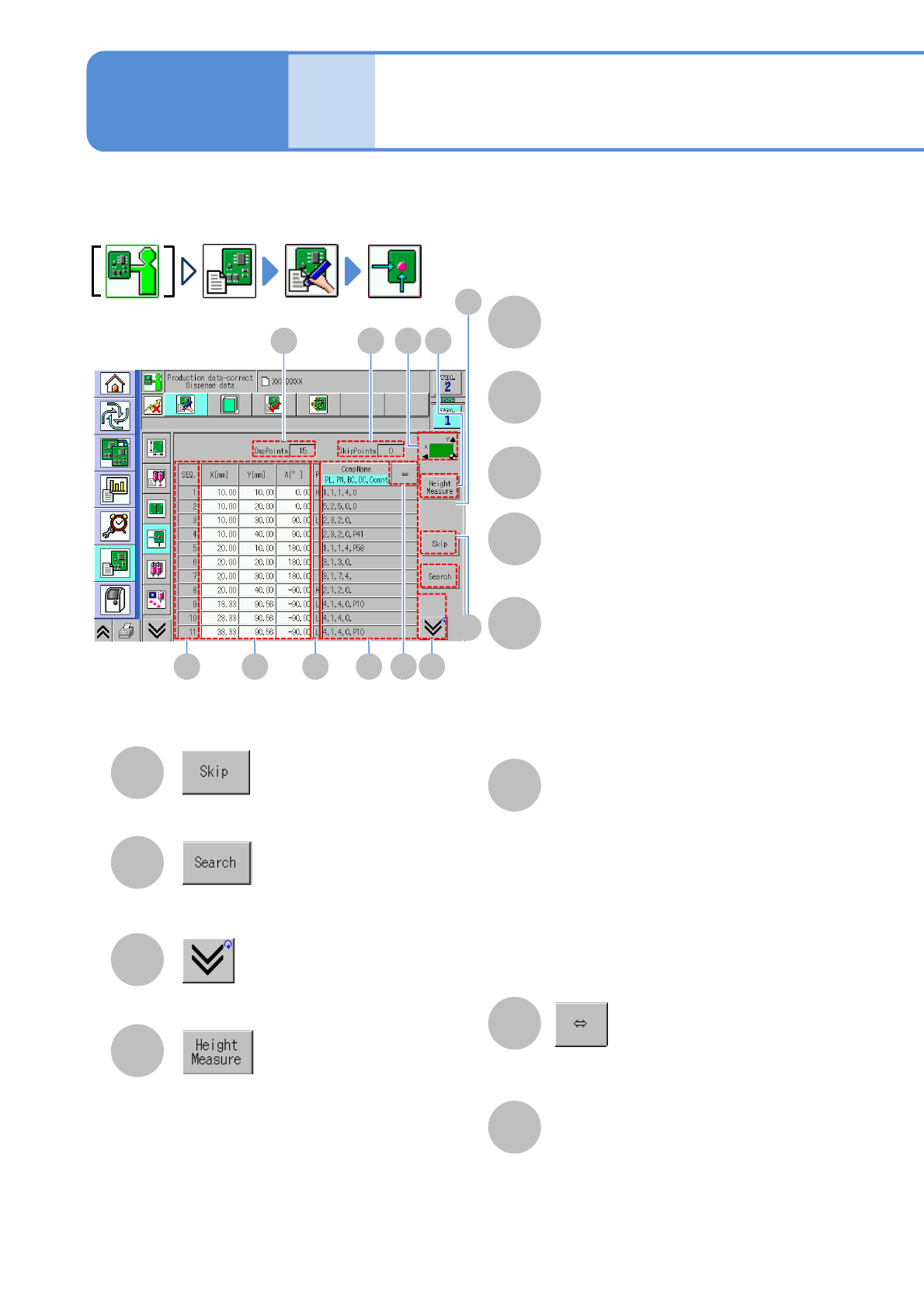
Dispensing data edit
(dispensing head)
DspPoints
You can check and modify the dispensing data.
C
The total number of dispensing points is
displayed.
B
SkipPoints
The total number of skipped points is
displayed.
C
SEQ.
The sequence number of the dispensing
point is displayed.
D
X[mm], Y[mm], A[°]
Dispensing-point coordinates are
displayed.
E
P
An order of priority of dispensing point is
displayed.
Blank when the PCB is placed after
dispensing.
When dispensing and placement are
performed alternatively, ‘L’ is displayed
for as a priority.
F
CompName/PL,PN,BC,DC,Com
nt
Switches the display between
‘CompName’ and ‘PL, PN, BC, DC,
Comnt’ (part list number of linked
components, pattern recognition number
of dispensing point data, dispensing
condition of dispensing point data,
numbers of multipoint/dispensing of
linked component data (0 for invalid
multipoint/dispensing),comment).
G
Shows the rest of the component name
by scrolling.
B
D E F G
L
I
H
K
J
H
Coordinate reference bitmap
display
The bitmap showing the coordinate
reference is displayed.
I
Sets/Clears the skip settings.
J
Searches SEQ, coordinates, and
comments.
K
Scrolls up and down the list.
L
The local height measurement data is
displayed.
The transit is possible only if the local
height measurement data is set.
Data
editing
Operating procedure
6-1-17