N7201A616E00_0317.pdf - 第421页
NPM-W 2 EJM7DE-MB-06O-0 0 6-1-19 -2 F Check item Area check: This shows whether the area inspectio n function is enable d or not. Nozzle total check: This shows whether the nozzle cloggin g inspection function is enabled…
NPM-W2 EJM7DE-MB-06O-00
F
6-1-19-1
B
A
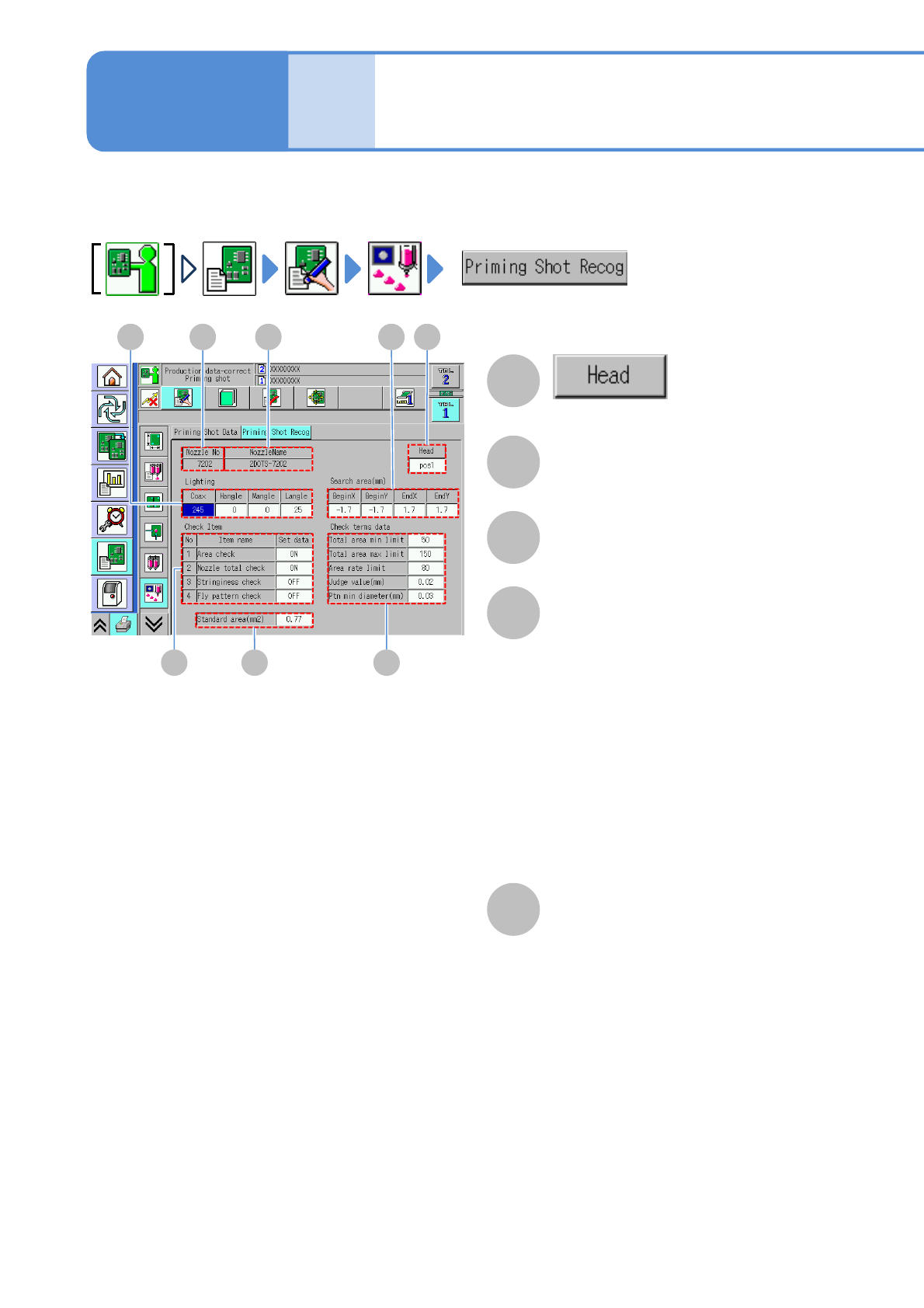
You can view and set various recognition data used in dummy dispensing recognition
The applicable nozzle position is
displayed.
B
Nozzle No
C
NozzleName
D
Lighting
Brightness of the head camera lighting is
displayed.
Coax:
The lamp value of the coaxial is displayed.
H-angle:
The lamp value at the high angle is
displayed.
M-angle
The lamp value at the middle angle is
displayed.
L-angle
The lamp value at the low angle is
displayed.
E
Search area (mm)
Begin X:
The X coordinate at the lower left of the
search area is displayed.
Begin Y:
The Y coordinate at the lower left of the
search area is displayed.
End X:
The X coordinate at the upper right of
the search area is displayed.
End Y:
The Y coordinate at the upper right of
the search area is displayed.
ACD
G
E
H
Data
editing
Operating procedure
6-1-19
Dummy dispensing
recognition data edit
(dispensing head)
NPM-W2 EJM7DE-MB-06O-00
6-1-19-2
F
Check item
Area check:
This shows whether the area inspection
function is enabled or not.
Nozzle total check:
This shows whether the nozzle clogging
inspection function is enabled or not.
Check:
This shows whether the stringiness
inspection function is enabled or not.
Fly pattern check:
This shows whether the skipped pattern
inspection function is enabled or not.
G
Check terms data
Total area low limit (%) :
The lower limit of the total area is
displayed.
Total area up limit (%) :
The upper limit of the total area is
displayed.
Area rate limit (%) :
The limit of the large/small area ratio is
displayed.
Judge value(mm) :
The stringiness judgment value is
displayed.
Ptn min diameter (mm) :
The minimum pattern diameter is
displayed.
The minimum pattern diameter size
should be set to a value lower than the
hole diameter of the nozzle used.
H
Standard area (mm
2
)
Setting
change
NPM-W2 EJM7DE-MB-06O-00
6-1-20-1
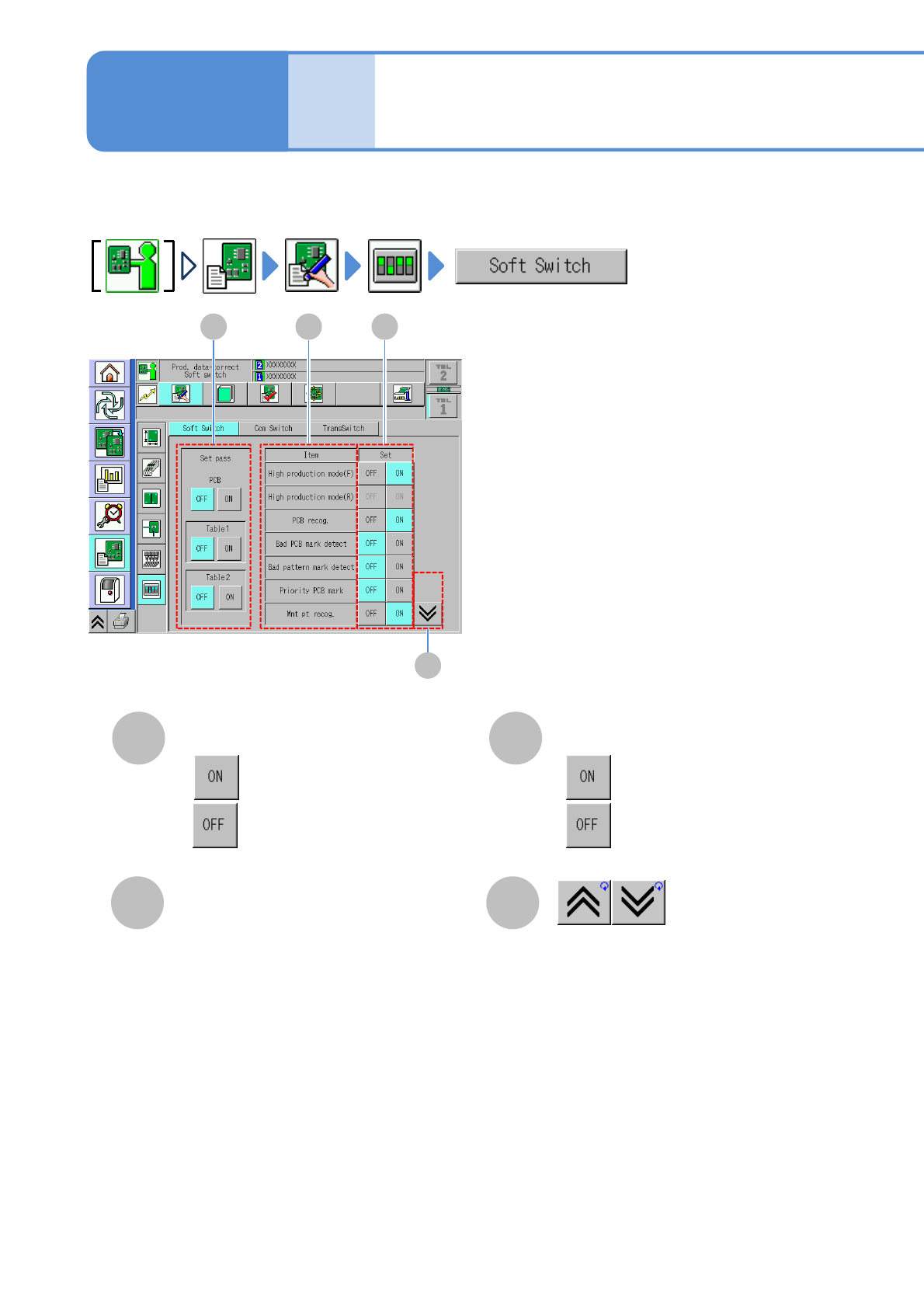
You can set the operation conditions or switch a pass table between ON and OFF.
A
D
B
Item
Shows the previous or next table.
Set
C
Data
editing
Soft switch setting
Displays soft switch items.
●
●
:Enable.
:Disable.
Operating procedure
6-1-20
A
B
C
D
Set pass
●
●
:Pass.
:Not pass.
About settings other than the items
in the next page, see the operating
instruction of NPM-DGS.