N7201A616E00_0317.pdf - 第702页
NPM-W 2 EJM7DE-MB-09O -00 9-1-9 -1 Specifi- cation A utoma tic suppor t pin c hange 1 Operating procedure 9-1-9 Item Specification Configuration Applicable PCB Single conveyor Maximum:750 mm(L) x 550 mm(W) / Minimum:50 m…

NPM-W2 EJM7DE-MB-09O-00
9-1-8-4
At
a glance
NPM-W2 EJM7DE-MB-09O-00
9-1-9-1
Specifi-
cation
Automatic support pin
change 1
Operating procedure
9-1-9
Item Specification
Configuration
Applicable
PCB
Single conveyor
Maximum:750 mm(L) x 550 mm(W) / Minimum:50 mm(L) x 50 mm(W)
Dual conveyor
Dual lane mode
Maximum:750 mm(L) x 260 mm(W) / Minimum:50 mm(L) x 50 mm(W)
Single lane mode
Maximum:750 mm(L) x 510 mm(W) / Minimum:50 mm(L) x 50 mm(W)
Function
Data creation function
of the support pin
arrangement
Checking the reverse side image downloaded to the DGS window with the
placement coordinates of the front side, the machine visually decides the
arrangement of support pins and creates the production data.
●The data is created on DGS.
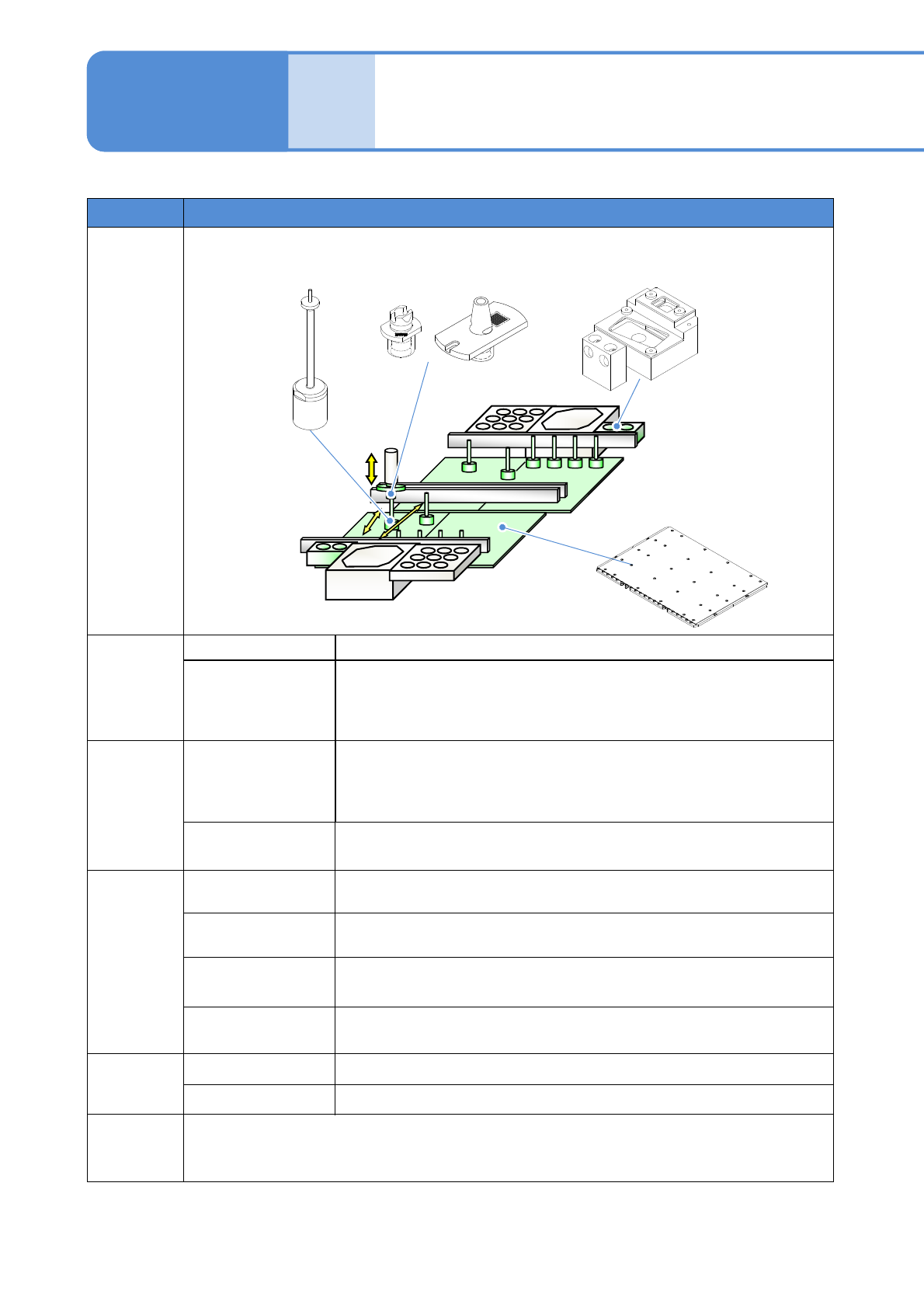
Support pin automatic
arrangement function
The support pins (for automatic change) are automatically arranged using the
nozzle for support pins based on the production data.
Arrangement
conditions
Head
Placement head (16-/12-/8-/3-nozzle head)
Arrangement pitch
Minimum pitch: 16 mm (XY-direction)
The number of pins
Up to 40 pins/PCB * Note, however, that for L≦350mm, up to 20 pins/PCB
Arrangement data
Enables to create and choose the arrangement data per machine
Applicable
nozzle
100-nozzle
For 16-,12-,8-nozzle head
1100-nozzle
For 3-nozzle head
Arrangeme
nt time
100s/PCB
(350 mm x 260 mm The optimum condition value when 10 pins are arranged at the center of the
PCB)
Support pin
(for automatic change)
Support pin nozzle
Nozzle changer
for support pin
PCB-support block
(for automatic change)
*As for the machine without head, or with the inspection head or dispensing head installed, support pins
on all lanes are changed by the placement head on one lane. Because automatic change for the support
pins are not allowed by the machine without head or with only the dispensing head installed, make sure
you install the placement head to one lane head.
NPM-W2 EJM7DE-MB-09O-00
9-1-9-2
1. Do not apply strong impact on the support pin (for automatic change) such as dropping. It may deform
the pin. Also do not use a deformed support pin (for automatic change).
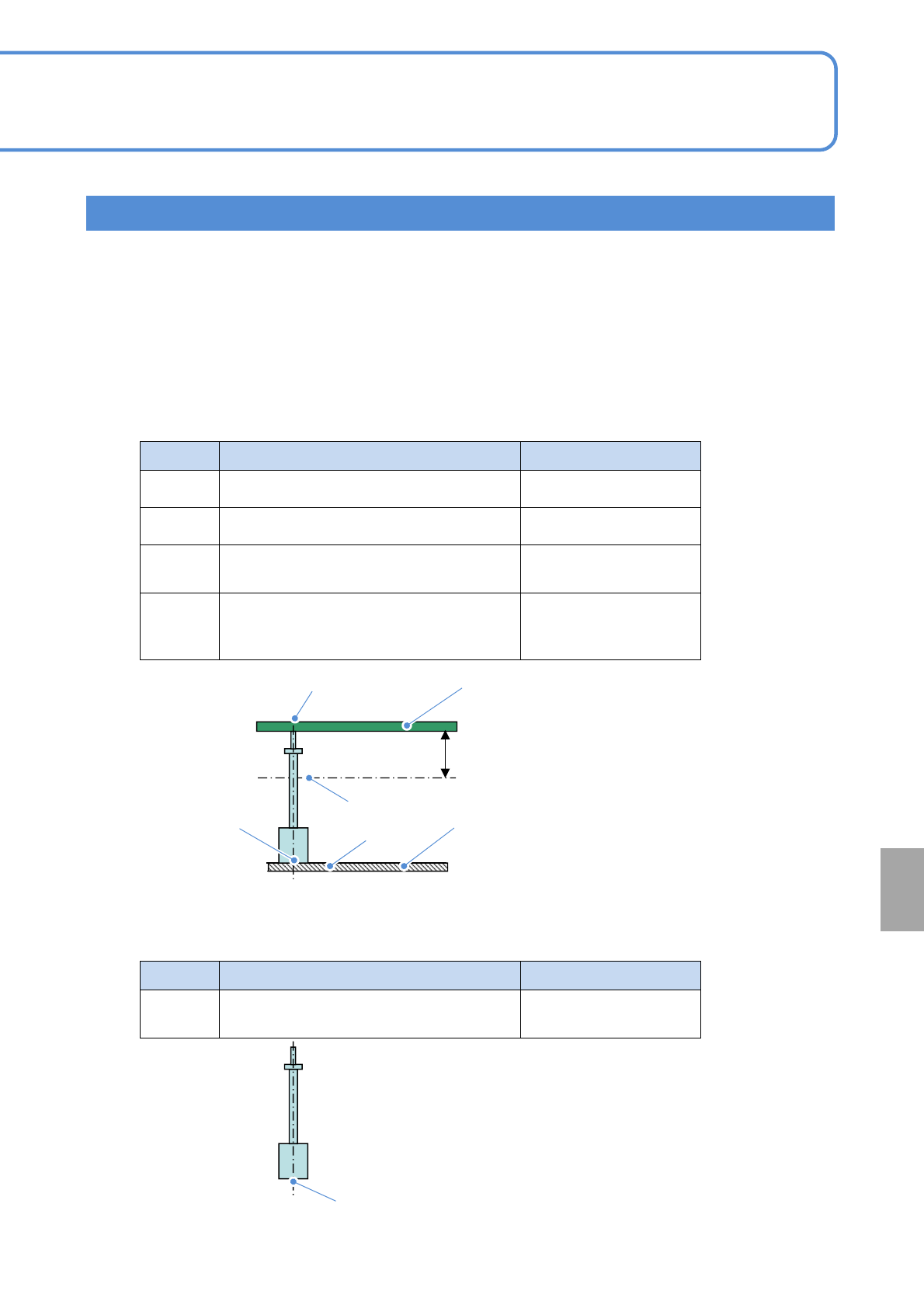
2. The support pin (for automatic change) uses a magnet.
It may have an affect on an electrical component being mounted (e.g. inductor). Looking at electrical
component specification and magnetic flux density under the condition described table below, be careful
while handling the support pin.
Symbol Location Magnetic flux density
A
PCB top surface 1.5 mT(15 G)
B
Bottom of a PCB 28mm 6 mT(60 G)
C
Support block top surface around the
support pin (for automatic change)
50 mT(500 G)
D
Between bottom surface of the support pin
(for automatic change) and support block
top surface
500 mT(5000 G)
●Magnetic flux density (reference value)
Installation condition
28 mm
PCB
A
B
D
C
PCB-support block
(for automatic change)
Symbol Location Magnetic flux density
E
Support pin (for automatic change) bottom
surface
320 mT(3200 G)
Single pin condition
E
At
a glance
Handling precautions