DFD6361-Maintenance.pdf - 第207页
B-135 Procedur es for setting a monitor value of v acuum press ure The procedure shown below is an e xample of the setting vacuum pressure monitoring value of the chuck table workpiece vacuum. Step No. Do This 1 Press th…
B-134
4-5. Setting a Monitor Value of Vacuum Pressure
DFD6351 and DFD6361's control mechanism for the vacuum pressures
Among the five vacuum lines of DFD6351 and DFD6361, the following four
line excluding the spinner table vacuum use a mechanism to save air
consumption.
- Chuck table workpiece vacuum
- Chuck table vacuum
- Upper arm vacuum
- Lower arm vacuum
In the vacuum lines of traditional models, the air is supplied to the ejector all
the while vacuum operation is performed.
DFD6351 and DFD6361, however, continuously monitors the changes in the
vacuum pressure and the air is supplied to the ejector only when the vacuum
pressure drops to or lower than a threshold.
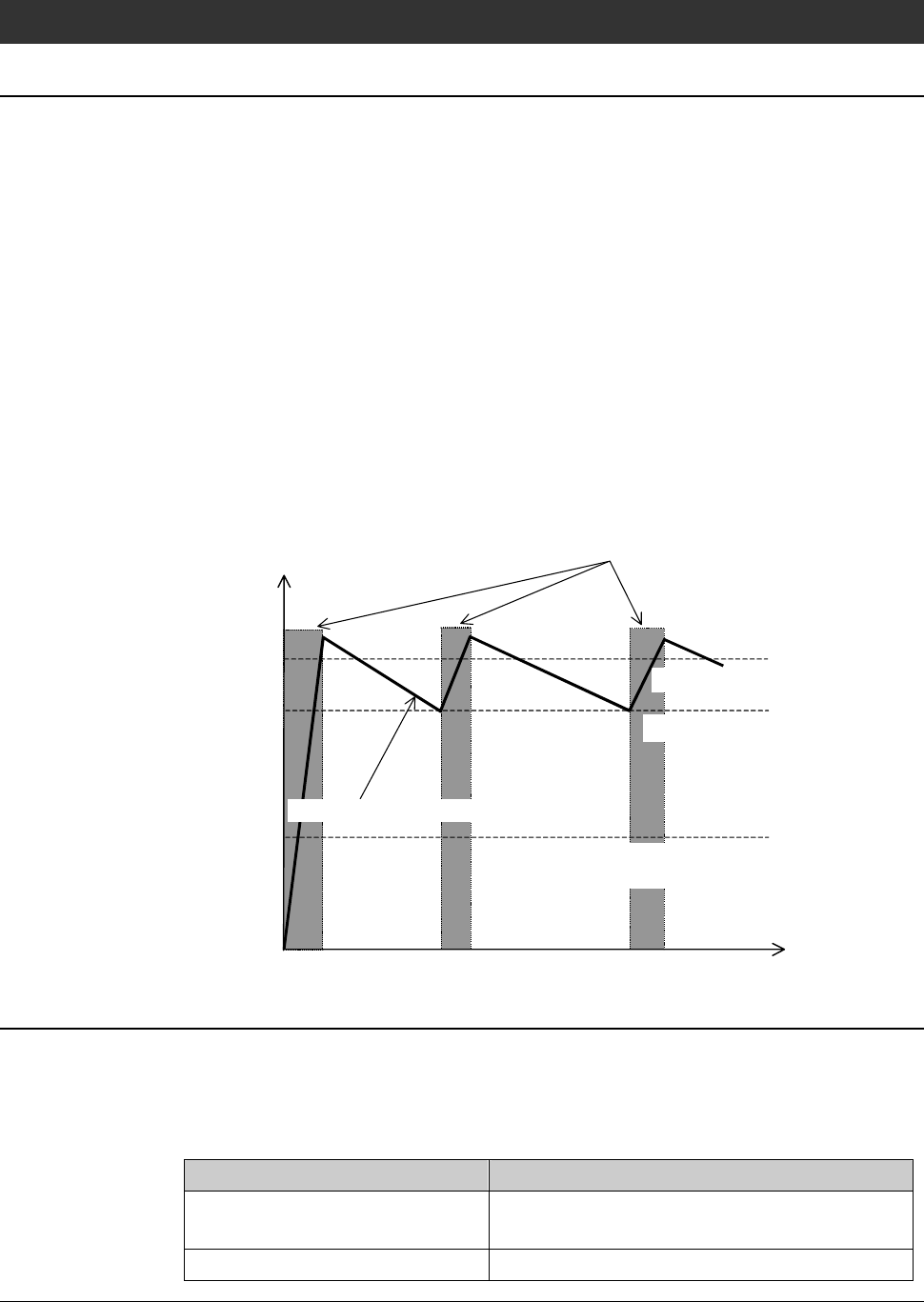
Therefore, it is necessary to set three thresholds for each vacuum line, such as
"target pressure", "pressure to resume vacuuming" and "lower limit".
Vacuum pressure
Time
C:Lower limit
(If below, vacuum error will occur.)
A:Target pressure
Time or period when air is
supplied to the ejector
Changes of vacuum pressure
B:Pressure to resume vacuuming
Pressure sensor of the chuck table vacuum
The chuck table section has two vacuum lines. One is the chuck table vacuum
to secure the chuck table itself on the θ-axis table, and the other is the chuck
table workpiece vacuum to absorb a workpiece to the chuck table.
Each of the vacuum lines consists of one ejector and two pressure sensors.
Sensor Name Function
Workpiece vacuum sensor Detects whether a workpiece exists on the
chuck table.
Table vacuum sensor Controls the air-saving mechanism.
B-135
Procedures for setting a monitor value of vacuum pressure
The procedure shown below is an example of the setting vacuum pressure
monitoring value of the chuck table workpiece vacuum.
Step No.
Do This
1
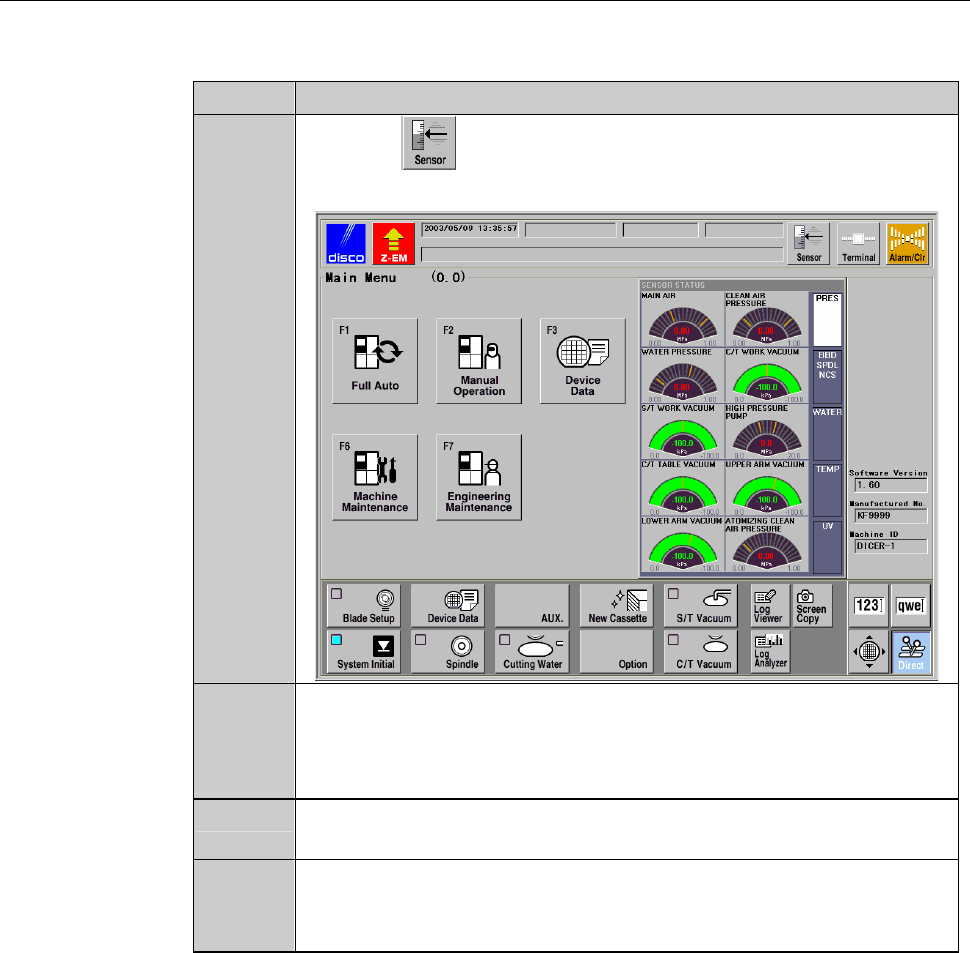
Press the button.
- SENSOR STATUS screen is called up.
2
Measure the target pressures both when a workpiece is placed on
the chuck table and when no workpiece is located there.
While reading the value of [C/T WORK VACUUM], turn
ON/OFF the chuck table workpiece vacuum.
3
Press the <F6> button on the MAIN MENU screen [screen 0.0].
- PASSWORD screen is called up.
4
Type the user password and press the <ENTER> button.
- The MACHINE MAINTENANCE screen [screen 6.0] is called
up.
B-136
Procedures for setting a monitor value of vacuum pressure (Continued)
Step No.
Do This
5
Press the <F6> button on the MACHINE MAINTENANCE screen
[screen 6.0].
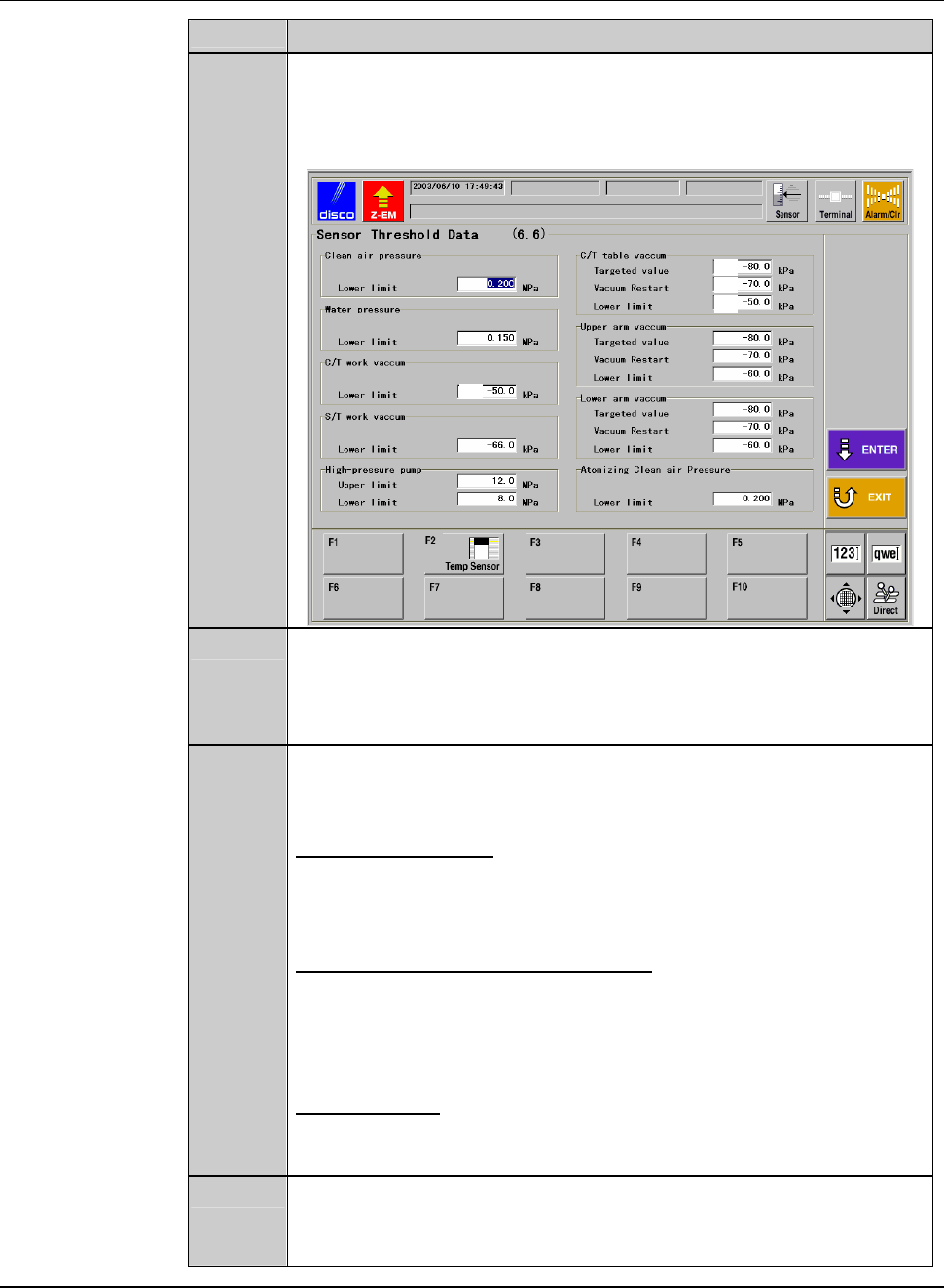
- The SENSOR THRESHOLD DATA screen [screen 6.6] is called
up.
[1]
[4]
[2]
[3]
6
Specify the value of [4].
- As a "lower limit", specify an intermediate value between the
target pressure when a workpiece is placed on the chuck table
and the one when no workpiece is located on the table.
7
While checking the pressure of [C/T TABLE VACUUM] with a
workpiece placed on the chuck table, enter necessary values to [1],
[2] and [3].
[1]Targetpressure
Enter a target vacuum pressure to reach during vacuum ON. The
smaller this value is, the longer the air will be supplied to the
ejector, which reduces the air-saving effect.
[2] Pressure to resume vacuuming
When the pressure drops to the value defined here, the air supply
to the ejector will be resumed.
If the value of [2] is close to [1], the duration of air supply will
increase, which reduces the air-saving effect.
[3] Lower limit
Enter a threshold to determine whether or not a chuck table is
secured.
8
Press the <ENTER> button after inputting all the values of [1]
through [4].
- The machine updates the data.