DFD6361-Maintenance.pdf - 第208页
B-136 Procedur es for setting a monitor value of v acuum press ure (Conti nued) Step No. Do This 5 Press the <F6> button on the MACHINE MAINT ENANCE screen [screen 6.0] . - The SENSOR THRESHOLD DATA screen [ screen…
B-135
Procedures for setting a monitor value of vacuum pressure
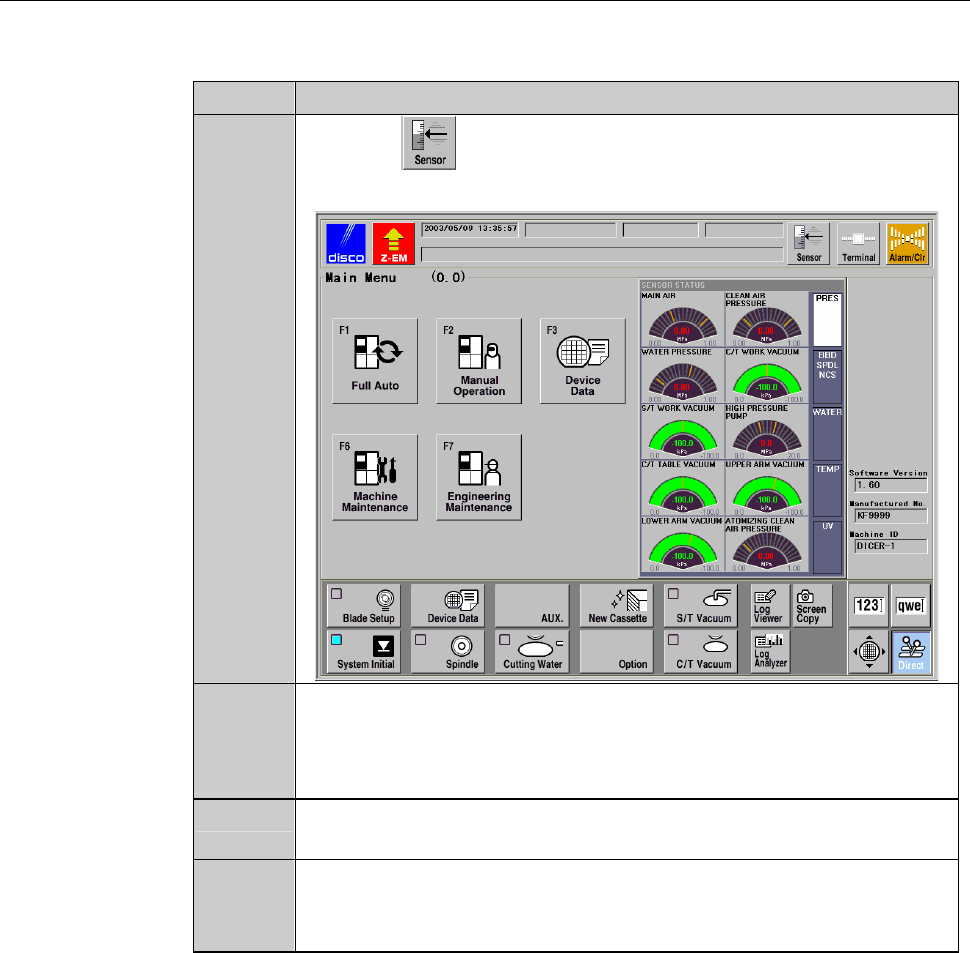
The procedure shown below is an example of the setting vacuum pressure
monitoring value of the chuck table workpiece vacuum.
Step No.
Do This
1
Press the button.
- SENSOR STATUS screen is called up.
2
Measure the target pressures both when a workpiece is placed on
the chuck table and when no workpiece is located there.
While reading the value of [C/T WORK VACUUM], turn
ON/OFF the chuck table workpiece vacuum.
3
Press the <F6> button on the MAIN MENU screen [screen 0.0].
- PASSWORD screen is called up.
4
Type the user password and press the <ENTER> button.
- The MACHINE MAINTENANCE screen [screen 6.0] is called
up.
B-136
Procedures for setting a monitor value of vacuum pressure (Continued)
Step No.
Do This
5
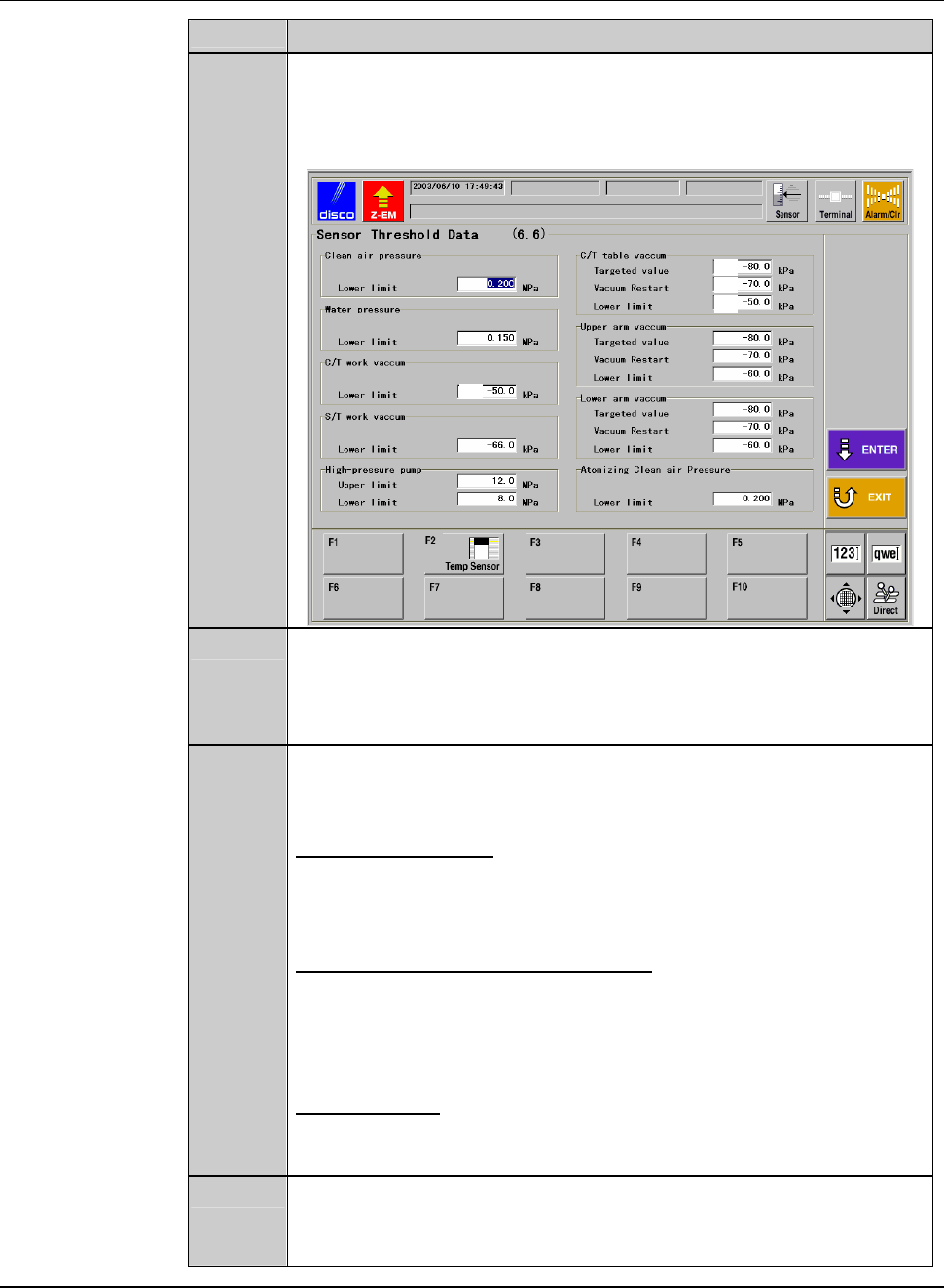
Press the <F6> button on the MACHINE MAINTENANCE screen
[screen 6.0].
- The SENSOR THRESHOLD DATA screen [screen 6.6] is called
up.
[1]
[4]
[2]
[3]
6
Specify the value of [4].
- As a "lower limit", specify an intermediate value between the
target pressure when a workpiece is placed on the chuck table
and the one when no workpiece is located on the table.
7
While checking the pressure of [C/T TABLE VACUUM] with a
workpiece placed on the chuck table, enter necessary values to [1],
[2] and [3].
[1]Targetpressure
Enter a target vacuum pressure to reach during vacuum ON. The
smaller this value is, the longer the air will be supplied to the
ejector, which reduces the air-saving effect.
[2] Pressure to resume vacuuming
When the pressure drops to the value defined here, the air supply
to the ejector will be resumed.
If the value of [2] is close to [1], the duration of air supply will
increase, which reduces the air-saving effect.
[3] Lower limit
Enter a threshold to determine whether or not a chuck table is
secured.
8
Press the <ENTER> button after inputting all the values of [1]
through [4].
- The machine updates the data.
B-137
5. Adjusting Utilities for Spinner Atomizing Nozzle
[Optional Accessory]
Summary of this section
This section describes how to adjust the air pressure of clean air and flow rate
of cleaning water of spinner atomizing nozzle in the machines which
incorporates the atomizing nozzle as an optional accessory.
Safety precautions for utility adjustment of spinner atomizing nozzle
WARNING
- In the digital I/O check procedures, touch panel buttons except for
function buttons are inoperative.
The personnel performing digital I/O checkout must bear this in
mind and exercise due care to ensure safety.
- In the digital I/O check procedures, the operation command for
solenoid valves and etc. can be forcibly turned ON and OFF by the
function buttons. In some cases, therefore, a cylinder may be
invoked to operate.
Ensure that no person other than the maintenance personnel
touches the machine during this procedure.
- If any touch panel control is inadvertently activated during
maintenance or inspection, unexpected machine operation may
cause death or serious injury.
While you don't use the touch panel, press the Disco's logo button
located at the upper left of the screen in order to lock up and
deactivate the touch panel.
CAUTION
When you perform maintenance with the outer cover removed,
observe the following precaution. If you stand the removed outer
cover against the machine, you may receive injury by the cover if it is
toppled by the earthquake or like that.
When you take off the outer cover for maintenance purposes, store it
sufficiently away from the working area.