DFD6361-Maintenance.pdf - 第215页
C-3 1. Calling up ENGINEERING MAINTENANCE Screen [Screen 7.0] Summary of this sectio n This section desc ribes the procedures to call up the ENGINEERING MAINTENANCE screen [ screen 7.0] and the detailed information o f t…
C-2
Contents of this chapter (Continued)
Section No. Title Contents
7 Maintenance Scheduler - Procedures to display the
MAINTENANCE
SCHEDULER screen that
enables you to specify the parts
replacement timing or periodic
maintenance cycles
- Details of the screen
- Procedures to set the schedule
8 Maker Data - Notes on the maintenance screen
used by DISCO personnel
9SECS/GEMSetup
[User-specified
specification]
- This is the setup for the function
to manage data stored by the
machine and collect data of the
machine operation.
For information about this
specification, see the technical
documentation provided from
DISCO.
C-3
1. Calling up ENGINEERING MAINTENANCE
Screen [Screen 7.0]
Summary of this section
This section describes the procedures to call up the ENGINEERING
MAINTENANCE screen [screen 7.0] and the detailed information of this
screen.
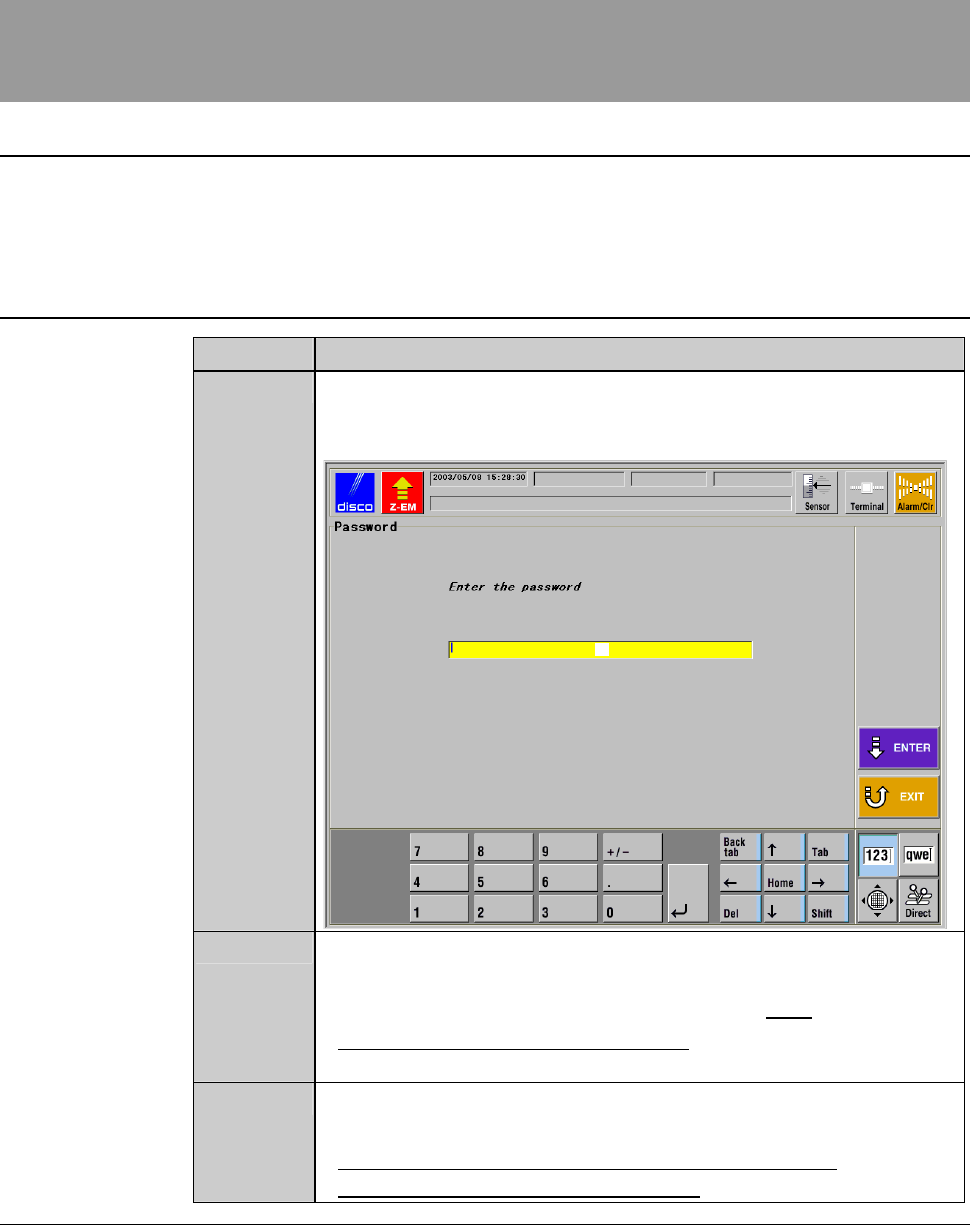
Procedures to call up ENGINEERING MAINTENANCE screen [screen 7.0]
Step No. Do This
1
From the MAIN MENU screen [screen 0.0], press the <F7>
button.
- The PASSWORD screen then appears.
[1]
2
Input the engineering password in the input space [1], and then
press the <ENTER> button.
- The factory preset engineering password is "123".
- To change the engineering password, see the section 5 of this
chapter, [Customizing Setting].
3
The ENGINEERING MAINTENANCE screen [screen 7.0]
appears only when the entered password is correct.
- For the detailed information of the ENGINEERING
MAINTENANCE screen [screen 7.0], see the next page.
C-4
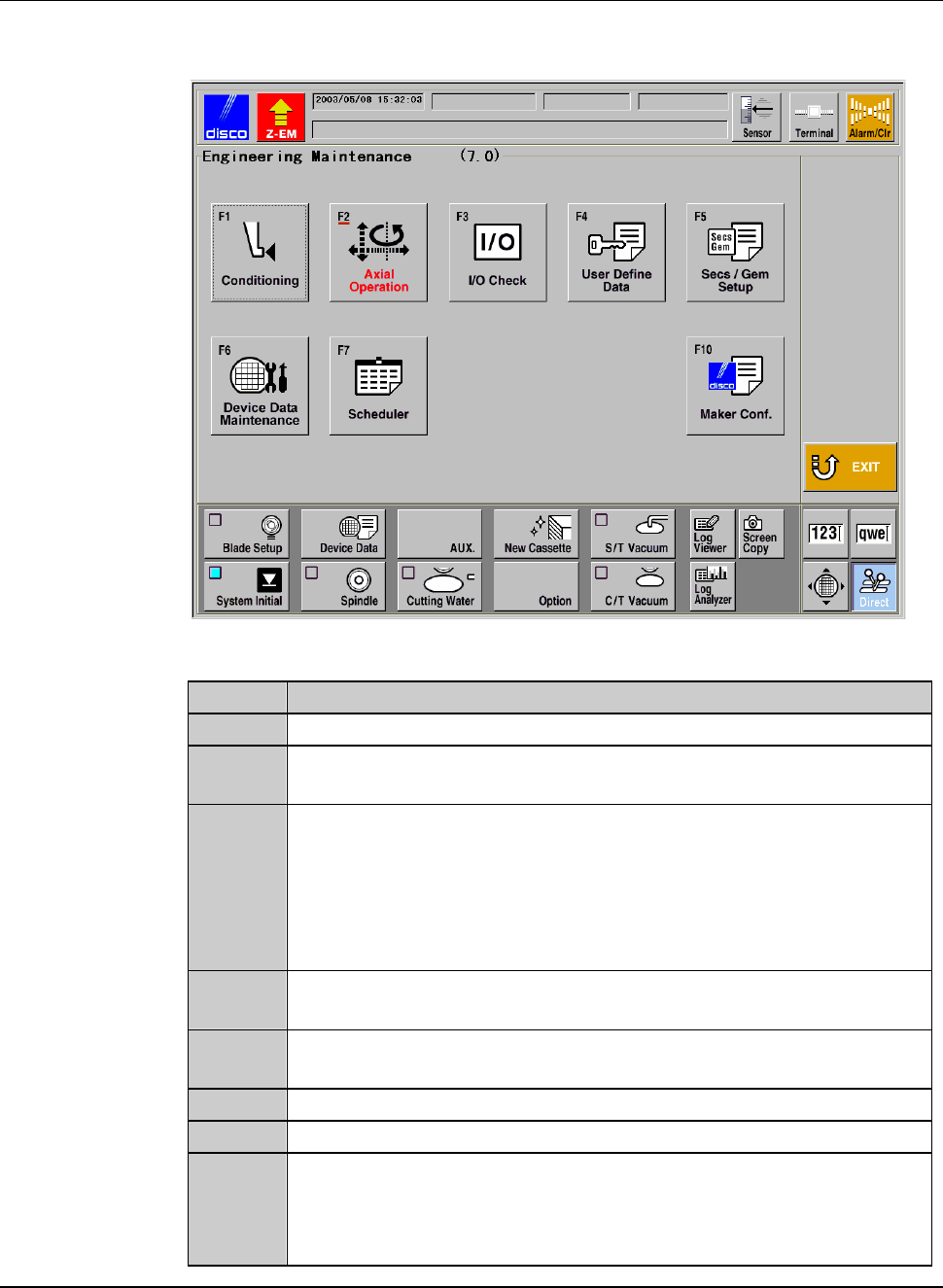
ENGINEERING MAINTENANCE screen [screen 7.0]
[Screen]
[Function Button]
Press To
F1
Call up the FRANGE DRESSING screen [screen 7.1].
F2
Call up the AXIS OPERATION screen which is used to check the
axis operations.
F3
Call up the I/O CHECK screen which is used to check the
conditions of the solenoid valve or sensor.
Among I/O CHECK screens, there are the DIGITAL OUTPUT
screen to activate the solenoid valve, the DIGITAL INPUT screen
to check the conditions of the sensor or the like and AXIS
SENSOR STATUS screen to verify the axis sensor conditions.
F4
Call up the USER DEFINE DATA screen [screen 7.4] which
allows you to select various function setup data.
F5
Call up the screen which accept starting and setting the
SECS/GEM.[User-specified specification]
F6
Call up the DEVICE DATA MAINTENANCE screen.
F7
Call up the MAINTENANCE SCHEDULER screen.
F10
Call up the MAKER DATA screen.
(The input of the maker password is required for displaying the
MAKER DATA screen, which is to be handled by the DISCO
maintenance personnel only.)