DFD6361-Maintenance.pdf - 第255页
C-43 5-1. Setting on USER DEFINE DATA Screen [Screen 7 .4] About USER DEFINE DATA scr een [scree n 7.4] In the USER DEFINE DATA screen [scre en 7.4], you can chan ge the machine function setup such as permission of chan …
C-42
5. Customizing Setting
Summary of this section
This section explains about the ways to customize the various machine
functions to suit individual user requirements.
Section No. Title Contents
5-1 Setting on USER
DEFINE DATA Screen
- Procedures to change machine
function settings such as the
permission of speed change and
language to be used, by using the
function buttons
C-43
5-1. Setting on USER DEFINE DATA Screen
[Screen 7.4]
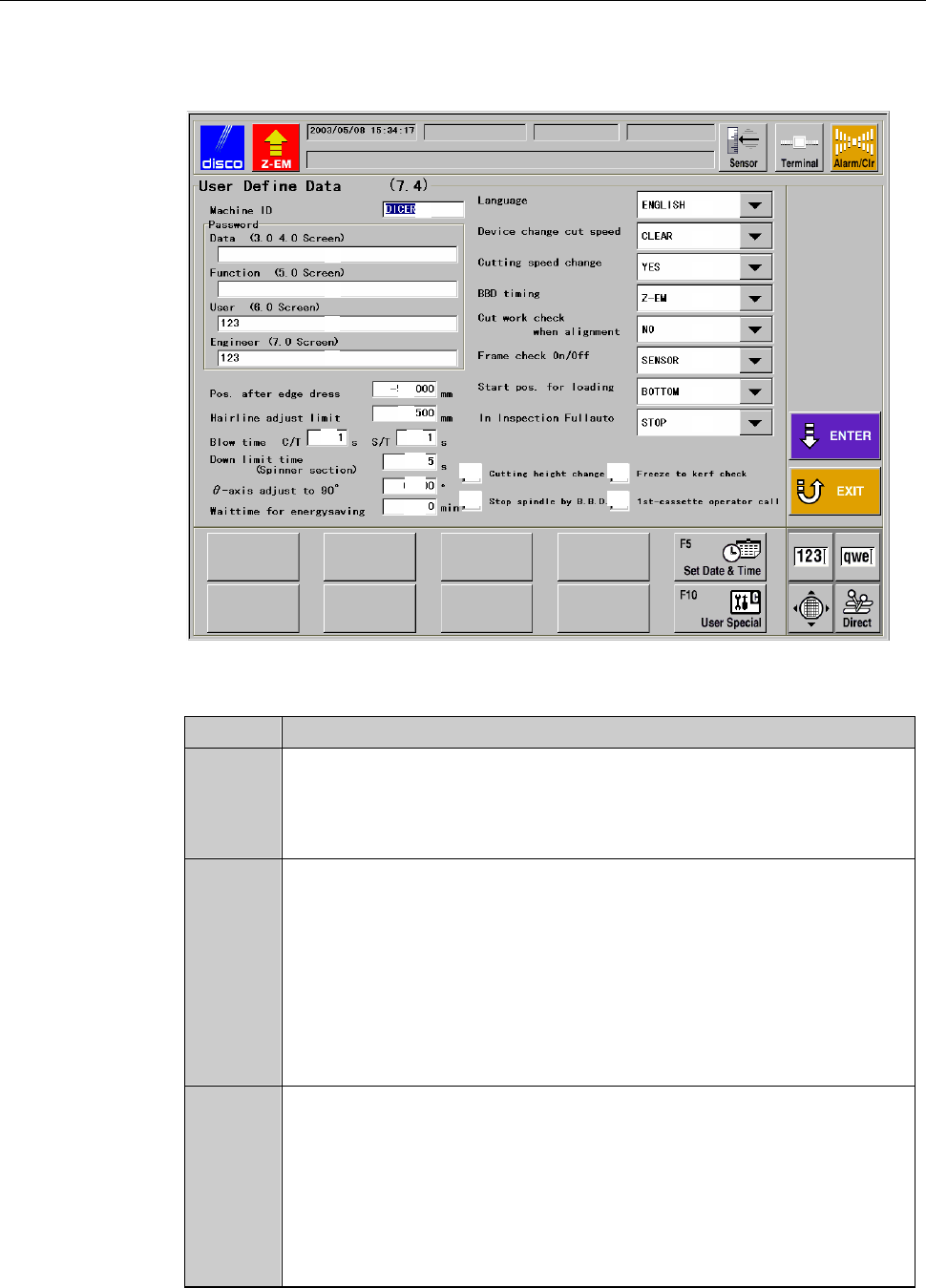
About USER DEFINE DATA screen [screen 7.4]
In the USER DEFINE DATA screen [screen 7.4], you can change the machine
function setup such as permission of changing speed or the language to be
used, by using the function buttons.
You can also set the password for the PASSWORD screen.
Procedures for setting on USER DEFINE DATA screen [screen 7.4]
Step No. Do This
1
From the ENGINEERING MAINTENANCE screen [screen 7.0],
press the <F4> button.
- The USER DEFINE DATA screen [screen 7.4] then opens.
2
Change setting. To finalize data edits, press the <ENTER>
button.
- The data setup is then updated.
When aborting the setting procedures
To cancel the setting procedures, press the <EXIT> button.
- Pressing the <EXIT> button cancels any edits on the screen.
- The display returns to the ENGINEERING MAINTENANCE screen
[screen 7.0].
C-44
USER DEFINE DATA screen [screen 7.4]
The description of USER DEFINE DATA screen [screen 7.4] is as follows:
[Screen]
[1]
[2]
[3]
[4]
[5]
[6]
[7]
[8]
[9]
[10]
[11]
[12]
[13]
[14]
[15]
[16]
[17]
[18]
[21]
[22]
[23]
[24]
[19]
[20]
[Setting Item]
Item No. Descriptions
[1]
Enter the user-defined machine ID number for management
purposes.
The entered ID number (or name) is displayed on the MAIN
MENU screen [screen 0.0].
[2]
Enter the data password for calling up the DEVICE DATA screen
[screen 3.1.2], SETUP DATA screen [screen 4.7] and the manual
operations of alignment teaching and shape recognition.
- If no password is entered here, the system does not prompt for
password input.
- Data password protected screens can be opened by the function
password, user password or engineering password.
- No password has been entered at factory prior to shipment.
[3]
Enter the function password for calling up the OPERATOR
MAINTENANCE screen [screen 5.0].
- If no password is entered here, the system does not prompt for
password input.
- Function password protected screens can be opened by the user
password or engineering password.
- No password has been entered at factory prior to shipment.