DFD6361-Maintenance.pdf - 第256页
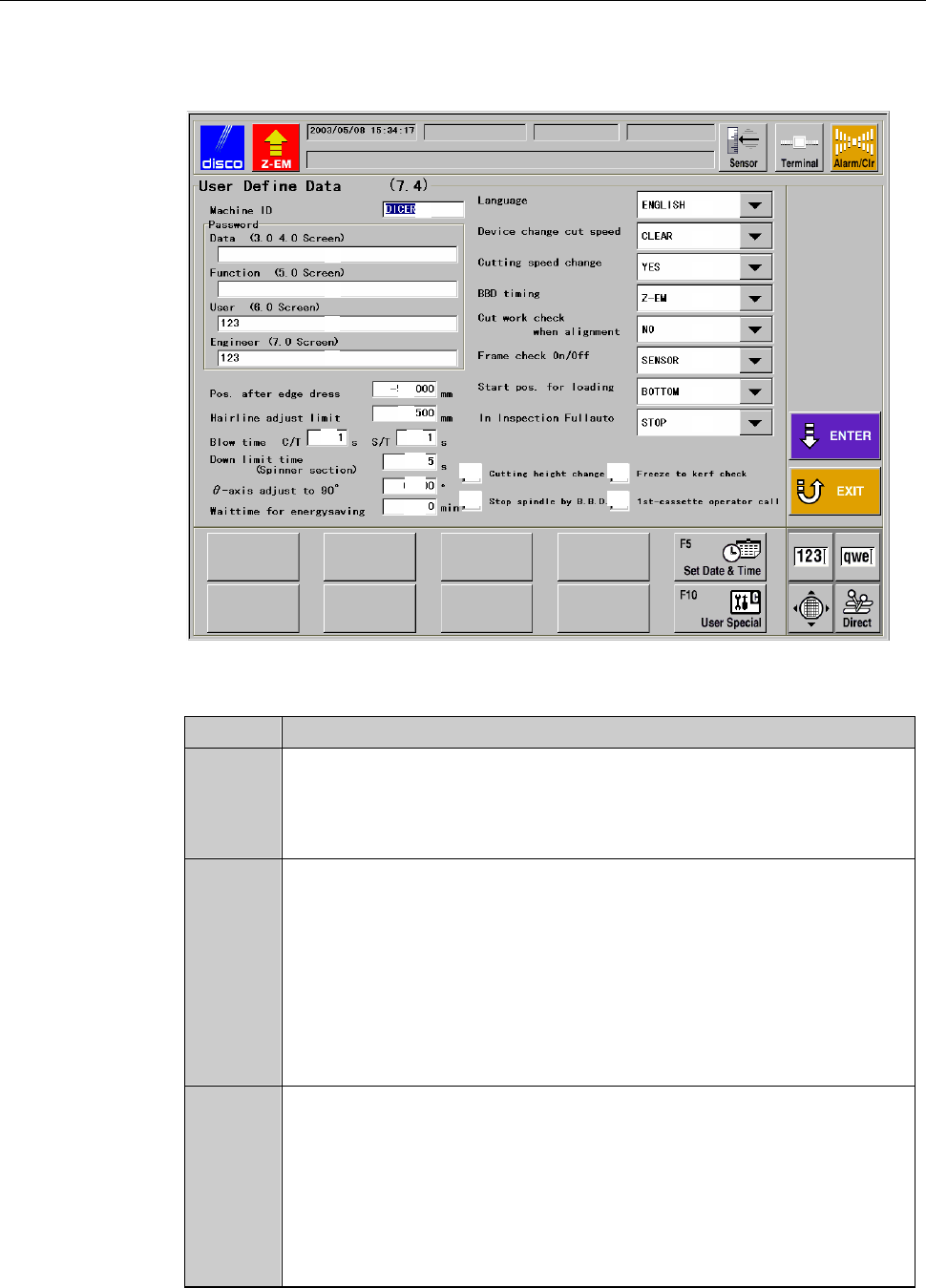
C-44 USER DEFINE DATA scre en [screen 7.4] The description of USER DEFINE DATA scre en [screen 7.4] is as follows: [Screen] [1] [2] [3] [4] [5] [6] [7] [8] [9] [10] [11] [12] [13] [14] [15] [16] [17] [18] [21] [22] [23] …
C-43
5-1. Setting on USER DEFINE DATA Screen
[Screen 7.4]
About USER DEFINE DATA screen [screen 7.4]
In the USER DEFINE DATA screen [screen 7.4], you can change the machine
function setup such as permission of changing speed or the language to be
used, by using the function buttons.
You can also set the password for the PASSWORD screen.
Procedures for setting on USER DEFINE DATA screen [screen 7.4]
Step No. Do This
1
From the ENGINEERING MAINTENANCE screen [screen 7.0],
press the <F4> button.
- The USER DEFINE DATA screen [screen 7.4] then opens.
2
Change setting. To finalize data edits, press the <ENTER>
button.
- The data setup is then updated.
When aborting the setting procedures
To cancel the setting procedures, press the <EXIT> button.
- Pressing the <EXIT> button cancels any edits on the screen.
- The display returns to the ENGINEERING MAINTENANCE screen
[screen 7.0].
C-44
USER DEFINE DATA screen [screen 7.4]
The description of USER DEFINE DATA screen [screen 7.4] is as follows:
[Screen]
[1]
[2]
[3]
[4]
[5]
[6]
[7]
[8]
[9]
[10]
[11]
[12]
[13]
[14]
[15]
[16]
[17]
[18]
[21]
[22]
[23]
[24]
[19]
[20]
[Setting Item]
Item No. Descriptions
[1]
Enter the user-defined machine ID number for management
purposes.
The entered ID number (or name) is displayed on the MAIN
MENU screen [screen 0.0].
[2]
Enter the data password for calling up the DEVICE DATA screen
[screen 3.1.2], SETUP DATA screen [screen 4.7] and the manual
operations of alignment teaching and shape recognition.
- If no password is entered here, the system does not prompt for
password input.
- Data password protected screens can be opened by the function
password, user password or engineering password.
- No password has been entered at factory prior to shipment.
[3]
Enter the function password for calling up the OPERATOR
MAINTENANCE screen [screen 5.0].
- If no password is entered here, the system does not prompt for
password input.
- Function password protected screens can be opened by the user
password or engineering password.
- No password has been entered at factory prior to shipment.
C-45
USER DEFINE DATA screen [screen 7.4] (Continued)
[Setting Item]
Item No. Descriptions
[4]
Enter the user password for calling up the MACHINE
MAINTENANCE screen [screen 6.0].
- If no password is entered here, the system does not prompt for
password input.
- User password protected screens can be opened by the
engineering password.
- The factory preset user password is "123".
[5]
Enter the engineering password for calling up the ENGINEERING
MAINTENANCE screen [screen 7.0].
- If no password is entered here, the system does not prompt for
password input.
- Engineering password protected screens cannot be opened by
other passwords.
- The factory preset engineering password is "123".
[6]
When the <F1> button is pressed from the ENGINEERING
MAINTENANCE screen [screen 7.0] to select the conditioning
operation, the spindle automatically moves. You can specify the
spindle destination in this column.
When a minus value is entered, the Z1-axis side spindle is
automatically moves to rearward from the chuck table center.
[7]
Enter the limit value for the correction distance during the hairline
alignment.
[8]
Enter the table blow-release time for the chuck table vacuum OFF
sequence.
[9]
Enter the table blow-release time for the spinner table vacuum
OFF sequence.
[10]
Specify the length of interval between the spinner cleaning water
turning ON and initiation of monitoring of the cleaning water
pressure.
[11]
Enter the correction value for θ-axis rotation accuracy. This
correction value is effective only for 90-degree rotation.
[12]
Energy-efficient function. The machine measures the length of
time while any operation such as alignment, cut or full automation
is not performed. If no operation is made for a given length of
time, the machine automatically turns OFF the power of the motor
driver and stops air supply.
Specify the time between establishment of the energy-saving mode
and the last machine operation. If zero is entered here, this
function does not work. Note that system initial is required when
the energy-saving mode is canceled.
[13]
Select the language to be used on the screen.