DFD6361-Maintenance.pdf - 第286页
D-1 D. TROUBLESHOOTING Cont ents of t his ch apter This chapter d escribes th e causes, check point s and remedies fo r the problems that occur when turnin g ON the power or during machine ope ration and the errors cause…
C-73
9. SECS/GEM Setup
[User-Specified Specification]
About SECS/GEM setup
The SECS/GEM setup makes it possible to perform communication between a
machine and host computer, which enables you to manage data held by the
machine as well as collect the machine operation data.
For information about operation and specifications, technical documentation is
available only for the machines incorporating this function. See the technical
documentation.
D-1
D. TROUBLESHOOTING
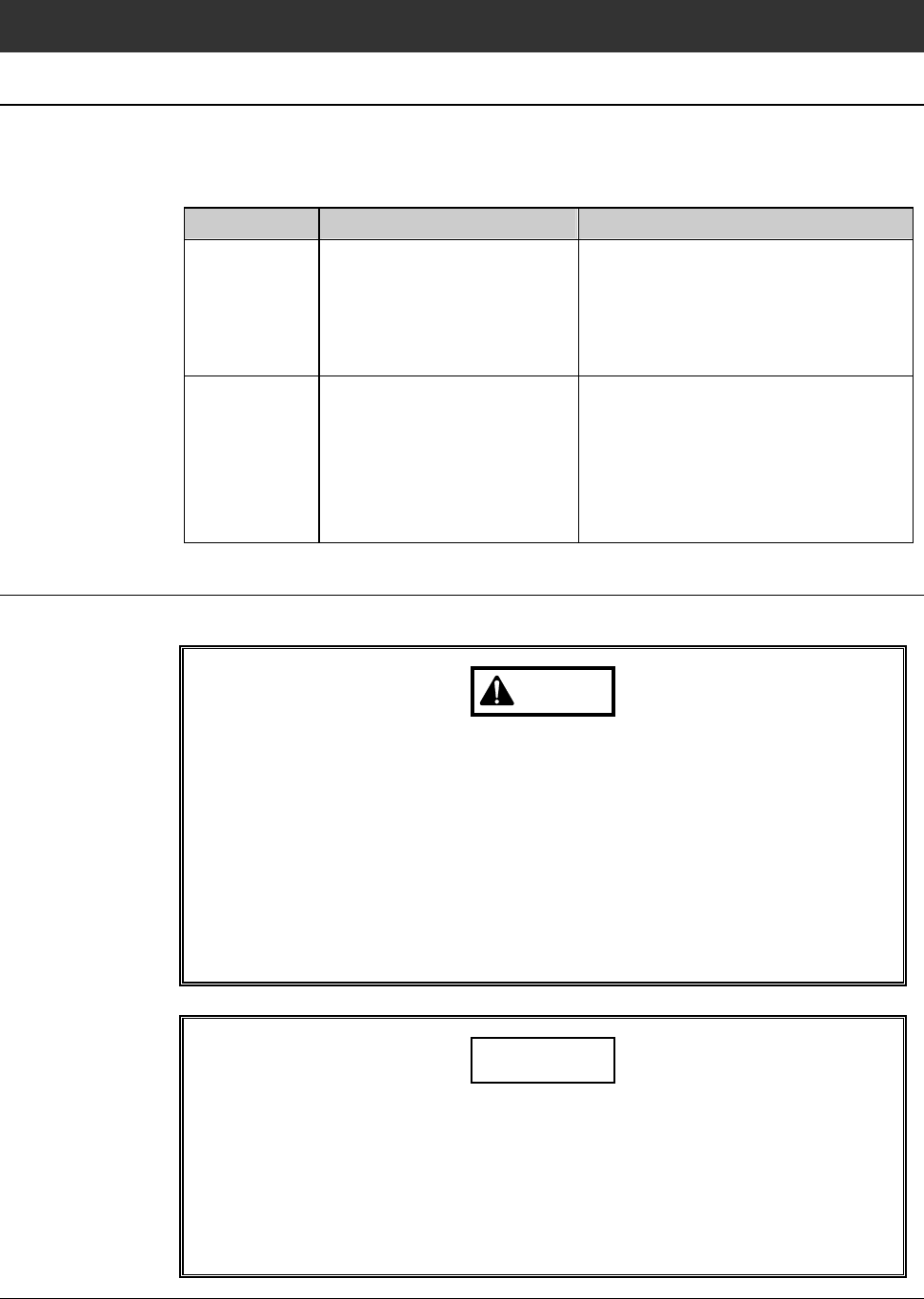
Contents of this chapter
This chapter describes the causes, check points and remedies for the problems
that occur when turning ON the power or during machine operation and the
errors caused by the improper operation.
Section No. Title Contents
1 Remedies for Problems
Invoking No Error Code
Indication
- Problems at
Power ON -
- Check points for the problems
that occur at power-on
- Remedies for the problems that
occur at power-on
2 Remedies for Problems
Invoking Error Code
Indication
-Causesoftheerrorofwhich
error code is displayed when an
improper operation is performed
or in the event of failure during
machine operation
- Remedies for errors
Safety precautions to be observed during troubleshooting
In troubleshooting, observe the following safety precautions.
WARNING
- Troubleshooting must be carried out by qualified maintenance
personnel who have received maintenance training. While a
maintenance task is being performed, no one other than the
maintenance personnel must touch the machine.
- If you attempt to replace parts with the power left ON, you may
receive an electric shock or get your body caught by a drive section,
which may result in serious injury or death.
Before replacing any defective part, be sure to turn OFF the facility
power supply.
CAUTION
- While the machine is serviced, be sure that the power, air, N
2
or
water supply is not turned ON/OFF by irrelevant persons.
Special care must be taken particularly when the machine shares
the same facilities with other equipment.
- Use the digital tester for the measuring instrument. Do not use the
megohm tester.
D-2
1. Remedies for Problems Invoking No Error
Code Indication - Problems at Power ON -
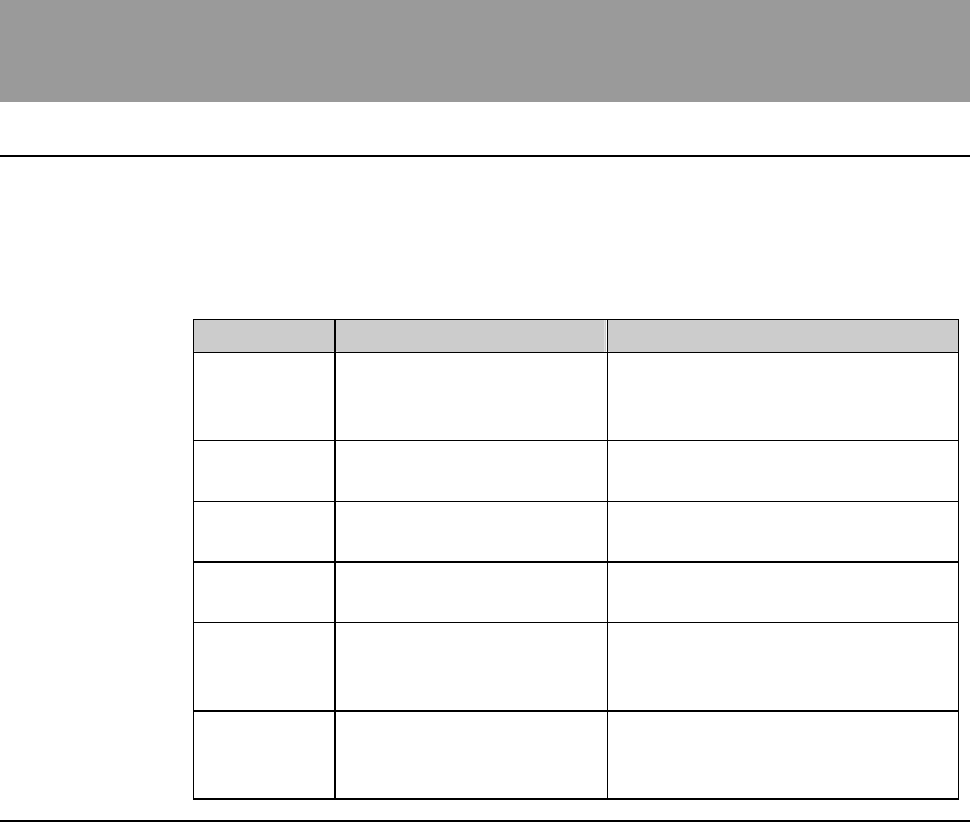
Summary of this section
The problems that invoke no error code indication usually occur when turning
ON the power. These errors can be classified by the trouble arising section and
there are, in some cases, more than one causes for one error.
This section describes the causes, check points and remedies for the problems
arisen when turning ON the power.
Section No. Title Contents
1-1 Main Circuit Breaker
Problems
- Remedies for the problem when
the main circuit breaker does not
turn ON
1-2 Main Power Supply
Problems
- Remedies for the problem
related to the main switch
1-3 POWER Lamp (Power-
On Lamp) Problems
- Remedies for the problem when
the POWER lamp does not light
1-4 Touch Panel Problems - Remedies for the problem when
the touch panel displays nothing
1-5 Microscope Light Source
Problems
- Remedies for the problem when
the halogen lamp in the light
source box does not light
1-6 EMO Switch Problems - Remedies for the problem that
the power does not turn OFF by
the EMO switch