DFD6361-Maintenance.pdf - 第305页
D-20 Error wi th a code beg inning w ith "X" Error codes beginnin g with the letter X represent ax is-related errors. Please refe r to the section 2-8, [Remedies for Axis-Relate d Errors] regarding the rule of …
D-19
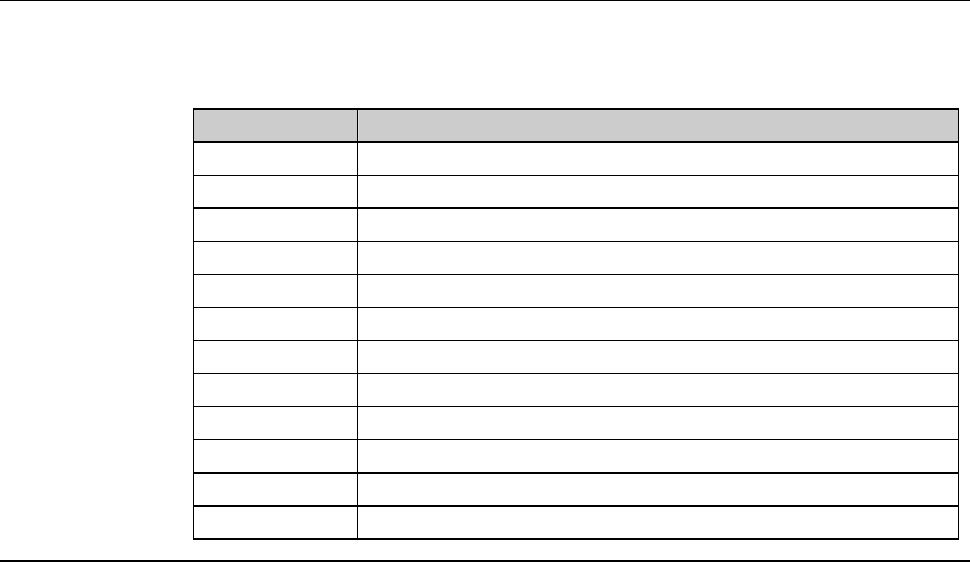
Error with a code beginning with "K"
Error codes beginning with the letter K represent errors related to kerf check.
Please refer to the section 2-7, [Remedies for Kerf Check-Related Errors]
regarding the way to handle the error.
Error Code Message
K0038 Kerf check: Not found.
K0039 Kerf check: Off center.
K0040 Kerf check: Too wide.
K0041 Kerf check: Too narrow.
K0042 Kerf check: Chipping size.
K0043 Kerf check: Chipping area.
K0044 Kerf check: Target not found.
K0045 Kerf check: Target position error.
K0046 Kerf check: Too wide. (Center to Chipping)
K0047 Kerf check: Too wide. (Include chipping)
K0048 Could not find kerf center.
K0049 Kerf center position error.
D-20
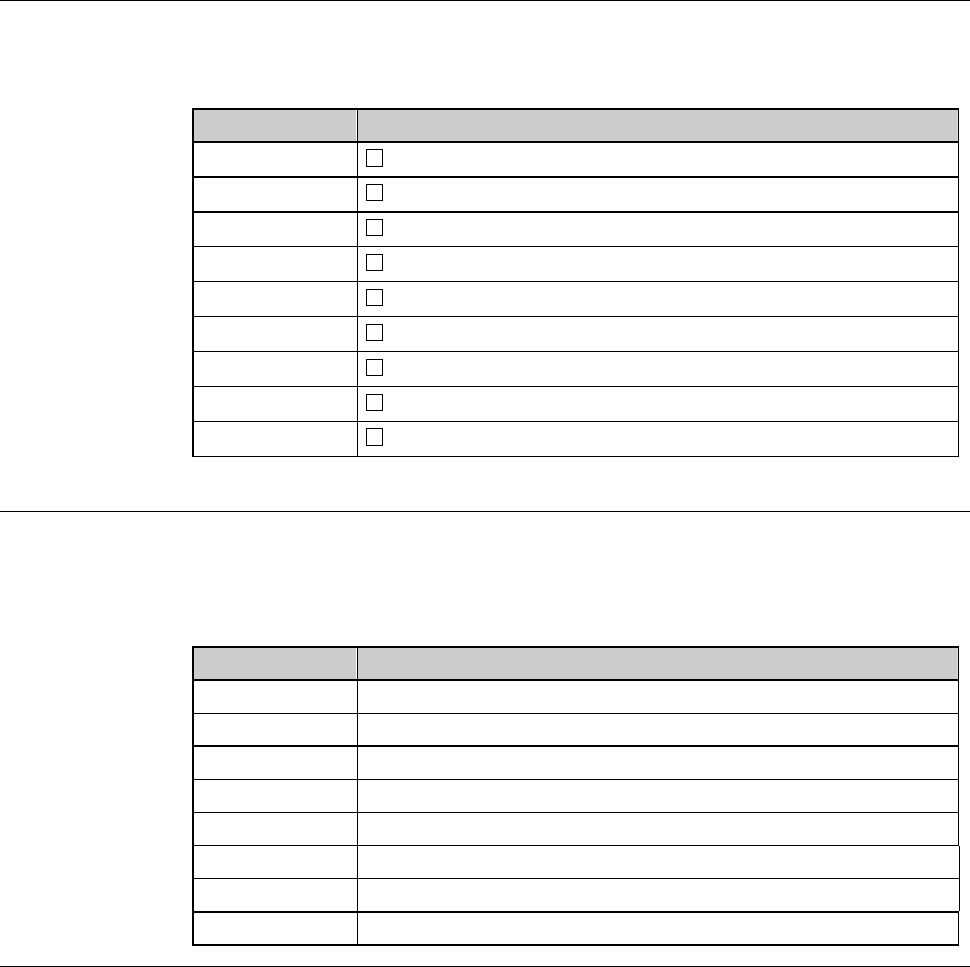
Error with a code beginning with "X"
Error codes beginning with the letter X represent axis-related errors.
Please refer to the section 2-8, [Remedies for Axis-Related Errors] regarding
the rule of error code and detailed remedies.
Error Code Message
X•••0
-axis unrecoverable error. Restart the machine.
X•••1
-axis unknown error.(…..Reinitialize.)
X•••2
-axis servo error. Restart the machine.
X•••3
-axis CW end error.(…..Reinitialize.)
X•••4
-axis CCW end error.(…..Reinitialize.)
X•••5
-axis vibration error (near).(…..Reinitialize.)
X•••6
-axis vibration error (far).(…..Reinitialize.)
X•••7
-axis position error.(…..Reinitialize.)
X•••8
-axis scale retry error.(…..Reinitialize.)
Error with a code beginning with "O"
Error codes beginning with the letter O represent errors caused by other
reasons.
Please refer to the section 2-9, [Remedies for Other Errors] regarding the way
to handle the error.
Error Code Message
O0516 Workpiece in cassette.
O0518 Cassette switch turned OFF.
O0519 Remove the workpiece at W/T.
O0520 Remove the workpiece at C/T.
O0522 Remove the workpiece at S/T.
O1028 Remove the workpiece at Upper Arm.
O1029 Remove the workpiece at Lower Arm.
O1036 Inspection cassette switch turned OFF.
D-21
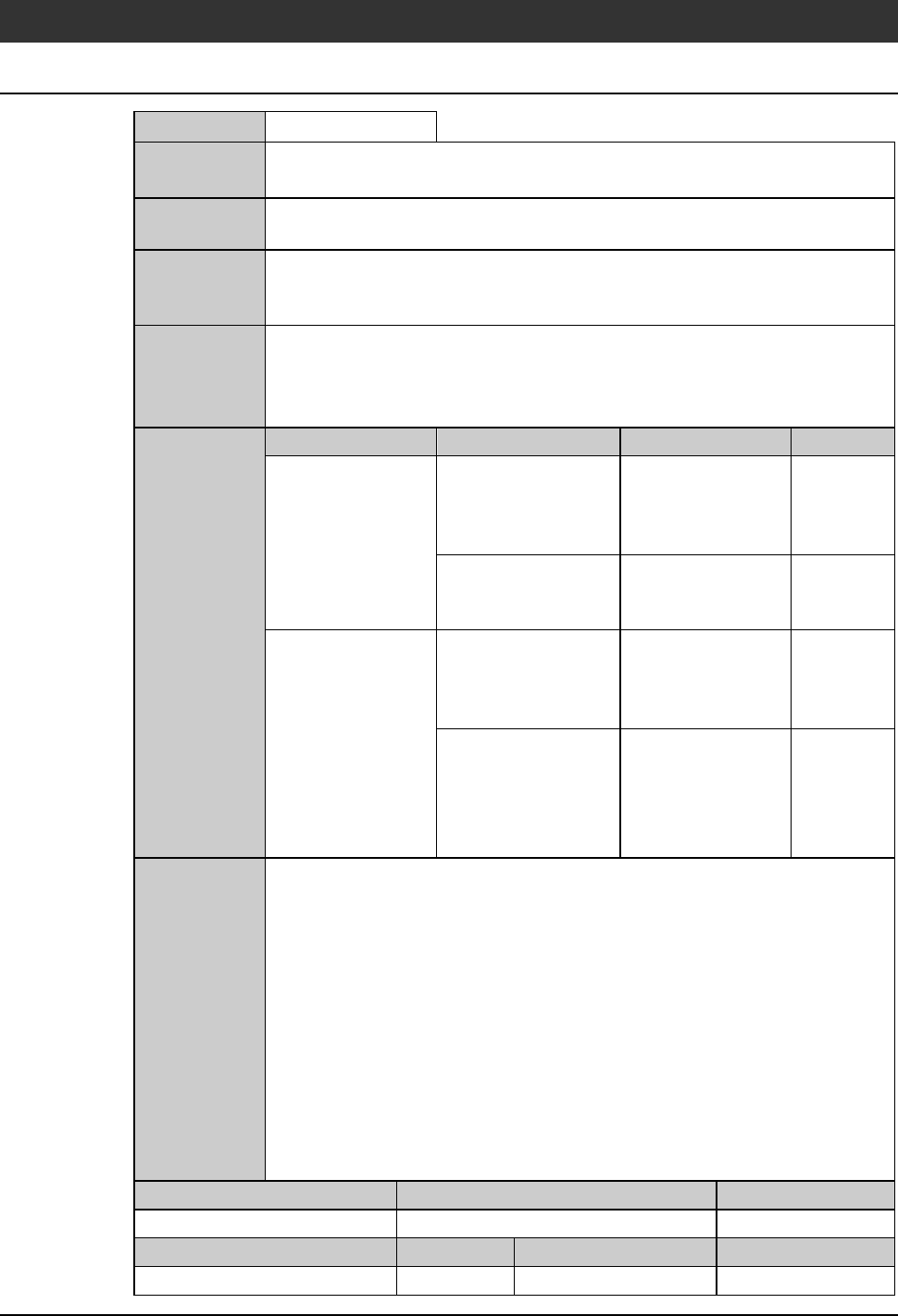
2-3. Remedies for Errors Requiring Emergent Stop
E0002 : EM switch pressed.
Error code
E0002
Message
EM switch pressed.
What was
detected
The signal input from the EMO switch was detected.
During what
operation it
occurred
At any time.
State after
detection
The Z-axis retreats to the upper end and the power turns OFF.
The other axis drive systems come to an immediate stop.
(If the error occurs during spindle rotation, the power turns OFF and the
spindle enters the free running state with the covers locked.)
Phenomenon Probable causes Remedy Reference
What to do
EMO operation is
not actuated even
after the EMO
switch is pressed.
The switch is
defective.
Replace the switch.
Contact your
nearest DISCO
Service Office.
The wiring is
shorted.
Contact your
nearest DISCO
Service Office.
The EMO operation
is actuated although
the EMO switch is
OFF.
The switch is
defective.
Replace the switch.
Contact your
nearest DISCO
Service Office.
The wiring is broken. Contact your
nearest DISCO
Service Office.
Recovery
(1) Turn the EMO switch in the direction of the arrow to put it back to the
normal position.
(2) Turn OFF the machine power.
(3) Wait more than one minute and then turn the power back ON.
(4) Effect system initialization.
Maintenance level Maintenance personnel level Hazard level
Measuring equipment used Tools Replacement parts Protective gear