SIPLACE D4-D4i 工程师手册_EN.pdf - 第136页
Service Work PCB conveyor system 4.4.16 Replac ing the Light Barriers for Tran smitter and Receiver Modules 136 Service Manual SIPLACE D4/D4i Transmitter: ► Unscrew the holder wit h the receiv er. ► Unscrew the receiver …
Service Work
4.4.16 Replacing the Light Barriers for Transmitter and Receiver Modules [00370063] PCB conveyor system
Service Manual SIPLACE D4/D4i 135
Overview
4.4.16.1
4.4.16.1 Replacing the Transmitter or Receiver for Placement Areas 1 + 2
Replacing the Transmitter or Receiver for Placement Areas 1 + 2
Receiver:
► Remove the stop rail.
► Remove the short belt guide.
► Unscrew the holder with the receiver.
► Unscrew the receiver from the holder.
► Unthread the connection cable as far as the relevant conversion board of the conveyor edge.
► Unplug the conversion board of the conveyor edge.
► Rerun the connection cable accordingly and reconnect the conversion board of the conveyor edge
to the electricity supply.
► Fix the receiver at the holder.
► Fix the holder, together with the receiver, to the base so that the holder lies flat on the base.
► Mount the short belt guide and align it.
► Mount the stop rail.
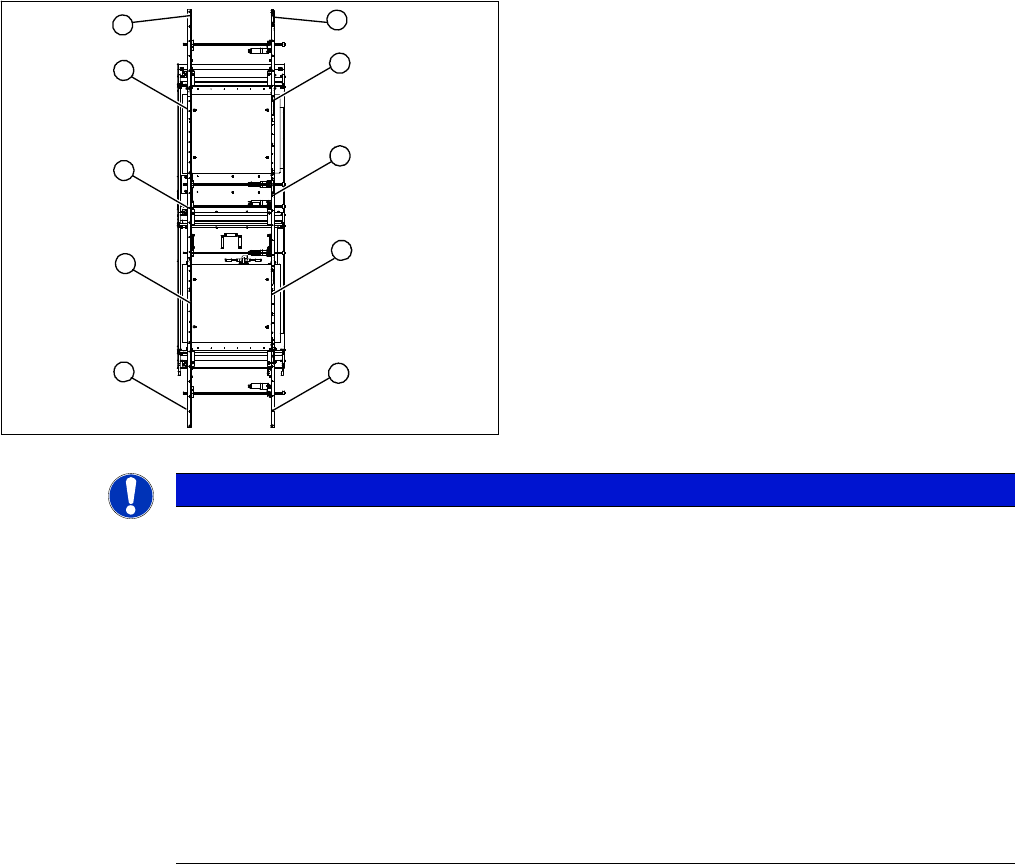
Legend
1. Transmitter at input conveyor
2. Receiver at input conveyor
3. Transmitter at placement area 1
4. Receiver at placement area 1
5. Transmitter at intermediate conveyor
6. Receiver at intermediate conveyor
7. Transmitter at placement area 2
8. Receiver at placement area 2
9. Transmitter at output conveyor
10. Receiver at output conveyor
10
9
8
7
1
6
5
4
3
2
NOTICE
Important instructions for replacing the light barrier
The transmitters are installed on the moveable side of conveyor models, while the receivers are
on the fixed side (applies to the standard conveyor system, fixed side - right).
Check whether it would be helpful to feed in the new cable with the aid of the old one, at least
in some areas.
The connection plug is equipped with contacts, which are pressed onto the wires. You may find
it helpful to remove the contacts from the connection plug, in order to run the cable better
through openings.
For replacement purposes, the connection cable must be unthreaded as far as the relevant
conversion board of the conveyor side. This might be somewhat complicated depending on the
routing of cables inside the machine base.
► You may wish to contact Siemens AG SMD Service regarding this work or proceed as fol-
lows.

Service Work
PCB conveyor system 4.4.16 Replacing the Light Barriers for Transmitter and Receiver Modules
136 Service Manual SIPLACE D4/D4i
Transmitter:
► Unscrew the holder with the receiver.
► Unscrew the receiver from the holder.
► Unthread the connection cable as far as the relevant conversion board of the conveyor edge.
► Unplug the conversion board of the conveyor edge.
► Rerun the connection cable accordingly and reconnect the conversion board of the conveyor edge
to the electricity supply.
► Fix the new light barrier in the original position.
4.4.16.2
4.4.16.2 Replacing the Transmitter or Receiver for the Input or Output Conveyor
Replacing the Transmitter or Receiver for the Input or Output Conveyor
Receiver:
► Remove the stop rail.
► Remove the short belt guide.
► Unscrew the holder with the receiver.
► Unscrew the receiver from the holder.
► Unthread the connection cable as far as the relevant conversion board of the conveyor edge.
► Unplug the conversion board of the conveyor edge.
► Rerun the connection cable accordingly and reconnect the conversion board of the conveyor edge
to the electricity supply.
► Fix the receiver at the holder.
► Fix the holder, together with the receiver, to the base so that the holder lies flat on the base.
► Mount the short belt guide and align it.
► Mount the stop rail.
Transmitter:
► Unscrew the holder with the receiver.
► Unscrew the receiver from the holder.
► Unthread the connection cable as far as the relevant conversion board of the conveyor edge.
► Unplug the conversion board of the conveyor edge.
► Rerun the connection cable accordingly and reconnect the conversion board of the conveyor edge
to the electricity supply.
► Fix the new light barrier in the original position.
NOTICE
Art und Quelle der Gefahr
The transmitters on the input and output conveyors are freely accessible. The bracket must be
loosened and the screws fastening the light barrier removed.
NOTICE
Art und Quelle der Gefahr
Otherwise check whether you can run the cable through the opening by removing the contacts
in the connection plug.

Service Work
4.4.17 Replacing the Laser Light Barriers for Stopper Positions [00370385] PCB conveyor system
Service Manual SIPLACE D4/D4i 137
4.4.16.3
4.4.16.3 Replacing the Light Barriers for the Intermediate Conveyor
Replacing the Light Barriers for the Intermediate Conveyor
Transmitter:
► Unscrew the holder with the receiver.
► Unscrew the receiver from the holder.
► Unthread the connection cable as far as the relevant conversion board of the conveyor edge.
► Unplug the conversion board of the conveyor edge.
► Rerun the connection cable accordingly and reconnect the conversion board of the conveyor edge
to the electricity supply.
► Fix the new light barrier in the original position.
Receiver:
► Remove the stop rail.
► Remove the short belt guide.
► Unscrew the holder with the receiver.
► Unscrew the receiver from the holder.
► Unthread the connection cable as far as the relevant conversion board of the conveyor edge.
► Unplug the conversion board of the conveyor edge.
► Rerun the connection cable accordingly and reconnect the conversion board of the conveyor edge
to the electricity supply.
► Fix the receiver at the holder.
► Fix the holder, together with the receiver, to the base so that the holder lies flat on the base.
► Mount the short belt guide and align it.
► Mount the stop rail.
4.4.17
4.4.17 Replacing the Laser Light Barriers for Stopper Positions [00370385]
Replacing the Laser Light Barriers for Stopper Positions [00370385]
Parts
▪ Laser light barrier transmitter module PA1 assembly [00370385-xx]
▪ Laser light barrier transmitter module PA2 assembly [00370386-xx]
▪ Laser light barrier - receiver module PA1 [00365772-xx]
▪ Laser light barrier - receiver module PA2 [00365774-xx]
NOTICE
Art und Quelle der Gefahr
The transmitter on the intermediate conveyor is freely accessible. The bracket must be loos-
ened and the screws fastening the light barrier removed.