SIPLACE D4-D4i 工程师手册_EN.pdf - 第221页
Settings 6.4.1 Component Trolley - Setting the Basic Height Component Han dling Service Manual SIPLACE D4/D4i 221 6.4 6 . 4 C o m p o n e n t H a n d lin g Component Handling 6.4.1 6 . 4 . 1 C o m p o n e n t T r o lle y…
Settings
C&P12 6.3.13 Other Mechanical Settings on the Star
220 Service Manual SIPLACE D4/D4i
Maintenance recommendations:
▪ Use the valve plunger ONLY when greased. (Isoflex topas).
▪ Replacing the valve plunger also means:
– Clean the valve plunger housing! Otherwise good plungers with new grease are installed in the
old, contaminated environment.
– Grease the valve plunger: Use the appropriate tool [03049689-01] to grease the valve plunger.
– Perform vacuum tests with the red SOKO nozzles, vacuum test DLM [03067029-01].
▪ Regularly check the sleeve-nozzle vacuum plate "blue" (available from 10/2008, white) and replace
when necessary (with 1.5mm Allen key).
6.3.13
6.3.13 Other Mechanical Settings on the Star
Other Mechanical Settings on the Star
▪ Set the air blast tube so that it overlaps the circular guide frame by 0.7 mm.
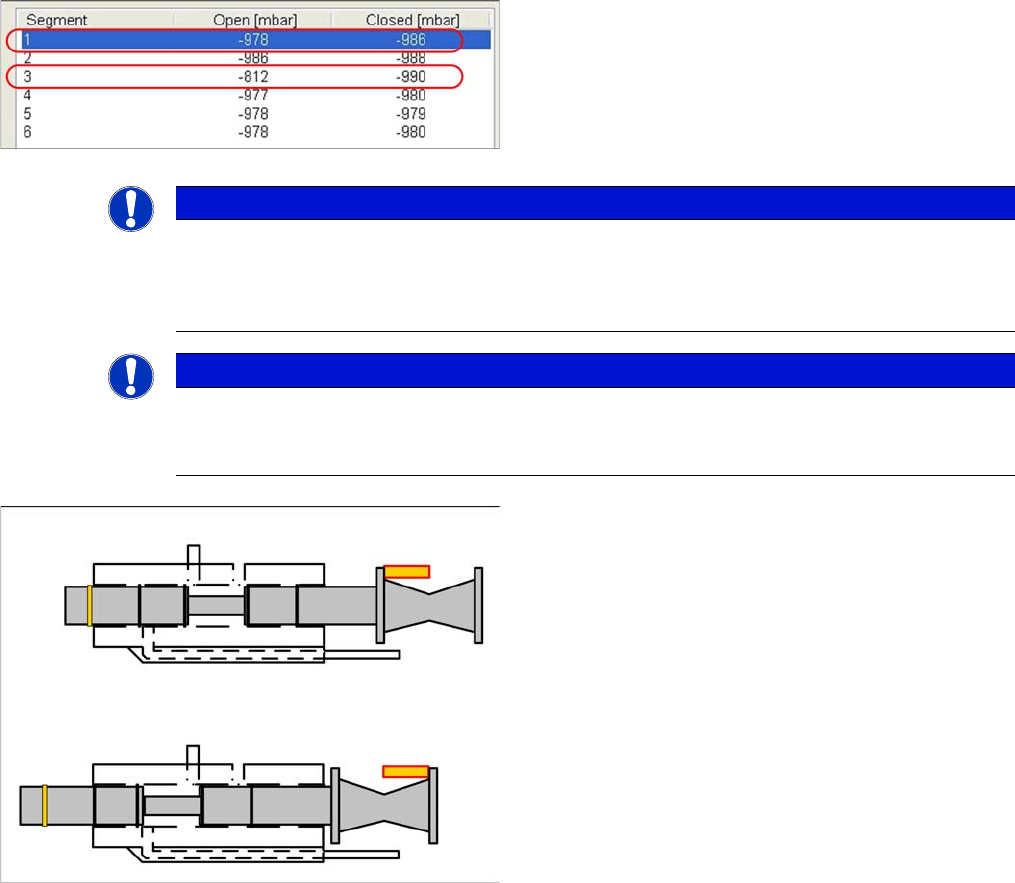
Scenario 2
Example of defective vacuum values, which indicate a
damaged silicone hose on segment 1 and an open nozzle
at segment 3.
NOTICE
Silicone hose defect
Under certain circumstances, silicone hose defects might only be detected when the segments
are moved out. It could therefore be advisable to release the Z axis and to perform a vacuum
test of the segment in its lowered state (single measurement run).
NOTICE
Missing valve plunger
If both measurements for a particular segment are only around 210mbar, this indicates that the
valve plunger is missing.
Vacuum values and valve plunger positions
▪ If the valve plunger is in the position "nozzle open",
the vacuum area will be sealed against the environ-
ment with two seals.
▪ If the valve plunger is in the position "nozzle closed",
the vacuum area (at the rear, near the drive) will be
sealed against the environment with only one seal.
If the "vacuum value closed" is too low, this indicates that
the seal is not sufficiently greased or that it is damaged.
Settings
6.4.1 Component Trolley - Setting the Basic Height Component Handling
Service Manual SIPLACE D4/D4i 221
6.4
6.4 Component Handling
Component Handling
6.4.1
6.4.1 Component Trolley - Setting the Basic Height
Component Trolley - Setting the Basic Height
6.4.1.1
6.4.1.1 Parts, equipment and tools
Parts, equipment and tools
The following tools and equipment are needed to adjust the height of the component trolley:
▪ Set of Allen keys, size 5
▪ Eyebolt with M12 thread to raise the component trolley table,
DIN 580 M12-St [00048350-xx]
▪ Leverage device for raising the component trolley table, must be able to carry at least 80 kg
6.4.1.2
6.4.1.2 Adjusting the Component Trolley to the Board Transport Height
Adjusting the Component Trolley to the Board Transport Height
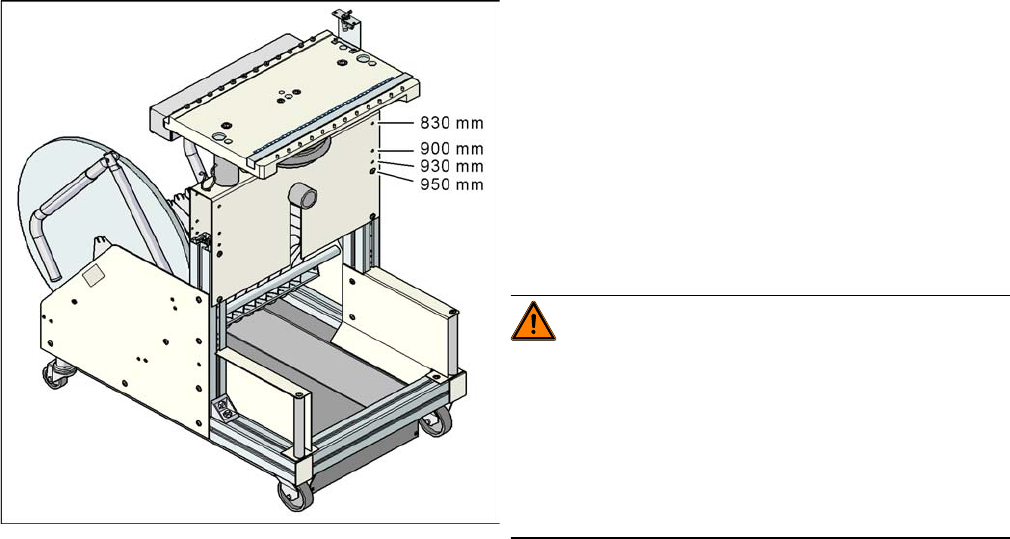
Component trolley with a PCB conveyor height of
950 mm
▪ Holes drilled for board transport heights 830 -
950 mm in the guidance bars
The component trolley for the S feeder modules can be
easily and quickly adjusted to the following board trans-
port heights:
▪ 830 mm ±15 mm standard height
▪ 900 mm ±15 mm SMEMA height
▪ 930 mm ± 15 mm SMEMA height
▪ 950 mm ±15 mm SMEMA height
WARNING!
The component trolley height may only be set by
SIPLACE technicians or other qualified and officially au-
thorized (certified) personnel.
Observe the applicable accident prevention regulations.
Remove all feeder modules from the changeover table
plate, before you adjust the height of the changeover ta-
ble.
Settings
Component Handling 6.4.2 Control Unit on Cutter
222 Service Manual SIPLACE D4/D4i
6.4.1.3
6.4.1.3 Adjusting the Component Trolley Height
Adjusting the Component Trolley Height
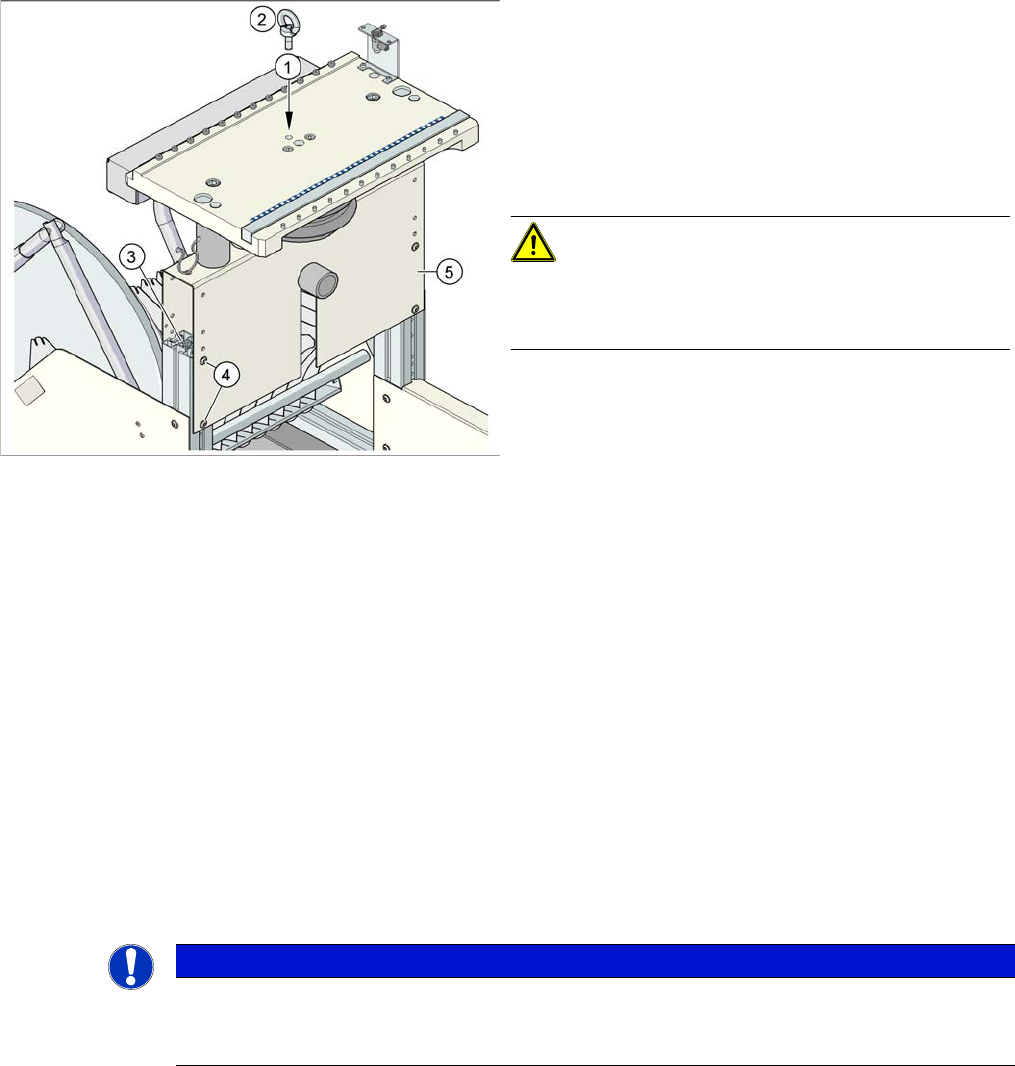
Overview
Setting
► Remove all the feeder modules from the component trolley.
► Screw the eyebolt into the M12 hole provided (1) on the component trolley table.
► Hook the leverage device into the eyebolt (2).
► Tighten the rope of the leverage device.
► Loosen the 8 hexagon socket-head screws, M6x12 (4).
► Lift or lower the component trolley table to the required height. Make sure that the hole for the re-
quired height in the bridge (5) is level with the top hole in the vertical profile bar (3).
► Fasten the bridge (5) to the vertical profile bar (3) with the eight hexagon socket-head screws M6x12
(4).
► Unscrew the eyebolt from the component trolley table.
6.4.2
6.4.2 Control Unit on Cutter
Control Unit on Cutter
Position of eyebolt on component trolley
1. M12 hole drilled for eyebolt
2. Eyebolt DIN 580 M12-St
3. Vertical profile bar
4. Eight pieces hexagon socket-head screw SN 62355,
M6x12
5. Bridge
CAUTION!
Always use the fit-up aid (screwed eyelet) to fix the table
plate, irrespective of whether you want to raise or lower
the component trolley.
NOTICE
Control unit [03006411-xx] is replaced by CAN node module.
This version of the control unit is replaced by the backwards compatible CAN node [03052027-
xx] module.