SIPLACE D4-D4i 工程师手册_EN.pdf - 第70页
Service Work Gantry 4.2.8 Replacing the X Motor Unit 0 0333167-xx 70 Service Manual SIPLACE D4/D4i 4.2.7.5 4 . 2 . 7 . 5 S e t t in g s Settings See also 4.2.7.4 Installing the X- axis toothed belt [ ➙ 69] 4.2.8 4 . …
Service Work
4.2.7 Replacing the X Axis Toothed Belt [00331076-02] Gantry
Service Manual SIPLACE D4/D4i 69
4.2.7.4
4.2.7.4 Installing the X-axis toothed belt
Installing the X-axis toothed belt
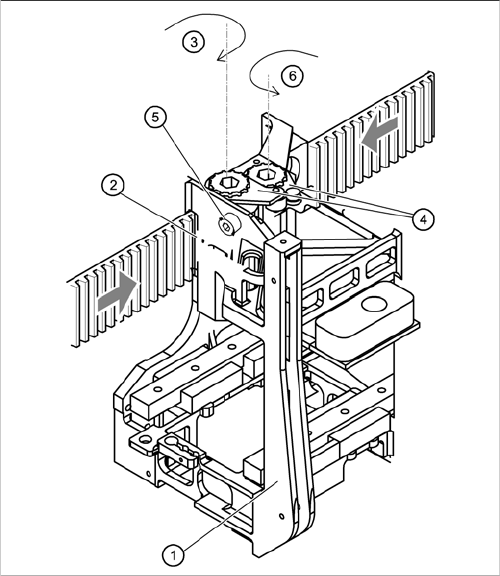
► Place the toothed belt around the synchronizing disk of the X-axis motor unit.
► Thread the toothed belt in at the deflection unit.
► Thread both ends of the toothed belt in through the openings on the tension jack (2), until it is run
approx. 270° around the synchronizing disks (3).
► Fit the two tensioning keys (4) (see "4.2.5 Replacing the Tensioning Keys [00329478-01, 00329485-
01]" [ ➙ 62]).
Fixing the X-axis toothed belt to the tension jack
Legend
1. Head mount
2. Tension jack
3. Synchronizing disk, long
4. Tensioning keys
5. Hexagon socket-head screw for tensioning the
toothed belt
6. Synchronizing disk, short
Service Work
Gantry 4.2.8 Replacing the X Motor Unit 00333167-xx
70 Service Manual SIPLACE D4/D4i
4.2.7.5
4.2.7.5 Settings
Settings
See also
4.2.7.4 Installing the X-axis toothed belt [ ➙ 69]
4.2.8
4.2.8 Replacing the X Motor Unit 00333167-xx
Replacing the X Motor Unit 00333167-xx
Tools and Equipment
▪ Set of DIN 911 Allen keys
▪ Cable ties
▪ Belt tension measuring device TSM [00326015-xx]
▪ "Measuring belt tensions" operating instructions
Parts
▪ X motor unit [00333167-xx]
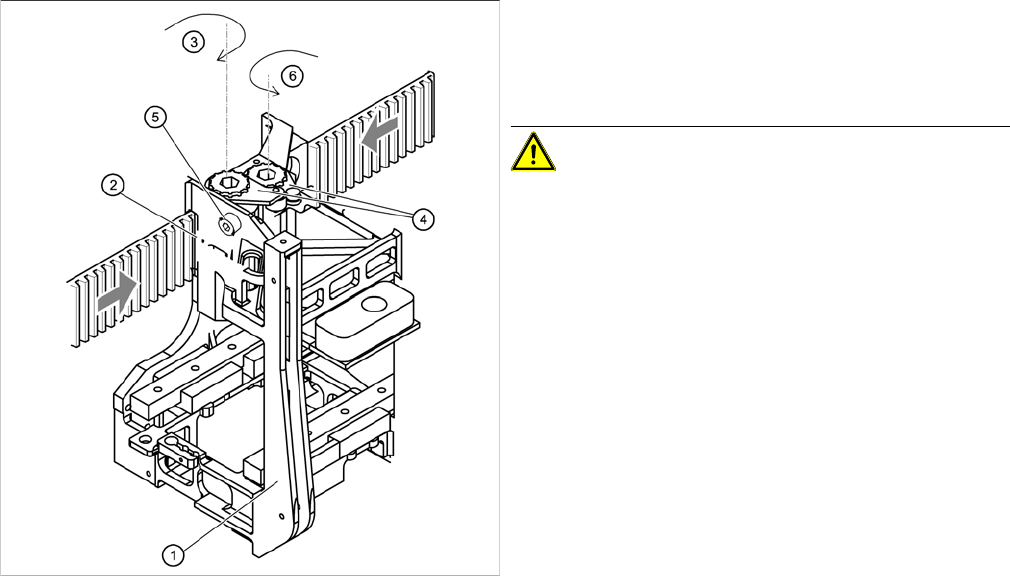
Fixing the X-axis toothed belt to the tension jack
► Push the head mount (1) towards the X axis motor
unit, as far as the stop on the elastomeric spring.
► Turn the hexagon socket-head screw (5) to set the
belt tension to 53 Hz 1/3 Hz.
CAUTION! Do not overstretch the toothed belt
when adjusting the belt tension.
► Secure the hexagon socket-head screw (5) with the
locknut.
Service Work
4.2.8 Replacing the X Motor Unit 00333167-xx Gantry
Service Manual SIPLACE D4/D4i 71
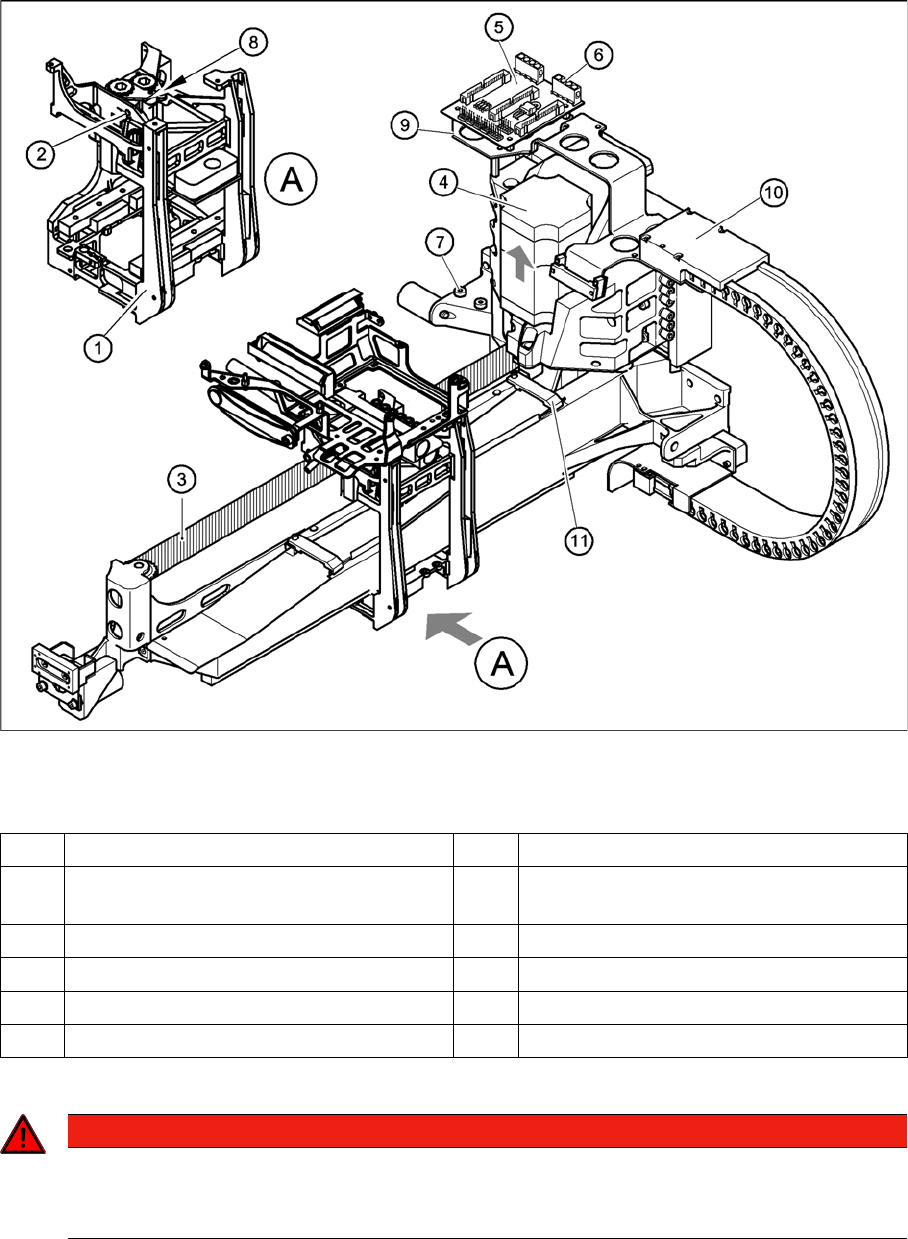
Removing the X-axis motor unit
Replacing the X-axis motor unit
Legend
► Switch off the machine and secure it to prevent unauthorized reactivation.
Gantry 1 or 3
► Remove the black cover strip on the cross-beam above the gantry concerned:
⇨ Unplug the fan cable. The fan is fixed to the black cover strip.
⇨ Remove the black cover strip (3 M6x8 hexagon socket-head screws).
► Cut the cable ties holding the X-axis motor cable.
1 Head mount 7 2 x M6x14 hexagon socket-head screws
2 M4 x35 hexagon socket-head screw for
tensioning the X toothed belt
8Locknut
3 Synchroflex X-axis toothed belt 9 Board holder
4 X-axis motor unit 10 Cable clamps
5 X/Y distributor 11 Cable clamp
6 X5 socket for X-axis motor
DANGER
POWERFUL MAGNETIC FIELD
► Always follow the special safety instructions when working in the vicinity of powerful mag-
netic fields.